Artificial intelligence (AI; in Lithuanian, DI, short for "dirbtinis intelektas") is computer software that does tasks that used to require a person: it recognizes speech and images, translates texts, makes recommendations and writes answers. ChatGPT, Claude, Gemini and Copilot are just one kind of AI: chat tools where you type a question in your own words and get an answer as text. They are very good at helping you write, explain and plan, but they sometimes state wrong facts with confidence, so you should always check anything important.
AI or DI: what is the difference?
There is none. AI is the English abbreviation, DI is the Lithuanian one (dirbtinis intelektas). Official EU and Lithuanian documents in Lithuanian use DI, while everyday speech and tool names more often use AI. This article uses AI throughout.
The Council of the European Union describes AI in its explainer as "the use of digital technologies to create systems that can perform tasks that normally require human intervention" (Council of the EU page "What is AI?", Lithuanian version).
The legal definition is in Article 3(1) of the EU Artificial Intelligence Act (Regulation (EU) 2024/1689): "'AI system' means a machine-based system that is designed to operate with varying levels of autonomy and that may exhibit adaptiveness after deployment, and that, for explicit or implicit objectives, infers, from the input it receives, how to generate outputs such as predictions, content, recommendations, or decisions that can influence physical or virtual environments" (Artificial Intelligence Act, EUR-Lex).
Put simply: it is a program that receives data (your question, a photo, your voice), "decides" by itself what to do with it and returns a result: an answer, a recommendation or a prediction. The difference from an ordinary program is that nobody wrote a rule for every case in advance: the system learned from a huge number of examples.
How does a ChatGPT-style tool work? A large language model without jargon
Chat tools are built on a large language model (LLM). The word "model" here means a program that learned a task from examples rather than from rules written by a person. "Large" because it was trained on an enormous amount of text: books, articles, web pages.
During training the model did not memorize specific sentences but patterns: which words usually follow each other, what an email, a recipe or an explanation looks like. When you type a question, it builds the answer one small piece of text at a time (technically called a token, which is a word or part of a word), each time choosing the most fitting continuation based on what has already been written.
The closest everyday comparison is a phone keyboard that suggests the next word. A language model does the same thing, only far better: it "sees" your whole question and the earlier conversation, so it can write a long, coherent text.
- 1You type a question
- 2The model "sees" the question and the whole earlier conversation
- 3It picks the most fitting next piece of text (token)And repeats this until the answer is finished.
- 4You get likely text, not a verified factSo check numbers, dates and rules.
This leads to the most important property worth remembering: the model produces likely text; it does not look up the truth in a database. Most of the time the likely answer is also the correct one, but not always. For the same reason the same question can get slightly different answers, which is normal; the Microsoft Copilot help page says so too.
Where you already use artificial intelligence every day
AI did not arrive with ChatGPT. Many forms of it have long been working in your phone and computer; we just do not usually call them that.
- Translators. When you paste a text into an online translator and get a fairly natural translation, a language model trained on millions of pairs of translated texts is doing the work.
- Email spam filters. Email services separate ads and scam emails from real ones by themselves: a model has learned what spam usually looks like.
- Recommendations. "You might also like" on video platforms, music apps or online stores is a system that guesses what will interest you based on your behavior and that of similar people.
- Voice assistants and dictation. When you speak a message to your phone and it turns it into text, or ask a voice assistant about the weather, AI recognizes your speech.
- Photo search on your phone. In Google Photos, for example, you can search for a pet, a city or an event even though you never tagged your photos: the app recognizes what is in them by itself (Google Photos Help).
- Maps and navigation. When an app warns you about a traffic jam and suggests another route, it is predicting traffic based on data from a great many trips.
So how are ChatGPT and similar tools different? The earlier AI examples each do one narrow job. A chat tool is general-purpose: the same window can write an email, explain a contract clause, come up with a birthday plan or help you prepare for an exam.
How is a chat tool different from Google search?
A search engine finds pages that already exist and shows you links. You put the answer together yourself, but you can usually see where it comes from: the municipality, the manufacturer or a forum.
A chat tool writes new text tailored to your exact question. You can continue it like a conversation: "shorter", "simpler", "write it differently". That is its biggest advantage: you do not have to combine ten sources yourself.
But there is a cost: if the tool answers only from what it learned, you do not see the source, and its knowledge ends at a certain date. Some tools can search the web and add links to the answer. For example, OpenAI states that search in ChatGPT is on by default and the sources are shown in the answer (OpenAI Help: "Does ChatGPT tell the truth?"). In that case those links are worth opening.
A practical rule: if you need a current fact (opening hours, a price, a rule, a phone number), go to search or the official website. If you need something explained, rewritten, shortened, invented or planned, use a chat tool.
Why you need to check the answers: what are "hallucinations"?
A "hallucination" is what we call it when AI gives wrong information that sounds completely convincing. It is not a malfunction and not a deliberate lie: the model simply wrote likely text that does not match reality.
OpenAI lists typical cases in its Help Center: wrong definitions, dates or facts, made-up quotes, studies and links to sources that do not exist, and overconfident answers to complex questions. It also stresses that a confident tone does not mean reliability. Anthropic (the maker of Claude) likewise warns that Claude can write things that look correct but are seriously wrong, and advises not to treat it as your only source of truth (Anthropic Help on incorrect responses).
An example: you ask when your local ward office (the smallest unit of local government in Lithuania) is open. The tool may answer "Mon–Fri 8:00–17:00", because that is what typical opening hours look like, not because it knows. You need to check such an answer on the office's website.
What to always check: numbers, dates, prices, laws and rules, health, money and legal advice, quotes and links. You can ask: "List the sources you are relying on", and then open them. If a link does not work or the page says something else, trust the page, not the tool.
Where AI is usually less risky: when you know the answer yourself or can easily judge the result, such as an email draft, shortening a text, a list of ideas or rewriting a sentence more simply.
What not to type into an AI chat
A chat tool is not your locked notebook. Do not type passwords, personal ID numbers, bank card details, personal information about other people or clients, or health data. If you need help with a document, remove names, addresses and numbers before pasting it.
In many tools you can turn off the use of your chats for improving the models. In ChatGPT, for example, you do this under "Data Controls" in the settings by switching off "Improve the model for everyone" (OpenAI Data Controls FAQ). We cover the settings of other tools in their own articles.
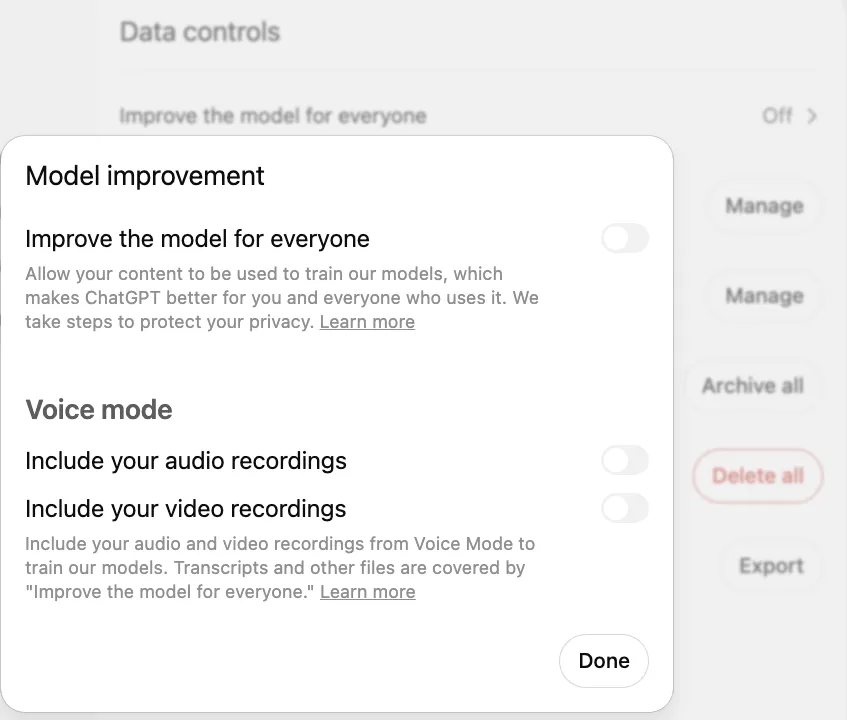
- 1 Improve the model for everyone – in Data controls; clicking it opens this window
- 2 Toggle off (gray) – your chats are not used to train models
A safe first step: try it in 10 minutes
- Pick one tool. You do not need to look for "the best" one. You can start with ChatGPT (What is ChatGPT and how to use it), Claude (What is Claude and how to start using it), Google Gemini (What is Google Gemini and how to use it every day) or Microsoft Copilot (What is Microsoft Copilot). If you do not know which to choose, a comparison by task will help (ChatGPT, Claude, Gemini or Copilot).
- Start with a harmless task. One that involves no personal data and whose result you can easily judge yourself.
Explain simply how a heat pump works, as if you were talking to someone without a technical background. Up to 150 words.
- Refine it with a second message. Do not open a new chat; just write what you want done differently.
Now make it even shorter, 3 sentences, and add one example from everyday life.
- Check one fact. If the answer contains a number or a claim you want to use, find it in a reliable source. It is a good habit from day one.
How to word your requests so the answers are more accurate, with more everyday examples, is explained separately (How to write AI prompts). When you want to try a specific task, you will find the steps in the guides on writing an email (How to write or fix an email with AI), translating (How to translate text to and from Lithuanian with AI) and creating an image (How to create an image with AI).
And when you want more
A chat tool answers questions, but it does not do anything in your systems by itself. When you want AI to work with your company's email, documents or other software, the next step is AI agents (AI agents for business).
Sources
EU Artificial Intelligence Act (Regulation (EU) 2024/1689), EUR-Lex: the official legal definition of an AI system (Article 3(1)); the link opens the Lithuanian version.
Council of the EU: "What is AI? Uses and impact": a short official explainer (Lithuanian version).
OpenAI: "Does ChatGPT tell the truth?": what mistakes ChatGPT makes and how to check its answers.
Anthropic: why Claude sometimes gives wrong answers: an explanation of hallucinations from the makers of Claude.
Microsoft: "Get started writing prompts in Microsoft Copilot": why the same question can get different answers and why they need checking.
OpenAI Data Controls FAQ: how to turn off the use of your chats for improving ChatGPT.