If you need to quickly understand what a foreign contact wrote, or translate a short text, Google Translate or DeepL is enough: both translate to and from Lithuanian for free. When it is not just the words that matter but also the tone, the terminology and how the reader will understand the text, choose a chat tool (ChatGPT, Gemini, Claude or Copilot) and tell it clearly who the translation is for. After reading this you will know which tool to use when, have a few prompts ready to copy and a checklist worth going through before sending a translated text.
When are Google Translate or DeepL enough?
Translators are tools built for one job: you paste the text, choose the language and get a translation right away. They are fast, you do not need to explain anything, and they can translate a document while keeping its layout. Lithuanian is on the language lists of both Google Translate and DeepL (checked October 21, 2026).
They are a good fit when you need to: understand an email or article you received; translate a short, simple message; quickly skim a document in a foreign language; check what a single sentence or term means.
What to know about the free versions. On the Google Translate website on a computer you can translate .docx, .pdf, .pptx and .xlsx files of up to 10 MB (PDFs up to 300 pages). Document translation does not work on a phone or a small screen, and it does not translate scanned PDF pages or text inside images. The free version of DeepL has monthly limits: according to the pricing page, one file translation per month, with files up to 5 MB. Limits change, so check the official pages for the current ones (links in the sources).
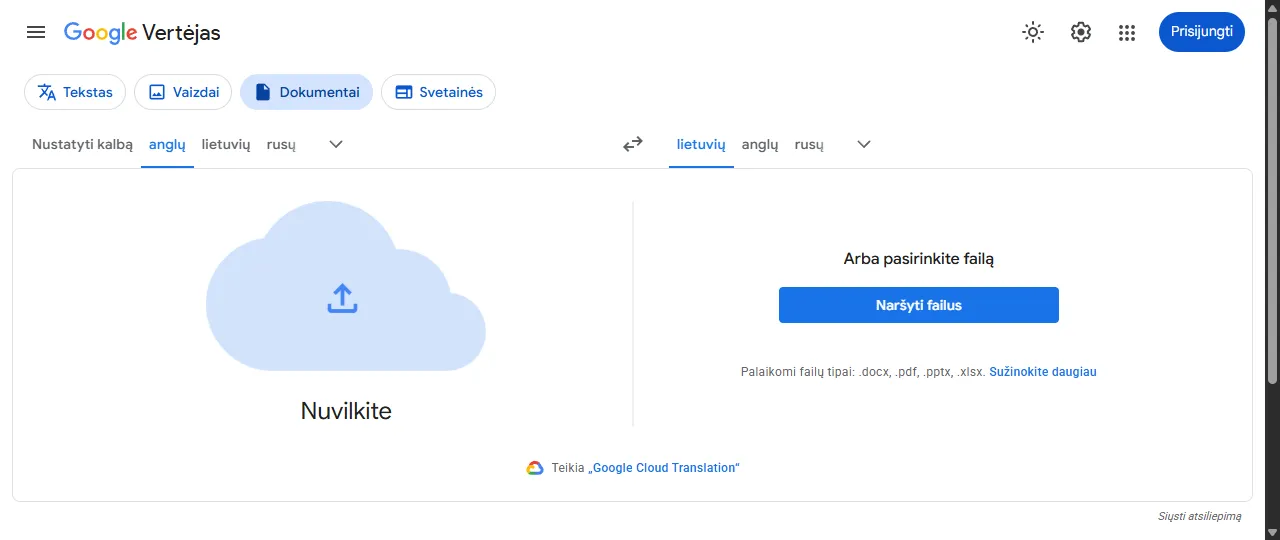
- 1 Documents tab ("Dokumentai")
- 2 Languages: translate from (left) and into (right)
- 3 Browse your files ("Naršyti failus") – choose the file; when the translation is done, you download the translated document
What translators do not do: they do not ask who the text is for, so they do not know whether you are writing to a client or a friend, or whether "ticket" in your company means a support request or a travel ticket. Tone and terminology are left to chance.
When are ChatGPT, Gemini, Claude or Copilot better?
You can explain the context to chat tools, so they suit cases where the translation has to sound natural and fit a specific reader. All four understand Lithuanian and have free versions; how they differ is covered in a separate comparison (ChatGPT, Claude, Gemini or Copilot).
Choose a chat tool when: the email goes to a partner or client and the level of politeness matters; the text contains terms from your field; you need not a word-for-word translation but an adaptation for a Lithuanian reader (a product description, an ad, a manual); you want an explanation of why something was translated a certain way.
The key phrase a translator will not understand but a chat tool will: "translate and adapt it for a Lithuanian reader". Then it will not only translate but also replace expressions that do not sound Lithuanian, units of measurement and forms of address. Just remember: an adapted text is no longer an exact translation, so do not do this for contracts and official texts.
Translation prompt examples you can copy
All the prompts are examples; replace the details with your own. The more you say about the reader and the goal, the less you will have to fix. General prompt-writing principles are covered separately (How to write AI prompts).
- An email to a supplier in German. First write the email in your own language, then paste it with a prompt like this:
Translate this email into German. The recipient is a supplier in Germany we are working with for the first time. Polite, businesslike tone, formal address 'Sie'. Leave dates and amounts unchanged. After the translation, briefly explain in English what you changed. Text: […]
- A product description for an online store, from English into Lithuanian.
Translate this product description into Lithuanian and adapt it for Lithuanian shoppers: natural sentences, no anglicisms, inches and pounds converted to centimeters and kilograms. Do not change the technical specifications and do not add anything. Text: […]
- A photo of a manual. Take a photo of the page and upload it to the chat with the add button next to the message box.
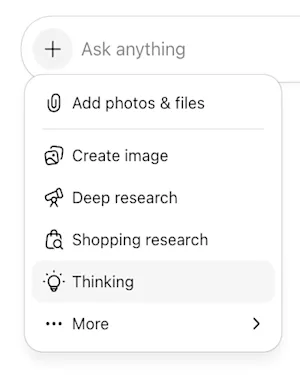
- 1 + on the left of the message box – opens the menu
- 2 Add photos & files – upload a photo of the manual or a document
The photo shows a page of a heating boiler manual in Polish. Translate it into Lithuanian. If you cannot make out a word, mark it [unclear] instead of guessing. At the end, explain in 3 sentences what to do when it shows error E5.
- A terminology glossary. If you translate many similar texts, first agree on the terms and then ask the tool to stick to them.
Pick the 15 most important terms from this text and give me a table: the term in English, the suggested Lithuanian equivalent, a short note if the equivalent is ambiguous. Text: […]
Once you have reviewed and corrected the glossary, write in the same chat: "From now on, follow this glossary when translating." DeepL also has a glossary feature, but it is very limited in the free version.
How to check a translation before sending it
AI translations usually sound fluent, so mistakes are easy to miss. Before sending an important text, go through this list.
- Back-translation. If you do not know the language you are translating into, translate the result back into your own language in another tool or a new chat. If the meaning has changed, the translation needs fixing. This does not catch style errors, but it catches errors of meaning well.
- Numbers, dates, units. Compare every amount, date, quantity and phone number with the original. Watch the date format (in English, 03/04 can mean both March 4 and April 3) and the decimal separator (1.5 in English, 1,5 in Lithuanian).
- Form of address. Is the reader addressed the same formal way throughout the text (the Lithuanian "Jūs", the German "Sie", the French "vous")? In translations the form of address sometimes switches halfway through.
- Grammatical cases and names. When translating into Lithuanian, check that names of people, companies and products are declined correctly (Lithuanian changes word endings by case). When translating from Lithuanian, check that first names and surnames have not stayed in "Lithuanianized" forms and have not lost letters with diacritics (č, š, ž).
- Signs of "translationese". In a Lithuanian text these sound suspicious: "yra atsakingas už" (a calque of "is responsible for") instead of "atsako už", an unnecessary "jūsų" (your) before every noun, "atlikti užsakymą" (a calque of "place an order"), English word order and unnecessary capital letters in headings. You can ask the tool to fix such places: "Rewrite this in more natural Lithuanian without changing the meaning."
- What was added or left out. Chat tools sometimes "polish" a text or skip a sentence. Ask: "Compare the translation with the original and list what was left out or added." Still review it yourself, because the tool can also make mistakes when checking.
Document translation and privacy
Before uploading a file or pasting text into any translator or chat tool, think about what is in it. Do not upload personal ID numbers, copies of passports and other identity documents, health information, personal data of clients or employees, or contracts with confidential terms. If you need a translation, replace names, amounts and addresses with markers ("Client A", "amount X") and put the real ones back after translating.
Free versions often use texts to improve the service. For example, DeepL's privacy policy says that texts and translations from the free services are used to train models, and the free DeepL Translator must not be used to translate texts containing personal data; the paid Pro version is meant for that. ChatGPT and other chat services have a setting that lets you turn off the use of chats for training; where to find it is described in the guide about ChatGPT (What is ChatGPT and how to use it).
If you translate company documents at work, first check which tools your organization allows: business accounts with different data terms are often meant for this.
When do you need a professional translator?
AI translation is fine for getting to know a text and preparing a draft, but it is not always fine for the final result. A professional translator is worth it when a mistake would be costly: contracts, legal and financial documents, medical information, safety instructions, texts that will be printed or published in large volumes.
Official documents (for example, diplomas, certificates, court or migration documents) often come with extra requirements for the translation, such as being done or certified by a particular translator or agency. The requirements depend on the institution and the country, so before translating, ask the institution you will submit the document to. In such cases an AI translation can at most help you understand the content.
Common mistakes
Sending a translation without reading it because it "sounds fine". Translating too long a text in one go: chat tools sometimes shorten or skip parts, so translate a long document in sections. Asking to "translate and adapt" a contract where precision is needed. Not saying who the text is for and then being surprised by the wrong tone. Uploading personal data to free tools.
If you are translating an email, our guide on how to write an email with AI (How to write or fix an email with AI) may also help: it is often easier to ask for the email to be written straight in the foreign language from your own bullet points than to translate one you have already written.
Sources
Google Translate Help: Translate documents and websites: supported file formats, the 10 MB and 300 PDF page limit, document translation not available on a phone, scanned pages not translated.
Google Cloud Translation: supported languages: Lithuanian (lt) on the language list of Google's translation models.
DeepL Translator: English–Lithuanian: Lithuanian and translation of PDF, Word and PowerPoint files.
DeepL plans and pricing: free version limits (number of file translations, file size, glossaries).
DeepL privacy policy: use of free-service texts for training and the ban on translating personal data with the free version.