In short: in 2026, AI in accounting works best for repetitive, structured work: capturing and entering incoming VAT invoices, categorizing bank statements, processing receipts, checking VAT numbers and duplicates, answering internal questions and preparing monthly summaries. In Lithuania it is implemented by three types of vendors: accounting software (Rivile, Site.pro, Labbis), digitization services (Fitek, įvesk.lt) and automation integrators that connect email, accounting, the bank and the CRM. The cost ranges from €0 for built-in OCR to about €0.18–0.58 per invoice, or from €450 for a custom flow.
What it looks like in practice: a supplier's PDF invoice arrives in a shared mailbox → n8n picks it up, OCR and a language model extract the fields → the system checks the totals, the VAT number (VIES) and duplicates → an entry is created in Rivile or Site.pro. The accountant only reviews exceptions: a new supplier, totals that do not match, an unclear VAT rate or expense account. I build flows like this; see process automation and automation for accounting.
A typical situation in a company with 5–50 employees: every month the accountant spends dozens of hours on manual work, entering incoming invoices, checking bank statements, preparing i.SAF registers and answering the same questions from colleagues. Below are 7 specific tasks AI already takes over, how invoice scanning works, a comparison of Lithuanian solutions with prices, and who implements them.
Why accounting is one of the first areas where AI delivers real value
Accounting has three traits that make it especially well suited to automation. First, the documents are structured and standardized: a VAT invoice always has the same mandatory fields, and a bank statement has a fixed format. Second, the processes are repetitive and high-volume: 100 invoices a month are processed by the same rules. Third, the result is easy to verify: the totals have to match, the VAT number has to be valid, and the invoice must not be a duplicate.
The time involved is significant: on its product page, Rivile states that entering one invoice by hand takes about 5–10 minutes, and in a 2026 Fitek survey (350 accountants), invoice processing took up about 28% of working time, with one purchase invoice taking 12.9 minutes on average. Both figures come from the vendors themselves, not from independent measurements.
1. VAT invoice OCR and automatic data entry
This is the most common area and the one that pays back fastest. A supplier sends a PDF, an n8n flow picks it up, and AI extracts the mandatory VAT invoice fields (the supplier's company and VAT codes, invoice number, date, amount excluding VAT, VAT rates and amount, total) and creates an entry in Rivile, Site.pro (formerly B1.lt), Directo or another program. The accountant only approves the cases where the system is not sure.
How it works step by step is explained below, in the section on invoice scanning. For a comparison of tools, see AI OCR for VAT invoice recognition.
2. Expense reports: receipt photos from a phone
Business trips, fuel, parking: employees photograph receipts and send them by email or message. Done by hand, the accountant transfers the data into the expense report and assigns a category. With AI, the photo is processed automatically: the amount, date and seller are extracted, a category is suggested based on the seller (“Circle K: fuel”, “hotel: accommodation”), and the accountant receives a pre-filled draft report and only approves it.
3. Automatic bank statement categorization
Every line of a bank statement has to be assigned to an account in the chart of accounts and matched to an invoice. AI categorization relies on past entries: frequent counterparties are recognized right away, and payments are matched to unpaid invoices by amount, date and payer details. New, unknown payments go to a review queue with a suggested category. The longer the system runs, the fewer lines are left for manual work.
- 1The bank statement is imported
- 2Known counterparty → account based on history
- 3Payment is matched to an unpaid invoiceBy amount, date and payer details
- 4Unknown payment → review queueWith an AI-suggested category
- 5The accountant approves only exceptions
4. Detecting payroll anomalies before payment
Before payment, AI reviews the payroll sheet and flags typical errors: duplicate entries, sudden jumps (for example, a salary that differs by more than 30% from last month without an approved change), unexpected changes in Sodra (social insurance) rates, bonuses without a basis and arithmetic mismatches. The system does not decide anything: it prepares a review list that the accountant checks in a few minutes instead of a few hours.
5. A Q&A agent for internal team use
“What is the per diem for a business trip to Riga?”, “Where do I send the rent invoice?”: questions like these come up every week. An AI agent that works on the RAG principle answers from your own documents (company policies, VMI (Lithuanian tax authority) clarifications, contract terms) with a link to the source. A colleague asks in Slack, Teams or by email, and the accountant only steps in for non-standard cases. Important: an agent like this does not replace legal or tax advice.
- 1A colleague asksSlack / Teams / email"What is the per diem for Riga?"
- 2The agent finds the answer in your documentsPolicies, VMI clarifications, contracts
- 3It replies with a link to the source
- 4It hands non-standard cases to the accountant
6. Explaining VAT, excise and GDPR questions in contracts
When a new supplier contract arrives, AI can read the text and prepare a list of questions for the accountant: which VAT regime applies, whether reverse charge is provided for, whether there is a data processing clause under GDPR Article 28, and what the payment terms and penalties are. The accountant does not need to read 20 pages; it is enough to check the flagged places.
7. A monthly P&L summary in plain language
A manager does not need a table but an answer to “what changed and why”. AI takes the profit and loss data from the accounting software and prepares a summary in plain language, for example: “Profit fell 12%, mainly due to higher logistics costs; sales grew 4%.” (an example). The summary goes to the manager by email on the first working day of the month, while interpretation and decisions stay with people.
How does AI invoice scanning work?
AI invoice scanning combines OCR (text recognition), a language model that understands which text is the supplier, the number or the VAT amount, and rules that check the result. In practice the flow looks like this:
- Collection. Invoices are picked up from a shared mailbox (for example, invoices@…), a Google Drive folder or a supplier portal.
- Recognition. The PDF or photo is turned into text; the AI model extracts the fields into a structure (JSON).
- Checks. Does amount excluding VAT + VAT = total, is the VAT number valid (VIES), has this invoice already been entered, is the supplier known.
- Coding. Based on the supplier's history, an expense account, department or project is suggested.
- Transfer. The entry is created in the accounting software through the API or an import file, and the PDF is attached to the entry.
- Exceptions. Uncertain fields are sent to the accountant for approval; her corrections are used next time.
Electronic PDF invoices from supplier systems are recognized more accurately than scanned or photographed ones, so it is worth measuring accuracy on your own invoices from last month before choosing a solution.
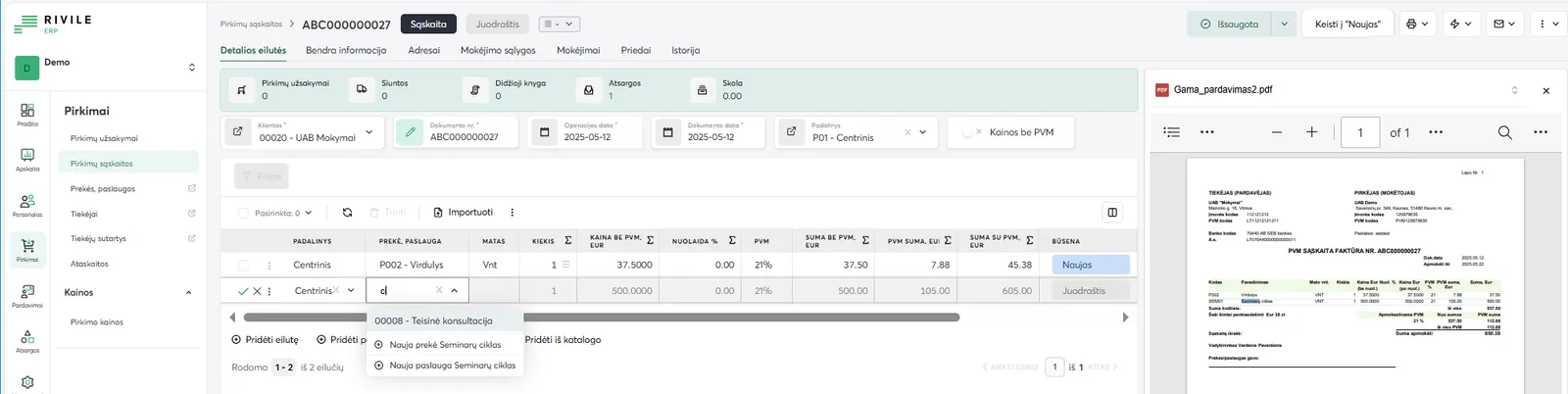
- 1 Recognized header: supplier, invoice number, date
- 2 Invoice line: product or service, quantity, price, VAT rate and amounts
- 3 Draft: the digitized invoice is waiting to be checked
- 4 Change to "New": after checking, the invoice moves out of draft
- 5 The original PDF alongside makes it easy to check the fields
Best AI invoice processing solutions in Lithuania (as of October 2026)
“Best” depends on which accounting software you use and how many invoices you receive. I checked the prices on the vendors' websites on October 17, 2026.
| Solution | What it is | Price | Best for |
|---|---|---|---|
| Rivile ERP digitization | AI scans purchase invoices directly into Rivile ERP | Free up to 10 documents/month | Rivile ERP users |
| Site.pro (formerly B1.lt) | Invoice recognition, AI assistant, MCP connector | Accounting from €7 per company/month + a user plan | Companies that keep their books in Site.pro |
| Fitek | Incoming invoice management: scanning, approvals, e-invoices, fraud detection | €12–20 per user/month + €0.23–0.58 per invoice | Companies with approval chains and high volume |
| įvesk.lt | Digitization with human review, prepared for import | €0.18–0.30 per document | Accounting firms, seasonal volumes |
| Labbis AI | Line-level digitization, built into KONTO | €0.09–0.20 per page, €100–285/month | Labbis KONTO customers; others via integration |
| Custom flow (n8n + AI) | Collection from several sources, checks, coding, transfer to any program with an API or import | From €450 + about €20–50/month for tools | When you need to connect email, accounting, the bank and the CRM |
A more detailed price breakdown and payback calculation is in invoice automation cost in 2026. If you are still choosing a program for sales invoices, see the comparison of invoicing software.
AI solutions for an accounting department: what fits where
| Problem | AI solution | Where to start |
|---|---|---|
| Hundreds of incoming invoices a month | OCR + AI field recognition, automatic entry | The accounting software's OCR or a custom flow |
| Bank reconciliation takes days | Matching payments to invoices, categorization | Bank statement import + rules + AI suggestions |
| Errors in i.SAF and the VAT return | Checking VAT numbers, totals and duplicates before filing | An automatic check before the 20th of each month |
| Colleagues keep asking the same things | An internal AI agent with your policies | A Slack / Teams bot with a document base |
| The manager is waiting for reports | An automatic monthly summary in plain language | An email on the first working day of the month |
| Sales invoices are retyped from the CRM | Automatic invoicing triggered by a CRM event | CRM + accounting software API integration |
How these solutions fit into one system for an accounting firm or a company's finance department is shown on the automation for accounting page.
Who implements AI for accounting processes in Lithuania?
In Lithuania, AI for accounting is implemented by three types of vendors, and they solve different problems:
- Accounting software makers. Rivile, Site.pro, Labbis and others build OCR and AI assistants into their systems. The advantage: nothing to set up. The drawback: it only works in their program and only for the scenarios they planned for.
- Invoice digitization services. Fitek, įvesk.lt, Fintech lab's “Išmani sąskaita” (Smart Invoice) and others scan documents and prepare them for import into your program, often with human review. You pay per document.
- Automation integrators. They connect your email, accounting software, bank, CRM and communication tools into one flow with checks and an exception queue. This is what Aigentas.lt does: I work with n8n, Make, OpenAI and Claude, and I connect Rivile, Site.pro, Directo, Xero, Google Sheets and Excel. A first solution starts at €450, we agree on the price in writing before starting, and setup takes 1–2 weeks.
When choosing a vendor, ask to test the solution on your real invoices from last month and to show what happens to documents it does not recognize. More about the service: process automation and AI agent development; prices are on the pricing page.
What stays with people: decisions, accountability, complex tax situations
Decisions and context. AI does not know the history of a dispute with a supplier or the owner's decisions on profit distribution. Accountability. A person is answerable to VMI and auditors for the accuracy of accounting and tax data; AI can prepare, but not sign. Complex tax cases. International transactions, transfer pricing within a group and non-standard VAT schemes require qualified advice.
How to start: a 30-day pilot
The most practical way is to start with one process, usually scanning incoming invoices, because it gives the fastest return with the lowest risk.
- Week 1. I count how many invoices you receive, from where and in what format; we agree where the data will go.
- Week 2. I build the flow in a test environment and run last month's invoices through it as a test.
- Week 3. I put it into real use in “create and review” mode: the accountant checks every entry.
- Week 4. Together we review the statistics: how many invoices were processed without corrections, where it makes mistakes, what to change.
Related articles: automatic invoicing, invoice automation with B1, Rivile and Xero.
Frequently asked questions
Which accounting processes should you automate with AI first?
Start with capturing and entering incoming invoices, because that is the biggest repetitive job. Next come bank statement categorization and payment matching, receipt processing for expense reports, VAT number and duplicate checks before i.SAF (the Lithuanian VAT invoice register), an internal Q&A assistant and monthly summaries for management.
How does AI invoice scanning work?
The invoice is picked up from email or a folder, OCR turns it into text, a language model recognizes the fields (supplier, company and VAT codes, number, date, amounts, VAT), the system checks the totals, the VAT number and duplicates, and then creates an entry in the accounting software. Uncertain cases go to a review queue for the accountant.
Who implements AI for accounting processes in Lithuania?
Three groups of vendors: accounting software makers with built-in AI (Rivile, Site.pro, Labbis), specialized invoice digitization services (Fitek, įvesk.lt, Fintech lab) and automation integrators that connect your email, accounting software, bank and CRM into one flow, including Aigentas.lt.
How much does AI for accounting cost?
Built-in OCR is free up to a certain limit in some programs (Rivile ERP: 10 documents per month). Digitization services cost about €0.18–0.58 per invoice. A custom automated flow from me starts at €450 one-off plus about €20–50 per month for tools.
Will AI replace accountants?
No. AI takes over data entry and the first checks, but a person is responsible for the accuracy of the books, tax interpretations and decisions. In practice the accountant becomes a reviewer and advisor rather than someone retyping data.
Is it safe to process financial data with AI tools?
Yes, if you use business API terms under which data is not used to train models, sign a data processing agreement (GDPR Article 28) and keep the data in the EU. For the most sensitive cases, n8n can run on your own server.