Microsoft Copilot is Microsoft's tool for chatting with artificial intelligence: you write a question or task in your own words, and it answers in text. Most often "Copilot" means the free tool at copilot.com, in the phone or desktop app, in Windows and in the Edge browser. You can try it for free and write in Lithuanian. But Microsoft also uses the same name for the Copilot features in Word and Excel, for Copilot in work accounts and for the developer tool GitHub Copilot. So first it is worth working out which Copilot you have heard about.
Four "Copilots": which one did people mean?
They all work on a similar principle: they are based on a large language model (LLM). That is a program trained on a huge amount of text that can produce answers similar to ones a person would write. What differs is where the tool "lives", which account you sign in with and what you pay for. Status checked on October 19, 2026 on official Microsoft and GitHub pages; the names have changed more than once in recent years, so you may find older ones elsewhere.
- Free Microsoft Copilot. This is the one colleagues usually mean. You find it at copilot.com (the old address copilot.microsoft.com now redirects there), in the "Microsoft Copilot" app for phones (Android, iPhone), for Windows and Mac computers, and in the Edge browser, where the Copilot button is in the top right corner. You sign in with a personal Microsoft account.
- Copilot with a Microsoft 365 home subscription. If you pay for Microsoft 365 Personal, Family or Premium (Word, Excel, PowerPoint, Outlook for home), Copilot also appears inside the apps themselves; for example, Word can help you rewrite a paragraph. The chat limit here is higher than in the free version. On the Family plan only the subscription owner can use the AI features.
- Copilot in a work account. If your company uses Microsoft 365 and you sign in with a work email, you may have Copilot Chat: a chat tool that Microsoft includes at no extra charge in eligible business licenses. Full Copilot in work apps (Outlook, Teams, Word with your company's documents) is a separately paid license, "Microsoft 365 Copilot Business", which the company buys together with a Microsoft 365 business plan. In the app you will see a "Work" or "Personal" tag next to your profile; that is how you can tell which account you are signed in with.
- GitHub Copilot. This is an assistant for developers that suggests code in the coding environment and answers questions about code. It needs a GitHub account and is not directly connected to the Microsoft Copilot chat app. If you do not write code, you do not need it.
One more source of confusion: the app formerly called "Microsoft 365" (and before that "Office") was renamed "Microsoft 365 Copilot", and Microsoft now calls it simply "Microsoft Copilot". If you found such an app on your computer, it is not something new and paid: it is the same place where you open documents and chat with Copilot.
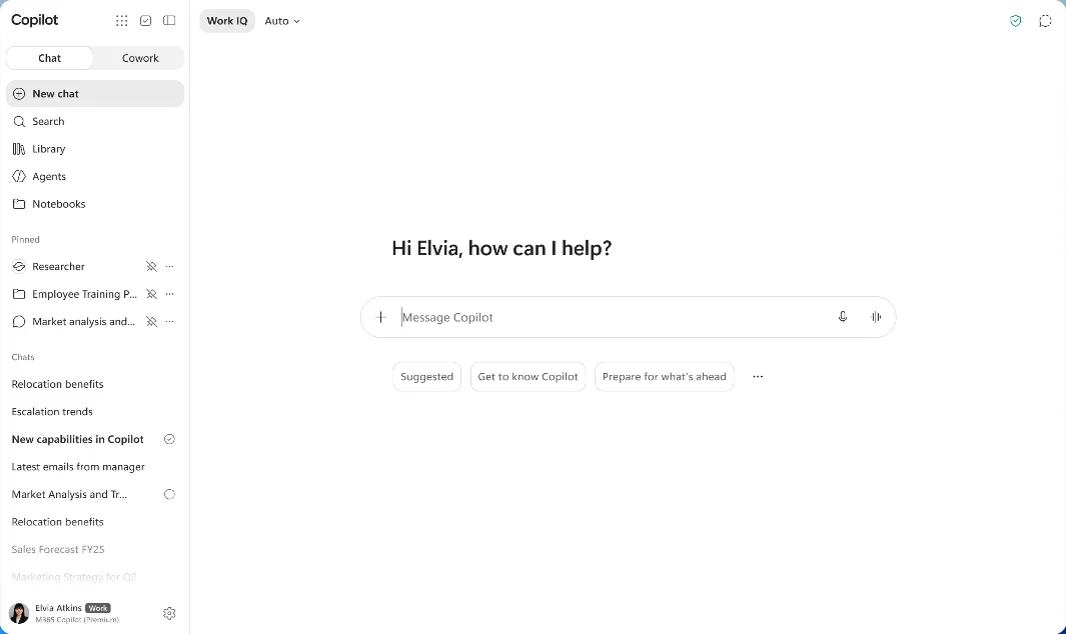
- 1 New chat: start a new chat
- 2 + → Add images or files: upload a file or image
- 3 This is where you type your prompt; Lithuanian works too
- 4 The tag next to your name shows the account type: Work or Personal
How to start using Copilot for free
- Open copilot.com or install the app. On a computer, a browser (the program you use to view websites) is enough. On a phone, you find the "Microsoft Copilot" app in Google Play or the App Store; make sure the publisher is Microsoft Corporation.
- Sign in with a personal Microsoft account. This is the same account you use for Outlook.com, Hotmail, Xbox or to sign in to Windows. If you do not have one, you can create it for free. Microsoft says that signing in unlocks more features, including chat history, so it is most convenient to sign in right away.
- Write in Lithuanian if you like. On Microsoft's help page about supported languages, Lithuanian is listed among the languages you can write prompts and get answers in, and for personal accounts also among the languages you can speak in ("Copilot Voice"). Answer quality in Lithuanian may be lower than in English, so double-check precise terms.
Age: under Microsoft's rules, Copilot can be used by people aged 13 and over, and in some countries the limit is higher. Chats of teenagers aged 13 to 18 are not used to train models, and they are not shown personalized ads.
First try: what to write
It is best to start with a real, small task you would be doing today anyway. For example, preparing for a meeting. Copy the text and change the details to your own:
Tomorrow I have a 30-minute meeting with a new supplier, and we will talk about delivery times. Write 5 questions worth asking and a short meeting plan. Keep it simple.
What to expect: within a few seconds you get a list of questions and a draft plan. Some questions will be obvious, some will be ones you had not thought of. It is a draft, not a final answer.
Then refine it in the same chat. Copilot sees the earlier messages, so you do not need to repeat everything:
Keep the 3 most important questions and, for each one, write what I could say if the supplier says they cannot shorten delivery times.
If you use the Edge browser, try one more thing: open a long article or PDF document, click the Copilot button in the top right corner and type "Summarize this page in 5 bullet points". The first time, the browser will ask permission to use the page's information. More on working with long documents: (A long PDF with AI). How to phrase a task more clearly so the answer fits the first time is in a separate article (How to write AI prompts).
How much does Copilot cost?
Home plan prices were checked on October 23, 2026 on Microsoft's official comparison page for Lithuania. The page does not say whether prices include VAT, so you will see the final amount at checkout.
Free Copilot: €0, with usage limits (Microsoft does not state them as numbers, and the limits change). It is entirely enough to start.
Microsoft 365 Personal: €10.00 per month or €99.00 per year (1 person). Microsoft 365 Family: €13.00 per month or €129.00 per year (up to 6 people, but Copilot for the owner only). Microsoft 365 Premium: €22.00 per month or €219.00 per year, with the highest Copilot limits and extra AI features. There is no longer a separate "Copilot Pro" plan in this comparison. It is only worth paying if you want Word, Excel and cloud storage anyway, or if you keep running out of the free version's limits.
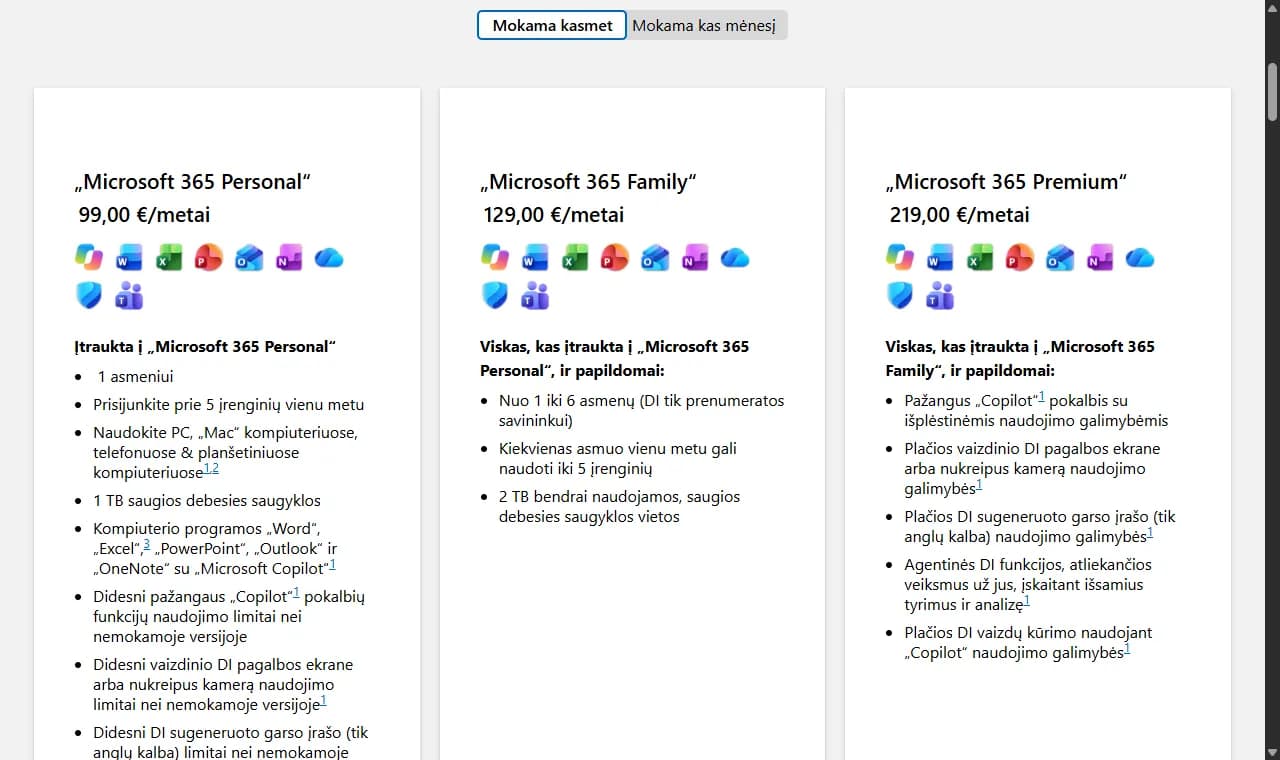
- 1 Switch to "Paid monthly" ("Mokama kas mėnesį" on the Lithuanian page) to see monthly prices
- 2 Plan name and price in euros
- 3 Copilot limits are higher than in the free version
In work accounts, Copilot Chat is included in eligible Microsoft 365 business licenses at no extra charge. Microsoft now offers full Copilot with company data in bundles with a business plan: on the business plans page for Lithuania (checked October 23, 2026), "Microsoft 365 Business Standard and Microsoft 365 Copilot Business" costs €20.36 and "Microsoft 365 Business Premium and Microsoft 365 Copilot Business" €27.73 per user per month, paid annually, excluding VAT. The cheapest, Microsoft 365 Business Basic (€6.07), comes without a Copilot Business license. Some more advanced AI features are charged by usage. A comparison of business plans with ChatGPT, Gemini and Claude is in the article on AI tools for companies (ChatGPT for business).
GitHub Copilot has a free plan with limited usage, and the paid Pro plan costs $10 per month (in US dollars, as stated on github.com).
What to watch out for: mistakes and sensitive data
Copilot can answer confidently but wrongly: mix up dates, make up a law article that does not exist or calculate something incorrectly. Check anything related to money, law, health or facts you will send to others. When Copilot cites sources, open them and see whether they really say that.
Do not type personal ID numbers, customer contacts or contract details, passwords, bank details or health information into personal Copilot. When signed in with a personal account, you can turn off the use of your chats for training AI models in the privacy settings (profile → Privacy); Microsoft calls these options "Training on conversation activity" and "Training on voice conversations". In newer app versions the menu location may differ slightly.
For Microsoft 365 home subscriptions (Personal, Family, Premium), Microsoft states that prompts, responses and file content are not used to train the underlying models when you use Copilot in Word or Excel. For work, use a work account if your company has given you one; different data protection terms meant for business apply to it. Do not use a personal account for work documents.
Copilot or another tool?
If you already use Windows, Edge or work with Microsoft 365, Copilot is the most convenient place to start: it is already at hand. If you mostly live in Gmail and Android, or simply want to compare how the same task looks in different tools, the comparison of ChatGPT, Claude, Gemini and Copilot by situation will help you choose (ChatGPT, Claude, Gemini or Copilot).
When a chat tool is no longer enough and you want AI to do the work itself in your company's systems, for example to answer in a Teams channel or process enquiries, that is the next step. How this works in a Microsoft environment is covered separately (Microsoft Teams automation).
Sources
Microsoft 365 plan comparison (Lithuania): home plan prices in euros and Copilot features in each plan.
Supported regions and languages in Microsoft Copilot: which languages you can write and speak to Copilot in.
Microsoft Copilot age limits and parental controls: age limits and restrictions for teenagers.
Microsoft Copilot privacy controls: how to turn off the use of chats for model training.
Microsoft 365 business plans and pricing (Lithuania): business plans with and without Copilot Business, prices in euros excluding VAT.
Microsoft 365 Copilot pricing for business: what Copilot Chat includes for a work account.
GitHub Copilot plans: the free and paid plans of Copilot for developers.