Start with the tool that is already at hand: if you use Gmail or an Android phone, start with Gemini; if at work you use Outlook, Teams and Word, start with Copilot; and if you simply want to try one without any links to other tools, start with ChatGPT or Claude. All four have a free version, so you do not need to buy anything. There is no single "best" answer: you will most likely find out what suits you by trying the same task in two tools. The exact prompt for that is below.
What do all four have in common?
All four are chat tools running on a large language model (LLM): a program trained on a huge amount of text that produces answers to your question. They write emails, explain complicated text, help you prepare for a meeting or come up with ideas. And all of them sometimes get things wrong, so facts, numbers and legal matters need checking whichever one you choose.
Lithuanian language (checked October 19, 2026 on the official help pages): OpenAI lists Lithuanian among the languages supported by ChatGPT, Google among the Gemini website languages (Lithuania is also listed among the countries where Gemini is available), and Microsoft among Copilot's languages for writing and voice. Anthropic's Help Center says you can talk to Claude in any language, and Lithuania is listed among the countries where Claude is available. In practice you can write to all four in Lithuanian; how natural their answers sound is best judged yourself.
What really sets them apart for a beginner is not "intelligence" but what the tool is connected to: which account you sign in with, whether it can see your email or documents, whether it is already on your phone. That is what to choose by.
Which AI tool fits your situation?
- You use Gmail, Google Drive or an Android phone: start with Gemini. You sign in to Gemini with the same Google account you already have, and on an Android phone it can be the main voice assistant. Google also lets a personal account connect Gmail, Calendar and Drive so Gemini can find information in your emails or files. This feature is for people aged 18 and over, is turned on in settings and is rolling out gradually, so it may not be available to you yet. How to get started is covered separately (What is Google Gemini and how to use it every day).
- You use Microsoft 365 at work: start with Copilot. If your company uses Outlook, Teams and Word, sign in to Copilot with your work account: Microsoft includes Copilot Chat in eligible business licenses at no extra charge, and business data protection terms apply to work accounts. At home you find free Copilot in Windows, the Edge browser and at copilot.com. Which "Copilot" is which is untangled in the article on Copilot (What is Microsoft Copilot).
- You just want to try one: ChatGPT or Claude. Both work in the browser and in phone apps, both have a free plan, and neither needs any other system you use. First steps with ChatGPT (What is ChatGPT and how to use it) and with Claude (What is Claude and how to start using it) are covered separately.
- You already pay for Microsoft 365 at home. If you have a Microsoft 365 Personal, Family or Premium subscription, Copilot is already included and works in Word, Excel, PowerPoint and Outlook (on the Family plan, for the subscription owner only). Before buying another AI subscription, try what you already pay for.
- You work a lot with long texts and documents. This is where the tools differ most, but it is best to see the differences yourself rather than from ads. A practical path: if your documents are already in Google Drive, start with Gemini; if they are in Word and OneDrive, start with Copilot. Otherwise, try ChatGPT and Claude with the same non-sensitive document (for example, a public law text or a long article). What file sizes you can upload for free depends on the tool and changes; you will find it on its help page.
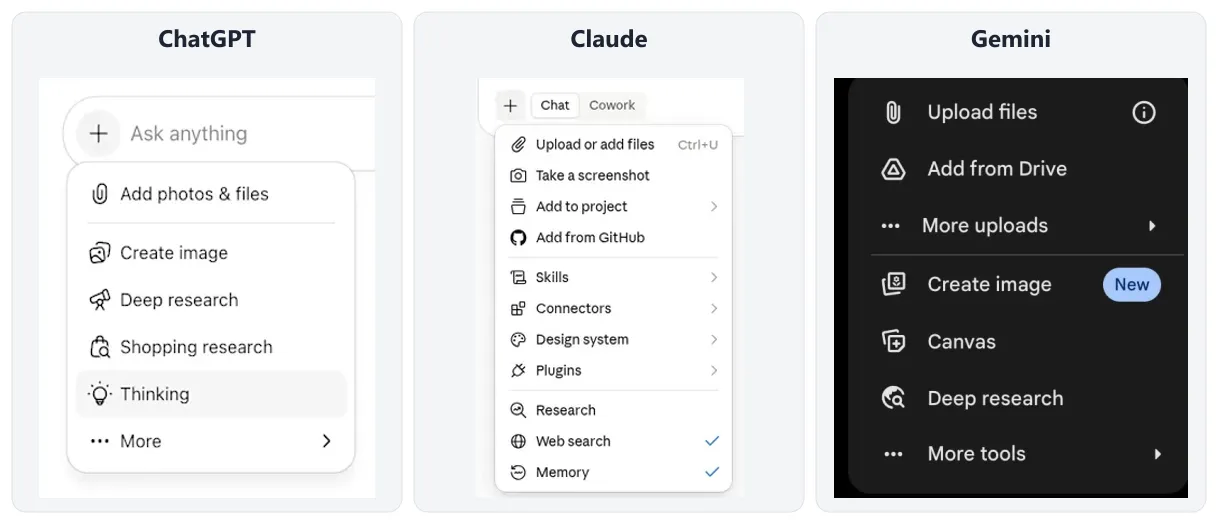
- 1 + on the left of the message box opens the menu
- 2 ChatGPT: Add photos & files
- 3 Claude: Upload or add files
- 4 Gemini: Upload files (or Add from Drive if the file is in Google Drive)
- You want to talk to it by voice on your phone. ChatGPT, Claude and Copilot allow voice conversations in their free versions too, just with limits, and on an Android phone Gemini can be the main voice assistant. OpenAI says ChatGPT voice mode is available to free users on a limited basis. Anthropic says Claude voice mode is on all plans, including free, and languages other than English are still in beta there. Microsoft has added Lithuanian to Copilot's voice languages for personal accounts. Whether a tool understands your Lithuanian pronunciation well, check yourself: for example, dictate a shopping list to it.
- You write code. There is a separate tool for that, GitHub Copilot, which works in the coding environment and has a free plan. This article is about chat tools for everyday work, so I do not go into programming details.
Try the same task in two tools
Instead of reading "best AI" rankings that go out of date within a few months, spend 15 minutes on your own task. Open two tools (for example, the one you picked for your situation plus ChatGPT or Claude) and paste the same text into both.
I run a small company. A customer writes angrily by email that their order is 5 days late. Write a polite reply: apologize, explain that the goods will be delivered this Friday, and offer free delivery on their next order. No more than 120 words.
Then write the same follow-up in both tools:
Make it warmer and shorter, without the standard apology for the inconvenience. Sign it with the name Tomas at the end.
- 1Open two toolse.g. Gemini and ChatGPT
- 2Paste the same prompt into both
- 3Send both the same follow-up
- 4Judge by the 4 questionsLanguage, instructions, nothing made up, how many follow-ups it took.
Compare the answers using four questions:
- Does the language sound natural? No strange words, phrases that read like a translation, or grammar mistakes (if you write in Lithuanian, watch the word endings).
- Did it follow the instructions? Length, Friday, free delivery, the name: is everything there?
- Did it make anything up? For example, did it promise a discount or compensation you did not ask for?
- How many follow-ups did it take? The tool that gets you to the result faster suits you better, at least for this task.
Instead of the email you can use a real task of your own: a meeting plan, a plain-language explanation of a complicated document, ideas for an event. Just do not upload sensitive data. How to phrase a task so the answer fits the first time is explained separately (How to write AI prompts).
What not to do when choosing
Do not buy a subscription on day one. The free versions are entirely enough to start, and paying only makes sense when you keep running out of limits or need a specific paid feature. Limits and models change, so yesterday's comparison may no longer hold today.
Do not upload sensitive information to any of them: personal ID numbers, customer data, passwords, health information. This applies equally to all four. Most of them let you turn off the use of your chats for training models in the settings; it is worth doing that right away after reviewing the privacy settings of the tool you choose.
Do not use a personal account for work if your company has its own rules or has given you a work account (for example, Copilot through Microsoft 365 or Gemini through Google Workspace). If your company has no such rules yet, I wrote about introducing AI tools to a team in the article on ChatGPT for business (ChatGPT for business).
How much do ChatGPT, Claude, Gemini and Copilot cost?
All four have a free plan. Paid plan prices vary by country and change, so here are the starting prices the official pages show from Lithuania (checked October 23, 2026), with links to more detailed articles.
- ChatGPT: Go €8, Plus €23 per month. All plans, and when it is worth paying, are covered separately (How much does ChatGPT cost, and is the free version enough?).
- Claude: Pro €18 per month or €15/month paid annually; prices exclude tax. More in the article on Claude (What is Claude and how to start using it).
- Gemini: Google AI Plus €4.99, Google AI Pro €21.99 per month (What is Google Gemini and how to use it every day).
- Copilot: the paid version comes with a Microsoft 365 Personal subscription for €10 per month (or €99 per year); for companies, Copilot is sold together with Microsoft 365 business plans (What is Microsoft Copilot).
If you want to manage without any subscription at all, which free tool to pick for a specific task (an email, a document, an image, a translation) is listed separately (Free AI).
When a chat is no longer enough
Once you are used to one of these tools and notice that you repeat the same task every day (copying emails, retyping data from one system into another), the next step is AI that does it on its own. How that differs from a chat tool is explained in the article on AI agents (AI agents for business).
Sources
ChatGPT Voice (OpenAI Help Center): voice mode and its availability for free users.
ChatGPT language settings (OpenAI Help Center): the list of supported languages, including Lithuanian.
Gemini supported languages and countries (Google): Lithuanian and Lithuania among the Gemini website languages and countries.
Gemini Connected Apps (Google): how to connect Gemini to Gmail, Calendar and Drive, and the requirements.
Claude plans and pricing (Anthropic): what the free Claude plan includes and how much Pro costs.
ChatGPT pricing (OpenAI): Go, Plus and Pro prices in your country's currency.
Google AI plans (Google): Gemini plan prices in euros for Lithuania.
Microsoft 365 plan comparison (Lithuania): prices in euros for home plans with Copilot.
Supported regions and languages in Microsoft Copilot: Copilot languages for writing and voice.