Gemini is Google's AI assistant. You type or say a question in plain language, and it answers, helps you write a text, explains a photo or puts together a plan. Gemini works in Lithuania and understands Lithuanian. To start for free, all you need is a regular Google (Gmail) account and the address gemini.google.com or the Gemini app on your phone. This article is about personal Gemini, not the Gemini built into a company's Google Workspace account.
First: which Gemini are we talking about?
Google uses the name "Gemini" for several things, so beginners easily get confused. The simplest way to tell them apart is by where you see it.
- The Gemini app and gemini.google.com. This is a separate chat window where you talk to the assistant. This article is about it.
- Gemini on an Android phone. On many Android phones Gemini is gradually replacing the earlier "Google Assistant": a long press on the side or home button opens Gemini. It is the same assistant, just quicker to reach.
- Gemini in a work account (Google Workspace). If a company uses Google Workspace, Gemini can be turned on inside Gmail, Docs, Sheets and Meet. This is managed by the company's administrator, and different terms apply to work accounts. What that version actually does in a company is covered separately (Gemini in Google Workspace for business).
Gemini itself, like ChatGPT or Claude, is based on a large language model (LLM): a program trained on a huge amount of text that puts together a likely answer based on your words. That is why it can be wrong even when it sounds confident. A general explanation of how this works is in the introductory article (What is artificial intelligence? A plain explanation without jargon).
How to start using Gemini: what you need
In short: open gemini.google.com (or the Gemini app on your phone), sign in with your Google account, type a question or task in the box at the bottom and click the send button (Submit) or press Enter. You add a file or photo with the "+" button on the left of the box. Each step in more detail below.
A Google account. If you have a Gmail address, you already have an account. Personal Gemini needs an account you manage yourself. According to the Google Help Center (checked October 19, 2026), you can use Gemini with a personal or school account from age 13 or the age that applies in your country, and with a work account only from age 18.
A browser or phone. On a computer, open gemini.google.com in a supported browser (Chrome, Safari, Firefox, Opera or Edge). On Android, the Gemini app is offered in the Google Play Store (Lithuania is on the list of supported countries); it needs Android 9 or later and at least 2 GB of RAM. iPhone users find the Gemini app in the App Store. Only look for the apps in the official stores: the publisher must be Google.
Lithuanian language. Lithuanian is on Gemini's official list of supported languages. The phone app has a noted exception for Lithuanian: the "Hey Google" voice command and some actions with other apps do not work. This does not affect written chat.
First try: prepare for a conversation or meeting
A good first task is one whose result you can judge yourself right away. For example, tomorrow you have a difficult conversation with a customer or your manager. Type:
Tomorrow I have a 20-minute meeting with a client who is unhappy about a delayed project. I want to keep a good relationship and agree on a new deadline. Put together a short plan for the conversation: how to start, 3 main points, and what to say if the client asks for a discount.
What to expect: within a few seconds you get a structured plan with suggested phrases. Some of them will be too generic or not your style. That is normal, because Gemini does not know the details of your situation. Fix it by continuing the same chat:
The client is a small family business, we talk informally. Make the phrases simpler and add what I can offer instead of a discount.
It is usually that second prompt that gives a useful result. How to phrase a task more clearly the first time is in a separate guide (How to write AI prompts).
Another way to try it: take a photo with your phone of something you do not understand (instructions in a foreign language, a device error message, a table) and ask: "What does this say and what should I do next?" Just do not photograph documents with personal data.
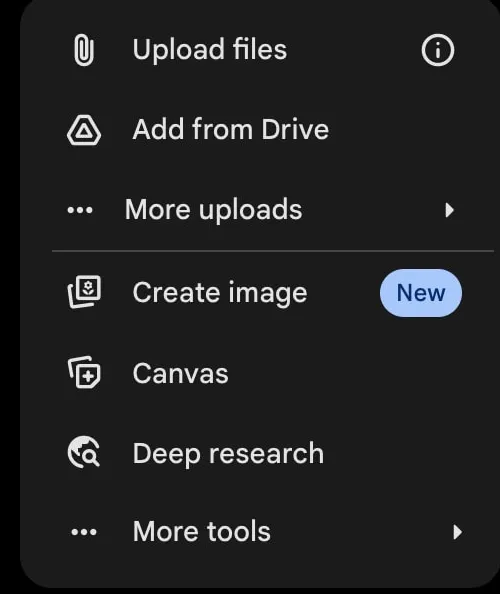
- 1 Upload files: a file or photo from your computer
- 2 More uploads: other sources, such as photos or notebooks
- 3 Create image and other tools: image creation, Canvas, Deep Research
What makes Gemini different?
Gemini is made by Google, so it is naturally tied to the Google services many people already use: an Android phone, the Chrome browser, a Gmail account. If you already have all of that, starting is easiest: you do not need to create a new account.
According to Google's subscriptions page for Lithuania (checked October 23, 2026), the free plan includes image creation and editing, Deep Research (a longer web search with a report), Gemini Live (a real-time voice conversation where you can show your camera or screen) and Canvas (a separate window for editing text or code). The list of features and their names change, and some depend on region and language.
If you have heard of Gems (saved assistants with your instructions, for example "always fix the grammar in my emails"), note that Google is replacing them with skills. A skill is a set of reusable instructions you call up in a chat by typing "/" and its name, and Gemini can also apply it on its own. In personal Google accounts, Gems are moved to skills automatically from November 2026, so it makes sense to create new instructions as skills straight away. Skills in a personal account are available from age 18.
It is also worth knowing what free Gemini does not do: according to the same page, Gemini in Gmail, Vids and other Google apps is included for personal accounts only in paid plans, starting with Google AI Plus. For company work accounts this is handled through Workspace and the company administrator, not a personal subscription.
Is Gemini free, or do you need a Google AI plan?
You can start for free. The paid personal plans are now called Google AI Plus, Google AI Pro and Google AI Ultra; they add more usage, more capable models and more Google storage (the free amount is 15 GB). On the subscriptions page shown for Lithuania (checked October 23, 2026), prices are listed in euros per month: AI Plus €4.99, AI Pro €21.99, AI Ultra from €99.99 (Ultra with the highest limits is €219.99). The page does not say whether VAT is included, so check the final amount at checkout.
Usage limits apply to all plans and change; Google notes that limits may vary. If the free plan is enough for your everyday questions, there is no need to pay. What you can do for free with different tools, by task, is listed separately (Free AI).
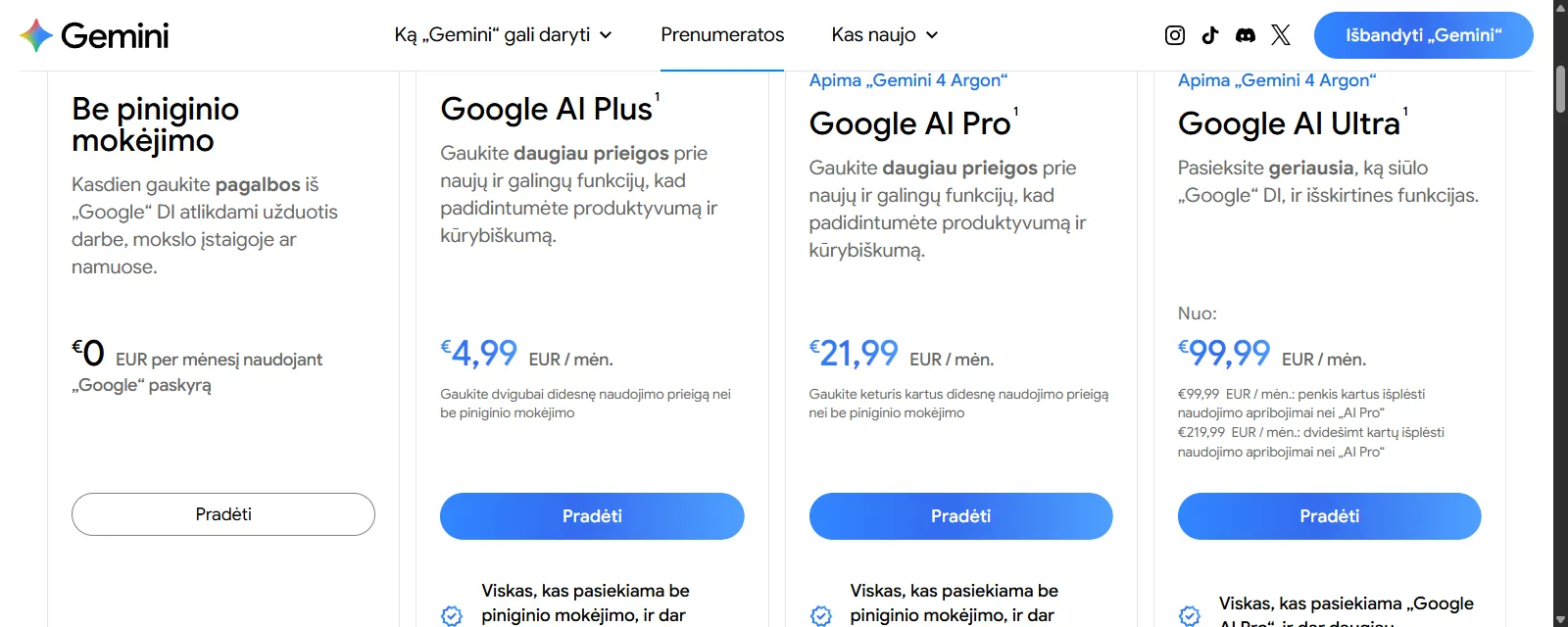
- 1 Free Gemini: a Google account is enough
- 2 Paid plan prices in euros per month
Your chats: where to find them and how to stop them being used for training
Gemini chats are stored in a place called Gemini Apps Activity, and whether it is saved is controlled by the Keep Activity setting. According to the Google Gemini Privacy Hub (checked October 19, 2026), when this setting is on, Google uses your activity to improve its services, including training generative AI models, and some chats may be read by human reviewers. By default, activity is deleted automatically after 18 months; you can change this to 3 or 36 months.
If you turn Keep Activity off, new chats no longer appear in your activity history and are not used to train AI models (except when you send feedback yourself), but they are still kept in your account for 72 hours so Gemini can respond. You turn Keep Activity off on the Gemini Apps Activity page, which you reach from the Gemini settings menu.
- 1Settings & help
- 2Activity
- 3On
- 4Turn off (or Turn off and delete activity)
Labels as in the English Google Help Center (checked October 23, 2026). You can also open the same page at myactivity.google.com/product/gemini.
Google itself advises: while activity is on, do not enter confidential information or anything you would not want a human reviewer to see. In practice that means no personal ID numbers, passwords, bank cards, customer lists or health information. If you need help with a real document, replace names and numbers with sample ones.
What to do when Gemini answers wrong
Gemini can give outdated or inaccurate facts, especially about Lithuanian law, taxes, prices and opening hours. The fact that Gemini is made by Google does not mean every answer has been checked against search. When the answer matters, ask for the source and open it yourself, or check the official website of the institution.
If the answer is off topic, context is usually missing: who it is for, what the situation is, what length and tone you need. If the chat has grown long and Gemini starts getting confused, start a new chat with one clear task.
If you are wondering whether Gemini or another tool suits you better, I compared them by task (ChatGPT, Claude, Gemini or Copilot). And when you want AI to work not just in a chat but with your company's systems, start with the explanation of what AI agents are (AI agents for business).
Sources
Where you can use Gemini: the list of countries, including Lithuania, and supported languages.
What you need to sign in to Gemini: account types, age limits and supported browsers.
The Gemini app on your phone: where the app is available, Android requirements and exceptions for Lithuanian.
Google AI plans: features of the free and paid plans and prices in euros.
Moving from Gems to skills: when Gems are replaced by skills and what skills are.
Gemini Privacy Hub: the Keep Activity setting, retention periods and advice on confidential information.