Claude is an AI assistant made by the US company Anthropic. You write to it in plain text, and it answers, explains, rewrites, summarizes or helps you think an idea through. Claude is officially available in Lithuania and you can write to it in Lithuanian. You can start for free in a browser at claude.ai or with the Claude app on your computer or phone. All you need is an email address and a phone number. Below: how to sign up, what to write the first time and what to watch out for.
What is Claude, in plain words?
Claude works like ChatGPT or Gemini: it is a chat tool with a large language model (LLM) inside. That is a program trained on a huge amount of text that puts together the most likely answer based on your words. It does not "know" anything the way a person does, so it can be wrong even when the answer sounds confident. If you are reading about artificial intelligence for the first time, start with the general explanation (What is artificial intelligence? A plain explanation without jargon).
The word "Claude" means two things: the app you chat in (the claude.ai website and the desktop and mobile apps) and the family of models itself. Model names and versions change several times a year, so I do not list them here. For a beginner it does not matter: the app picks the model for you.
In everyday work Claude is mostly used for text: reading and summarizing a long document, rewriting an email in a different tone, explaining a complicated idea more clearly. The free plan currently also lets you search the web, create files, turn on memory across chats and create so-called artifacts: documents or simple tools that open in a separate window and that you can keep editing.
In the settings and the "+" menu you will see a few more names. Projects are separate workspaces with their own chats, uploaded documents and instructions: for example, one project for customer emails and another for reports; the free plan allows up to 5. Skills are sets of instructions and files that Claude picks up for certain tasks, for example creating Word, Excel, PowerPoint or PDF files; they only work when code execution and file creation are turned on. Connectors link Claude to other tools, such as Google Drive or Slack, so it can work with the information stored there. You do not need any of these on day one. They become useful later, once you use Claude every day.
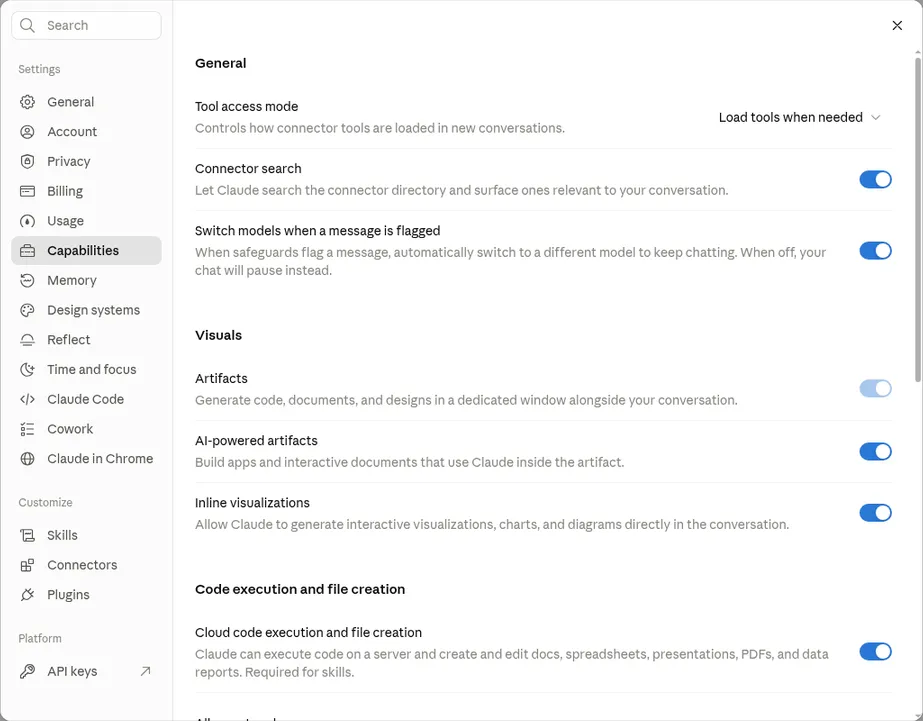
- 1 Capabilities: this is where you turn on extra Claude features
- 2 Artifacts: documents and tools in a separate window next to the chat
- 3 Cloud code execution and file creation: lets Claude create and edit documents, spreadsheets, presentations and PDFs; Skills do not work without it
- 4 Skills: sets of specialized knowledge and workflows; Connectors: link Claude to other tools and data sources
Does Claude work in Lithuania and understand Lithuanian?
Yes. Lithuania is on Anthropic's official list of countries where the service is offered (checked October 19, 2026).
There is one nuance with language. Claude's menus and buttons are not translated into Lithuanian: the interface is currently offered in 11 languages (English, French, German, Italian, Spanish, Japanese and others), and Lithuanian is not one of them. However, the Anthropic Help Center says that whatever the interface language, you can talk to Claude in any language: it replies in the language you write in. So if you write in Lithuanian, you get the answer in Lithuanian.
The quality of Lithuanian text is usually good enough for everyday emails and explanations, but not flawless: unnatural phrases or wrong word endings appear now and then. Read any text you will send to a customer or publish yourself.
How to create a Claude account and install the app
- Open the official address or app. In a browser (Chrome, Edge, Safari or another) go to claude.ai. You can download the Claude desktop app for macOS or Windows (there is also a version for ARM processors) from claude.com/download, and the phone app from the App Store or Google Play (the publisher must be Anthropic). The apps are free on all plans, and chats, projects and memory sync between the browser, computer and phone (checked October 23, 2026).
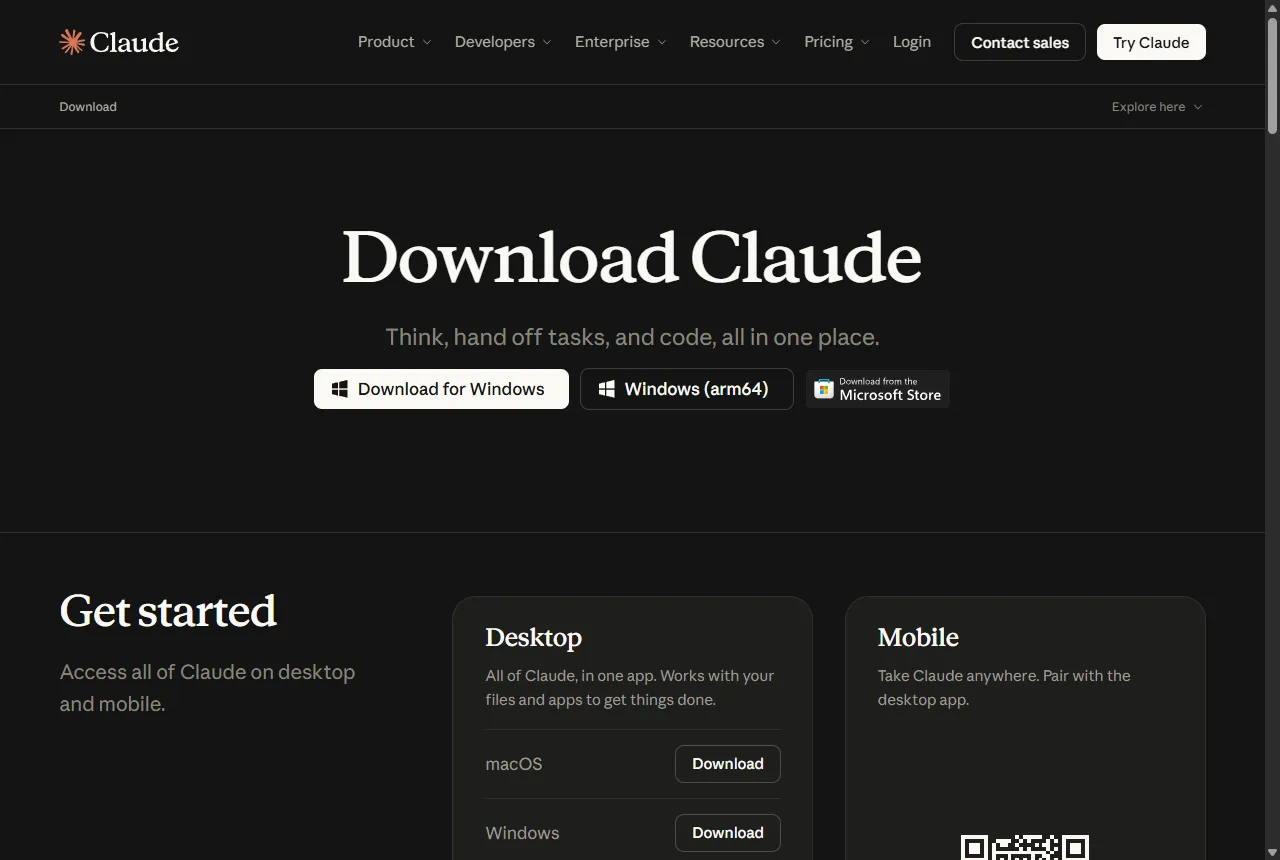
- 1 Desktop app for Windows
- 2 Desktop section: separate buttons for macOS and Windows
- 3 Mobile section: the phone app
- Choose how to sign in. You can sign in with a Google account or enter an email address, in which case you will get a sign-in link by email. If the email does not arrive, check your spam folder.
- Verify your phone number. Anthropic requires all new users to verify a phone number with an SMS code, and you cannot skip this step. A regular mobile number works; virtual (VoIP) and landline numbers are not accepted.
- Check the age limit and settings. Under Anthropic's consumer terms you must be 18 or older to use Claude. Before your first chat it is worth opening the privacy settings, covered below.
First try: give Claude your own text
The best first task is not a question "about everything" but a text of your own that you want to improve. That way you see right away whether the result is useful. For example, copy an email you wrote recently (without names, phone numbers or other personal data) and write:
Below is my email to a supplier about a late order. Rewrite it to be more polite and shorter, but keep a clear request to deliver the goods by Friday. Email: [paste the text]
What to expect: within a few seconds you get the rewritten email, often with a short note on what was changed. The first version is rarely perfect, and that is normal. The chat continues, so you do not need to start over; just say what does not fit.
Too formal, we have worked with this supplier for a long time. Make it warmer, and drop the last sentence about the contract terms.
That second prompt is the core skill: not hunting for the "perfect" first prompt, but fixing the result the way you would with a colleague. More examples of how to phrase a task clearly are in a separate guide (How to write AI prompts).
Other tasks for your first week: upload a long PDF (for example, rules or instructions) and ask "List the 5 most important things that affect me as a [job title]"; ask it to help you prepare for a meeting with "Ask me 5 questions a customer might ask about [topic]"; or ask it to explain a term you do not understand "as if to an eleven-year-old".
Files, long documents and where Claude helps
You can attach documents and images to a chat. According to the Anthropic Help Center (checked October 19, 2026), PDF, DOCX, TXT, CSV, RTF, HTML, EPUB and other formats are supported, plus JPEG, PNG, GIF and WebP images; up to 20 files per chat. Excel (XLSX) files need the code execution and file creation feature turned on in settings.
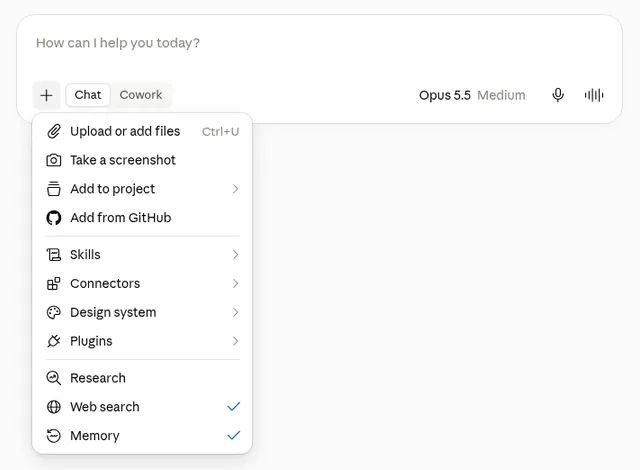
- 1 Click + at the bottom left of the message box
- 2 Upload or add files: choose a file and click Open (the Help Center calls this item "Add files or photos")
- 3 Skills: sets of specialized knowledge and workflows Claude uses for certain tasks
- 4 Connectors: link Claude to other tools and data sources
This helps when you have a lot of text and little time: a draft contract you want to understand before meeting a lawyer, a long email thread or meeting notes. Just remember that a summary does not replace the document. If the decision matters (money, deadlines, legal consequences), ask Claude to point to where in the document it says so, and check it in the original. A step-by-step guide to quickly finding what you need in a long PDF is in a separate article (A long PDF with AI).
Is Claude free, or do you need a paid plan?
The free plan is enough to start. The paid plans are called Pro and Max. On the claude.com/pricing page opened from Lithuania (checked October 23, 2026), Pro costs €18 per month billed monthly, or €15/month if you pay for a year upfront (€180). Max starts at €90 per month, billed monthly only. The page notes that prices exclude tax, so you will see the final amount with VAT at checkout.
The main difference between the plans is how much you can use. All plans have limits that, according to Anthropic, reset on a rolling five-hour window, and paid plans also have weekly limits. Exactly how many messages fit depends on their length, attached files and the model, and the limits change. If on the free plan you often see a message that you have reached the limit, that is a sign Pro is worth considering.
What not to give Claude and how to control your data
Do not put personal ID numbers, passwords, bank details, customer contacts or health information into a chat. If you need to work with a real document, first remove or replace names and numbers (for example, "Client A").
Since fall 2025, users of personal accounts (Free, Pro, Max) choose for themselves whether Anthropic may use their chats to improve its models. The choice is in the settings: Settings → Privacy → Help improve our AI models (the Anthropic Help Center calls it "Model Improvement"; checked October 23, 2026). According to Anthropic, if you allow it, data is kept for up to five years; if not, a 30-day retention period applies. Deleted chats are not used for training, and so-called "incognito" chats are not used even with this setting on. You can change your choice at any time.
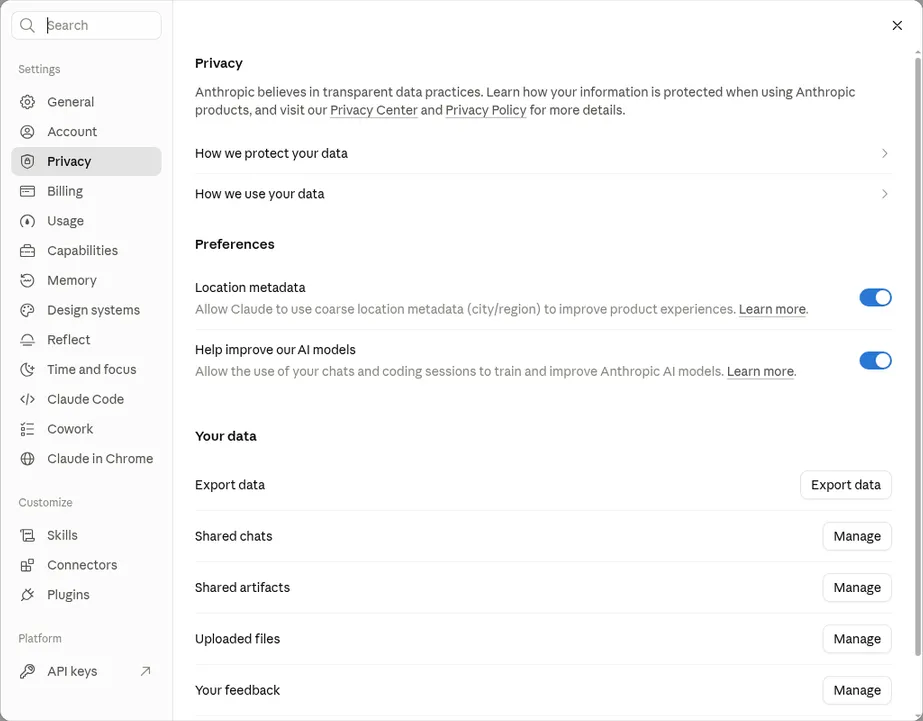
- 1 Privacy section
- 2 Help improve our AI models (in the Help Center: "Model Improvement"): turn it off if you do not want your chats used to improve models (on in this screenshot)
For work information this matters: a personal account belongs to you, not your company. If you plan to use Claude with customer data or with your whole team, first talk to your manager or data protection officer. Anthropic has separate business plans for companies, with different terms.
What to do when Claude gets it wrong
Claude, like other chat tools, can give inaccurate facts, make up a source that does not exist or calculate something wrong. Be especially careful with answers about Lithuanian laws, taxes, prices and dates: they change, and the model's knowledge has a cutoff. When the answer matters, ask: "How do you know this? Give me the source" and open it yourself.
If the answer went in the wrong direction, adding the missing context usually helps: who the text is for, what it should achieve, what you definitely do not need. If the chat is already long and tangled, start a new one. Claude works better with one clear task.
Once you have tried Claude and want to compare it with other tools on your own tasks, that is covered separately (ChatGPT, Claude, Gemini or Copilot). And when you want AI not just to answer in a chat but to work with your company's systems, read what AI agents are (AI agents for business).
Sources
Claude plans and pricing: Free, Pro and Max features, prices excluding tax, explanation of usage limits.
Claude download: the official Claude apps for computer and phone.
What are Skills and what are Projects: explanations from the Anthropic Help Center.
Anthropic supported countries: confirms that Claude is available in Lithuania.
Using Claude in your preferred language: which languages the interface is translated into and that you can chat in any language.
What kinds of files can I upload to Claude: formats, sizes and the number of files per chat.
Anthropic update to consumer terms and privacy policy: the choice on using chats for training and retention periods.
Anthropic consumer terms: age limit (18) and terms of use.