ChatGPT is a chat tool made by the company OpenAI: you type what you need into a box in plain words, and it answers in text. It writes an email draft, explains a complicated text, suggests ideas or helps you prepare for a meeting. It understands and answers in Lithuanian, and the interface can be switched to Lithuanian. You do not need to look for, or pay for, a separate "Lithuanian version": a free account on the official website chatgpt.com or in the OpenAI app is enough to start. Below are the steps from signing up to your first useful task (information checked October 23, 2026).
What is ChatGPT in plain words?
ChatGPT runs on a large language model. A language model (LLM, large language model) is a program trained on a very large amount of text that can produce a meaningful answer to your request. A prompt is simply what you type into the chat box (in Lithuanian it is called "užklausa", or sometimes "promptas").
It is important to understand one thing: ChatGPT does not "know" the answer like an encyclopedia; it puts together the most likely text. That is why it is very good at writing, rephrasing, summarizing and explaining, but sometimes states an inaccurate fact in a confident tone. When you need up-to-date information, ChatGPT can search the web and cite sources, and then it is worth opening and checking them.
If you first want to understand what artificial intelligence is in general and how a chat tool differs from search, we explain that separately (What is artificial intelligence? A plain explanation without jargon).
Where to find and download the real ChatGPT
The official ChatGPT address is chatgpt.com. The company website is openai.com. There are official phone apps for iOS (App Store) and Android (Google Play), desktop apps for Windows and macOS, and an extension for the Chrome browser. An app is the same service, just installed on your device instead of opened in a browser. You will find links to all versions on the official download page (checked October 23, 2026): install from there.
You do not need to download a separate "Lithuanian" ChatGPT app, and there is none: after installing the official app, you can turn on Lithuanian in the settings (see below for how).
On the web and in app stores there are many websites and apps with "ChatGPT" or "GPT" in the name that are not OpenAI products: they show ads, ask for separate payment or collect your data. Before installing, check that the app's developer is listed as OpenAI. Do not pay third-party websites for "ChatGPT in Lithuanian": the official ChatGPT works in Lithuanian, and for free. Never enter your ChatGPT password on other websites.
Can you use ChatGPT without an account?
In some countries you can try ChatGPT without signing in. However, the OpenAI Help Center currently states that this option is not yet available in Europe (except the United Kingdom), so in Lithuania you will most likely see a sign-in or sign-up screen right away. The account is free, and with it your chats are saved in your history, you can continue them on another device and change the interface language.
The age limit under OpenAI's terms of use for Europe: users must be at least 13 years old or the minimum age in their country, and those under 18 need permission from a parent or guardian.
How to sign up and switch ChatGPT to Lithuanian
- Open chatgpt.com or the official app. Click the sign-in or sign-up button.
- Choose how to create your account. Currently you can sign in with a Google or Apple account, a phone number or an email address. Then follow the steps on the screen.
- Think about which address to use. OpenAI recommends using an email address you own for personal use, and a separate account with your work email for work. Note: if you create the account with an address on your employer's domain, it may later be linked to the company's business account, and the administrator will be able to manage it.
- Turn on Lithuanian. Lithuanian is on OpenAI's official list of languages supported by ChatGPT, and ChatGPT often adapts to your browser or phone language by itself. If not, on a computer click the profile icon → Settings → General → Language and choose Lithuanian. In the app, you will find the language in the "App" section of the profile settings. You can change the language only when signed in.
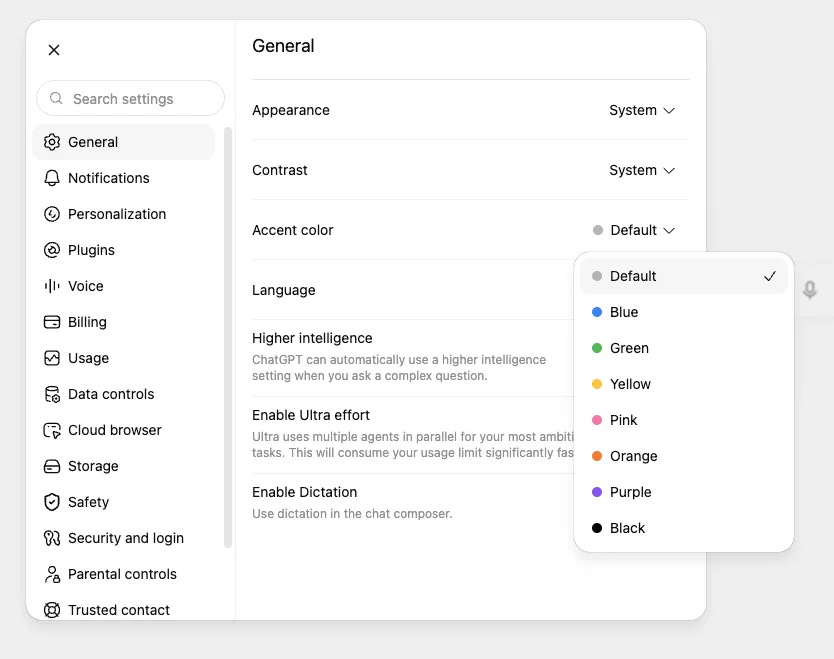
- 1 General – general settings
- 2 Language – click it and choose Lithuanian from the list
The interface language changes only the menus and buttons. You can write in Lithuanian in the chat either way: ChatGPT answers in the language you write in.
Your first try: what to type into ChatGPT
For your first time, pick a real, small task whose result you can judge yourself. For example, an email you keep putting off. Copy this prompt and replace the details with your own:
I work at a small furniture store. Write a short, polite email to a customer saying that the wardrobe they ordered will be delivered 3 working days later than promised because the supplier is late. Offer a 5% discount on their next purchase. Up to 100 words, formal address, no excessive apologizing.
What to expect: within a few seconds you will get an email draft with a greeting, an explanation and an offer. It will usually be tidy, but read it carefully: Lithuanian text can contain unnatural phrases or expressions translated word for word from English, and sometimes ChatGPT "adds" details you did not ask for (e.g. a specific date or reason). Fix such places yourself or ask it to fix them.
A good prompt is like a task for a new colleague: who you are, what you need, who the text is for, how long and in what tone. You will find more such examples with explanations in the guide on how to write prompts (How to write AI prompts), and email examples with a pre-send check in a separate guide (How to write or fix an email with AI).
Refining: a second prompt in the same chat
ChatGPT is most useful not in its first answer but when you refine it. In the same chat ChatGPT remembers what you talked about, so you do not need to repeat everything. For example:
Shorten it to 60 words and add that, if it is more convenient for the customer, the wardrobe can be picked up earlier from our warehouse in Kaunas.
Other useful refining phrases: "give me 3 different versions", "make it more formal", "explain it more simply, as if a teenager were reading", "what is missing from this text?". If the answer is nothing like what you expected, it is often quicker to start a new chat and write a more precise prompt.
What else is worth trying in your first week (examples): "Explain simply what this contract clause means: […]", "Tomorrow I have a job interview for an accountant position. Ask me 5 questions the employer might ask and rate my answers", "Suggest 10 ideas for an 8-year-old's birthday party at home, budget 50 euros", "I am learning Excel. Explain how the XLOOKUP function works and give me one exercise".
How to upload a file or photo to ChatGPT
ChatGPT can read a document or photo and work with it: summarize a PDF, translate a photographed manual, explain a table. According to OpenAI's pricing page, file uploads and image analysis are available on the free plan too, but limited: after a certain amount you will have to wait or choose a paid plan. The exact limits are not published and change over time.
How to do it: click the add button next to the message box, choose a file from your computer (on a phone, a photo or the camera) and in the same box write what to do with it. An example:
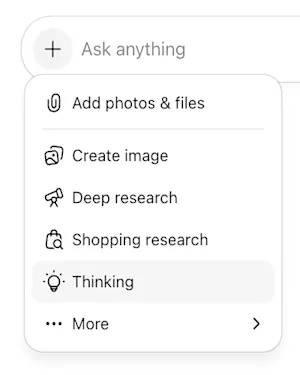
- 1 + on the left of the message box – opens the menu
- 2 Add photos & files – attach a file or photo from your computer
The photo shows a page of a washing machine manual in German. Translate it into Lithuanian and briefly explain what to do when the red light is blinking.
The same "+" menu also has Create image. You can also just ask for an image in words in the chat, and you will find all the images you have created in the sidebar under More → Images. How to write a good image description is explained separately (How to create an image with AI).
Before uploading a file, check that it contains no personal data (more on that below). How to ask questions about a long document and check the answers is described separately (A long PDF with AI). What the free plan allows and how the paid plans differ is also covered separately (How much does ChatGPT cost, and is the free version enough?).
When ChatGPT gets it wrong
ChatGPT can make calculation errors, mix up dates, or "remember" a law article or a book that does not exist. This is not a malfunction; it is how language models work. Simple rules: always check facts, numbers, prices, legal and health questions in an official source; ask for sources and open them; do not make important decisions (medical, legal, financial) based on a ChatGPT answer alone.
If you see a mistake, say so directly: "This number is wrong, recalculate it step by step." That is often enough to improve the answer.
What not to type into ChatGPT and which settings to turn on
Do not put personal ID numbers, personal data of clients or colleagues, passwords, bank card details, health information or confidential company documents into a personal ChatGPT account. If you need help with such a text, replace names and numbers with made-up ones ("Client A", "amount X").
By default, OpenAI may use chats from personal accounts to improve its models. You can turn this off: on a computer, profile icon → Settings → Data Controls → switch off "Improve the model for everyone" (in the app, via your profile → Data Controls). The setting applies to the whole account, and your chats stay in your history.
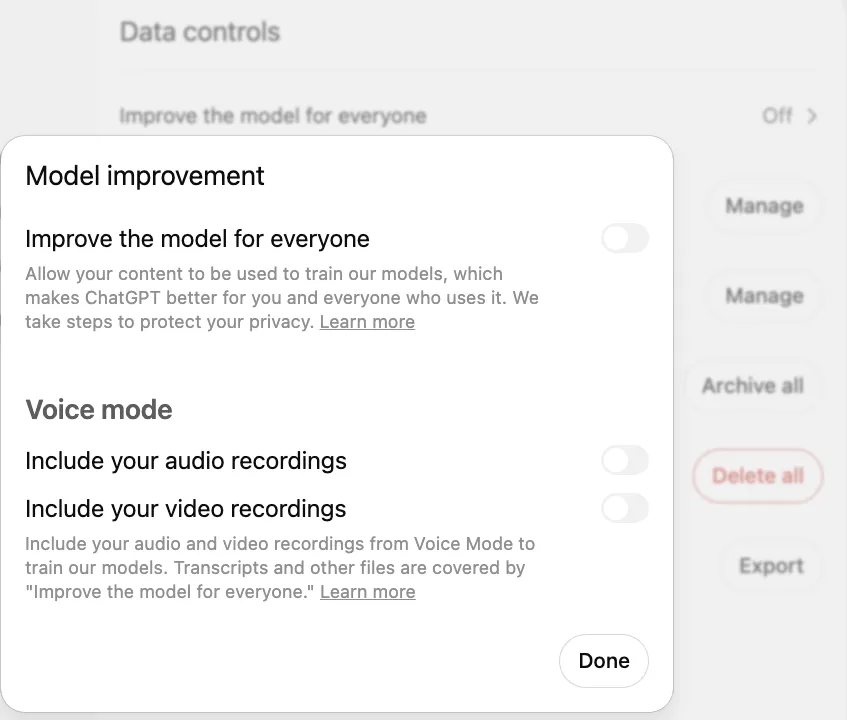
- 1 Improve the model for everyone – in Data controls; clicking it opens this window
- 2 Toggle off (gray) – your chats are not used to train models
When you want a one-off chat, use a Temporary Chat: according to OpenAI, it does not appear in your history, is not used to train models, does not create memories and is deleted from OpenAI's systems after 30 days. ChatGPT also has memory: it can remember details about you from earlier chats. You can review or turn it off in the settings (Settings → Personalization → Memory).
If you plan to use ChatGPT at work with company data, that is a different question: business plans, data protection and GDPR are discussed in the article on ChatGPT for business (ChatGPT for business).
Is ChatGPT free, and how much does the paid version cost?
Yes, you can start for free, and for most first tries that is entirely enough. A paid version gives you more messages, files and images and more advanced models. On the ChatGPT pricing page opened from Lithuania (checked October 23, 2026), Go costs €8, Plus €23 and Pro from €103 per month; you will confirm the final amount at checkout. What you get for free, how much each plan costs and when it is worth paying are covered in detail in a separate article (How much does ChatGPT cost, and is the free version enough?).
What next?
Once chatting with ChatGPT becomes routine, you will notice that you spend a lot of time copying text from email or documents into the chat window and back. That is when it is worth learning how an AI agent, which works with your company's systems by itself, differs from a chat tool (AI agents for business). And if you are still choosing which tool to start with, we compared them by task (ChatGPT, Claude, Gemini or Copilot).
Sources
ChatGPT download page: the official apps for phone and computer.
OpenAI Help Center: The ChatGPT home page: using it without an account and where that is not available.
OpenAI Help Center: Changing your language: supported languages, including Lithuanian.
OpenAI Help Center: Data controls: how to turn off the use of chats for training and what temporary chats are.
OpenAI Terms of Use for Europe: the age limit and sign-up rules.
ChatGPT pricing: free and paid plan features, prices in your country's currency.
OpenAI Help Center: Images in ChatGPT: creating images in the chat and the Images section.