A good prompt for an AI tool is a request that a person who knows nothing about your situation would understand: what you want, who it is for, what the circumstances are and what form of answer you expect. You do not need "magic phrases" or any special language. It is enough to write the way you would explain the task to a new colleague, and then fix the answer with a second message. The same principles work in ChatGPT, Claude, Gemini and Copilot.
What is a prompt?
A prompt is everything you write (or say) to a chat tool: a question, a request, pasted text with an instruction. In Lithuanian people often just borrow the English word and say "promptas"; it means the same thing.
Why does the wording matter? The tool cannot see you, does not know who you are writing to, how long the text should be or what you have already tried. If you do not tell it, it guesses and gives an "average" answer that would suit anyone. The more useful context you give, the less guessing. How these tools work in general is explained in the introductory article (What is artificial intelligence? A plain explanation without jargon).
Four questions worth answering in a prompt
The tool makers' advice differs in wording but agrees in substance. Microsoft writes that a Copilot prompt can include a goal, context, expectations and a source, and that only a clear goal is required (Microsoft help on Copilot prompts). Google's Gemini help mentions persona, task, context and format (Google Gemini help). Anthropic suggests imagining Claude as a brilliant but new employee who does not know your habits: if a prompt would confuse a colleague, it will confuse Claude too (Anthropic prompt engineering guide).
In practice these are four questions you can ask yourself before you hit "send".
- What exactly do I want? Not "write about…" but "write an email asking…".
- What is the context? Who you are, who it is for, what has already happened, what matters.
- What result do I expect? Length, tone, form: 3 options, a list, up to 100 words, polite, in plain words.
- What should it rely on, and what should it not do? Pasted text to work from, and limits, for example "if you don't know, say so; don't make anything up".
You do not always need to answer all four. For a simple question one sentence is enough. But when an answer disappoints, it is usually exactly one of these things that was missing.
Six examples: vague prompt → improved prompt → why it is better
All the texts below are examples you can copy and adapt. The answers will be a little different each time, and that is normal.
- A polite email when you are annoyed.
Vague prompt: "Write a letter about the elevator."
Improved prompt: "Write a short, polite but clear email to the chair of our apartment building's owners' association. The elevator has been out of order for two weeks, I live on the 7th floor, and my elderly mother, who finds stairs hard, lives with me. I want to know when the elevator will be fixed and ask for a reply by Friday. No accusations or threats, up to 120 words."
Why it is better: the tool knows the recipient, the problem, why it matters, what exactly you are asking for, and what tone and length you need. Without that it would have written a generic letter you would have to rewrite.
- Explaining a complicated text simply.
Vague prompt: "What does this mean?" (with a pasted contract paragraph)
Improved prompt: "Below is a paragraph from my apartment lease. Explain in plain words what it means for me as the tenant: what I must do, what I cannot do and what would happen if I did not comply. If any part can be read two ways, flag it separately. [paste the paragraph without names, addresses or personal ID numbers]"
Why it is better: it is clear from whose point of view to explain and what answers you need. Asking it to flag ambiguities helps you spot what to clarify with the other party or a lawyer; an AI explanation is not legal advice.
- Preparing for a job interview.
Vague prompt: "How do I prepare for a job interview?"
Improved prompt: "Next week I have a job interview for a receptionist position at a dental clinic. For the past 5 years I worked as a cashier in a shopping center. Act as the manager running the interview: ask me one question at a time (8 in total), wait for my answer, and after each one briefly tell me what was good and what to improve."
Why it is better: instead of a generic list of tips you get a rehearsal tailored to your experience and the specific job. Asking for "one question at a time" turns the answer into a conversation.
- Brainstorming ideas.
Vague prompt: "Birthday ideas."
Improved prompt: "Help me come up with ways to celebrate my son's 10th birthday. There will be 8 kids, on a Saturday at the end of October (it may rain), the budget is about 150 euros, and my son likes soccer and Lego. Suggest 5 different ideas: 2 at home and 3 away from home. For each, list what needs to be prepared in advance."
Why it is better: age, number of kids, weather, budget and interests rule out unsuitable ideas, and asking it to group them and add preparation makes the list usable. Still check prices and opening hours of specific places yourself: the tool may not know them or may get them wrong.
- Learning something.
Vague prompt: "Explain percentages."
Improved prompt: "I want to learn to calculate percentages so I understand discounts in stores. I was weak at math in school. Explain step by step how to calculate a 15% discount on a price of 64 euros. Then give me 3 similar problems and don't show the answers until I send mine."
Why it is better: the tool knows your level and goal, so it explains more simply and with an example that matters to you. Asking it not to reveal the answers right away turns it into a teacher rather than an answer key.
- A simple work task.
Vague prompt: "Shorten this." (with pasted meeting notes)
Improved prompt: "Below are my notes from a team meeting. Write a summary for colleagues who were not there: first 2–3 sentences on what was decided, then a list of who does what and by when. If a task has no deadline, write 'no deadline given'; don't make anything up."
Why it is better: it says who the summary is for and what structure is needed. The last sentence reduces the risk that the tool "fills in" missing dates on its own, which is one of the most common mistakes.
How to continue the chat and fix the answer
The first answer is rarely final, and that is not your fault. The OpenAI Help Center recommends starting with an initial prompt, evaluating the answer and refining it: changing the wording, adding context or simplifying the request (OpenAI prompt engineering tips). Microsoft also writes that it usually takes a few messages.
The key is to write in the same chat: the tool sees what has already been said, so you do not need to repeat everything. And say specifically what does not fit, not just "bad". A few examples of how this sounds:
- 1First promptWhat I want, context, the result, what to rely on.
- 2Evaluate the answerWhat fits, what does not?
- 3Refine in the same chat"Too long. Cut it to 5 sentences…"
- 4Ask for sources if there are factsOpen the links yourself.
- 5Drifted? A new chat with a better first prompt
Too long. Cut it to 5 sentences and keep only the request and the deadline.
Sounds too formal. Write it as if to a neighbor you know.
The second option is the best, but the ending is too sweet. Change only the last sentence.
What information are you missing to answer more precisely? Ask me questions, then revise.
Where does this information come from? List the sources you are relying on.
That last prompt is especially useful when the answer contains numbers, dates or rules. The tools can make up facts and even links, so open the sources yourself.
If the chat has "drifted" and the tool keeps going back to what you do not want, it is often quicker to start a new chat and write a better first prompt straight away, including what you learned from the first attempt.
What not to put in a prompt
The more context, the better the answer, but not just any context. Do not type or upload into a chat tool passwords, personal ID numbers, bank card or account numbers, health information, personal data of other people and customers, or confidential work documents unless your employer has clearly allowed it.
Usually it is enough to replace the details: "the customer" instead of a name, "my apartment" instead of an address, an approximate amount instead of the exact one. This hardly affects the quality of the answer.
In personal accounts you can turn off the use of your chats to improve models (setting names change, so check the tool's help page). In ChatGPT this is the "Improve the model for everyone" setting under "Data Controls" (OpenAI Data Controls FAQ). In personal Claude accounts, chats are used to improve models if you allow it in the privacy settings (Anthropic Privacy Center). In Gemini, saving activity is controlled by the "Keep Activity" setting described in the Gemini Privacy Hub. Even with these settings off, it is better not to upload sensitive data.
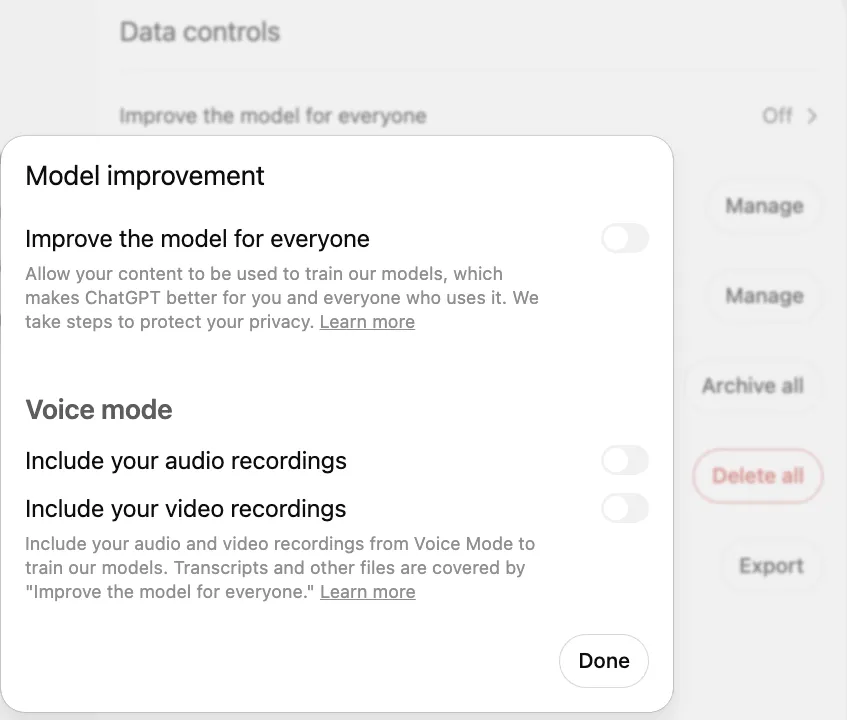
- 1 Improve the model for everyone: in the Data controls section; clicking it opens this window
- 2 The toggle is off (gray): your chats are not used to train models
Does this work in ChatGPT, Claude, Gemini and Copilot?
Yes. The advice from the makers of all four tools (a clear goal, context, the desired result and refining with a second message) is essentially the same, so the prompts in this article work in any of them. What differs is other features: which files you can upload, whether the tool searches the web, whether it can see your emails and documents (for example, Microsoft 365 Copilot at work). That is covered in separate articles on ChatGPT (What is ChatGPT and how to use it), Claude (What is Claude and how to start using it), Gemini (What is Google Gemini and how to use it every day) and Copilot (What is Microsoft Copilot).
You can write in whatever language is comfortable for you; the principles do not depend on language. If the answer sounds unnatural, just ask: "Rewrite this in more natural English, with shorter sentences." If you are still choosing which tool to start with, the comparison by task will help (ChatGPT, Claude, Gemini or Copilot).
When your prompts start repeating
If you notice that at work you write the same prompt every week and then move the result into another program by hand, that is a sign part of the work can be automated. What that looks like in a company is covered in the article on ChatGPT for business (ChatGPT for business).
Sources
OpenAI: "Prompt engineering best practices for ChatGPT": official ChatGPT prompt tips on clarity, context and refining.
Anthropic: prompt engineering guide ("Be clear and direct"): the "new colleague" rule and examples of refining a request.
Google: "Tips for creating custom Gems": the four parts of a good Gemini prompt: persona, task, context, format.
Microsoft: "Get started writing prompts in Microsoft Copilot": goal, context, expectations and source in a Copilot prompt.
OpenAI Data Controls FAQ: how to turn off the use of ChatGPT chats to improve models.
Anthropic Privacy Center: is my data used for training: when Claude chats are used to improve models.