In short: bank reconciliation is automated in three layers: statements arrive in your accounting on their own (a camt.053 file, Swedbank Gateway, SEB Baltic Gateway or open banking), rules match payments by invoice number, amount and company code, and AI suggests matches for the payments the rules could not place. A person only approves the doubtful cases.
I checked the banks' prices and features on their websites on October 17, 2026. Prices change, so check the bank's fees before signing a contract.
What is bank reconciliation and why does it eat up time?
Bank reconciliation means linking every bank transaction to an accounting entry: an incoming transfer is matched to a sales invoice, an outgoing payment to a supplier invoice, a bank fee to an expense account. At the end of the month, the bank balance must match the balance in your books.
Importing the statement itself is easy today. What eats up time are the exceptions: the customer wrote "for goods" in the reference, paid three invoices with one transfer, paid 2 cents short, the owner paid from a personal account, and money from the online store arrives as a Paysera or Stripe payout that bundles a hundred orders. These exceptions are exactly what is worth automating.
- 1Statements arrive in your accounting on their owncamt.053 · Swedbank Gateway · SEB Baltic Gateway · open banking
- 2Rules match the clear paymentsBy invoice number, amount and company code.
- 3AI suggests matches for the rest
- 4The accountant approves only doubtful ones
How to get bank statements from Swedbank, SEB, Luminor, Revolut and Paysera automatically
Most Lithuanian banks let you download a statement in the ISO 20022 camt.053 XML format, which almost all accounting software can import. But you have to download the file by hand every time. The automatic options:
| Bank | Automatic channel | Price (October 2026) | Notes |
|---|---|---|---|
| Swedbank | Swedbank Gateway (direct or through an operator) | Direct: €60 contract + €35/month; other banks' accounts +€15/month. Through an operator: free for the customer | Through Gateway you can also receive statements for SEB, Luminor, Citadele, Artea, Urbo and other bank accounts |
| SEB | SEB Baltic Gateway (API) | Direct: €50 activation, statements €10/month, intraday statements €25/month. Through an intermediary: €5/month, not charged to business plan customers | Statements for any period within 2 years; information from other banks (Swedbank, Luminor) |
| Luminor | camt.053 export; via Swedbank Gateway, SEB Baltic Gateway or open banking | Depends on the chosen channel | Rivile ERP connects through a licensed open banking provider |
| Revolut Business | Business API: transactions and webhooks | Depends on the Revolut plan | Up to 1,000 transactions per request; on Freelancer plans, data older than 90 days is only available for 5 minutes after authorization |
| Paysera | Paysera API: real-time statements, bulk payments | Under Paysera's terms | ISO 20022 XML and PDF statements also available in self-service |
An important point: if your accounting software is already a bank "operator", connecting through it is usually the cheapest option. For example, Rivile ERP (a widely used Lithuanian accounting system) has a direct bank connection through a licensed open banking provider, while Rivile GAMA needs a separate Rivile API key for open banking import, and you can only pull entries no older than 3 months directly. The permissions a bank grants are valid for a limited time, so they have to be renewed periodically; this is one of the most common "why did it stop working" cases.
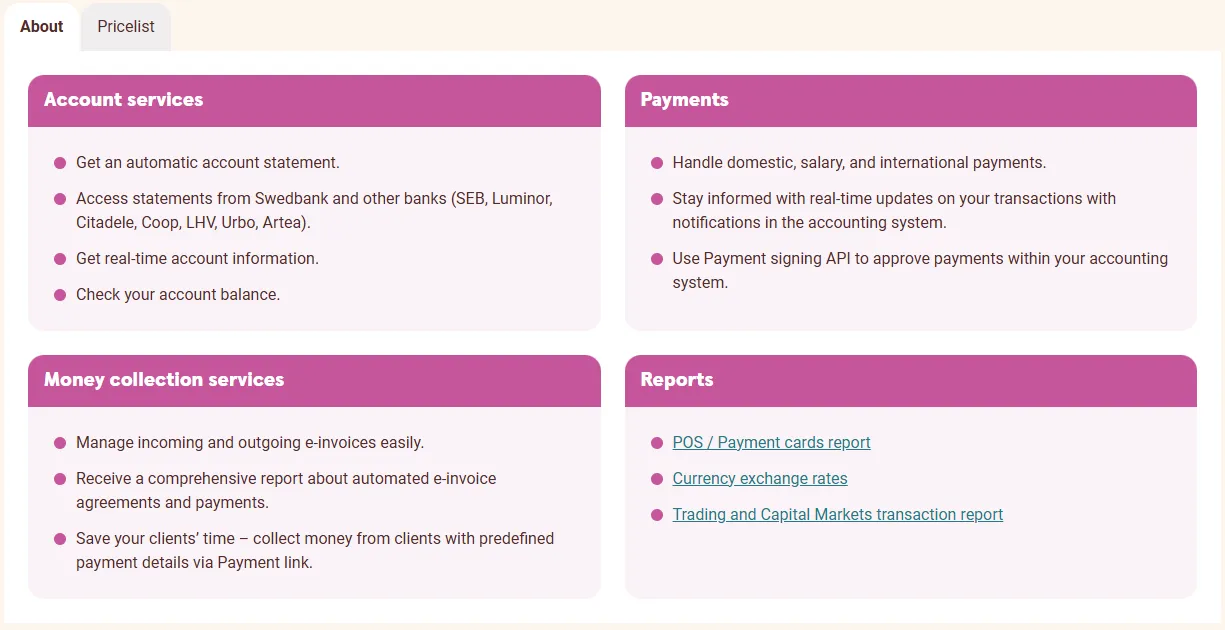
- 1 Pricelist: contract and monthly fees
- 2 Get an automatic account statement: the statement arrives automatically
- 3 Statements for other banks' accounts (SEB, Luminor, Citadele and more) in the same channel
How does automatic payment-to-invoice matching work?
Well-designed reconciliation goes from the strictest rules to the loosest. Each transaction is checked in order until a match is found:
- Structured reference. A payment code or invoice number in the structured field (camt.053 RmtInf/Strd) or the EndToEndId.
- Invoice number in the reference. Searched for by your series pattern, e.g. "SF-2026-" followed by digits, and the amount is compared.
- Company code and amount. The payer's code from the statement plus the only unpaid invoice for that amount.
- IBAN and amount. The payer's account, already linked to the customer before.
- Several invoices. The payment amount equals the total of several unpaid invoices from that customer.
- Partial payment and rounding. An allowed tolerance (e.g. up to €0.05) or a partial match.
- Bank fees, interest, payments to VMI (the Lithuanian tax authority). Recognized by the transaction code (e.g. CHRG, INTR) and the recipient.
Whatever is left after these rules goes to AI or a person. So that the rules catch more next time, the system remembers a new IBAN or name variant on the customer record.
Where AI helps: unmatched payments
A language model handles well the cases where rules break: "pmt for inv. 1234 and 1240", "UAB Medis ir Ko per contract No. 7", "advance". A practical approach:
- The AI receives the transaction and the list of unpaid invoices of that customer (or customers with similar names), not your whole ledger.
- It returns a structured answer: which invoices, what amount for each, a confidence score, an explanation.
- High-confidence suggestions are presented to the accountant for one-click approval; low-confidence ones are left for manual work.
- The AI never changes amounts or creates entries on its own without approval.
AI is also useful at the end of the month: to compile a list of "who hasn't paid and how late they are" and to prepare reminder texts for customers. How AI is used in other accounting tasks is covered in AI in accounting.
How to reconcile Paysera or Stripe payouts with online store orders
For online stores, the biggest headache is not individual transfers but bundled payouts. The payment provider transfers one amount to your bank account for dozens or hundreds of orders, minus its fees. Your bank statement shows one line, while your books have a hundred invoices.
The automated solution works in three steps:
- The payout breakdown is fetched from the payment system (API or reports): which orders, which amounts, which fees.
- Each order is linked to an invoice in your accounting by order number.
- The bank line is split: order amounts are matched to invoices, fees go to expenses, and the difference (refunds, disputes) is flagged for review.
The same principle works for card terminal (POS) payouts. SEB Baltic Gateway, for example, also provides card reader reports, which can serve as the breakdown source. From a security point of view, reconciliation needs only read access: the automation tool does not need payment initiation rights.
Accounting software feature or a custom n8n workflow?
| Criterion | Software feature (Rivile, Site.pro, etc.) | Custom workflow (n8n / Make) |
|---|---|---|
| Price | Included or a small add-on | Setup from €450 + platform from €20/month |
| When invoices and accounting are in one program | Best fit | Usually not needed |
| When invoices are in another system (online store, CRM, invoicing app) | Weak | Main strength |
| Several payment channels (bank + Paysera + Stripe + Revolut) | Depends on supported banks | Combined into one view |
| AI for unmatched payments | Rarely | Can be added |
| Actions after matching (order status, reminder, CRM) | Limited | Any |
My advice: first make full use of what your software and bank already offer. Build a custom workflow only on top of what is left. On choosing between n8n and Make, see n8n or Make for a small business.
What an automated reconciliation workflow looks like: 7 steps
An example: a service company issues invoices in an invoicing app, keeps its books in Rivile and banks with SEB and Paysera:
- Every morning, n8n fetches yesterday's transactions from SEB (via Baltic Gateway or camt.053) and the Paysera API.
- Transactions are normalized into one format, and duplicates are dropped by the bank transaction ID.
- Unpaid invoices are pulled from the invoicing app.
- Rules match the clear cases; the invoices are marked as paid.
- The remaining transactions go to AI, which suggests matches with an explanation.
- The accountant receives one summary (by email or Slack): what was matched, what to approve, what is left.
- Reminders are sent automatically for overdue invoices, and approved payments are passed to accounting.
This workflow runs alongside your accounting software and does not replace it. If you issue invoices in your online store, it is worth automating the transfer of orders as well; see Rivile integration with an online store.
How much does bank reconciliation automation cost?
| Component | Price |
|---|---|
| Bank channel | €0 (camt.053 by hand, operator channel with a business plan) to €35–60/month (direct Gateway) |
| n8n platform | From €20/month (Starter, billed annually) or your own server |
| AI requests for unmatched payments | Usually a few euros a month for a small company |
| Workflow setup | From €450, price agreed in writing before starting, set up in 1–2 weeks |
Example (an illustration, not a client case): if an accountant spends 6 hours a month reconciling 300 transactions, and automation matches most of them and leaves a few dozen to approve, a few hours a month are saved. Whether it pays off depends on your hourly rate and number of transactions; send me those two numbers and I will email you a more precise estimate. Prices for other parts of accounting automation: invoice automation cost 2026; the service: process automation; solutions for accounting: automation for accounting; all prices: pricing.
Frequently asked questions
How do I import a bank statement into accounting software automatically?
Three ways: download an ISO 20022 camt.053 XML file from online banking and import it; connect the software to the bank through Swedbank Gateway or SEB Baltic Gateway; or use an open banking (AIS) connection offered by your accounting software. The last two work without uploading files by hand.
How much does a direct bank connection cost?
As of October 2026, the Swedbank Gateway direct channel costs a €60 contract fee and €35/month; through an operator (your accounting software) it is free for the customer. The SEB Baltic Gateway direct channel costs €50 to activate and from €10/month for statements; through an intermediary it is €5/month, and customers on a business service plan do not pay this fee.
Why doesn't my accounting software match all payments automatically?
The most common reasons: the payment reference has no invoice number or it contains a typo, several invoices are paid with one transfer, the payment is made in installments, the payer is a different person (e.g. the owner from a personal account), or the customer record has no bank account or company code.
What can artificial intelligence do in payment reconciliation?
AI reads the free-text payment reference, recognizes invoice numbers with typos, abbreviated company names and several invoices in one payment, and suggests a match with a confidence score. In doubtful cases, the accountant approves the final match.
Is it safe to give an automation tool access to my bank?
Reconciliation only needs read access: statements and balances. Payment initiation rights are not needed. Access keys are stored encrypted, and n8n can be installed on your own EU server so the data never leaves your infrastructure.
Is a separate workflow worth it if my accounting software already imports statements?
Not always. If the software matches more than 90% of payments and you quickly sort out the rest, an extra workflow will not pay off. It is worth it when payments come through several channels (bank, Paysera, Stripe, Revolut), invoices live in a different system from your accounting, or dozens of payments remain unmatched every month.
Sources and related articles
- Swedbank Gateway, SEB Baltic Gateway (in Lithuanian), Rivile GAMA: direct bank connection (in Lithuanian)
- Automatic i.SAF submission (Lithuanian VAT invoice register)
- SABIS e-invoices 2026 (Lithuanian public sector e-invoicing)
- Invoice automation with B1 (Site.pro), Rivile and Xero
- Xero integration and automation