Bookkeeping is one of the areas where manual work costs the most: recurring invoices, checking payments, sending reminders, pulling together monthly reports. These are all clearly defined, repetitive tasks, ideal for automation.
Small Lithuanian businesses often do not have a full-time bookkeeper, so the owner or manager does these tasks themselves. Automation can give them back anywhere from a few to a dozen or more hours a month to spend on growing the business.
How to automate creating and sending invoices
One of the most popular automation scenarios: when a client pays for an order or a project milestone is reached → an invoice is generated and sent automatically.
How it works technically: n8n or Make watches the sales system (for example, WooCommerce, a signed contract in Notion, a CRM status). When the right event is triggered → an invoice PDF is created automatically (from a Google Docs template or through invoicing software with an API, such as Site.pro or Xero) → it is emailed to the client → it is recorded in a Google Sheets invoice register.
- 1Event: order paid or milestone reachedWooCommerce · CRM · Notion
- 2An invoice PDF is createdGoogle Docs template · Site.pro · Xero
- 3The invoice is sent to the clientEmail
- 4A record appears in the invoice registerGoogle Sheets
The workflow runs in n8n or Make; for recurring invoices, the event is the first day of the month.
Recurring invoices: for clients with monthly subscription fees, the invoice is generated and sent automatically on the first day of every month. Zero manual work.
How to automate payment tracking
Tracking payments and chasing overdue invoices takes time and nerves. Automation handles it neatly.
Automatic payment tracking with Paysera (a Lithuanian payment provider): Paysera has an API that lets you read incoming payments automatically. n8n keeps checking for new payments → when a payment arrives → the matching invoice is automatically marked as paid in the CRM → the client gets a confirmation email.
Automatic reminders: if an invoice is not paid by the due date → D+3, a first reminder by email; D+7, a second reminder with a copy of the invoice; D+14, a final reminder asking the client to get in touch. All of this happens automatically, with no manual follow-up.
- 1The payment due date has passedPaysera API · n8n
- 2D+3 – first reminderEmail
- 3D+7 – second reminder with a copy of the invoice
- 4D+14 – final reminder asking the client to get in touch
When the payment arrives, the invoice is marked as paid in the CRM and the client gets a confirmation.
How to automate expense reports and budget tracking
Pulling together monthly expense reports and bookkeeping summaries is something that has to be done before the end of the month but often gets pushed back. Automation makes the process painless.
Automatic expense logging: every time an invoice arrives by email and is paid → n8n reads the email, identifies the amount, date and supplier → it is automatically entered into a Google Sheets expense table with a category.
A monthly bookkeeping report: on the last day of every month n8n collects all income and expenses from Google Sheets → generates a summary → emails it to the bookkeeper or manager. The bookkeeper gets structured data instead of a pile of receipts.
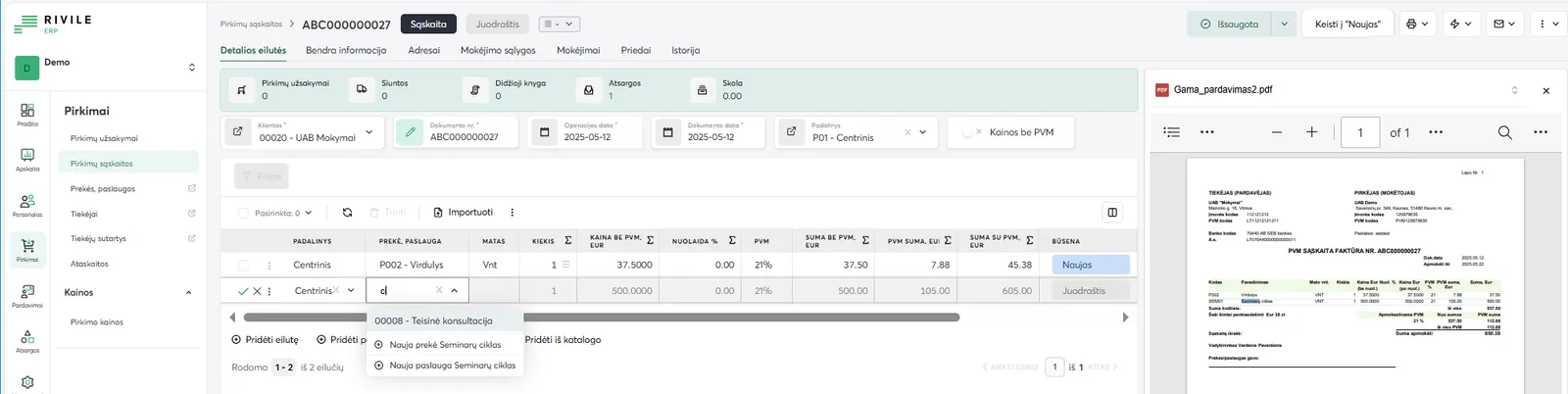
- 1 Recognized header – supplier, invoice number, date
- 2 Invoice line – quantity, price, VAT rate and totals
- 3 The original PDF alongside – easy to check the fields
How to integrate with Lithuanian accounting systems
Popular accounting systems in Lithuania and how they can be automated: Site.pro (formerly B1.lt) has an API that lets you create and send invoices automatically; Rivile, a popular Lithuanian accounting system, can be integrated through data export/import or a dedicated API; i.MAS (the smart tax administration system of VMI, the Lithuanian tax authority): the i.SAF (VAT invoice register) and i.VAZ (waybill register) data files are usually generated by the accounting software, and submitting them to VMI can be automated (i.SAF is filed monthly, by the 20th of the following month).
If you use popular international systems such as QuickBooks, Xero or FreshBooks, they have a full API and native integrations with n8n and Make.
If the system has no API, you can use email parsing (report emails are sent → the data is extracted automatically) or data file parsing (an Excel/CSV export → imported into n8n automatically).
What results can you expect, and how much does it cost?
Approximate savings from automating bookkeeping processes (depending on the number of invoices): creating and sending invoices, 2–5 h/month; checking payments and sending reminders, 2–4 h/month; pulling together the monthly report, 1–3 h/month. In total, 5–12 hours a month that you can spend on growing the business.
Investment: an invoice automation workflow, €450–600 to set up; payment tracking with a Paysera integration, €450–600; full automation of bookkeeping processes, €600–1,200. Monthly support (optional) from €150.
I recommend starting with creating and sending invoices. It has the fastest ROI (return on investment), and it is a small enough project with visible benefits that you can see results quickly.