Short answer: invoice automation usually covers four things: creating the invoice from a CRM deal or an online store order, checking the customer's VAT number, recognizing incoming PDF invoices and entering them into the accounting system, and making sure the data your accounting software uses to build i.SAF (Lithuania's VAT invoice register) is correct. What it costs depends on your systems and invoice volume; price examples are in the article (Invoice automation cost 2026), and setup is available through (Process automation).
Issuing VAT invoices is one of those processes that looks simple until the business grows beyond a handful of clients a month. Once you pass 20–30 invoices a month, creating invoices by hand in Excel or Word starts costing not only time but also mistakes: a wrong VAT code, a forgotten line item, an old template version sent to the client. In this article I look at what Lithuanian micro and small UABs (private limited companies) can automate with Smart-Bill and a CRM integration, how AI helps check VAT codes, and what you need to know about mandatory i.SAF reporting to VMI (the Lithuanian tax authority). You will find the general context of invoice automation in the article (Automatic invoicing in 2026); this companion piece focuses on the specifics of Lithuanian platforms and concrete technical solutions.
What does the Lithuanian invoicing ecosystem look like in 2026?
A few invoicing systems dominate the Lithuanian market. This article uses a Smart-Bill-type cloud invoicing tool as the example: what matters most is that the system has the Lithuanian VAT invoice form, a REST API and an affordable price (often from a few to a few dozen €/month; prices change). Before choosing, check that the system supports Lithuanian company details and i.SAF data export. Larger companies are more often better served by accounting systems such as B1, Rivilė, Finvalda or Pragma (Lithuanian accounting software): they are more deeply integrated with Lithuanian accounting, payroll and warehouse management, but cost more and need more technical knowledge to configure.
It is important to separate two VMI obligations. i.SAF is the register of issued and received VAT invoices that VAT payers submit every month (by the 20th of the following month), mandatory since October 2016. SAF-T is a file with the full set of accounting data, which VMI usually asks for on request, for example during an audit. Many invoicing and accounting systems generate the i.SAF XML file automatically, but its accuracy depends on whether the invoice data, especially the VAT codes, is correct from the start. Integrations with CRMs (Pipedrive, HubSpot), e-commerce (WooCommerce, Shopify) and delivery systems let you generate invoices automatically from data that already exists, without copying it between systems by hand.
What can you actually automate?
Invoice automation is not all or nothing: you can start with one process and expand as needed. Here are five specific automation points that give the biggest return for small and medium businesses in Lithuania. First, creating an invoice from a CRM deal: when a salesperson changes the deal status to "Won" in Pipedrive or HubSpot, an automation workflow (built with Make.com or Zapier) takes the client details, service lines and price, then creates the invoice in Smart-Bill, with no manual copying. Second, sending the invoice automatically by email with a PDF attachment and a payment link right after it is created. Third, tracking payments through a Paysera or bank webhook: a received payment automatically changes the deal status in the CRM to "Paid". Fourth, automatic reminders about overdue invoices after 7, 14 and 30 days: polite, personalized, with no human involvement. Fifth, a monthly check of the i.SAF export: the workflow automatically checks the consistency of the i.SAF file before it is submitted to VMI.
VAT codes: where AI helps
In Lithuania the standard VAT rate is 21%, and it applies to most goods and services. Reduced rates apply to certain goods and services (the list has changed in recent years; for example, from January 1, 2026, heating and hot water are taxed at the standard 21% rate instead of 9%), some transactions are taxed at 0% (for example, exports of goods), and most financial services are VAT-exempt. Check the current list of reduced rates in Article 19 of the Lithuanian VAT Law and on vmi.lt. Choosing the wrong VAT classifier code is a common problem that VMI can spot when analyzing i.SAF data.
This is where AI comes in. Modern language models, given the VAT rules and examples of your invoices, can suggest the right VAT code based on the description of the goods or service on the invoice. If it says "IT consulting service", the AI suggests 21%; if it says "medical devices", it suggests checking whether these are reimbursable medical aids, which may qualify for the 5% rate. An important nuance: AI suggestions are not 100% accurate, so a human review before final approval is mandatory, especially in borderline cases where the nature of the service is ambiguous. AI is a checking assistant that supports the accountant's decision, not a replacement for it. More on using AI in accounting: (AI in accounting).
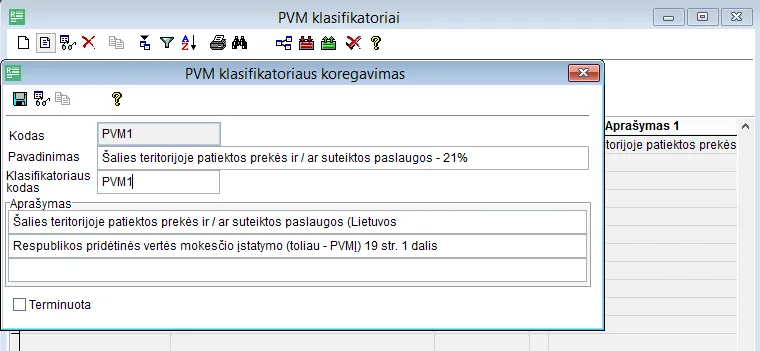
- 1 Name: which transaction and which rate the code applies to
- 2 Classifier code: PVM1 (standard 21% rate)
- 3 Description: the VAT Law article it is based on
Smart-Bill + Pipedrive integration: step by step
A typical integration workflow looks like this. Step one: a deal in Pipedrive reaches the "Won" stage. Step two: a Make.com workflow triggers automatically and takes the client's company code, VAT number, service lines, prices and contract number from the deal. Step three: a VAT invoice with the correct data is created through the Smart-Bill API; VAT codes are assigned automatically based on preconfigured rules, and the AI flags unclear cases for human review. Step four: the invoice is emailed to the client with a PDF attachment and a link to pay through Paysera or by bank transfer. Step five: when the payment arrives (Paysera webhook), the Pipedrive deal is tagged "Paid" and the payment date appears on the contact.
- 1The deal reaches the "Won" stagePipedrive
- 2Client and service data is collectedMake.com
- 3A VAT invoice is createdSmart-Bill APIUnclear VAT cases are flagged for review.
- 4The client gets the PDF and a payment linkEmail · Paysera
- 5Once paid, the deal is marked "Paid"Paysera webhook → Pipedrive
A workflow like this cuts the accountant's manual work from roughly 10–15 minutes per invoice to a few minutes of checking, apart from periodically verifying that everything works correctly. Setup time for the integration with ready templates and standard systems: 3–7 working days. On wider process automation options: (Process automation).
i.SAF automation: mandatory in 2026
i.SAF is a standardized XML file with data on issued and received VAT invoices that VAT payers submit to VMI every month (by the 20th of the following month). Many invoicing and accounting systems generate this file automatically. But automatic generation does not guarantee accuracy: if the invoices had wrong VAT codes or client details, the errors carry over into the i.SAF file and become visible to VMI. (Do not confuse it with SAF-T, the full accounting file submitted to VMI on request.)
An automated i.SAF check works as an extra safety layer: before each monthly submission, the workflow downloads the generated XML file, checks the VAT codes against the VMI classifier, looks for anomalies (the same invoice twice, a zero amount, a client code that does not exist) and emails a report to the accountant. Errors are fixed by hand before the final submission to VMI. Failing to submit i.SAF data, submitting it late or submitting incorrect data can lead to administrative liability, and errors can trigger additional questions or an audit from VMI; VMI decides on specific sanctions based on the nature of the breach.
Illustrative example: a UAB with 80 invoices a month
Illustrative scenario: the company and the numbers are built from typical processes and rough assumptions; these are not a specific client's results. Your numbers may differ.
Say an IT services UAB issued an average of 80 invoices a month. Before automation, the accountant spent about 6 hours a month creating invoices from the CRM by hand, emailing them and tracking payments, plus about 2 hours a month checking i.SAF data before submitting it to VMI. In total, about 8 hours of manual work a month.
With a Pipedrive → Make.com → Smart-Bill → Paysera integration in place (rough setup cost €1,100, monthly maintenance €80), most invoices could be created and sent automatically within seconds of the deal closing. The accountant would be left with about 30 minutes a month for checks and handling a few non-standard invoices, and the i.SAF file would be checked automatically before submission. The equivalent time saved is roughly 60–90 hours a year; at, for example, an accounting rate of €60/h, that is ~€4,000–5,000 a year, so the investment could pay for itself within a few months.
NowWith automation
80 invoices: creation, sending, payment tracking and i.SAF check
Numbers from the illustrative example above (about 8 h before and about 30 min after automation), not a specific client's result.
How much does VAT invoice automation cost?
How much does VAT invoice automation cost in Lithuania? Rough prices depending on how complex the integrations are: an invoicing system subscription costs from a few to a few dozen €/month depending on the plan (prices change); a Make.com or Zapier subscription from ~9–20 USD/month (Make Core or Zapier Professional is usually enough for a medium volume; prices change); setup work by a consultant €600–1,500 one-off, covering the integration configuration, error handling logic and training for the accountant. Total first-year costs: €900–2,400. Even 3 hours saved a month (often more) at an accountant's rate of €30–60/h quickly covers the initial investment, and after that every additional month is net savings.
What are the 5 most common mistakes?
Mistake one: automating without a review process. The workflow runs, but nobody checks whether the invoices are correct before they are sent. Clients receive wrong amounts or wrong VAT codes, which costs you both the relationship and a potential audit. Mistake two: VAT codes are not standardized in the CRM data. If different sales managers describe the same service differently, the AI will assign inconsistent VAT codes and i.SAF will have consistency problems. Mistake three: the bank integration is forgotten. Invoices are created automatically, but payments are still tracked by hand, which removes only half of the manual work. Mistake four: i.SAF is generated, but nobody reads it before it is submitted to VMI. Automation does not guarantee correct content, only a faster process. Mistake five: the workflow is not maintained after tax law changes. The list of VAT reliefs in Lithuania changes regularly, and the automation rules have to be updated along with the legislation.
Frequently asked questions
Does Smart-Bill have an API? Yes. Smart-Bill offers a REST API that lets you create, edit and export invoices from external systems programmatically. Authentication is by API key; documentation is available in the Smart-Bill help center. How long does a Pipedrive → Smart-Bill setup take? With a standard integration without complex logic branches, 3–5 working days: 1–2 days for configuration, 1 day for testing with real data, 1 day for training the accountant. Can AI fully replace an accountant? No. AI reduces the amount of manual work and helps spot errors, but interpreting VAT legislation in borderline cases, dealing with VMI and responsibility for the accounts remain a human's job. Automation is a supporting tool, not a replacement.
Want to automate VAT invoices from your CRM without errors? Write to me about which CRM you use and how you issue invoices now (free consultation). I will read it and reply by email on whether connecting to Smart-Bill is possible in your case; if more detail is needed, we will talk. We will agree on the price in writing before starting.