In short: i.SAF is the register of VAT invoices received and issued that every VAT payer files with the VMI (the Lithuanian tax authority) through i.MAS, its smart tax administration system. Legal entities file it every month, by the 20th of the following month, even if there were no invoices. Three parts can be automated: building the XML file, the checks before filing and the upload through the VMI web service, with the final approval left to the accountant.
I checked the deadlines, filing methods and technical requirements on the VMI website and in the i.SAF specifications on October 17, 2026. This article is not tax advice: for the VAT codes of specific transactions, talk to your accountant or the VMI.
What is i.SAF and how is it different from i.SAF-T?
i.SAF is the electronic invoice subsystem of the VMI's Smart Tax Administration System (i.MAS). Since October 1, 2016, VAT payers have used it to file registers of the VAT invoices they receive and issue. The VMI cross-checks this data: if you declared an invoice and your counterparty did not, or the amount, VAT code or number of invoices does not match, both sides see the mismatch.
i.SAF-T is a completely different file. It holds all bookkeeping data (general ledger, source documents, assets, payments) in the standard SAF-T format. It is not filed monthly, only when the VMI requests it, during a tax audit or another control action, with a deadline of no less than 10 days.
| i.SAF | i.SAF-T | |
|---|---|---|
| What it is | VAT invoice registers | A file with all accounting data (SAF-T) |
| Who files | All VAT payers in Lithuania | For-profit entities whose net sales revenue exceeds €300,000 |
| When | Every month (or other tax period), by the 20th | Only when the VMI requests it |
| Format | i.SAF XML (or manual entry in i.SAF) | SAF-T XML, ZIP allowed; split into periods of no more than a year |
| Worth automating? | Yes: it repeats 12 times a year | Usually an export from the accounting software plus a check in the VMI test environment is enough |
An important detail: the VMI states that an Excel spreadsheet is not considered a technical accounting tool, so data kept in Excel does not have to be submitted in a SAF-T file. A VAT payer, however, always files i.SAF registers, no matter where the books are kept.
Who has to file i.SAF and by when?
i.SAF registers must be filed by taxable persons registered as VAT payers in Lithuania. The deadlines set by the VMI (as of October 2026):
- Legal entities: for each calendar month, by the 20th day of the following month.
- Quarterly tax period: by the 20th day of the following month.
- Half-year tax period (usually individuals): by the 20th day of the first month of the next half-year.
- When deregistering from VAT: within 20 days after deregistration, or by the liquidation date if that comes first.
If there were no invoices in a month, you file a file with the header only. Invoices received go into the register of the period in which they were received; invoices issued, into the register of the period in which they were issued. The FR0600 VAT return is filed separately through EDS (the VMI electronic declaration system), by the 25th. Payment data can be filed in i.SAF, but it is optional: you need it if you want the VMI to prepare a preliminary VAT return for you.
How can you file i.SAF? Four methods compared
The VMI rules provide four methods. Which one you use determines how much of the work you can hand to automation.
| Method | How it works | Best for | Can it be automated? |
|---|---|---|---|
| Uploading an XML file to i.SAF | The accounting software generates the XML; the accountant logs in to i.MAS, uploads it and confirms the register | Most companies | Partly: building the XML and the checks |
| Web service | A program sends the XML (or gzip) through the VMI SOAP service with an i.MAS certificate and checks the processing status | Companies and accounting firms with many registers | Yes, end to end |
| Manual entry in i.SAF | Each invoice is typed into the i.SAF window | A few invoices a month | No |
| Issuing invoices directly in i.SAF | Electronic invoices are issued in i.SAF and included in the registers | Individuals (legal entities can only receive) | No |
A few technical facts from the VMI i.SAF web service specification that matter for automation: one file may contain data for only one tax period; a period can be filed in parts, each marked with a unique PartNumber; uploading a file with the same PartNumber replaces the earlier data, which is how corrections are made. The maximum file size is 1 GB, and the type is XML or gzip. A file moves through the statuses "uploaded" → "being checked" → "accepted" or "rejected", so automation can track the result on its own and report errors.
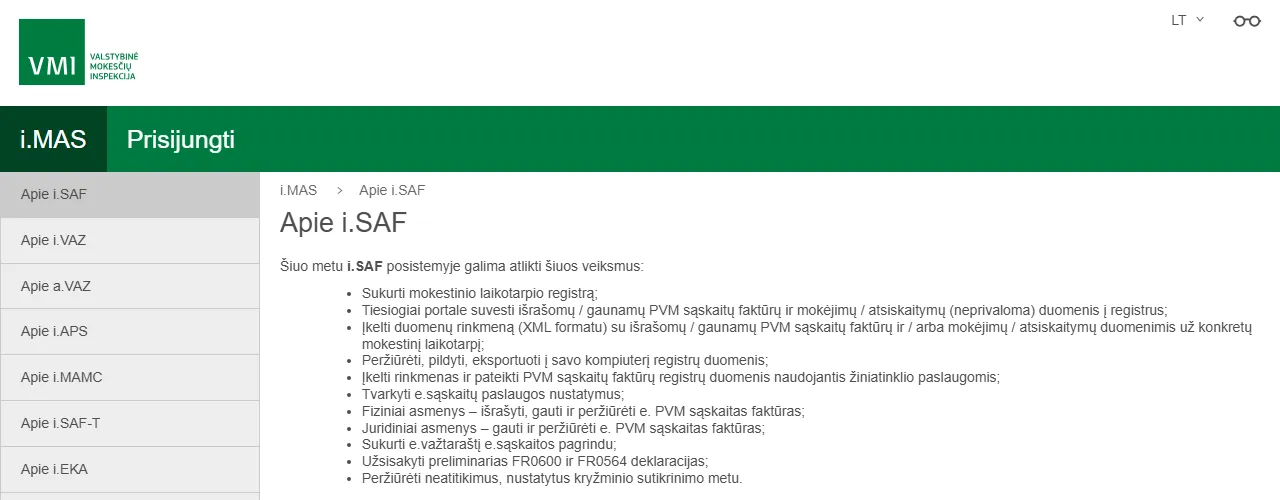
- 1 Log in: you access i.SAF through i.MAS
- 2 XML file upload: the most common method when the accounting software generates the file
- 3 Web services: the way to file i.SAF fully automatically
- 4 Cross-check mismatches: worth reviewing every month
How to automate i.SAF from Rivile, Site.pro or Excel
Rivile (GAMA and ERP)
Rivile is a separate Lithuanian accounting program (not B1). Both of its versions build i.SAF registers from the documents entered. What is worth automating here is what happens before the register is built: that all purchase invoices are entered on time (for example, with AI digitization), that online store sales are transferred, and, after the XML is generated, that the file is checked and delivered to the accountant. Rivile has a REST API, so an n8n flow can check in advance whether the period's documents are complete. More in the article Rivile integration with an online store, CRM and bank.
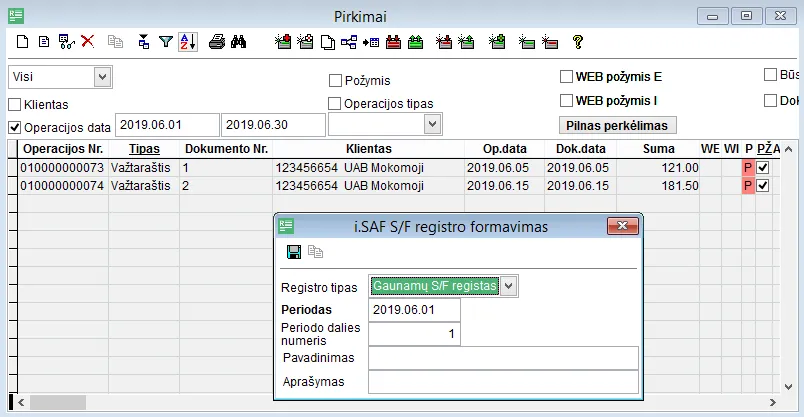
- 1 Operation date filter: choose the month the register is for
- 2 Generate i.SAF invoice register: a button in the toolbar
- 3 Register type: received or issued invoices
- 4 Period and period part number
Site.pro (formerly B1.lt)
The B1.lt accounting software is now called Site.pro. In full accounting mode, i.SAF registers are built from the invoices in the program. Site.pro has an API, so sales invoices can be created automatically from your CRM or online store; the i.SAF data is then correct from the moment the invoice is created, instead of being fixed at the end of the month.
Excel or several different systems
The hardest case is when invoices are issued in several places (for example, in invoicing software, in the online store and by hand), and the accountant collects everything in Excel. Automation then has three jobs: standardize the columns (dates, codes, amounts), assign VAT classifier codes and generate the XML according to the VMI XSD specification. This can be done with an n8n flow with a code step or a small script. For small companies it is often cheaper to switch to software that has an i.SAF export built in; you will find a comparison in the article invoicing software 2026.
What to check before filing i.SAF: 10 checks
Most i.SAF errors do not happen on the VMI side but when data is retyped by hand or passed through an intermediate spreadsheet. Automation can run these checks every month in a few seconds:
- The XML matches the XSD. Structure, required fields, date format: this is the first thing the VMI checks too.
- Header. Correct company code, period start and end, file type (F for full, S for issued, P for received).
- VAT classifier codes. Every line has a code from the VAT classifier, not an empty field.
- Amount math. The VAT amount matches the rate applied to the taxable value (within a rounding tolerance).
- Duplicates. The same invoice number with the same counterparty must not appear twice.
- Dates. All documents fall within the period being filed.
- Counterparty codes. Company and VAT codes are filled in; VAT codes of EU counterparties are worth checking in VIES.
- Completeness. Compare the number of invoices with the accounting software, online store orders and previous months: a sudden drop often means invoices were not entered.
- Credit notes. Correctly linked to the original invoices and with the correct sign.
- Last month's mismatches. Whether the VMI cross-check mismatches you see in i.SAF have been resolved.
AI is useful here in two places: suggesting a VAT code based on the invoice content (for example, reverse charge, EU services) and spotting anomalies, such as an unusually large amount or a new supplier with an odd code. But AI only flags doubtful lines; the accountant makes the decision. I described how AI reads invoices in the article AI in accounting.
What does an automated i.SAF flow look like?
An example: a typical flow for a small or mid-sized company (n8n, accounting software with an API or XML export):
- Days 1–5. The flow checks whether all of last month's sales from the online store and CRM are already in the books and whether received invoices from email have been entered. A list of what is missing goes to the person responsible.
- Day 10. The i.SAF XML is generated (by a software export or from the data), and the 10 checks are run.
- Days 10–12. The accountant receives a summary: number of invoices, VAT totals, comparison with last month, flagged doubtful lines.
- After approval. The file is uploaded through the VMI web service, or the accountant uploads it; the flow tracks the status until it is "accepted".
- Error. If the file is rejected, the error description from the VMI error reference is sent to Slack or email with a link to the specific invoice.
- Day 18. If the register has not been filed yet, a reminder goes out two days before the deadline.
A flow like this does not replace the accounting software or the accountant. It removes the manual checking and the "did we forget?" stress before the 20th.
What are the fines for a missing or incorrect i.SAF?
i.SAF registers are data the tax administrator needs, so failing to file them, or filing them late or incorrectly, falls under Article 187(2) of the Lithuanian Code of Administrative Offences: a warning or a fine. Other parts of the same article provide for higher fines for failing to submit documents after a written VMI reminder or for knowingly false data. Fine amounts change, so check the exact ranges in the current version of the Code on e-tar.lt.
The more common practical consequence is not a fine but lost time: cross-check mismatches, VMI enquiries and correction files. The less manual retyping, the fewer mismatches with your counterparties.
How much does i.SAF automation cost?
| Option | Price (October 2026) | When it fits |
|---|---|---|
| i.SAF export in the accounting software | Included in the software price (for example, Site.pro accounting: €7 per company/month + a user plan; Rivile ERP: from ~€19 per user/month; prices change) | All invoices are already in one program |
| Checks and reminders (n8n flow) | Setup from €450, n8n from €20/month (Starter, billed annually) or your own server | Data sits in several systems and you want checks before the 20th |
| Full flow with upload through the VMI service | Custom, with the scope agreed before work starts | Accounting firms, many companies or registers |
My first solution starts at €450; we agree on the price in writing before starting, and I set it up in 1–2 weeks. More on process automation, automation for accounting and pricing. You will find the prices of other parts of accounting automation in the article invoice automation cost 2026.
Frequently asked questions
What is the i.SAF deadline?
Legal entities file their VAT invoice registers with the VMI for each calendar month, by the 20th day of the following month. Individuals whose tax period is a half-year file by the 20th day of the first month of the next half-year. After deregistering from VAT, the data is filed within 20 days.
Do I need to file i.SAF if there were no invoices in a month?
Yes. According to the i.SAF XML specification, if there were no VAT invoices received or issued during the tax period, you file a file with only the header section filled in. An automated flow can prepare this empty register on its own.
What is the difference between i.SAF and i.SAF-T?
i.SAF is the mandatory monthly VAT invoice register. i.SAF-T is a file with all bookkeeping data (SAF-T), which companies submit only when the VMI requests it, during a tax audit or another control action. The obligation to be ready to submit it applies once net sales revenue exceeds €300,000.
Can I file i.SAF from Excel?
You can, but the VMI does not accept an Excel file directly: the data has to be converted into i.SAF XML according to the VMI XSD specification or entered manually in the i.SAF subsystem. The Excel conversion can be automated with a script or an n8n flow that also checks VAT codes, amounts and duplicates.
What is the fine for a missing or late i.SAF?
Article 187(2) of the Lithuanian Code of Administrative Offences provides for a warning or a fine for failing to submit data the tax administrator needs, or for submitting it late or incorrectly. Check the exact fine ranges in the current version of the Code on e-tar.lt, as they change. The VMI decides on each case based on the circumstances.
Can i.SAF be filed with no human involved at all?
Technically yes: the VMI has a web service through which a program uploads the file. In practice I recommend letting automation prepare and check the register while the accountant gives the final approval: the company remains responsible for the data.