In short: SABIS is the Lithuanian state invoicing system through which every invoice to public sector bodies and other contracting authorities must be submitted, even under verbal agreements and regardless of the amount. You can enter the invoice in the portal, import an XML file, send it through the universal interface from your accounting software or via the Peppol network. For private companies dealing with each other, e-invoices are not mandatory in 2026.
I checked the facts on the websites of the Ministry of Finance, NBFC and SABIS on October 17, 2026. I am not affiliated with any of the accounting software or Peppol service providers mentioned.
What is SABIS and how is it different from “E. sąskaita”?
SABIS (the shared invoice administration information system) replaced the earlier “E. sąskaita” system on September 1, 2024. It was modernized and is run by the National Shared Service Centre (NBFC). The main differences: invoices follow the European e-invoicing standard (EN 16931, the Peppol BIS Billing 3.0 format), the system is connected to the Peppol network, and buyers check, approve and mark invoices as paid inside SABIS itself.
Do not confuse it with i.SAF from VMI (the Lithuanian tax authority). The “E. sąskaita” service in the i.SAF subsystem is a VMI service where individuals can issue invoices and legal entities can only receive them. SABIS is for public procurement. And a VAT payer submits i.SAF registers to VMI in any case; more on that in i.SAF filing with VMI and how to automate it.
Who must use SABIS in 2026?
What matters is not your company's size or VAT status but who you are invoicing. The obligation is set out in the Law on Public Procurement, the Law on Financial Accounting and Government Resolution No. 405.
| Buyer | Is SABIS mandatory? | Note |
|---|---|---|
| Ministry, municipality, school, hospital, other budget-funded institution | Yes | All invoices, any amount |
| State or municipal enterprise, other contracting authority | Yes | If registered as a contracting authority |
| Purchase under a verbal agreement | Yes | Since January 1, 2025, regardless of the amount (previously only above €1,000 excl. VAT) |
| Private company in Lithuania | No | PDF or another agreed format is fine; e-invoices are voluntary |
| Foreign supplier selling to the Lithuanian public sector | Yes, via Peppol | Cannot log in to the SABIS portal; sends through a Peppol access point |
Since January 2025, SABIS automatically passes invoices under verbal agreements to CVP IS (the central public procurement information system), so the buyer no longer has to publish them separately. Contracts under verbal agreements do not need to be uploaded to SABIS, and no contract number is linked to the invoice.
How to send invoices to SABIS: 3 ways
The SABIS FAQ lists three ways invoice data gets into the system:
| Method | How it works | Best for | Automation |
|---|---|---|---|
| SABIS portal | Log in via VIISP (the Lithuanian e-government gateway), enter the invoice by hand or import an XML file | A few invoices a month | No (XML import is semi-automatic) |
| Universal interface | Your accounting or ERP system sends data through the SABIS API; OAuth 2.0 authentication, token valid for 5 min. | Dozens of invoices or more, one accounting system | Yes |
| Peppol network | The invoice is sent through a certified Peppol access point, and SABIS receives it as a network member | Regular suppliers, foreign companies, those who also send e-invoices to others | Yes, plus status responses |
In every case the same data model is used: the Peppol BIS Billing 3.0 invoice and credit note. SABIS distinguishes three invoice types: invoice, advance invoice and credit note. Whether it is a VAT invoice is determined by the selected VAT classifier. For reverse charge, the note goes in the remarks field.
You can try the universal interface in the SABIS training environment: in the supplier account, under “Organizacija” (Organization) → “Integracijos” (Integrations), you create an integration ID and code, and NBFC provides sample requests in Postman format.
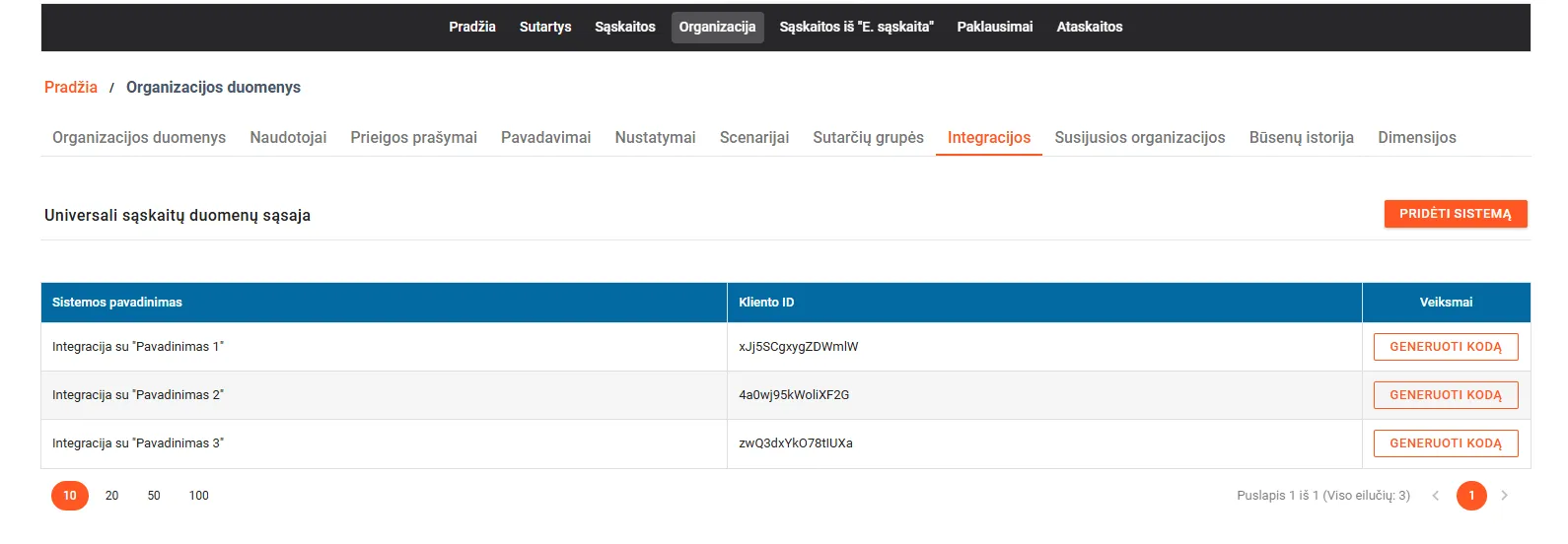
- 1 Organization: your organization’s details
- 2 Integrations: universal interface integrations
- 3 Add system: a new integration; copy the generated code right away, while it is shown
- 4 Client ID: the identifier of the system connecting to SABIS
- 5 Generate code: a new login code if the old one is lost
What is Peppol and do you need it?
Peppol is a European network for exchanging e-documents. A company connects to it through an access point, which can be your accounting software provider or a specialized e-invoicing operator. Lithuanian companies are identified on Peppol with scheme 0200 and their company code, and you can look up a buyer's Peppol ID in the public Peppol directory.
Peppol is worth choosing when:
- you regularly invoice several public sector buyers;
- you also invoice foreign clients in countries where e-invoices are already mandatory or common;
- you want an automatic response telling you whether SABIS accepted or rejected the invoice (Peppol BIS Invoice Response).
- 1Invoice is issued in your softwareAccounting software / ERP
- 2Sent through an access pointPeppol Access PointRecipient: scheme 0200 and company code
- 3SABIS receives and checks the invoiceSABIS
- 4A response comes back: accepted or rejectedPeppol BIS Invoice Response
A delivery confirmation does not yet mean the invoice was accepted; only the response in step 4 tells you that.
If you issue only a few invoices to the public sector per quarter, you do not need a separate Peppol operator: the portal or your accounting software's SABIS feature is enough.
Why are SABIS invoices returned or left unprocessed?
A Peppol delivery confirmation only means the invoice reached SABIS, not that it was accepted. According to NBFC's material on invoices over Peppol, an invoice under a written contract must meet these conditions:
- The contract is in SABIS. Public procurement contracts are transferred from CVP IS automatically every 4 hours; other contracts must be entered by the buyer.
- The contract is linked to the supplier submitting the invoice.
- The contract number on the invoice matches the number registered in SABIS, character for character.
- The supplier and buyer codes match the registered ones.
- For verbal agreements, “VERBAL” or “ŽODINĖ” is entered instead of the contract number.
- The person who issued the invoice is named on it, even if an operator sends it.
These checks are ideal work for automation: before sending, the flow checks the contract number against SABIS, and after sending it tracks the status and alerts you if the invoice is returned for correction.
The best e-invoicing solution for your business
There is no single “best” tool, only the most suitable one for how many invoices you send and to whom. My recommendation by situation:
| Situation | Solution | Why |
|---|---|---|
| Up to ~10 invoices to the public sector a month | SABIS portal (manual entry or XML import) | Nothing to install |
| Invoices are already issued in accounting software | The software's SABIS integration (e.g. Rivile ERP offers it as an add-on in its price list) | No double entry |
| Several systems (CRM, online store, accounting) or non-standard invoice logic | A universal interface connection via n8n or Make | You can add checks and notifications |
| You also send e-invoices to foreign or private clients | A Peppol access point | One channel for all Peppol recipients |
Before choosing, ask your accounting software provider: does it send to SABIS directly or via Peppol, and does it bring the invoice status back into the software? If the answer is “it only exports XML”, you will have to automate the rest. You will find a comparison of invoicing software in invoicing software in 2026.
How to send and receive e-invoices automatically
Sending: a sample flow
- An invoice is created in the accounting software (Site.pro, Rivile or another) or a CRM deal is marked “won”.
- n8n checks whether the buyer is a contracting authority (based on your customer list or a tag in the CRM).
- If so, it takes the contract number from the deal or contract record and checks it against SABIS data.
- The invoice is converted to the Peppol BIS 3.0 structure and sent through the universal interface or a Peppol operator.
- The flow checks the status periodically; if the invoice is returned, the responsible person gets a notification with the reason.
- When SABIS marks the invoice as paid, the information is passed to the CRM or accounting.
Receiving
If your company is itself a contracting authority, the SABIS universal interface lets you receive approved invoices straight into your business management system. A private company can receive e-invoices through a Peppol access point if its suppliers send them, and structured invoices go into accounting without OCR. All others (PDFs by email) still need digitizing; more on that in AI OCR for VAT invoices.
E-invoices and AI: where AI really helps
A search for “e-invoice AI” usually means one of two things: how AI can issue an e-invoice, or how AI processes the ones you receive. The honest answer:
- Where AI is not needed: Peppol / SABIS invoices themselves are already structured XML, read by software, not by a language model.
- Where AI helps: extracting data from PDF invoices and contracts; finding the correct contract number from the contract text; explaining the reason for a return in plain language; suggesting a VAT code and an accounting account.
- Where AI is risky: changing amounts or details on its own. Such actions are always approved by a person.
More examples in AI in accounting.
How much does a SABIS integration cost?
You can use the SABIS portal by logging in through VIISP. Extra costs come in if you choose your accounting software's SABIS module or a Peppol operator; their prices are published in the providers' price lists and depend on invoice volume. The price of a custom connection:
| Work | Price |
|---|---|
| Sending invoices through the universal interface from one system, with a contract check and status tracking | From €450 (price agreed in writing before starting) |
| n8n platform | From €20/month (Starter, billed annually; as of October 2026) or your own server |
| Maintenance and changes | From €150/month, if needed |
Start with a message: tell me which accounting software you use, and I will reply by email whether its built-in feature is enough or a connection is worth it. Service: process automation; solutions for accounting: automation for accounting; all prices on the pricing page.
Frequently asked questions
Who must submit invoices through SABIS?
All suppliers that sell goods, services or works to public sector bodies and other contracting authorities. Every such invoice goes through SABIS, including invoices under verbal agreements, regardless of the amount. If the buyer is not a contracting authority, you do not need to use SABIS.
Did SABIS replace “E. sąskaita”?
Yes. Since September 1, 2024, invoice senders and recipients use SABIS, which replaced the “E. sąskaita” information system. The system is run by the National Shared Service Centre (NBFC).
Do private companies in Lithuania have to send e-invoices to each other?
As of October 2026, no. Only B2G is mandatory (invoices to the public sector via SABIS). Companies can agree between themselves to use structured e-invoices, for example via Peppol, but the law does not require it. The EU ViDA package provides for e-invoicing and digital reporting of cross-border B2B transactions from July 1, 2030.
Can I upload a PDF invoice to SABIS?
Not as the invoice itself. The data has to be entered in the portal, imported as an XML (Peppol BIS Billing 3.0) file, sent through the universal interface or via the Peppol network. A PDF can only be an attachment.
Why did an invoice sent via Peppol stay unprocessed in SABIS?
Most often because of the contract: for an invoice under a written contract, the contract must be registered in SABIS and linked to the supplier, and the contract number, supplier code and buyer code on the invoice must match exactly. For invoices under a verbal agreement, write “VERBAL” or “ŽODINĖ” instead of the contract number.
What is the best e-invoicing solution for a business?
It depends on volume. A few invoices a month: the SABIS portal is enough. Dozens or more: accounting software with a SABIS integration or a connection to the universal interface. If you also send invoices to foreign or private Peppol members: a Peppol access point. An automated flow also checks contract data and tracks statuses.
What can AI do for e-invoices?
AI is useful where the data is unstructured: extracting data from PDF invoices you receive from private suppliers, matching an invoice to a contract or order, explaining why an invoice was returned. In a Peppol / SABIS invoice the data is already structured, so AI is usually not needed there.