“Zapier is too expensive, but we don't know what to pick instead.” I often hear this from small business owners in Lithuania. The answer almost always depends on two variables: how complex your workflows get and what monthly budget you have for automation tools. In 2026, the two main Zapier alternatives, n8n and Make.com, differ more than it seems at first glance.
In this article you will find a concrete pricing table by operation volume, the differences in integrations with examples of Lithuanian tools (Paysera, Montonio, Omnisend, Apsiskaitymas.lt, Site.pro (formerly B1.lt), Rivile), an analysis of complexity levels and a clear verdict for each scenario. I work mostly with n8n myself, but the article is honest about the cases where Make.com is the rational choice.
Quick verdict: when n8n, when Make.com
If you don't have time to read the whole article, here is the key decision table by scenario:
| Scenario | I recommend | Why |
|---|---|---|
| Beginner, first automation | Make.com | Visual editor, faster learning curve |
| Many workflows, limited budget | n8n self-hosted | No operation limits, you only pay for the VPS (from ~€5/month; prices change) |
| GDPR data localization required | n8n self-hosted | Data stays on your EU server |
| Complex JS logic and API integrations | n8n | Code node, Function node, HTTP Request |
| Google Workspace is the central platform | Make.com | Deeper Google integration out of the box |
| AI agents and LLM integration | n8n | Native AI nodes, LangChain support |
Make vs n8n: pros and cons in one table
Make is visual, convenient and quick to start with: no server needed, the first scenario takes a few minutes to build, and errors are easy to find. Its weak spots are the price, which grows with the number of operations (credits), and complex logic, which becomes hard to maintain in large scenarios. n8n is flexible and economical as volume grows: on your own server the license is free, the data stays with you, and where ready-made nodes are not enough you can write code. Its weak spot is that you need a server or a paid n8n Cloud plan, and a bit more technical knowledge at the start.
| Criterion | Make | n8n |
|---|---|---|
| Price at low volume | Free €0 (1,000 credits/month), Core from ~$9/month (billed annually; prices change) | €0 license on your own server + VPS from ~€5–15/month; n8n Cloud from €20/month (billed annually, as of October 2026) |
| Launching the first scenario | Minutes | Hours, if installed on your own server |
| Technical requirements | Minimal | Basic IT knowledge or a partner for maintenance |
| Where data is stored | Make cloud | Your server or n8n Cloud |
| Ready-made integrations | More ready-made apps | Fewer, but a universal HTTP node and code |
| Code | Limited | Full (JavaScript, Python) |
| Switching later | Possible, but scenarios have to be rebuilt from scratch; there is no automatic conversion | |
n8n vs Make pricing for specific scenarios
Before the table, an important difference in how usage is measured: Make.com counts operations (Make now calls them credits; a simple module action usually uses one credit), while n8n Cloud counts executions (each run of a workflow, regardless of the number of steps). A five-step Make.com workflow uses 5 operations; the same workflow in n8n uses 1 execution. Comparing the numbers directly is misleading, so judge by how complex your typical workflows are.
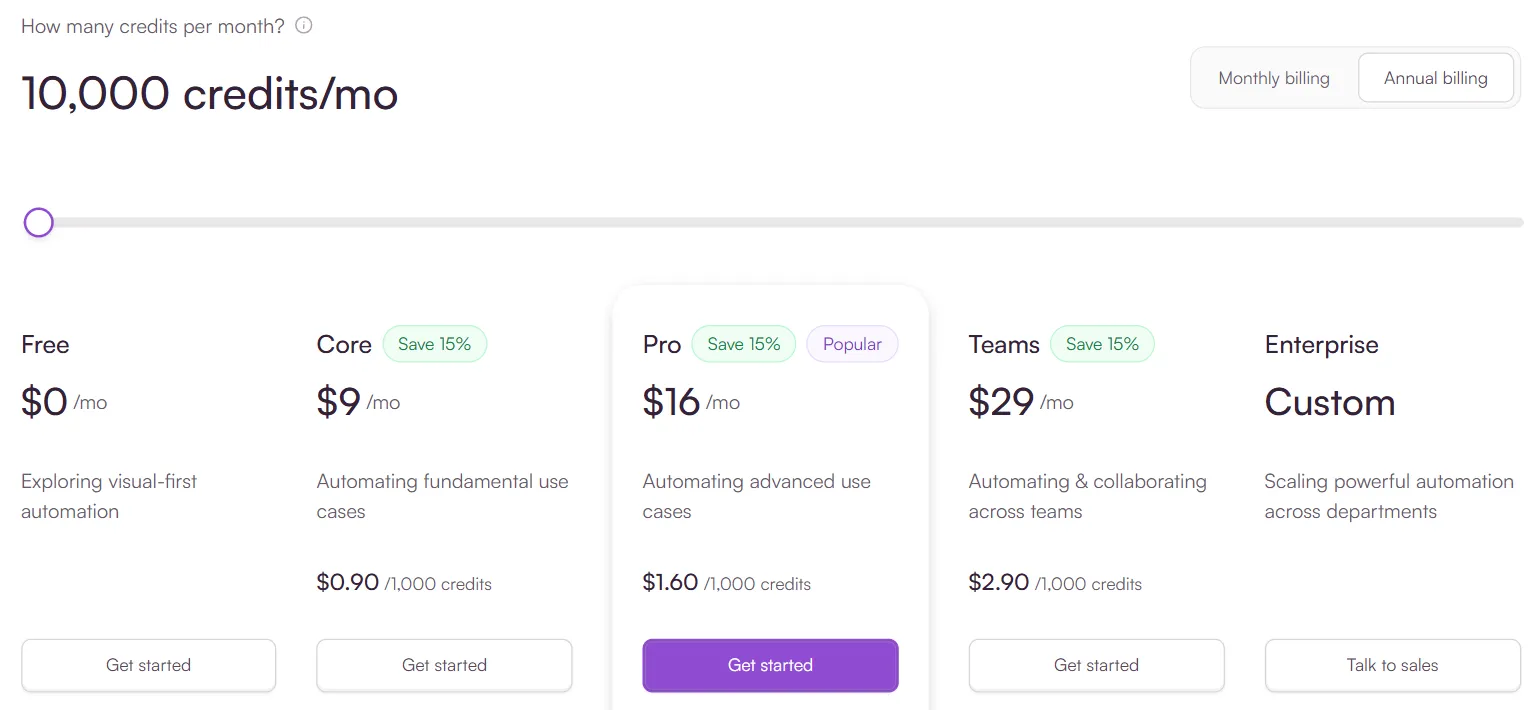
- 1 The number of credits changes the plan price
| Plan | Price/month | 100 ops/month | 1,000 ops/month | 10,000 ops/month |
|---|---|---|---|---|
| Make.com Free | €0 | ✓ | ✓ (limit 1,000) | ✗ |
| Make.com Core | ~€9 | ✓ | ✓ | ✓ (10,000 ops) |
| Make.com Pro | ~€16 | ✓ | ✓ | ✓ + unlimited scenarios |
| n8n Cloud Starter | €20 | ✓ | ✓ | ✗ (limit 2,500 executions) |
| n8n Cloud Pro | €50 | ✓ | ✓ | ✓ (10,000 executions) |
| n8n Self-hosted (VPS) | ~€5–10 | ✓ unlimited | ✓ unlimited | ✓ unlimited |
Prices are for annual billing, excluding VAT. n8n Cloud prices as of October 2026 (n8n.io/pricing); Make.com prices are approximate and change, so check make.com/en/pricing.
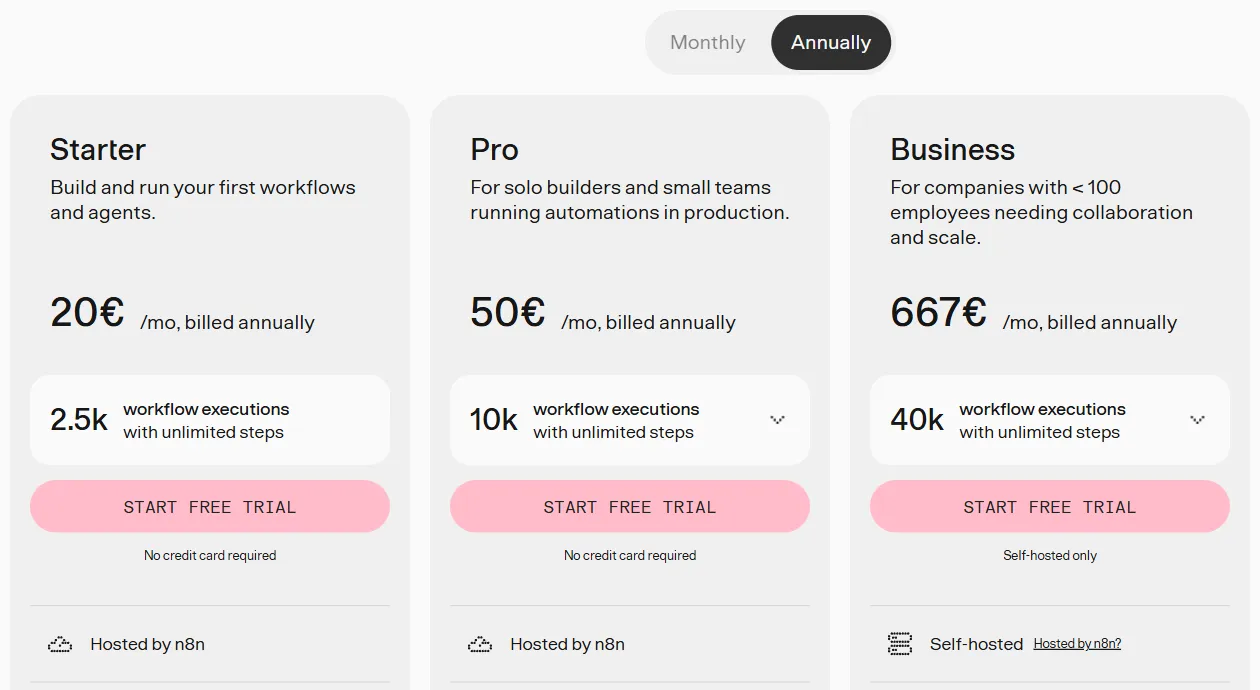
- 1 Starter: 2,500 executions per month
- 2 Pro: 10,000 executions per month
The practical takeaway: if you run up to 10–15 simple workflows a day, Make.com Core (€9) or even the Free plan is a rational choice. As volumes grow and workflows get more complex, self-hosted n8n becomes clearly cheaper: one inexpensive VPS (e.g. Hetzner, from ~€5/month; prices change) can handle hundreds of workflow runs a day with no extra fees. Over a year, the difference between Make.com Pro and self-hosted n8n can roughly reach €130–€200.
n8n vs Make integration differences in 2026
According to the platform itself (October 2026), Make.com offers integrations with more than 3,000 apps. n8n has several hundred ready-made nodes, but that number is only part of the picture.
n8n's key advantage is the HTTP Request node and the Code (JavaScript) node. This means you can integrate any API directly by writing a few lines of code. If Make.com has no module for your tool, you have to use the universal HTTP or Webhooks module, which takes more manual configuration. In n8n, simple cases are solved in a few dozen minutes with the HTTP node and the API documentation.
Both platforms work well with Google Workspace (Gmail, Sheets, Drive, Calendar), Slack, Notion, HubSpot, Airtable, Stripe, WooCommerce, Shopify and Microsoft 365. The difference shows up with the set of tools specific to Lithuania.
Examples with Lithuanian tools
One of the most common questions: will these tools work with Lithuanian systems? Below are the five most commonly used:
Paysera
Paysera (a Lithuanian payment provider) has a REST API and webhooks for payment notifications. Neither Make.com nor n8n has a native Paysera module in its catalog, but in n8n a Paysera integration is built with the HTTP Request node, roughly 20–30 minutes of configuration. In Make.com it goes through the Webhooks module, with a bit more manual work. A typical use case: new payment → update the order status in WooCommerce → send the customer a confirmation.
Montonio
Montonio (a Baltic payments and shipping platform) provides payment and buy-now-pay-later APIs and webhooks for e-commerce platforms. Both tools can receive Montonio webhooks and trigger workflows: new payment → create an invoice → update the CRM → email the customer. n8n wins here thanks to more flexible JSON transformation in the Code node when Montonio's data structure does not exactly match what the other system needs.
Omnisend
Omnisend has an excellent REST API, and Make.com has an official Omnisend module, which is the fastest route. n8n connects through the HTTP node with an Omnisend API key. If Omnisend is your central email marketing platform and you don't need complex logic, Make.com is the simpler choice here.
Apsiskaitymas.lt
Apsiskaitymas.lt (a Lithuanian invoicing tool) has an API for creating and retrieving invoices. Neither Make.com nor n8n has a native module, but in n8n integration through the HTTP Request node is a direct route, usually 1–2 hours of configuration. A typical workflow: new WooCommerce order → create an invoice in Apsiskaitymas → send the PDF to the customer → mark the order as paid.
Site.pro (formerly B1.lt) and Rivile
Site.pro (formerly B1.lt) and Rivile are separate Lithuanian accounting systems. Both have an API or data export and import options, but their documentation and access terms differ. In n8n, the HTTP Request node lets you integrate any system that has at least a basic API, and that is n8n's real advantage with Lithuanian tools that are not in the Make.com catalog. In practice: n8n = 1–3 hours of configuration; Make.com = a custom webhook is needed, often more complex.
Self-hosted n8n: when is a €5/month VPS worth it instead of €20/month Cloud?
n8n is distributed under a “fair-code” license (Sustainable Use License): the code is open, and for your own internal use you can run it on your own VPS and pay only for hosting the server. The smallest suitable VPS plans (e.g. Hetzner) cost from ~€4–5/month (prices change). n8n Cloud Starter costs €20/month and Pro €50/month (billed annually, as of October 2026). The difference per year: roughly €180–€540.
Three main reasons to choose self-hosted
1. GDPR data localization. When your workflows process customers' personal data (names, email addresses, payment information), GDPR requires you to know where the data is stored and processed. According to n8n, n8n Cloud stores data in the EU (Frankfurt), but it uses third-party cloud infrastructure. With a self-hosted VPS in Hetzner's Falkenstein or Helsinki data center, the data stays in the EU and you control exactly where. This matters especially for B2B companies that work with sensitive client data.
2. Unlimited operations. Self-hosted n8n has no operation limits. If the business grows and workflow volumes increase, the server price does not change. With growing volumes, a Cloud plan quickly turns into a €50–€100/month expense. Companies that run hundreds or thousands of automation actions a day often move to self-hosted.
3. Full control over debugging. Self-hosted n8n gives you full access to system logs, so you can see exactly which node failed, why and with what data. In the Cloud version, debugging information is more limited. This is critical when automation involves financial data or customer communication.
When self-hosted is not a good fit: if you are just starting, have 2–3 workflows and no technical knowledge or IT help, n8n Cloud Starter or Make.com is a better first step. Self-hosting requires knowing how to configure Docker or a Linux server.
The complexity threshold: 3 levels
Not every automation needs the same tool. Choosing the tool by complexity helps you avoid over-investing at the start and running out of capabilities as you grow:
Level 1: simple 2–3 step workflows
Examples: a new Google Forms response → add a row to Google Sheets; a new Calendly meeting → send a Slack message; an online store order → update the CRM contact. Both tools are a great fit for this level. Make.com is a bit more intuitive for beginners thanks to its visual canvas editor; n8n is faster to configure for people who already understand automation logic.
Level 2: medium complexity, with conditions and iterators
Examples: if the client's value exceeds €500, send it to the manager, otherwise into an automated email flow; iterate over all of the month's orders and generate a summary; filter webhook data by several conditions at once. n8n wins here thanks to more flexible IF / Switch nodes and better array and JSON transformation. In Make.com, more complex conditional logic needs more modules and quickly becomes hard to manage.
Level 3: API integration and custom JavaScript logic
Examples: a custom API endpoint with OAuth authentication and dynamic parameters; AI text processing with Claude or GPT built into a business process; cryptographic webhook validation with HMAC signatures; complex data transformation between the formats of different systems. At this level n8n is usually the more convenient choice. Make.com lets you run code only through a separate “Make Code” module (on paid plans, with execution time limits), so most of the logic has to fit into visual modules. The n8n Code node lets you run full JavaScript directly in the workflow.
A typical first 30 days with automation
What does a real first month with automation look like? This timeline applies to both Make.com and n8n users:
Week 1: setup and two simple workflows. Choose a platform, create an account or launch a self-hosted instance, and configure two simple but clearly valuable processes: for example, a new contact form on the website → add it to the CRM and send the customer an automatic confirmation; a new Calendly meeting → sync it to the team's Slack channel. The goal is to see how the system works with your real data before going further.
Weeks 2–3: lead-to-CRM and invoice automation. Add two critical business processes: new prospect information from the website form → automatically create a contact in the CRM, assign it to the responsible sales rep and send an intro email with a reply deadline. In parallel, the first invoice generation: new order → create an invoice in the accounting system → send it to the customer as a PDF attachment. These two processes usually give the fastest and most clearly measurable ROI.
Week 4: reports and alerts. Set up a weekly KPI summary: how many new leads, how many conversions, average response time. Automate the important alerts: if a lead has gone 48 hours without a reply, remind the sales rep; if stock falls below a set threshold, notify the purchasing manager. After 30 days you will have a working automation base and a clear picture of where to invest next.
5 automation workflows that justify the tool within 60 days
1. Website form → CRM (lead capture)
Website contact form → webhook → n8n or Make.com → create a contact in the CRM (HubSpot, Pipedrive) + send a Slack message to the responsible sales rep + an automatic confirmation email to the customer. It saves 5–10 minutes per lead; if you get 20 leads a month, that is 2–3 hours a month for this one process alone.
2. AI lead scoring
New lead → n8n Code node with the Claude or GPT API: the system evaluates the company size, sector and the content of the enquiry → assigns a priority (hot / warm / cold) → only hot leads trigger a direct Slack message to the sales rep, the rest go into an automated email sequence. This is a specific n8n advantage: in Make.com, AI nodes are more limited and need extra modules.
3. Automatic invoice generation
WooCommerce or Shopify order → create an invoice in the accounting system (Apsiskaitymas.lt, B1.lt, QuickBooks) → email the PDF to the customer → mark the order as paid. By hand this takes roughly 5–15 minutes per invoice; once automated, almost no manual work is left. At 100 invoices a month, that is roughly 8–25 hours saved every month.
4. Stock levels → automatic alert
Every day (or every few hours), check product stock in WooCommerce or the warehouse system → if stock falls below a preset threshold → send an email or Slack message to the purchasing manager with the product name and current quantity. Simple, but avoiding overselling and stockouts is money in your pocket.
5. NPS and customer satisfaction automation
After a project is completed or X days after a purchase → automatically send an NPS survey → if the score is 6 or lower (unhappy customers), immediately alert the manager with the customer's details and comment; if it is 9 or higher (promoters), send a request to leave a public review. NPS collected systematically over six months fundamentally changes your customer service strategy.
Migrating from Zapier: how long it really takes
Many Lithuanian companies started with Zapier, which makes sense: Zapier was one of the first automation tools to become widely popular. The Zapier Professional plan costs from $19.99/month (750 tasks) and Team from $69/month (2,000 tasks), billed annually (as of October 2026, zapier.com/pricing); the price rises as the number of tasks grows. Compared with self-hosted n8n (from ~€5/month), the difference per year is roughly ~€150 to ~€650, depending on the plan.
Migrating from Zapier to Make.com usually takes 1–3 days, depending on the number of workflows. Make.com has a similar visual philosophy and terminology, so the learning curve is not steep. Most Zapier integrations also exist in the Make.com catalog.
Migrating from Zapier to n8n takes a bit more time: n8n uses different terminology (Zaps become workflows, tasks become nodes) and a different way of working. But the payoff is bigger: many more possibilities and a lower long-term cost. For an average portfolio of 5–10 workflows, migration takes 2–5 days. Aigentas.lt offers a migration service: I move the logic of your existing workflows to n8n and optimize it after the move.
How Aigentas.lt works with n8n: from audit to handover
I work mostly with n8n: for me it is not one tool among many but a specialization. Here is what a typical collaboration looks like:
Initial discussion (free). You write to me about which tasks take up most of your team's time, and I reply by email with which ones are worth automating first and why. Once I have your numbers, I get specific: how many hours a week, the likely savings, and in how many months the ROI is reached. We arrange a call if one is needed.
Architecture design. Before configuring anything, I define the workflow logic: triggers, conditions, error handling, retry logic, notification channels. This step is often skipped when people configure things themselves, and that is exactly where most problems appear, when the system does not catch errors.
Configuration, testing and handover. I configure the n8n workflows with your real systems and test them with real data and error scenarios. At handover, I train your team on how to change parameters, add new steps and track errors without my help. The goal is a system you can run yourself, not permanent dependence on me.
More on n8n automation in Lithuania: 5 typical n8n use cases for Lithuanian companies and HR process automation with Make.com and n8n.
Frequently asked questions
Make or n8n: which should a small Lithuanian business choose?
If you are just starting and there is no technical person on the team, choose Make: you can launch your first scenario in a few minutes and you do not need a server. If data control matters to you, or you plan many automations or AI agents, choose n8n: on your own server it does not limit operations, and the price does not depend on volume.
Can I switch from Make to n8n later?
Yes, but there is no automatic conversion: scenarios have to be rebuilt from scratch. So it is worth estimating up front how many automations you plan per year and where the data has to be stored, so that you do not need a migration.
How is n8n different from Zapier?
n8n's code is open (a "fair-code" license) and it can run on your own server, so at higher volumes it is much cheaper. Zapier has the most ready-made integrations and the easiest start, but its price grows quickly with the number of tasks. You will find a comparison of all three platforms in the article "n8n vs Make vs Zapier 2026".
Can you help me choose and set it up?
Yes. Write to me about which processes you want to connect: I will read it and recommend a platform by email, and if needed we will arrange a call. The first working solution costs from €450, we agree on the price in writing before starting, and support starts at €150/month if you need it.