In short: use ChatGPT for business through a company account (ChatGPT Business from $20 per user per month), not through free personal accounts. That way business data is not used to train models by default, and an admin controls access. If your company works in Microsoft 365 or Google Workspace, first make use of the Copilot or Gemini you already have there. At the same time, adopt a one-page policy on what must never be uploaded to AI.
I checked the plans and prices on the OpenAI, Anthropic, Microsoft and Google pages and help centers on October 17, 2026. Prices exclude VAT; they are given in US dollars where the vendor does not publish a euro price.
If you have not used ChatGPT yet, start with how to get started with ChatGPT; the differences between the personal plans are covered in how much ChatGPT costs.
Which ChatGPT version should a company use?
OpenAI has personal plans (Free, Go, Plus, Pro) and business plans (Business, Enterprise). The difference is not just the limits. A business plan gives you a shared workspace, central billing, SSO and MFA, and business data is not used to train models by default (OpenAI Help Center). In personal accounts, each person has to turn off training on their data themselves, and the company cannot see who uploaded what.
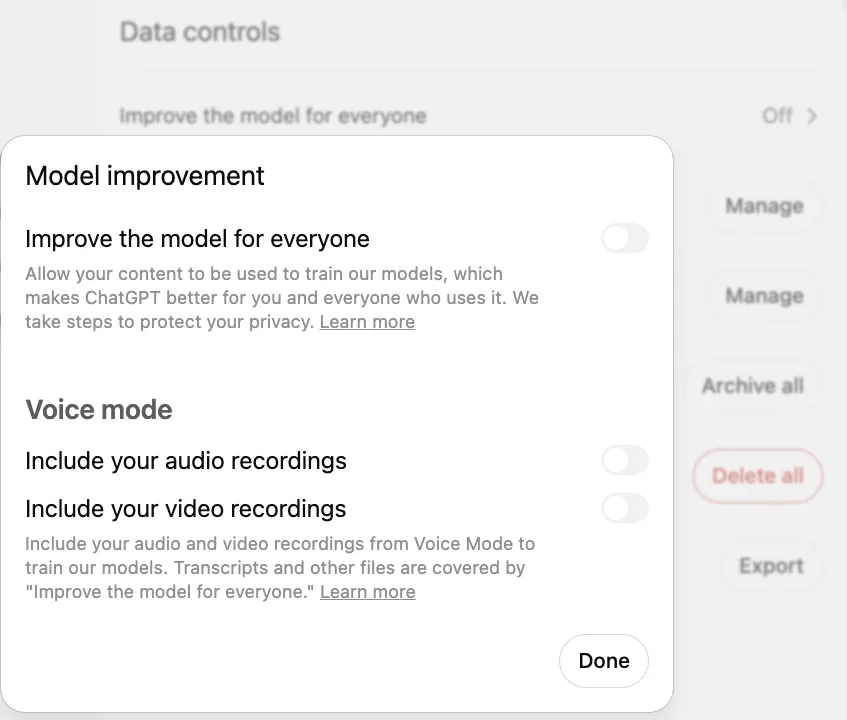
- 1 Improve the model for everyone in Data controls; clicking it opens this window
- 2 Toggle off (gray): chats are not used to train models
Since August 2025, ChatGPT Team has been called ChatGPT Business. In August 2026, Premium seats were added for the most active users; they can be mixed with Standard seats in the same workspace. It is also worth knowing that on the Business plan an admin can view and export members' chats, and employees should be told about this too.
ChatGPT Business vs Microsoft Copilot vs Gemini vs Claude: prices in October 2026
| Tool | Price | Best for | Data and control |
|---|---|---|---|
| ChatGPT Business | $20 per user/month (annual), $25 (monthly); minimum 2 seats. Premium seat: $100 / $125 | General work with text, files and analysis; shared projects for the team | Business data is not used for training by default; SSO, MFA |
| ChatGPT Enterprise | Custom quote | Larger organizations that need SCIM, audit logs and regional data residency | No training on business data; Compliance API, data retention controls |
| Microsoft 365 Copilot | Copilot Chat is included in Microsoft 365; Copilot Business about $21 per user/month (up to 300 users), Microsoft 365 Copilot: $30 | Teams that work in Outlook, Teams, Word, Excel and SharePoint | Runs inside your Microsoft 365 environment with your existing permissions |
| Gemini in Google Workspace | Included in Workspace plans; Business Standard €13.60 per user/month | Teams that work in Gmail, Docs, Sheets and Meet | Workspace data stays in your domain, managed by your admin |
| Claude Team | $20 per user/month (annual), $25 (monthly); Premium: $100 / $125; 2–150 members | Long documents, analysis, writing, coding, work with Microsoft 365 and Chrome | Commercial data is not used for training by default |
Sources: OpenAI Help Center (ChatGPT Business prices), Anthropic Help Center and claude.com/pricing (Claude Team), the Google Workspace price list, Microsoft partner and licensing sources (Microsoft does not publish a public euro price for Copilot Business; a licensing partner quotes it). Microsoft 365 Copilot can only be bought as an add-on to an eligible Microsoft 365 plan.
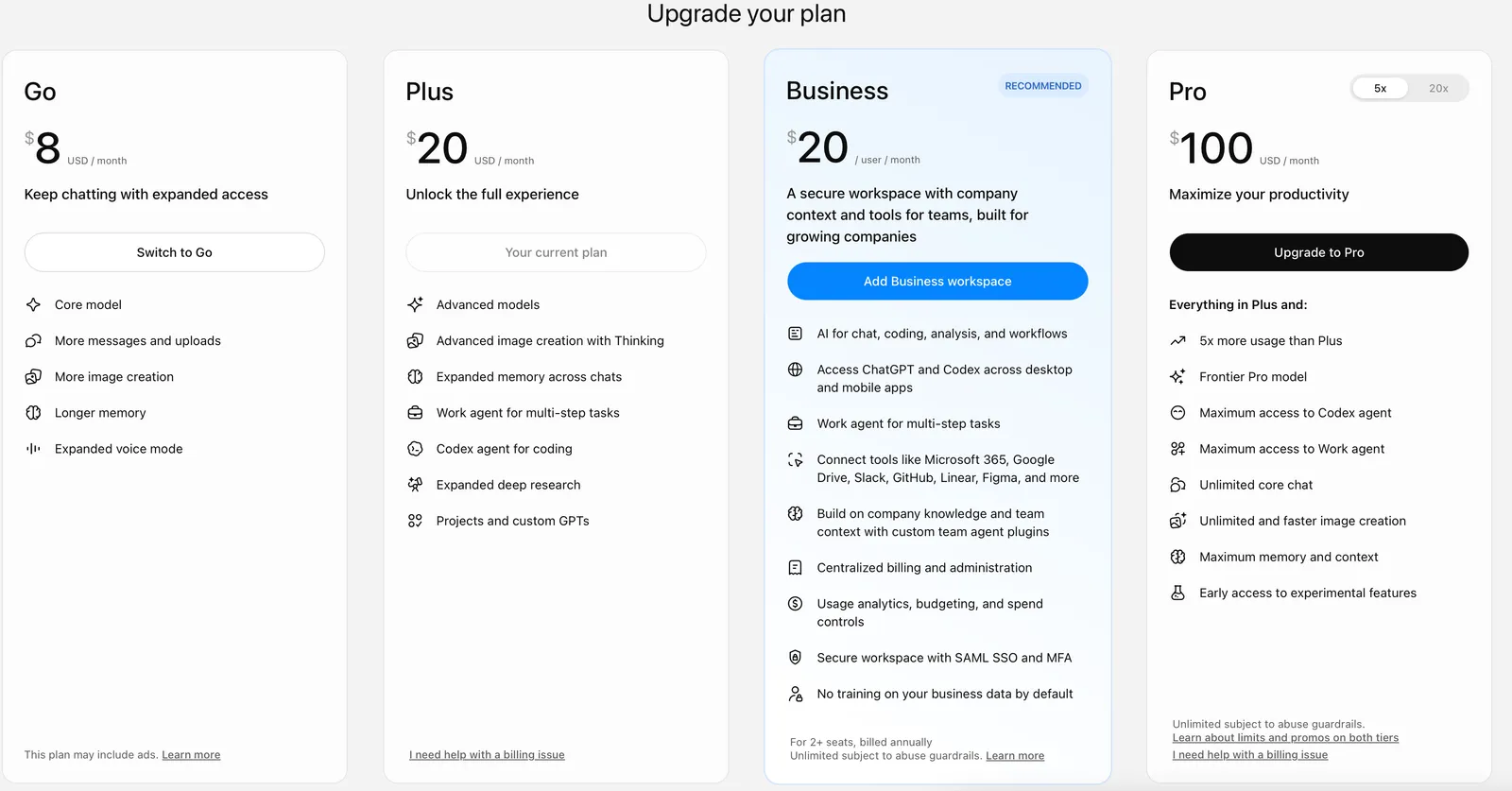
- 1 Business: $20 per user per month billed annually, from 2 seats
- 2 Connected work tools: Microsoft 365, Google Drive, Slack and more
- 3 Business data is not used for training by default
A practical tip: do not buy everything at once. If you have Microsoft 365 or Google Workspace, spend two weeks testing the Copilot Chat or Gemini you already have. If your staff mostly work with files, analysis and long texts regardless of email, choose ChatGPT Business or Claude Team. More on Gemini in the article Gemini in Google Workspace for business.
Is ChatGPT safe for company use? Data, GDPR and rules
The biggest risk is not ChatGPT itself but "shadow AI": employees use personal accounts and the manager does not know about it. So the first step is to give people an approved tool and clear rules.
| Data category | Can it be uploaded? |
|---|---|
| Public texts, website content, anonymized examples | Yes, on any plan |
| Internal documents, process descriptions, meeting notes | Only through a company (Business / Enterprise) account |
| Customer correspondence with personal data | Only on a business plan, with a DPA, ideally anonymized |
| Personal ID numbers, health and bank data, passwords, API keys | No |
| NDA-protected information, trade secrets | No, unless the contract allows it |
Under the GDPR, an AI provider that processes personal data on your behalf is a data processor, so you need a data processing agreement (DPA); all four vendors offer one on their business plans. Add the tool to your records of processing activities and, if needed, update your privacy policy. The National Cyber Security Centre of Lithuania has published guidelines on the safe use of generative AI in organizations (in Lithuanian), a good source for internal rules.
A one-page AI usage policy needs five points: which tools are allowed (company accounts only), which data must not be uploaded, who checks AI-written text before it goes to a customer, how AI content is labeled, and who in the company is responsible for the rules.
How to use ChatGPT in business: 15 tasks with ready-to-use prompts
Replace the information in square brackets with your own data, and only with data your rules allow you to upload. The prompts also work in Copilot, Gemini or Claude.
- Replying to a customer complaint. Prompt: “You are a customer service manager. The customer writes: [the gist of the complaint, without name or contact details]. Our rules: [return conditions]. Write a reply of up to 120 words: acknowledge the problem, offer a solution based on the rules, no legal jargon and no promises that are not in the rules.”
- Draft of a sales proposal. Prompt: “Write a draft sales proposal for [service] for a manufacturing company. The client's problem: [problem]. Structure: situation, solution, what the client gets, timeline, price [amount], next step. Up to 300 words, businesslike tone, formal address.”
- Meeting summary with action items. Prompt: “From these notes, prepare a summary: decisions, open questions and a task table (task, owner, deadline). If a deadline is unclear, mark it "to confirm"; do not make anything up. Notes: [text].”
- Sales data analysis. Prompt: “I am uploading a sales CSV for 12 months (without customer names). Show the 10 products whose sales dropped the most, the seasonality and 3 hypotheses why. Do the calculations with code and show a table.”
- Comparing supplier quotes. Prompt: “I am uploading 3 supplier quotes as PDFs. Build a table: price, delivery time, payment terms, warranty, penalties, what is unclear. At the end, list 5 questions I should ask each supplier.”
- Summary of public tender documents. Prompt: “From these tender conditions, extract: the subject of the procurement, qualification requirements, mandatory documents, the bid deadline, evaluation criteria and risky clauses. Give the section number for each.”
- Explaining a contract clause. Prompt: “Explain this contract clause in plain language and the risk it creates for the supplier. Give 3 questions for a lawyer. Text: [clause without party names and amounts].”
- Product descriptions for an online store. Prompt: “Based on these features, write a product description in Lithuanian (up to 120 words), a 5-point summary and a meta description of up to 155 characters. Do not use "highest quality" or "unique". Features: [list].”
- Translation with a glossary. Prompt: “Translate into English and Latvian. Use these terms: [term LT = EN = LV]. Keep the formatting. Mark places where the translation is ambiguous. Text: [text].”
- FAQ answers from your own rules. Prompt: “Here are our delivery and return rules: [text]. Write the 10 most common customer questions and answers, each up to 60 words. If the rules do not contain the answer, write "not in the rules".”
- Payment reminder emails. Prompt: “Write 3 reminders about an unpaid invoice: after 3 days (friendly), after 14 days (firm), after 30 days (final, mentioning further steps). Each up to 80 words, with a placeholder for the invoice number and payment link.”
- Job ad and interview questions. Prompt: “Write a job ad for [position]. Responsibilities: [list], salary: [range] before taxes. Add 8 structured interview questions with evaluation criteria. Avoid "dynamic team".”
- Onboarding plan for a new hire. Prompt: “Create a 30-day onboarding plan for a [position] employee: goals for each week, who to meet, which documents to read, how to check whether the week went well.”
- Writing a procedure from notes. Prompt: “From these notes, write a work instruction: purpose, who is responsible, numbered steps, common mistakes, what to do if something fails. Mark the steps that repeat and could be automated.”
- Monthly social media plan. Prompt: “Create a 4-week LinkedIn and Facebook plan for [company, field]. In a table: date, topic, post text up to 80 words, call to action. Use these facts about us: [facts]. Do not invent numbers or clients.”
How to write prompts that get accurate answers
- Role and context. Say what you would tell a new employee: who you are, who the text is for, what the goal is.
- Format and length. "A table with 4 columns", "up to 120 words", "3 options".
- Sources. Upload a document and ask it to rely only on that. Add: "if the information is not there, say so".
- Banned phrases. List the words you do not want; it is the fastest way to get rid of the "AI style".
- Reuse. Keep prompts and files that work well in a shared project so the whole team works to the same standard. Do not build new custom GPTs: OpenAI is switching them off on December 11, 2026 and suggests moving them to plugins.
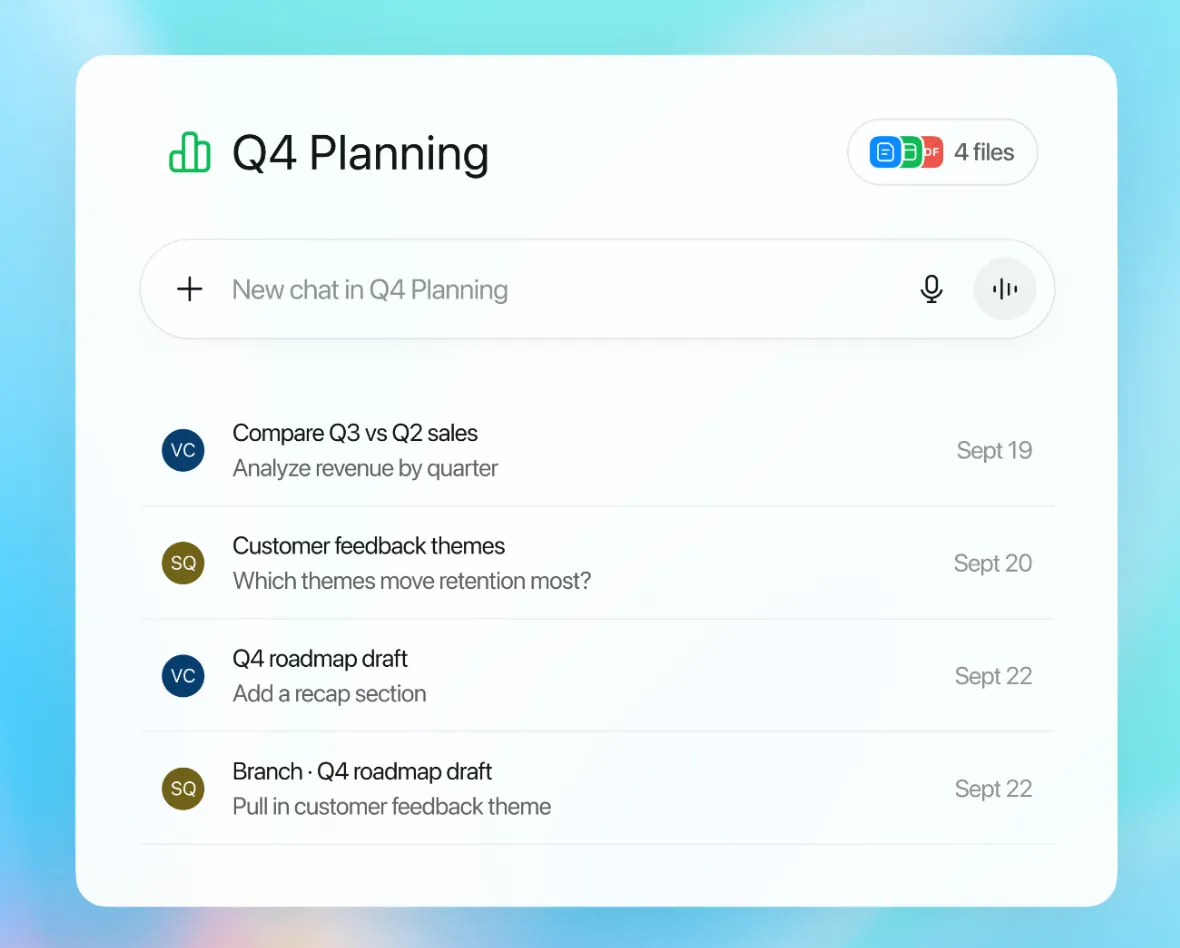
- 1 Project files: ChatGPT uses them when answering
- 2 New chat in the project, with the same context
- 3 Project chats in one place (in a shared project, colleagues' too)
How to roll out ChatGPT or Copilot to a team in 30 days
- Week 1: inventory. An anonymous survey: who already uses AI, with which accounts, for what. Pick one tool and write a one-page policy.
- Week 2: pilot. 3–5 people from different departments, with 2–3 specific tasks each (for example, from the list above).
- Week 3: prompt library. Put the best prompts into shared projects with your price list, tone and rules. If you already have custom GPTs, move them to plugins by December 11, 2026 (OpenAI FAQ).
- Week 4: measurement. How long does a task take before and after? Where did AI get it wrong? Only then decide whether to extend licenses to the whole team.
Monthly licenses are enough for a pilot; choose an annual plan only once you can see the tool is used every day.
When chat is not enough: automation and AI agents
ChatGPT is a great help for a person sitting at a computer. But if an employee copies an email into ChatGPT every day, then the reply back into email and the data into the CRM, you are paying for copy-paste. Signs that you need automation or an AI agent:
- the same task repeats dozens of times a week (enquiries, invoices, orders);
- AI has to rely on data from your systems: CRM, accounting software, price list, warehouse;
- it has to not only write but also take an action: create an invoice, update a deal, log an enquiry;
- the process has to run automatically, even when nobody is logged in;
- you need an action log and clear control over where data goes.
An example (a scenario, not a real client): an online store gets 40 questions a day. ChatGPT helps write replies faster, but an AI agent reads the email itself, checks the order status, prepares a reply according to your rules and leaves the person only to approve it. I explained how an agent differs from a chat tool in AI agents for business: what they are, and how I build them on the AI agent development page. A first solution starts at €450 (see pricing).
Team training and AI consulting: what I offer and what I don't
To be upfront: I do not sell separate ChatGPT or Copilot training courses. I build AI solutions, AI agents and system integrations, and I automate suitable repetitive work. So I can help in two ways:
- AI consulting. We start with your message: the initial discussion is free, I reply by email, and we arrange a call if one is needed. If we agree on more in-depth work, I assess where ChatGPT, Copilot or Gemini will be enough for the team and where a separate solution or automating repetitive work makes sense, and I prepare a plan of tools, GDPR risks and priorities. See AI consulting and AI strategy.
- Handing the solution over to the team. Once I have set up a solution or agent, I show employees how to use it and leave a written description.
For general skills there are free vendor resources: Microsoft Learn Copilot courses, OpenAI Academy, and the OpenAI guide for small teams (Lithuanian version). Remember the EU AI Act requirement: since February 2, 2025, organizations that use AI must ensure sufficient AI literacy among their staff, and a short internal training based on your rules helps meet it. More on artificial intelligence in AI for business: 5 use cases.
Frequently asked questions
How much does ChatGPT for business cost?
In October 2026, ChatGPT Business costs $20 per user per month billed annually or $25 billed monthly, with a minimum of 2 seats. For the most active employees there is a Premium seat at $100 / $125 with a five times higher limit. ChatGPT Enterprise pricing is by custom quote.
Is it safe to upload company data to ChatGPT?
In a free or personal account, no, unless you have turned off the use of data for training and it is not personal data or trade secrets. ChatGPT Business and Enterprise do not use business data for training by default, but personal ID numbers, health data, passwords and NDA-protected information should not be uploaded on any plan.
Which should I choose: ChatGPT, Copilot or Gemini?
If your team lives in Outlook, Teams and Excel, start by trying Microsoft 365 Copilot Chat, which is already included in your license. If you work in Google Workspace, Gemini is already in your plan. ChatGPT Business or Claude Team is worth it when you need a general tool for files, analysis and text regardless of your email system.
Does ChatGPT write good Lithuanian?
Good enough for drafts, summaries and internal texts. Always review texts meant for customers: you will find unnatural phrases, calques from English and wrong terms.
Do employees need AI training?
Yes. Since February 2, 2025, Article 4 of the EU AI Act requires organizations that use AI systems to ensure sufficient AI literacy among their staff. In practice this means a short training on approved tools, forbidden data, checking results and writing prompts.
When do you need an AI agent or automation instead of ChatGPT?
When the same task repeats every day, when the data sits in your CRM, email or accounting software, when AI has to not only write but also take an action (create an invoice, update the CRM), or when the process has to run without a person. At that point the ChatGPT chat window turns into copy-paste work, and automation removes that work.
Do you offer ChatGPT or Copilot training?
I do not sell separate training courses. I offer AI consulting (where ChatGPT or Copilot is enough for the team, where a separate solution makes sense, which tools to use, with GDPR recommendations), and I build AI solutions, integrations and AI agents; when I hand over a solution, I show the team how to use it. The initial discussion is free: you write what you want to achieve, I reply by email, and we arrange a call if one is needed.