In short: in Lithuania in 2026 you can issue invoices for free in several programs: without limits in Site.pro (formerly B1.lt), Saskaituok.lt and the inv123.lt generator, and with limits in Invoice.lt (up to 10 sends a month), F-Sąskaita (up to 5 invoices) and Invly (up to 3). If you are a VAT payer, choose software that prepares the i.SAF registers (monthly VAT invoice reports) or passes the data to your accountant, and as your invoice volume grows, one that has an API for automation.
I checked all prices and limits on the vendors' websites on October 17, 2026. Prices change, so check the vendor's page before you subscribe. I am not affiliated with these vendors and receive no payment for recommendations.
Which invoicing software should you choose: the short answer
| Your situation | What to choose |
|---|---|
| Self-employed, a few invoices a month | VMI i.SAF e-invoice (free), Saskaituok.lt, inv123.lt, Invly free plan |
| An MB or a small UAB, 5–50 invoices a month | Invoice.lt, F-Sąskaita, Invly, SaskaitaOnline.lt, plus an export for your accountant |
| You want invoices to go straight into accounting | Site.pro (free invoicing + paid accounting) or Rivile ERP |
| Invoices should be created automatically from the CRM or online store | Software with an API (Site.pro, F-Sąskaita Premium, Invly Team, Rivile) + an n8n / Make integration |
| You sell to the public sector | Any software + SABIS (mandatory for e-invoices to contracting authorities) |
11 invoicing programs compared: prices and limits (October 2026)
| Software | Free | Paid | i.SAF | API |
|---|---|---|---|---|
| Site.pro (formerly B1.lt) | Invoicing is free and unlimited | Full accounting: €7 per company/month + a user plan, excl. VAT; 30-day trial | Yes (in the accounting software) | Yes, API and MCP |
| Rivile ERP | None; OCR up to 10 docs/month free | Mini from €19 per user/month, Standard from €25 | Yes | Integrations, import |
| Invoice.lt | Unlimited series, up to 10 email sends/month | PRO version | — | — |
| F-Sąskaita | Up to 5 invoices and 5 expenses/month | €4.90 / €7.90 / €14.90 per month | — | API and webhooks on the Premium plan |
| Invly | 3 invoices/month, 5 clients | From €4.90/month; i.SAF and FR0600 export on the Business plan | Yes (Business plan) | API and webhooks on the Team plan |
| inv123.lt | Generator without registration | Pro €9.99/month | Yes (Pro) | — |
| Saskaituok.lt | Unlimited, no registration | — | — | — |
| SaskaitaOnline.lt | Up to 5 documents/month | €5 / €10 / €15 per month | — | — |
| Sąskaita plius | Free invoicing | See the vendor's website | i.SAF file export | — |
| VMI i.SAF e-invoice | Free | — | Goes straight into the registers | — |
| Apskaita 5 | Free, open source (Windows) | — | Yes | — |
"—" means I did not find this feature on the vendor's website or it is not advertised.
Free invoicing software: what do you get for €0?
Free programs differ not so much in whether you can issue an invoice (you can in all of them) as in what happens next: whether the invoice is emailed from the program, whether a client database is kept and whether you can export the data for your accountant.
- Site.pro (formerly B1.lt). Invoicing is free and unlimited. Best for: UABs and MBs (Lithuanian company types) that want invoices and accounting in one place.
- Invoice.lt. Unlimited series, up to 10 email sends/month. Best for: Service businesses that only need invoices and payment tracking.
- F-Sąskaita. Up to 5 invoices and 5 expenses/month. Best for: MBs, sole traders, small UABs; Premium when you need to connect other systems.
- Invly. 3 invoices/month, 5 clients. Best for: Sole traders and small businesses, Shopify / WooCommerce stores.
- inv123.lt. Generator without registration. Best for: Occasional invoicing; Pro for recurring invoices.
- Saskaituok.lt. Unlimited, no registration. Best for: A few invoices a month, PDF only.
- SaskaitaOnline.lt. Up to 5 documents/month. Best for: Sole traders and MBs that also need CMRs and receipts.
- Sąskaita plius. Free invoicing. Best for: Sole traders, business certificate holders, MB accounting.
- VMI i.SAF e-invoice. Free. Best for: Only for individuals with self-employed activity.
- Apskaita 5. Free, open source (Windows). Best for: People who know accounting and work on one computer.
The most common drawbacks of free plans are the limits (3–10 invoices or sends a month), the program's logo on the invoice and the lack of an i.SAF export. Once you issue more than 10–15 invoices a month, a paid plan at €5–10 usually costs less than the time you spend moving data by hand.
Paid invoicing software and accounting systems
Site.pro (formerly B1.lt). The B1.lt accounting software now runs under the Site.pro name: the b1.lt address redirects to site.pro. Invoicing is free for all legal forms (UAB, MB, IĮ, self-employed, business certificate), and full accounting costs €7 per company per month excluding VAT plus a user plan. There is a 30-day trial, synchronization with Shopify, Amazon, Etsy, Pigu.lt and Varle.lt, plus an API and an MCP interface for AI agents. That is why searches for "b1 apskaita" and "b1 accounting software" now lead to Site.pro.
Rivile ERP. A full accounting and trade system: the Mini plan from €19 per user per month (1 company, up to 2 users), Standard from €25. AI digitization of purchase invoices is free for up to 10 documents a month. Rivile GAMA (the installed version) costs from €49 per workstation per month and has a REST API.
F-Sąskaita. Start at €4.90/month (15 invoices), Growth at €7.90/month, Premium at €14.90/month with unlimited volume, a bank connection, API and webhooks. The Premium plan is interesting because invoices can be created automatically from other systems.
Invly. The Individual plan is €4.90/month; the Business plan adds receipt recognition from a photo and i.SAF and FR0600 data export; the Team plan adds Shopify and WooCommerce, API and webhooks.
Invoice.lt, inv123.lt, SaskaitaOnline.lt. Paid plans from €5 to €15/month add more sends, recurring invoices, i.SAF export (inv123 Pro) and bank statement import (Invoice.lt supports SEB, Swedbank, Paysera, camt.053 XML).
What must a Lithuanian invoice include: i.SAF and SABIS
Any program must let you enter the mandatory details: the seller's and buyer's names, company codes and VAT numbers (if applicable), the invoice series and number, the date, names of goods or services, quantities, prices, the VAT rate and amount, and the total.
- i.SAF. VAT payers must submit registers of issued and received VAT invoices to the i.SAF subsystem of the VMI i.MAS platform. Legal entities file for each calendar month by the 20th of the following month, even if there were no invoices (then empty registers are filed). Software that creates the i.SAF XML file saves the accountant a lot of work.
- VMI e-invoice. In the i.SAF subsystem, only individuals with self-employed activity can issue electronic invoices; companies that are VAT payers and have agreed to receive them can receive them.
- SABIS. Since September 1, 2024, the "E. sąskaita" system has been replaced by SABIS (the public sector e-invoicing system). Invoices to public sector bodies and other contracting authorities must be submitted through it; the system follows the European e-invoicing standard and connects to the PEPPOL network. If you often sell to the public sector, choose software that can create a PEPPOL / standard-compliant invoice (Site.pro, for example, advertises this).
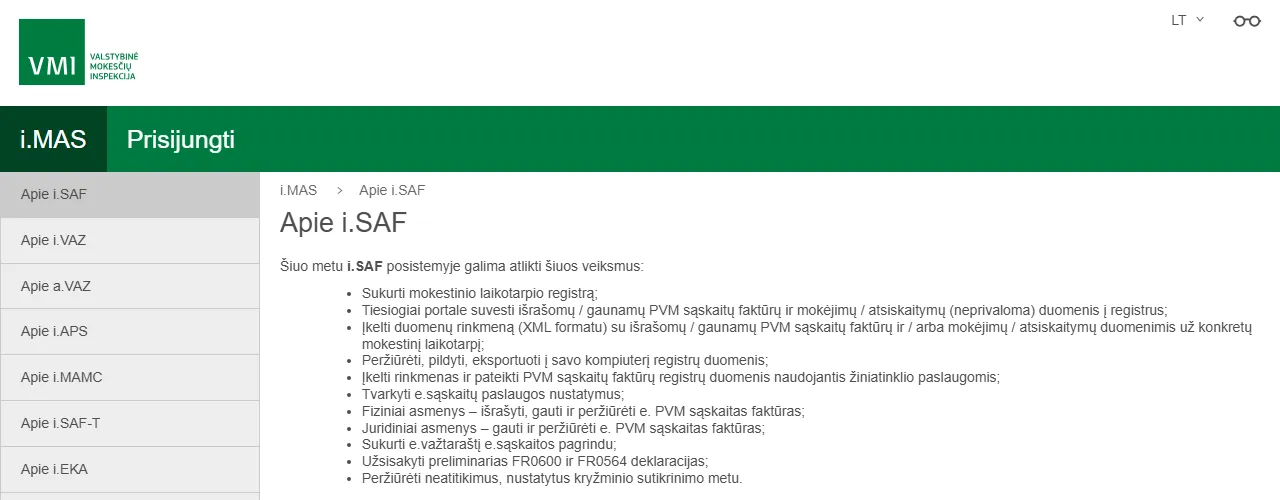
- 1 XML file: the register is generated by the invoicing or accounting software and uploaded here
- 2 Individuals can also issue e-invoices
- 3 Companies (legal entities) can only receive and view e-invoices
Invoice entry software for incoming invoices
If you are looking not for how to issue invoices but how to enter incoming supplier invoices, you need a digitization (OCR) tool: Rivile ERP digitization (up to 10 docs/month free), ivesk.lt (€0.18–0.30 per document with human checking), Fitek (from €0.23 per invoice + a plan fee), Labbis AI, Site.pro invoice recognition. A detailed price comparison is in invoice automation cost 2026, and how AI reads invoices is covered in AI in accounting.
Automatic invoicing: how to connect the software to your CRM and online store
The software you choose takes care of the invoice format. But for most companies, the time goes on what happens before and after: retyping data from the CRM or a contract, sending, checking payments and reminders. A typical automated workflow looks like this:
- 1Deal marked "won" or order paidPipedrive / HubSpot / online store
- 2Details and VAT number checkedn8n / Make + VIES
- 3Invoice created via APISite.pro / F-Sąskaita / Rivile
- 4PDF to the client, copy in the cloudGoogle Drive / SharePoint
- 5Paid: marked as paid; unpaid: reminder sent
- A deal is marked "won" in Pipedrive, HubSpot or another CRM, or an order is paid in the online store.
- n8n or Make takes the client's details and checks the VAT number (VIES) and the amounts.
- The invoice is created through the software API with the correct series and number.
- The PDF is sent to the client automatically and a copy is saved in Google Drive or SharePoint.
- When the payment shows up on the bank statement, the invoice is marked as paid; if there is no payment, a reminder is sent.
I set up such a workflow from €450 in 1–2 weeks, using the software you already have. How this works with specific accounting programs is described in invoice automation with B1, Rivile and Xero, and the whole accounting automation area on the automation for accounting page. The service description is at process automation, and prices are on the pricing page.
How to choose invoicing software: 6 questions
- How many invoices do you issue a month? Up to 5: a free plan is enough; 10–50: a paid plan at €5–15; more: consider accounting software and automation.
- Are you a VAT payer? If so, you need an i.SAF export or a connection to your accountant's software.
- Who does your accounting? Ask your accountant which format they import (Rivile, Site.pro, Excel, XML).
- Do you need to send from the program? Check the sending limits and whether you can send from your own domain (SMTP).
- Will you want to automate later? Choose software with an API or webhooks; you will save on the integration cost later.
- Can you take your data with you? Export to Excel / XML protects you if you decide to switch software.
Frequently asked questions
What is the best free invoicing software in Lithuania?
If you only need to issue an invoice and download a PDF, the Saskaituok.lt or inv123.lt generator without registration is enough. If you want invoices linked to your accounting, Site.pro (formerly B1.lt) offers unlimited free invoicing. Invoice.lt allows up to 10 email sends a month in its free version, and F-Sąskaita up to 5 invoices.
Does B1.lt still work?
The B1.lt accounting software is now called Site.pro: the b1.lt address redirects to site.pro. Pricing in October 2026 is €7 per company per month excluding VAT plus a user plan; invoicing is free.
Is free software suitable for a VAT payer?
You can issue a VAT invoice with free software too, as long as it has all the mandatory details. However, VAT payers must submit i.SAF registers of issued and received invoices to the VMI (the Lithuanian tax authority) every month (legal entities by the 20th of the following month), so it is more convenient to choose software that creates the i.SAF XML file or passes data to your accounting software.
Are e-invoices mandatory?
In October 2026 there are no mandatory e-invoices between companies in Lithuania; PDF is fine. Suppliers selling to contracting authorities (the public sector) must submit invoices through SABIS, the system that replaced "E. sąskaita" on September 1, 2024 and connects to the PEPPOL network.
How do I automate invoicing?
The simplest way is recurring invoices in the software itself (e.g., inv123 Pro, Invly). When an invoice has to be created by an event in another system (a won deal in the CRM, a paid order in an online store, a signed contract), you need an integration through the software API with n8n or Make. I set up such a workflow from €450.
What is the difference between invoicing software and invoice entry software?
Invoicing software creates your sales invoices to clients. Entry (digitization) software reads incoming supplier invoices and moves the data into accounting, e.g., Rivile ERP OCR, ivesk.lt, Fitek. Most companies need both.