An illustrative example: the accountant at a 25-person construction company receives 80–120 supplier VAT invoices as PDFs by email every month. Her job: open each PDF, read it and type the data into Rivile by hand: supplier name, VAT code, invoice number, date, amount, VAT rate. That can take several working hours a month. If an invoice is badly scanned or the supplier uses an unusual layout, a single document can take 10–15 minutes.
In many Lithuanian companies with 5–50 employees, this is normal. Finance managers and accountants who handle 100–500 incoming invoices a month often spend several hours a week on data entry alone: work an AI OCR system can do in seconds, leaving a person to check only the doubtful fields.
In this article I explain how AI OCR technology works for invoices, which 8 VAT fields have to be recognized, which tools suit Lithuanian businesses and how to connect them to local accounting software. You will also find a practical two-week rollout plan.
How AI OCR works for invoices
Traditional OCR (optical character recognition) worked simply: it "read" text from an image, pixel by pixel, and tried to recognize letters by their shape. This worked well for standardized documents but made mistakes when the font or layout changed or the document was scanned at an angle.
AI OCR works differently. Modern solutions such as Google Document AI, Amazon Textract or OpenAI models with vision use neural networks trained on large numbers of documents. They not only recognize text but understand the document's structure: where the header is, where the line items are, where the "Total" block sits. Even if a supplier uses an unusual layout or a colored table, AI can identify the fields correctly.
The process step by step: first, the PDF is converted into a high-resolution image (rasterization). Second, the AI model analyzes the image and identifies text blocks and their spatial relationships. Third, an NLP (natural language processing) layer extracts structured fields: invoice number, date, supplier, amount. Fourth, the results are returned as JSON or XML, ready for integration with the accounting system.
- 1PDF is converted into an imageRasterization
- 2The model finds text blocks and their positionDocument AI / Textract / OpenAI
- 3Fields are extractedNumber, date, supplier, VAT, amounts
- 4JSON or XML for the accounting software
The difference from manual entry is fundamental: the system processes 100 invoices in the same time as 1, usually a few seconds per document. More on the invoice automation process: automatic invoice issuing and processing.
8 required VAT invoice fields AI has to recognize
Article 80 of the Lithuanian VAT Law sets out the required details of a VAT invoice. There are more of them (for example, the buyer's VAT code and the names and addresses of the parties); below I cover the 8 that matter most for OCR. An OCR system is only useful if it extracts all the required fields correctly: a missing or wrong field means manual checking and the risk that the input VAT will not be deductible.
1. Seller's VAT code
A Lithuanian VAT code starts with "LT" and has 9 or 12 digits. OCR has to tell the VAT code apart from the company registration code, a common mistake in entry-level systems. Getting the VAT code right is critical: a wrong or missing seller VAT code creates a VAT deduction risk.
2. Invoice number
The unique invoice identifier, needed for duplicate control and bookkeeping. Numbers can be alphanumeric (for example, SF-2026-001482), so the system has to recognize any format.
3. Invoice date
The date decides which tax period the VAT falls into. Lithuanian suppliers use different formats: 2026-05-15, 15/05/2026, or the date written out in Lithuanian ("2026 m. gegužės 15 d."). AI has to normalize every format to one standard.
4. Amount excluding VAT
The net value of goods or services before VAT. When an invoice has several lines with different VAT rates, the system has to total each group separately.
5. VAT rate and 6. VAT amount
From January 1, 2026, Lithuania applies a standard VAT rate of 21% and reduced rates of 12% (for example, accommodation services) and 5% (for example, medicines and medical devices, books and periodicals), as well as 0% for certain transactions; the former 9% rate may still appear on invoices for earlier periods (VMI, the Lithuanian tax authority: VAT rates). An invoice can contain lines with different rates, so OCR has to separate each group and check that the VAT amount is mathematically correct.
7. Total amount including VAT ("Total due")
The final amount payable. A good OCR solution cross-checks: amount excluding VAT + VAT amount = total. If the numbers do not match, the invoice is immediately flagged for human review.
8. Goods or service lines
The detailed list with quantity, unit price and amount columns. Line recognition is the hardest task, especially when the table spans several pages or the supplier uses a non-standard column layout.
Best AI OCR tools for Lithuanian businesses: price comparison
There are several mature solutions on the market, from specialized SaaS platforms to flexible custom integrations. Below is a practical comparison by price, accuracy and fit for Lithuanian invoice formats.
Rossum: price on request
Rossum is one of the most advanced invoice OCR platforms in Europe. It comes pre-trained on a large volume of European invoices. Pros: high accuracy soon after setup (it is worth testing accuracy on Lithuanian invoices), a convenient correction interface where people's corrections improve the model, and API integration. The price is given on request, so it usually suits companies handling hundreds of invoices a month.
Klippa: priced by volume
Klippa is a Dutch startup offering a flexible document OCR API. Its strongest side is fast integration through a REST API and ready-made solutions for accounting systems. It supports many languages and document formats. The price depends on document volume and plan; check the vendor's website.
n8n + OpenAI: from about €20/month, prices change
The most economical option for a technically experienced business. The n8n automation platform receives PDFs by email or from cloud storage, converts them into images and sends them to the OpenAI API (a vision-capable model such as GPT-4o) with a specific extraction instruction. The model returns JSON with all the fields. Cost: a VPS for n8n at about €10–15/month (or n8n Cloud Starter at €20/month billed annually, as of October 2026) plus the OpenAI API at roughly $0.01–0.03 per invoice (100 invoices cost a few dollars). In total, from about €20/month depending on volume; API prices change. Setup takes technical knowledge, but flexibility is maximal: it can be adapted to any format.
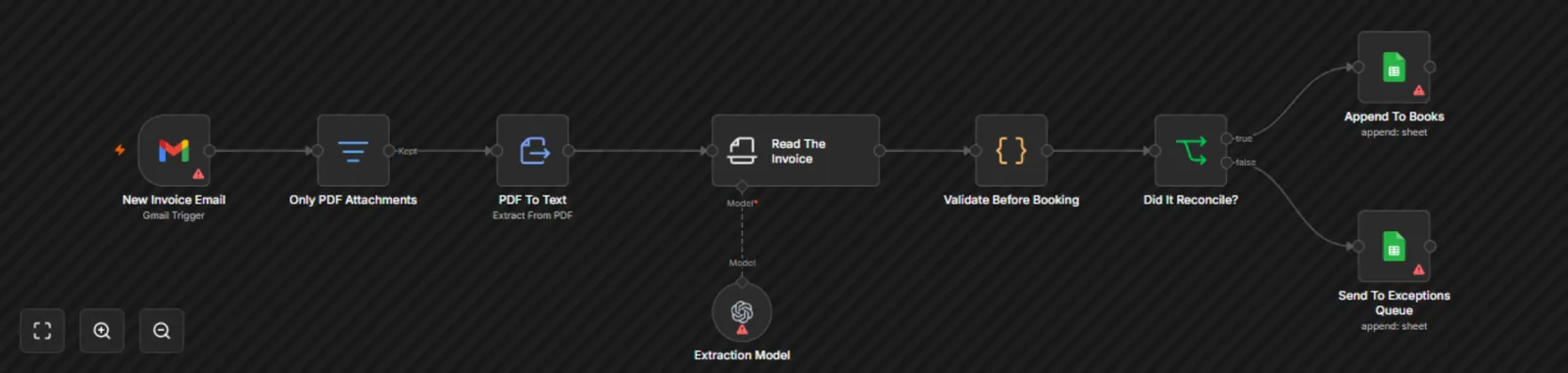
- 1 The OpenAI model extracts the invoice fields
- 2 Check: amount excluding VAT + VAT = total
Google Document AI: priced by volume
Google Document AI has a dedicated "Invoice Parser" model trained on invoices from around the world. You pay by the number of pages processed (see the Google Cloud price list). It integrates through a REST API or an n8n node, and it is a great fit if you already use the Google Cloud ecosystem.
How to connect invoice OCR to Lithuanian accounting software
An OCR system is only useful when the extracted data lands in the accounting software automatically, not in an Excel sheet that still has to be imported by hand. Below are the main Lithuanian systems and their integration options.
Lithuanian OCR solutions. Before building your own workflow, check what your software already has: Rivile ERP (a widely used Lithuanian accounting system) digitizes purchase invoices, up to 10 documents a month for free; Site.pro (formerly B1.lt) has invoice recognition; and ivesk.lt, Fitek or Labbis offer digitization at €0.09–0.58 per document (as of October 2026). All prices with sources are in invoice automation cost 2026, and where else AI helps in accounting in AI in accounting.
Rivile, one of the oldest and most widespread accounting systems in Lithuania, offers an integration API. For data exchange you can use the API directly or the XML import format Rivile supports as standard. In an n8n workflow, the Rivile XML is generated dynamically from the extracted fields.
Finvalda uses a REST API to upload incoming documents. The integration needs a Finvalda API key and a standard JSON format, which is easy to prepare in an n8n workflow. Finvalda is often chosen by companies with more complex accounting requirements.
Other programs (Directo, Site.pro, Labbis and others) usually accept data through an API or an import file (CSV, XML). In that case the fastest route is an n8n workflow: OCR → JSON → an automatically generated import file or API request → an entry in the accounting software that the accountant only approves.
How accurate is AI invoice OCR, and how do you improve it?
Accuracy depends on the document quality and the technology used. Practical guideline values by document type:
Native PDF (exported from accounting software): usually the highest accuracy. Most suppliers now issue invoices from software, and such a PDF has clear, machine-readable text. Accuracy is often close to manual entry, and speed is much higher.
Scanned PDF or photo: lower accuracy. Quality depends on the scan resolution (at least 300 DPI is recommended) and even lighting. Accuracy drops further for invoices scanned at an angle or folded.
How to improve accuracy: first, ask suppliers to send invoices as native PDFs, not scans. Second, create a list of approved suppliers: the system automatically checks the extracted VAT code against the list and flags mismatches. Third, in the first month always review 100% of invoices; later, only the flagged ones (low confidence score). Fourth, every corrected error teaches the system: solutions like Rossum learn from corrections, and accuracy grows after a few weeks.
- 1Invoice arrives by emailIdeally a native PDF
- 2AI OCR extracts the fields
- 3Automatic checkAmount excl. VAT + VAT = total; VAT code against the supplier list
- 4Low confidence score → human reviewIn the first month, all are checked
- 5Approved entry in the accounting softwareRivile / Finvalda / other
How to roll out AI invoice OCR in 2 weeks
A practical AI OCR rollout takes no more than two weeks for most companies with 5–50 employees. Below is a realistic step-by-step plan.
Week 1: preparation and testing
On Monday, collect 30–50 invoices from last month as a test set. Try to make the set cover different suppliers and formats, plus one scanned invoice for testing. On Tuesday and Wednesday, configure the OCR tool or n8n workflow, run the test set and review accuracy for each field separately. On Thursday and Friday, configure the integration with the accounting system in a test environment and check that the data shows up correctly in the accounting software.
Week 2: integration and launch
On Monday and Tuesday, set up monitoring of the inbox for incoming invoices: the system automatically picks up attachments from the specified email address. On Wednesday, run a full test cycle with accounting on 10–20 real invoices and fix the errors you spot. On Thursday, switch to production and set up error notifications and confidence score thresholds. On Friday, the first full working day with the live system: watch whether invoices are processed properly, whether errors are flagged and whether the accountant gets only the ones that need attention.
After the first month, review the statistics: how many invoices were processed automatically without human intervention, how many needed corrections, how many hours were saved. The target: most invoices are processed automatically and the accountant checks only the flagged ones. The exact figures depend on invoice quality and supplier variety; you will measure them after the first month.