For most everyday tasks you do not need to pay: ChatGPT, Gemini, Copilot and Claude have free versions, and for long documents and search with sources there are the free Gemini Notebook (formerly NotebookLM) and Perplexity. The difference is not "which one is smarter" but which task hits a limit in which tool. After reading this you will know what to open for a specific task, where the free version ends, what it costs you in data, and how not to fall for a fake "ChatGPT in Lithuanian" that asks for money.
If you are still choosing which single tool to start with at all, we compared that separately (ChatGPT, Claude, Gemini or Copilot). This article answers a different question: you have a specific task and do not want to pay.
Which free AI is best for writing or editing text?
Works well: any of the four: ChatGPT, Gemini, Copilot or Claude. For an email, an ad or fixing a paragraph, the free version is entirely enough.
The limit that matters most: not the number of messages but the length of the conversation. The longer you keep editing the same text in one chat, the sooner Gemini and Claude hit their limit; their limits reset every 5 hours. ChatGPT lets you chat by text without limit for free (abuse protections apply). When you start a new topic, open a new chat.
Fix the grammar and punctuation of this email, but do not change my words or tone. At the end, list what you changed. [paste the text]
How to write a whole email from scratch and check it is described step by step in the email guide (How to write or fix an email with AI).
Which free AI finds information with sources?
Works well: Perplexity: on the free plan every answer lists its sources. Web search is also available on the free ChatGPT and Claude plans.
The limit that matters most: a link to a source does not mean the source really says that. Open at least one link and check the number or date. For questions about Lithuanian law, taxes and prices, the final source is the official institution's website, not an AI answer.
What documents are needed in Lithuania to replace an identity card? Use only official pages of Lithuanian institutions and give a link next to every statement.
Which free AI can read a long document?
Works well: Gemini Notebook (formerly NotebookLM). You upload a PDF, a Google document or a link, and it answers using only your sources, with references to specific places. You can switch the answer language to Lithuanian.
The limit that matters most: for free, up to 50 sources in one notebook and 50 chats per day (Google says limits may change). In an ordinary chat window the limit is different: how much text the tool "reads" at once. ChatGPT's pricing page lists about 12 pages of text per prompt for the free plan, and Gemini's "reading capacity" (context) without a paid plan is much smaller than on paid plans. If the document is long, the tool may simply miss part of it, so ask about specific sections.
How to ask about a PDF and check that the answer really comes from the document is covered separately (A long PDF with AI).
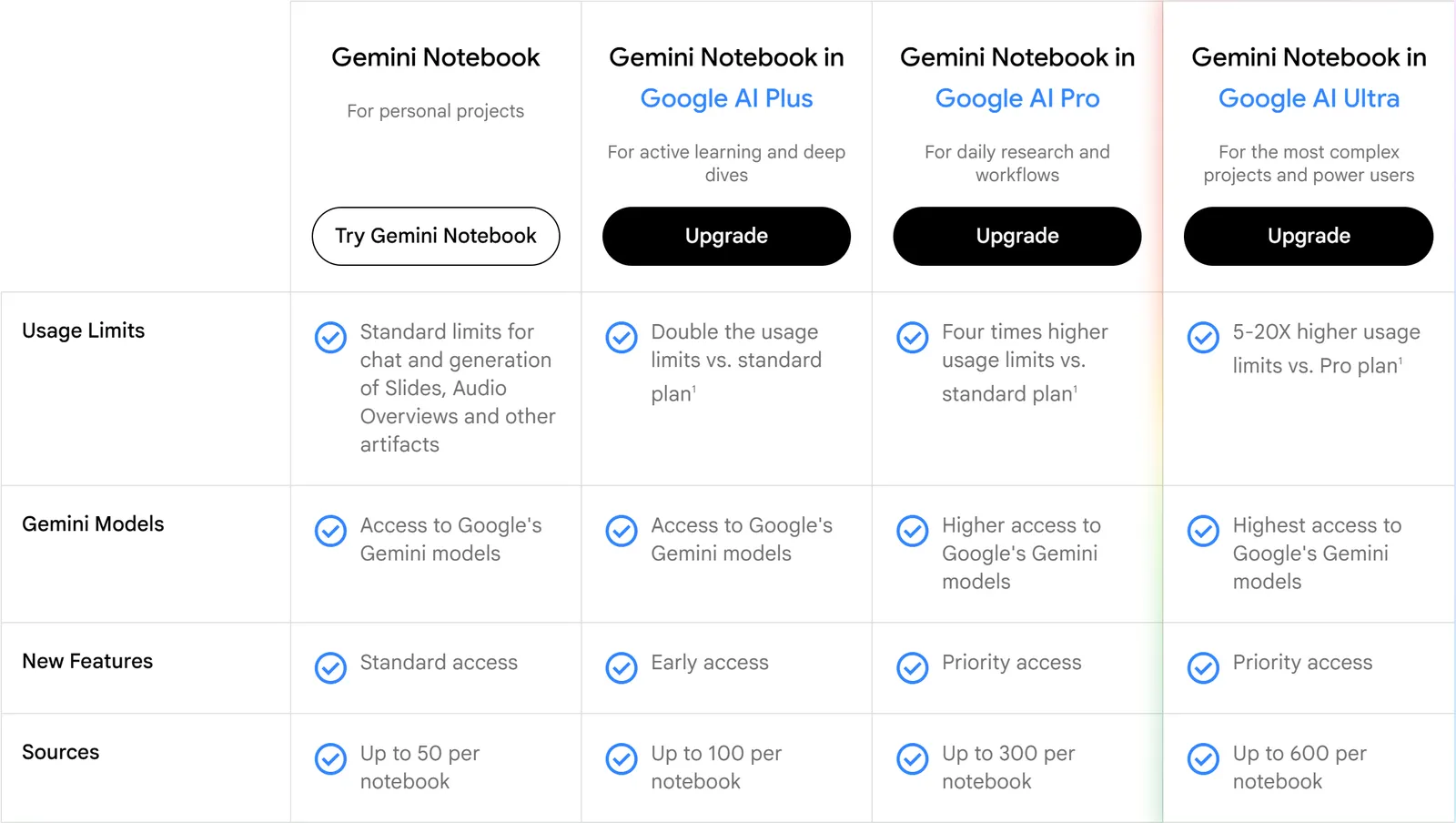
- 1 Gemini Notebook: free plan for personal projects
- 2 Usage Limits: standard chat and generation limits
- 3 Sources: up to 50 sources in one notebook
Which free AI can create an image?
Works well: ChatGPT, Gemini and Copilot: all three let you create images for free.
The limit that matters most: the number of images is limited separately from chats. In ChatGPT, once you hit the limit you have to wait until it resets. In Gemini without a paid plan you download the image at a lower resolution (1K; with a plan, 2K). You can create images in Gemini from age 13, but edit them only from 18.
Create a square image for a small bakery's post: fresh rye bread on a wooden table, morning light, no text in the image at all.
It is better to add text to the image yourself: Lithuanian letters often come out with mistakes. More on this in the image guide (How to create an image with AI).
Which free AI is good for translation?
Works well: any chat tool. Their advantage over a plain translator is that you can ask them to keep the tone, explain an idiom or translate a photographed instruction.
The limit that matters most: the same "reading capacity". Translate a long document in parts, otherwise the end may be shortened or skipped. Before sending a translation to someone else, ask for it to be translated back into the original language and compare the meaning.
Translate this email into English, keeping a professional but friendly tone. If any phrase cannot be translated word for word, mark it and explain your choice. [text]
When you can trust an AI translation and when you need a person is covered in the translation guide (How to translate text to and from Lithuanian with AI).
Which free AI can you talk to by voice or on your phone?
Works well: Copilot: Microsoft added Lithuanian to the list of voice chat languages for personal accounts. Voice mode is also available on the free ChatGPT and Claude plans.
The limit that matters most: free voice is limited separately and more tightly than text. ChatGPT counts voice use over a rolling 24 hours and tells you when you reach the limit. Check whether the tool understands your pronunciation well with a short test, for example by dictating a shopping list.
What does "free" actually mean?
All the information below was checked on October 21, 2026 on the makers' official pages. Limits change often, so there is no point memorizing exact numbers; it is more important to understand how they work.
- Limits reset; they do not run out for good. Gemini's limit resets every 5 hours until you reach the weekly limit. The free Claude limit also resets every 5 hours. ChatGPT limits files, images, voice and data analysis separately, and when you reach a limit it shows when you can continue.
- The "most expensive" features are limited first. File uploads, images, voice and deep research run out sooner than a plain chat. Google says that during heavy load some features (e.g. deep research) may be temporarily unavailable to free users.
- Not all models are available. Free plans do not run the makers' most advanced models. That is enough for everyday emails and explanations, but not always for complex analysis.
- ChatGPT may show ads. OpenAI says ads may be shown to users on the Free and Go plans; in August 2026 they were expanded to 31 European countries. Ads are shown below the answer and labeled. According to OpenAI, they do not affect the answer, and chats are not shared with advertisers. In the European Economic Area, personalized ads are not shown for now. You can find ad settings under Settings → Ad Controls.
What you "pay" with your data
Chats in free personal accounts may be used by the makers to improve their models unless you turn this off. You can turn it off in all the main tools:
- ChatGPT: Settings → Data Controls → turn off "Improve the model for everyone".
- Claude: Settings → Privacy → turn off "Help improve our AI models".
- Gemini: turn off "Keep Activity" on the Gemini Apps Activity page. While it is on, some chats may be reviewed by human reviewers.
- Copilot: profile → Privacy → turn off the use of your chats for model training.
- 1Settings & help
- 2Activity
- 3On
- 4Turn off
Based on the Google Help Center in English (checked October 23, 2026). After you turn it off, chats are still kept in the account for up to 72 hours but are not shown in the activity history.
According to Google, Gemini Notebook does not use the sources you upload for training unless you send feedback yourself (e.g. click "like / dislike").
Even with these settings off, do not put personal ID numbers, passwords, bank details, health information, customer lists or confidential company documents into free personal accounts. If you need help with a real document, replace names and amounts ("Client A", "amount X").
How to spot a fake "ChatGPT in Lithuanian"
In search results and app stores there are many websites and apps with "ChatGPT", "GPT" or "AI" in the name that are not products of OpenAI, Google, Microsoft or Anthropic. Some of them ask you to pay for what is officially free. Signs that you should stop:
- The address is not official. The real addresses: chatgpt.com, gemini.google.com, copilot.com, claude.ai. The app publisher must be OpenAI, Google LLC, Microsoft Corporation or Anthropic.
- It asks for payment right away. Before your first question it shows a "free trial" that needs a card, or a weekly subscription. The official tools let you start without paying.
- It promises a "Lithuanian version" for money. The official ChatGPT, Gemini, Copilot and Claude write in Lithuanian for free too.
- It asks you to log in with your ChatGPT or Google password on a page that is not official.
If you have already subscribed through an app, cancel the subscription in your phone's store settings (App Store or Google Play): deleting the app alone does not stop the payments. You can find the official ChatGPT apps on the OpenAI download page.
When does a paid plan make sense?
It is worth paying only when you notice one of these yourself: you hit the limit several times a week on the same work; you need to upload longer documents than the free version allows; you constantly create many images; or you do not want to see ads in ChatGPT. If you rarely hit the limit, there is nothing to pay for.
Before buying, it is worth trying another free tool for the same task: often that is enough. How much ChatGPT plans cost and when paying is not worth it is covered separately (How much does ChatGPT cost, and is the free version enough?). And how to write one prompt so you do not need five follow-ups (and so save your limit) is in the prompt guide (How to write AI prompts).
Sources
ChatGPT Free Tier FAQ (OpenAI): what the free plan includes, separate limits for files, images and voice, waiting until reset.
ChatGPT pricing: unlimited text chat for free, about 12 pages of text per prompt, limited voice and images.
Ads in ChatGPT (OpenAI): who sees ads, that they do not influence answers, personalization in the EEA, Ad Controls.
ChatGPT Ads expands across Europe (OpenAI): ads expanded to 31 European countries in August 2026.
ChatGPT Voice (OpenAI): voice limits counted over a rolling 24 hours.
Gemini Apps limits & feature availability (Google): 5-hour and weekly limits, smaller context without a plan, features limited during heavy load.
Generate & edit images with Gemini Apps (Google): image creation, age limits, 1K resolution without a plan.
Gemini Apps Privacy Hub (Google): Keep Activity and human reviewers.
NotebookLM is now Gemini Notebook (Google): renamed in July 2026.
Gemini Notebook limits (Google): 50 sources and 50 chats per day for free, data not used for training.
Gemini Notebook output language (Google): Lithuanian among the supported languages.
Get started with Claude (Anthropic): the free plan limit resets every 5 hours.
Claude plans and pricing (Anthropic): web search, voice mode and the training setting on the free plan.
Perplexity pricing: free plan with sources in every answer and limited daily use.
Updates to Copilot and the Microsoft Copilot app (Microsoft): free chat, images and files with limits.
Supported languages for Microsoft Copilot (Microsoft): Lithuanian for writing and voice.