In 2026 almost every small business in Lithuania faces the same choice: Google Workspace or Microsoft 365? Both cost about the same, and both offer email, a calendar and document editing. But AI features, security level, GDPR compliance and migration effort differ a lot. This article is for the owner or operations manager of a 5–30 person business who uses free Gmail or an outdated Microsoft Office installation today and is thinking about moving to a paid business platform. The comparison is based on October 2026 prices (prices change), what the AI features really do, and three typical Lithuanian business scenarios, so you can decide on facts rather than marketing promises. If you are just getting to know Google Workspace, I recommend reading the general Google Workspace guide for business first (Google Workspace administration for business). Here I focus on the logic of the choice and on prices.
The short answer (if you are in a hurry)
Google Workspace suits teams that collaborate more than they build complex documents: agencies, consultants, e-commerce operations and marketing teams. Real-time co-editing, Google Meet and the natural link to Google Analytics, Search Console and Google Ads make this ecosystem more efficient for marketing, customer management and project coordination. Microsoft 365 suits businesses that depend on complex Excel formulas, Word documents with macros, or deep Outlook integration with ERP systems. If your IT already runs on Windows Server, Active Directory or Azure, moving to Google would add integration costs. In 2026 the price difference between the platforms is minimal; the decision comes down to how you work, how much you need AI features and what technical setup you already have.
Google Workspace vs Microsoft 365 prices in 2026
Google Workspace Business plans (€ per user per month, excluding VAT, Google pricing page, checked October 23, 2026). With an annual commitment: Business Starter €6.80, Business Standard €13.60, Business Plus €21.10. Paying monthly without a commitment (Flexible), the same plans cost €8.10, €16.20 and €25.30. Starter: 30 GB of storage per user, Meet for up to 100 participants, Gemini only in Gmail and the chat app. Standard: 2 TB, Meet for up to 150 participants with recording, Gemini in Docs, Sheets, Gmail, Meet and other apps. Plus: 5 TB, Meet for up to 500 participants, Vault archiving and more advanced device management. For most 5–30 person companies Business Standard is the best fit: Gemini is included, storage is enough and the price per employee is reasonable.
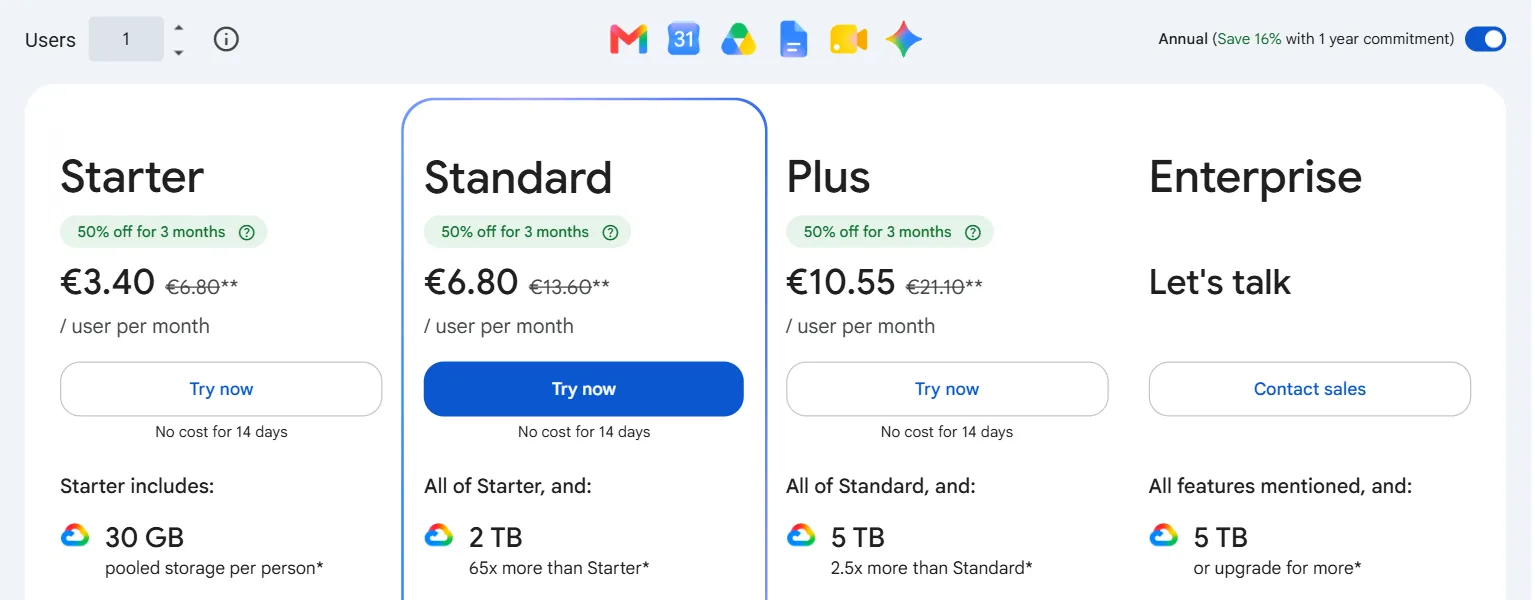
- 1 The annual billing switch changes the price
- 2 Regular Starter price: the crossed-out amount
Microsoft 365 Business plans (€ per user per month, excluding VAT, paid annually, Microsoft Lithuania pricing page, checked October 23, 2026). Business Basic: €6.07 (with Teams) or €4.67 (EEA version without Teams): web and mobile Office apps only, Exchange email, 1 TB of OneDrive, basic Copilot Chat. Business Standard: €12.13, with desktop Word, Excel, Outlook and other apps. Business Premium: €19.06, adding Defender, Intune and Purview protection. Paying monthly, Standard costs €14.56 and Premium €22.87. On its pricing page Microsoft now shows the bundles with Copilot first: Business Standard + Microsoft 365 Copilot Business at €20.36 (€17.58 without Teams) and Business Premium + Copilot Business at €27.73 (€24.94 without Teams). With Copilot Business the AI works inside Word, Excel, Outlook and Teams. The Copilot Business add-on bought separately costs €18.20 (a promotional price of €15.60 applied in October). Without Copilot, the plans include only basic Copilot Chat.
Hidden costs the price list does not mention. With Google: the 30 GB of storage in Business Starter fills up fast in a team that emails a lot, and extra storage or a higher plan costs more. With Microsoft: Copilot appears in the apps only with Copilot Business, so Business Standard with Copilot (€20.36) costs about one and a half times as much as Google Business Standard with Gemini (€13.60). Defender and Intune are only in Business Premium. When you set a budget, count the whole package (office apps, AI and security), not just the price of the base plan.
Google WorkspaceMicrosoft 365
Business Starter / Business Basic
Business Standard / Business Standard
Business Plus / Business Premium
Prices excluding VAT, paid annually, from the pricing pages above (checked October 23, 2026). Microsoft Business Basic is the version with Teams; Copilot Business is not included in these prices.
Gemini vs Microsoft 365 Copilot: which AI is better for business?
What both AI assistants do with email, documents and meetings. Google Gemini (included in Business Standard and higher plans) suggests email replies in Gmail, summarizes long email threads and chat histories, drafts Google Docs from the context you give it and creates Google Meet meeting notes automatically. Microsoft 365 Copilot does essentially the same in Outlook, Word and Teams (emails, documents, meeting summaries), but it needs Microsoft 365 Copilot Business (€18.20 per user per month as an add-on, or a bundle with Business Standard for €20.36, paid annually). The practical takeaway: if AI help with email and documents is your main criterion, Google Workspace Business Standard with Gemini is the more cost-effective choice. More specific examples of Google Workspace AI automation are in a separate article (Google Workspace + AI).
Lithuanian language support matters for Lithuanian businesses. In 2026 both Gemini and Copilot understand and write Lithuanian at an acceptable level. With both, though, complex professional terminology or specific business context needs review and editing. My practical advice: use AI to produce the first version (emails, draft proposals, meeting notes) and always review it before sending. AI works especially well for repetitive templates where the form is fixed and the content changes.
If you mix up the different Copilot products (free Copilot, Copilot in a Microsoft 365 subscription and Microsoft 365 Copilot for work), they are explained in the beginner's guide (What is Microsoft Copilot).
How to connect a CRM: Pipedrive, HubSpot, Bitrix24. Google Workspace connects to HubSpot and Pipedrive through Gmail sync: contacts, emails and activity history sync automatically without complex setup. Microsoft 365 integrates deeply with Dynamics 365 CRM, but Pipedrive or HubSpot often need extra configuration or third-party tools (Make, Zapier). Bitrix24 officially supports both platforms through its integration marketplace. If you use or plan to use Pipedrive or HubSpot, the Google Workspace integration is usually smoother and needs less technical setup. To see how CRM integrations fit into broader automation, read (Process automation).
Collaboration tools: Docs vs Word, Meet vs Teams
Real-time co-editing in Google Docs is the industry benchmark: several people edit a document at once without conflicts, and changes appear without saving. The web version of Microsoft Word also supports collaboration, but version conflicts happen under heavy use, and working with both local copies and cloud versions sometimes causes confusion. Google Meet is simple, runs in the browser without installing anything and is easy for outside participants (customers, partners) too. Microsoft Teams offers more structured project management: channels, files straight from SharePoint, Planner tasks. It is a more integrated collaboration environment. If your team's communication and project management must happen in one structured place, Teams is more powerful. If the main need is fast co-writing of documents and video calls, Google's option is simpler and more intuitive.
Security and GDPR compliance
Both vendors are GDPR-compliant platforms with European data centers, data processing agreements (DPAs) and ISO 27001 certification, so the basic requirements for a Lithuanian business are met on both. There are important differences at plan level, though. Google Workspace Business Plus includes Vault (data archiving and eDiscovery) and more advanced device management, while the most advanced DLP (data loss prevention) features are in the Enterprise plans. On Microsoft, advanced security (Defender, Intune, Purview features) is available at Business Premium or Enterprise level. The practical takeaway: if strict GDPR requirements apply to your work (for example, you handle health, financial or other sensitive personal data), compare the security feature lists of specific plans, because on both platforms stronger protection is only in the higher plans. Either way, talk to your data protection officer about the requirements for specific data categories before choosing a platform.
How hard is migration for 5–30 users?
Moving from free Gmail accounts to Google Workspace Business is technically the simplest: domain setup and MX records take 1–2 working days, and data migration is usually not needed. Moving from Microsoft to Google (or the other way) with existing email history and documents in a 5–30 user company typically takes 5–10 working days: moving email archives (PST to Gmail using the official migration tools), moving OneDrive files to Google Drive and training users in the new environment. A critical detail: if the team uses Microsoft-specific Excel features such as Power Query, macros or VBA formulas, they do not work in Google Sheets, and migration means rebuilding those workflows. Before you plan any migration, audit your workflows first and list the Microsoft-specific features your team uses. Then you can decide with a clear estimate of risk and cost.
- 1Set up the domain and MX records1–2 days
- 2Move email archives2–3 days
- 3Files and access rights1 day
- 4Training, old system runs in parallel1–2 days
A typical timeline from the FAQ section below. If you use Power Query, macros or VBA, you need a workflow audit before these steps.
3 typical Lithuanian business scenarios
Consulting firm, 10 employees. Main needs: writing and editing documents together, video meetings with clients, simple financial planning. The team writes a lot of email and often builds proposals and reports together. Excel is used for simple calculations without complex macros. Recommendation: Google Workspace Business Standard, €136 per month for 10 users with an annual commitment (€162 without a commitment). Gemini will help write proposals, summarize client meeting notes and suggest email replies. A HubSpot or Pipedrive CRM integration will run smoothly. Google Meet for client meetings is simpler than Teams on the client's side, where a Microsoft account is often not needed.
E-commerce, 15 employees. What matters: warehouse management integration, day-to-day WooCommerce or Shopify operations, and a marketing team that uses Google Analytics, Search Console and Merchant Center heavily. Recommendation: Google Workspace Business Standard, €204 per month for 15 users with an annual commitment (€243 without a commitment). The natural integration with Analytics, Search Console and Merchant Center makes daily marketing and e-commerce operations more efficient. Gemini will suggest product descriptions and marketing copy right in Google Docs. Microsoft Teams and Outlook would add extra steps here when connecting to Google's analytics tools.
Manufacturing company (UAB, a private limited company), 25 employees. Main needs: complex Excel supply chain spreadsheets with Power Query, integration with an ERP (Navision, SAP), a Windows Server environment. Recommendation: Microsoft 365 Business Standard, about €303 per month for 25 users paid annually, or Business Premium (about €477 per month) if device management is needed. With the Copilot Business bundle the total rises to about €509 (Standard) or €693 (Premium) per month. Excel features in manufacturing (Power Query, Power Pivot, production planning macros) remain Microsoft's strength, and Google Sheets cannot fully replace them today. ERP integration with the Microsoft ecosystem is usually smoother and needs less extra technical setup than a connection with Google.
Which one to choose for your type of business
In short: choose Google Workspace if your business is built around collaboration, marketing, customer service or e-commerce operations, or if you use Google Analytics and Google Ads every day. Also choose Google if you want AI features (Gemini) without paying for a separate Copilot add-on. Choose Microsoft 365 if you work in manufacturing, finance or law with complex Excel or Word workflows, already have Microsoft server infrastructure or use Dynamics 365 CRM: migration would create more problems than it solves. Either way, if you want AI tools (Gemini or Copilot) to really become part of your team's daily processes and bring measurable value, start with a short message: write to me about which tasks your team does by hand every day. I will read it and reply by email with the AI features that should help you most; if needed, we will set up a call.
FAQ
Can you migrate from Microsoft to Google without losing data? Yes. Email archives, contacts and calendar events move without loss using Google's official migration tools (Google Workspace Migration for Microsoft Exchange). Files from OneDrive or SharePoint move to Google Drive, and most formats (Word, Excel, PowerPoint) are converted to Google formats automatically. However, complex Microsoft-specific features (macros, VBA formulas, Power Query) do not work in Google Sheets and will need rewriting. I recommend auditing your files before migration and identifying the critical documents. For a 20-user company the whole migration typically takes 5–10 working days. To stay safe, never cut off access to the old systems until the new ones are fully tested.
Which AI is better for documents in Lithuanian? In 2026 both Gemini and Copilot handle Lithuanian at an acceptable level, but neither is perfect with complex professional terminology. Gemini (included in Google Workspace Business Standard) writes understandable Lithuanian for emails, proposals and meeting notes, but the final text should always be reviewed. Copilot works with Lithuanian at a similar level. On cost, Gemini is already included in Business Standard, while the Copilot Business add-on costs €18.20 per user per month (paid annually, checked October 23, 2026). For a 20-user company that is about €364 extra per month. If AI for Lithuanian documents is your main criterion, this price difference is a strong argument for Google Workspace.
How long will migration take for a 20-user company? A typical timeline: 1–2 days to set up the domain and MX records and test the new platform; 2–3 days to move email archives (depending on data volume and how many years of mail there are); 1 day to move files and configure access rights; 1–2 days for staff training and adjustment. In total: 5–10 working days. If you use complex Microsoft-specific workflows, you need an extra preparation stage. My recommendation: plan the migration for a quieter business period and keep the old system running in parallel for the first week. That removes the risk of disrupting work at critical moments.