Until early 2025, Gemini for Google Workspace was a separate paid add-on. In January 2025, Google included it in the Business plans and raised the plan prices at the same time: as of October 2026, Business Standard costs €13.60 per user per month (excluding VAT, annual commitment), while the cheapest plan, Business Starter (€6.80), has limited Gemini features (Google Workspace pricing). An IT manager or owner weighing a move to Standard because of Gemini usually asks one question: will it pay off?
This is not Google's marketing copy but a practical review for small businesses in Lithuania: typical scenarios with Gemini in Docs (a draft sales proposal), Gemini in Sheets (Lithuanian data) and Gemini in Gmail (everyday business email), and for Meet, what Google officially supports. The observations are indicative, not lab measurements; results depend on the task, the text and the Gemini version. I explain when Gemini in Workspace is enough and when it is worth considering separate automation with Make.com or n8n. For a broader look at the Google Workspace ecosystem, read the Google Workspace business guide.
This article is about company Workspace accounts. If you want to try Gemini with a personal Google account, start with a simple Gemini guide for beginners.
What is Gemini in Google Workspace (and how is it different from Gemini Advanced)?
First, it helps to separate three things Google calls "Gemini". The confusion raises a lot of questions in business because the product names overlap.
Gemini Free (the personal version). A free AI chat assistant at gemini.google.com. It is a separate tool that is not integrated into your Google Workspace environment. You can ask questions and generate text, but it does not see your Gmail messages, Docs documents or Drive files. It is fine for personal use but gives you no business context.
Gemini in Google Workspace Business plans (included in the plan price). This is what the article is about. Gemini is built straight into the apps you already use: Docs, Sheets, Gmail, Meet and Slides. The AI sees the context of your documents, can suggest text right in the document, analyze Sheets data in plain language, draft replies in Gmail, and transcribe and summarize Meet meetings. The data stays inside Google Workspace and is not used to train the model.
Enterprise plans and Gemini Enterprise. Extra features for large organizations: more advanced data protection policies, extended administration, additional agent scenarios. Most small Lithuanian companies usually do not need this level; the Business plans are typically enough.
The key difference from personal Gemini subscriptions (formerly Gemini Advanced, now the Google AI plans): the Workspace version works with your organization's data and is managed by an admin, while the personal one is a personal assistant. For a business, the Workspace plan is the one that matters.
Gems are being replaced by "skills". If your team uses Gems (saved instructions for specific tasks), note the change: starting in October 2026, Workspace users are getting skills, reusable instructions you can call in the Gemini app and in most Workspace apps, even several in one prompt. In personal accounts, Gems will move to settings on November 17, 2026; in Workspace business accounts they will keep working until at least March 1, 2027. Skills do not yet sync between the Gemini app and Workspace, so it is worth recreating important Gems in advance (Google Workspace Updates, checked on October 23, 2026).
Gemini in Google Docs: what "Help me create" and "Help me write" really do in Lithuanian
In 2026, Google updated Gemini in Docs. "Help me create" is for a new document: you open a blank document, type a prompt and get a formatted draft, for which Gemini can also use your Drive files, emails or chats. "Help me write" edits existing text: you type the prompt in the bar at the bottom of the document or in the side panel, and the suggested changes are visible only to you until you accept them. One important detail: Google officially lists 19 supported languages, and Lithuanian is not among them yet (Workspace Updates, July 2026). Prompts in Lithuanian usually work, but the quality is not guaranteed.
A typical scenario: a project manager has to prepare a draft sales proposal for an IT services client. They open a blank Docs document and type into the "Help me create" field (in Lithuanian): "Write a draft sales proposal for an IT audit service for an accounting firm with 20 employees, budget €3,000–5,000."
What to expect: within a few seconds Gemini generates a structured draft with sections such as "Project scope", "Methodology", "Pricing" and "Other terms". The text is in Lithuanian and fairly fluent, but you may run into problems: an Anglo-Saxon structure (bullet points instead of flowing text), terms that sound like unnatural translations from English, prices in the wrong currency. These are signs that the model is not specifically adapted to the Lithuanian business context, so the draft always needs a review.
Where Gemini in Docs really helps: polishing existing text through the "Help me write" bar. When a proposal is almost written and you ask it to "make it more professional and shorter", the result is usually better than when generating from a blank page. Translation from English into Lithuanian also works well, a real time saver for team members who receive documents in English. In short: for drafts, a quick starting point that always needs editing; for polishing and translation, genuinely effective.
Practical advice: use Gemini in Docs as a draft generator, not as the final author. Preparing a document can get noticeably shorter if you spend the time on careful editing instead of writing from scratch; how much shorter depends on the type of document.
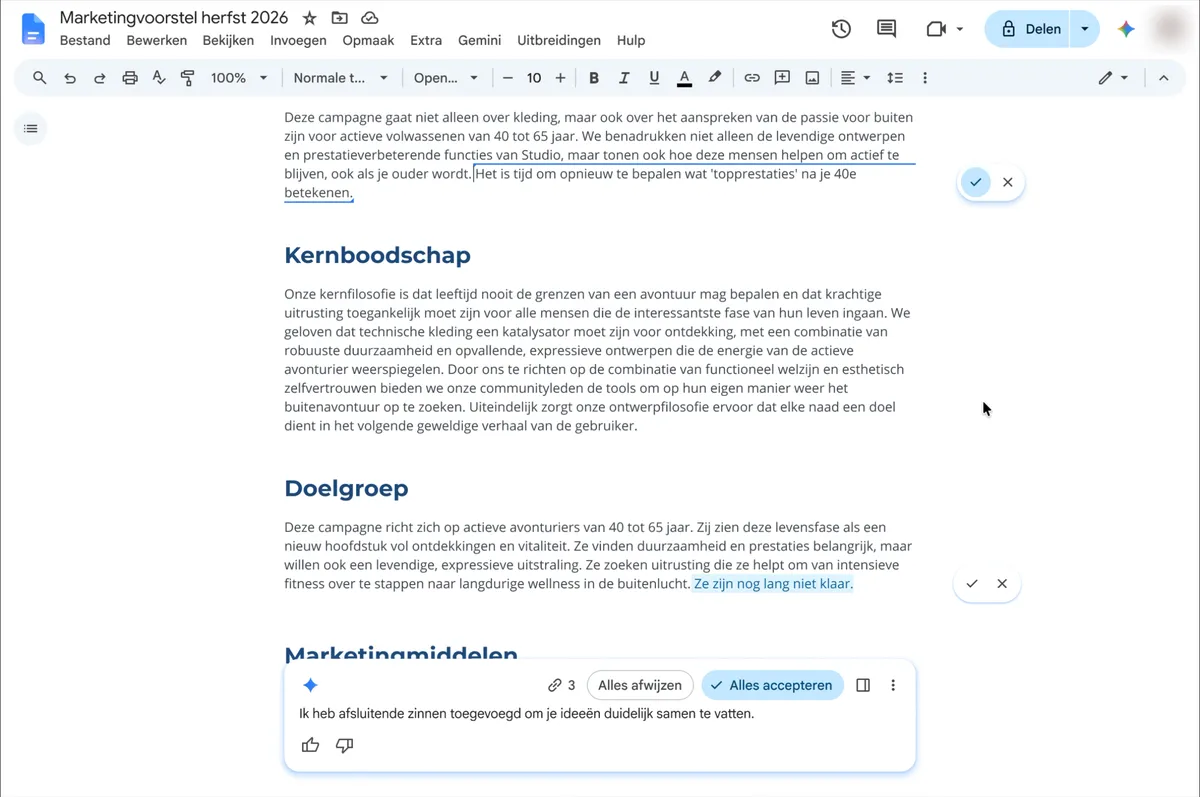
- 1 The Gemini bar at the bottom of the document: type your prompt here
- 2 Accept (✓) or reject (✕) a single suggestion
- 3 Reject all / Accept all: reject or accept every change
- 4 Ask Gemini: opens the Gemini side panel
Gemini in Google Sheets: AI formulas instead of VLOOKUP – do they work with Lithuanian column names?
The Sheets integration works through the Gemini side panel or directly in a column. Two typical scenarios: building a formula in plain language and summarizing data.
Building formulas. Say you have a sales report with columns for "Customer", "Region", "Amount EUR", "Date" and "Sales rep" (named in Lithuanian), and you ask: "Create a formula that adds up the total for Vilnius region deals in October." For a task like this, Gemini usually suggests a SUMIFS formula with the column references. Questions phrased in English tend to work more reliably; Lithuanian column names with diacritics (ė, ą, ų) can sometimes cause recognition errors, so always check the formula. My advice: ask Gemini for formulas in English, or rename the columns without diacritics beforehand.
Data analysis. This is where Gemini in Sheets shines most. Give it a sales table and ask "which 3 customers brought in the most revenue last year?", and within seconds Gemini returns a structured answer with a summary and highlights the trends. That is a tangible time saving: a quick analysis that takes a fair amount of time by hand can be ready in a few minutes (the result is still worth checking).
Practical value: Gemini in Sheets works best for data analysis and summaries, especially for managers without deep Excel/Sheets skills. It does build formulas, but Lithuanian specifics need extra attention.
Gemini in Gmail: email summaries and reply drafts – when they help and when they hurt
The Gmail integration offers two main features: summarizing long email threads and drafting replies. The experience differs between the two.
Email summaries: a real benefit. When a thread runs to 15–20 messages written by different people at different times, the summary feature works very well. In one sentence or a short list, Gemini pulls out the key facts: who proposed what, which decisions were made and which actions are expected. In long project coordination threads, a summary can save a few minutes of reading (important details are still worth checking in the original). This is the feature that helps most in day-to-day work, especially for managers coming back from a vacation or meetings.
Reply drafts: use with care. Gemini suggests an automatic reply draft by analyzing the content of the incoming email. In English, the drafts usually have the right tone and structure. In Lithuanian, the text is grammatically correct but sometimes too formal or too "corporate" for Lithuanian business relationships. In sensitive negotiation or relationship-based emails, always edit and add a personal touch. I strongly advise against sending Gemini-generated replies without reviewing them, especially to customers.
When Gemini in Gmail really helps: catching up on threads quickly after a few days off; preparing a standard informational reply with factual data; translating emails from English or German. When you are better off without it: sensitive communication with unhappy customers; negotiating terms or prices; personal relationships with long-term partners.
Gemini in Google Meet: does transcription and note-taking work in Lithuanian?
Meet transcription and automatic meeting notes ("Take notes for me") are among the most promising Gemini in Workspace features. But teams that speak Lithuanian face a major limitation worth knowing before buying a plan.
Lithuanian is not supported yet. As of October 2026, Google Meet transcripts support eight languages: English, French, German, Italian, Japanese, Korean, Portuguese and Spanish (Google Meet Help). Lithuanian is not on the list, so Gemini in Meet is currently not a reliable tool for transcribing Lithuanian meetings or producing their notes. The feature is useful for meetings with foreign partners held in one of the supported languages.
What to do with Lithuanian meetings. For Lithuanian transcription you need a separate speech recognition tool that supports Lithuanian, and a summary and task list can then be prepared from the transcript with a language model in an automation workflow (for example, in n8n). In that case, too, treat the notes as a working basis rather than a final document; editing is still needed.
Practical advice: before calculating the benefit of Gemini, check which language your meetings are held in. If it is Lithuanian, leave Meet notes out of the payback calculation. For other Google Workspace automation options, see the article with practical examples.
Gemini vs Make.com / n8n: when Workspace AI is enough and when you need separate automation
Gemini in Workspace is built in, convenient and needs no technical setup. Make.com and n8n are more flexible but take setup. Where is the line between the two?
When Gemini in Workspace is enough: if your needs are text-based and stay within the Google ecosystem: drafts, summaries, formulas, notes. No coding, no API keys, no maintenance. It is a plug-and-play option for a team that wants to save time on daily work without investing in technical infrastructure.
When you need Make.com / n8n: when the workflow has to connect several different systems, for example when a new lead in the CRM should automatically create a proposal from a Google Docs template, send a Slack notification and create a calendar event. Gemini cannot run multi-system flows like that without a person stepping in. The same goes for scheduled runs (every night, every week), conditional logic (if/else) or integrations with non-Google systems (CRM, ERP, e-commerce). In these cases, Make.com or n8n offer far more.
- 1A new lead appears in the CRMCRM
- 2A proposal document is created from a templateGoogle Docs
- 3The team gets a notificationSlack
- 4A meeting appears in the calendarGoogle Calendar
Make.com or n8n run a chain like this without a person stepping in; Gemini can help write the proposal text itself.
A hybrid is usually the right answer. For most Lithuanian businesses, Gemini in Workspace and Make.com or n8n are not alternatives; they complement each other. Gemini handles everyday writing and analysis right inside the apps. Make.com or n8n run the more complex multi-system workflows. Together they cover the full picture. For specific process automation scenarios, see the business process automation service.
How much does Gemini in Google Workspace cost, and when does it pay off for a 5-person company?
Let's finish with numbers. Since Gemini is now included in the plan, the real question is whether to pay for Business Standard (€13.60 per user/month) instead of Business Starter (€6.80 per user/month), where Gemini features are limited (prices exclude VAT, annual commitment, as of October 2026). For a team of 5, the difference is €34 a month, or €408 a year. When does that investment pay off?
Payback calculation (illustrative). Say an employee hour costs the company about €15 (an indicative assumption; estimate it from your own salaries, Sodra contributions (Lithuanian social insurance) and overheads). For €34 a month to pay off, the whole 5-person team needs to save at least 2–3 hours a month, which is less than an hour per person per month.
Illustrative scenario: a project management team (5 people). The team writes proposals and emails every day and analyzes Sheets reports. Gmail summaries help them catch up on long threads faster, Docs drafts shorten writing the first version, and Sheets gives quick reports. If each person saves at least an hour a month, the 2–3 hour threshold is reached. Notes from Lithuanian Meet meetings are not included in the calculation, because Lithuanian is not supported in Meet transcripts.
When Gemini does NOT pay off: if the team uses Google Workspace minimally (only Gmail and Calendar), if employees do not want to or have no time to learn new tools, or if the main processes are not text-based (manufacturing, logistics, technical work). Also, if only 1–2 out of 5 employees would actively use Gemini, it is more efficient to change the plan structure than to pay for everyone.
Recommendation: before turning Gemini on for the whole team, run a 30-day pilot with the 2–3 most active users. Measure how many hours are actually saved, and only then decide on a wider rollout. Often a few of the most active users get the most value, while for the rest of the team a simpler training investment would give a better return.