"We already have Microsoft 365. Is it still worth paying for Slack?" Lithuanian business owners ask this question often. Others ask the opposite: "The team wants Slack, but the IT manager says Teams is enough." Both come down to the same decision: picking a communication platform that does not cost too much, does not hurt productivity and does not load employees with a new tool that has no clear benefit.
In 2026 both tools have built-in AI assistants, better video features and broad integration options. But the gap between them has not disappeared; it has moved to other areas: AI quality, licensing logic and the integration ecosystem. In this article you will find concrete prices with Lithuanian VAT, a feature comparison table, an analysis of Copilot vs Slack AI and a clear migration plan for a company (UAB) with 15–80 employees.
Quick verdict: which one fits whom
If you do not have time to read the whole article, here is the core decision table by situation:
| Situation | I recommend | Main reason |
|---|---|---|
| You already pay for Microsoft 365 | Teams | Included in the license, no extra cost |
| Tech team + active integrations | Slack | A very wide integration catalog and a more flexible API ecosystem |
| A team of 20+ people, mixed use | Compare the AI features | Copilot vs Slack AI: the difference is substantial |
| Many external partners and clients | Teams | Guest access and federation at no extra charge |
| Workflow automation with n8n | Slack | Deeper support for webhooks and the Bot API |
| Just starting to digitize communication | Teams (Free) | A free plan, integrated with Outlook |
How much do Slack and Teams cost? Pricing in real numbers
Important: in the European Economic Area, Microsoft 365 Business plans come in two versions, with Teams and without Teams (the latter are cheaper). If your company already has a Microsoft 365 plan with Teams, you do not pay extra for Teams. Slack is a separate service with its own licensing. Below are prices excluding VAT and with the 21% Lithuanian VAT (which applies to electronic services):
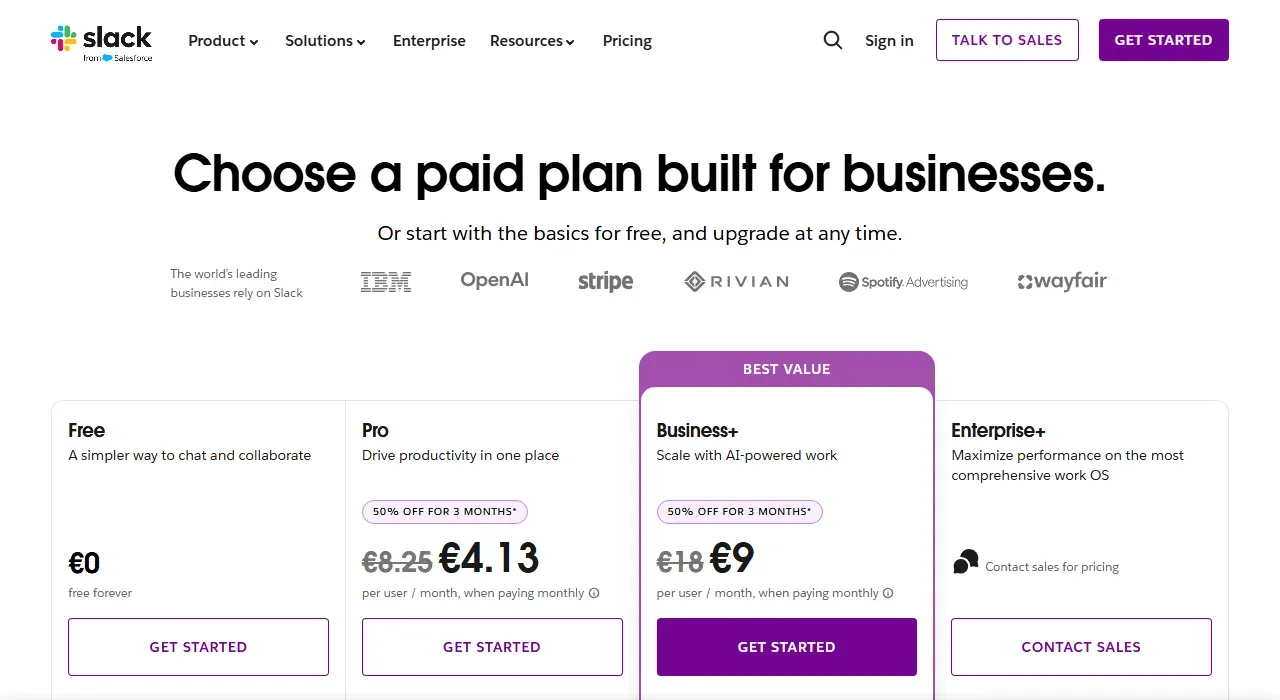
- 1 Pro: €8.25 per user per month (without the discount)
- 2 Business+: €18 per user per month (without the discount)
| Plan | Price/user/month (excl. VAT) | With 21% VAT | 50 employees/year |
|---|---|---|---|
| Microsoft 365 Business Basic | €6.07 | €7.34 | €4,407 (Teams included) |
| Microsoft 365 Business Standard | €12.13 | €14.68 | €8,806 (Teams included) |
| Microsoft 365 Business Premium | €19.06 | €23.06 | €13,838 (Teams included) |
| Slack Pro | €6.75 | €8.17 | €4,901/year |
| Slack Business+ | €15.00 | €18.15 | €10,890/year |
| Teams Free | €0 | €0 | €0 (limited features) |
Slack prices are from Slack's euro price list, billed annually (checked on October 23, 2026); billed monthly, Pro costs €8.25 and Business+ €18. Microsoft 365 prices are from Microsoft's Lithuanian pricing page, plans with Teams, billed annually (checked on October 23, 2026); the EEA versions without Teams are cheaper, and the price may differ if you buy through a partner.
The practical takeaway: if your company already pays for Microsoft 365 Business Basic (€7.34 per user/month with VAT), the extra cost of Teams is zero. Adding Slack Pro (€8.17 per user/month with VAT, billed annually) on top of your existing Microsoft 365 means a 50-person company would pay about €4,900 a year extra for a parallel communication platform. That figure is an important decision point: do Slack's advantages justify this amount for your specific use case?
MonthlyAnnual
Slack Pro
Slack Business+
Prices excluding VAT from the table and the note above (checked on October 23, 2026).
Slack vs Teams features: where each falls short and where it wins
| Feature | Slack | Microsoft Teams |
|---|---|---|
| Channels and threads | ★ The best on the market: threads are well organized | ★ Channels work; threads are less intuitive |
| Video calls | Good (Slack Huddles), but not its main strength | ★ Wins: Teams Meetings is a B2B leader |
| Screen sharing | Standard, works well | ★ Wins: more control, Together Mode |
| Number of integrations | ★ A very wide app catalog (Slack Marketplace) | A wide app catalog, but building integrations is harder |
| Message search | ★ Precise, with filters and channel context | Works, but contextual filtering is less precise |
| AI features | Slack AI (conversation summaries, channel context) | ★ Microsoft 365 Copilot (deeper, Office integration) |
| Mobile UX | ★ A cleaner, faster mobile app | Works, but harder to navigate on mobile |
| External guests | Slack Connect (a paid add-on on some plans) | ★ Guest access included as standard |
AI agents in 2026: Copilot in Teams vs Slack AI
AI assistants became the main selling point for both platforms in 2025–2026, and the difference here is significant.
Microsoft 365 Copilot
Microsoft 365 Copilot is bought on top of a Microsoft 365 license: the Copilot Business plan for small and mid-sized companies (up to 300 users) costs €18.20 per user/month excluding VAT, billed annually, on Microsoft's Lithuanian pricing page (a promotion in October 2026 brought it to €15.60; checked on October 23, 2026). The advantage is that Copilot works across the whole Microsoft ecosystem: in Teams chats, Outlook emails, Word documents, Excel sheets and OneNote notes. Concrete actions it can take: a meeting summary with a list of decisions at the end of a Teams meeting, pulling the gist out of a long email directly in Outlook, generating a document draft from the context of a Teams chat. This is valuable if the team works with Office documents and Teams calls every day. The downside is the significant extra cost (about €10,920 a year excluding VAT for 50 users), and Copilot's quality depends directly on whether the company actively uses OneDrive and SharePoint storage.
Slack AI
Slack AI (according to Slack, since August 2025 the advanced AI features have been included in the updated Business+ and Enterprise+ plans instead of being sold separately) is specialized for channel communication: conversation summaries, a summary of channel context for a new employee with the "Catch me up" feature, and AI-assisted search. Its strength is that Slack threads and channels are the natural environment for Slack AI. The downside is that Slack AI does not work with emails, documents or spreadsheets the way Copilot does. If your communication mostly happens in Slack channels and documents are stored in Google Workspace, Slack AI is the more precise choice at a lower price. If the company uses Office documents and Teams meetings, Copilot gives more integrated value.
Slack and Teams integrations with business tools used in Lithuania
Another important criterion is how the platform integrates with the business tools common in Lithuania and with the most popular B2B systems.
Pipedrive
Pipedrive has official integrations with both Slack and Teams. Slack integration: an automatic channel notification when a deal moves to a new stage, and a direct message to the sales rep when a lead is assigned. Teams integration: similar, but the message formatting is less flexible. In comparison, the Slack integration with Pipedrive is more flexible: you can configure which channels show which deals by stage or by the responsible rep.
B1.lt (Rivile) and Apskaita5
Neither B1.lt nor Apskaita5 (Lithuanian accounting programs) has official integrations with Slack or Teams. However, an n8n workflow solves this for both platforms: a B1.lt or Apskaita5 webhook → n8n → a Slack channel or a Teams channel. A practical example: a new paid invoice in B1.lt → an automatic notification to the accountant and the director in the chosen channel. For this scenario Slack has slightly more flexible webhook formatting options, but Teams also works well with an n8n integration.
Notion and Jira
Notion and Jira have official integrations with Slack: notifications, page updates, Jira ticket status messages. The Teams integration with Notion is more limited (through Power Automate); with Jira it is official and works well. If your tech team uses Jira as its main project management system, the Teams and Slack integrations are equivalent in this case.
GitHub
GitHub has official Slack and Teams apps. The Slack integration has historically been stronger: more flexible event filtering and better Markdown rendering in GitHub notifications. If your developer team actively uses GitHub AND a communication platform, Slack is the more natural pairing.
How to migrate to Slack or Teams: a realistic 4-week plan
If you have decided to switch platforms or roll out a new communication tool, here is a 4-week migration plan that suits a company with 15–80 employees:
Week 1: communication audit
Before any migration, understand how you communicate now. How many team members use email as their main channel vs separate messages on their phones (Viber, WhatsApp)? Are there formal channels for projects, or does everything happen in private messages? Which integrations are used most? This audit helps you identify real usage patterns and avoid a situation where the new platform is technically in place but the team keeps communicating by email "because it is easier".
Week 2: designing the channel structure
The channel structure is the single most important factor in a communication platform's success. Set a clear logic from the start: #announcements (only management posts), #projects-{name} for each active project, #clients-{name} for each important client's communication, #tech-support, #time-off-and-notices. The most important rule: no more than 15–20 channels at the start. With too many channels the team finds information harder than in email and goes back to the old habit.
Week 3: integrations and automation
Set up three priority integrations that show value right away: (1) CRM → a channel notification when a deal is won or lost (the team sees the real pulse of the business); (2) the project management tool → ticket status updates to the relevant channels; (3) monitoring → alerts to the tech support channel (server errors, sales system notifications). These three flows show that the platform is more than messaging: it becomes the team's information hub.
Week 4: training and a retrospective
Run a 30–45 minute training for all employees: how to write channel messages vs direct messages, how to use threads for replies (important: threads are probably the most ignored feature in the first month), and how to set up notification filters so they are not annoying. After 4 weeks, hold a quick retrospective: which channels everyone uses, which ones nobody uses, and whether any information is harder to find than before. The retrospective helps you fine-tune the structure before habits set in.
When does a hybrid setup (Teams + Slack) make sense?
In some companies both platforms are used in parallel, and that is not unavoidable chaos as long as there is a clear logic. A hybrid setup makes sense when a company has two different types of departments with different communication needs.
The tech team uses Slack: developers, designers and the product team spend most of their time in Slack channels: GitHub notifications, Jira tickets, deploy alerts, technical discussions. Slack's integration ecosystem and Slack API beat Teams in this context.
Everyone else uses Teams: sales, finance, HR and admin teams that work with Office documents and Outlook email get more value from Teams and potentially from the Copilot integration.
The risk of a hybrid setup is that important decisions and information get scattered across two platforms. If you choose a hybrid model, set a clear rule: all communication that matters to the company (decisions, client situations, escalations) must happen on ONE platform, usually Teams. Slack stays the technical platform.
Team size: which platform fits better?
5–15 employees. What matters most is whether the team will actually start using the tool. Slack's interface is more intuitive: teams usually get up to speed in 1–2 weeks without special training. Teams needs a bit more onboarding, especially for people who are not active Office users. If you work in Google Workspace, it is usually Slack; if in Microsoft 365, Teams at no extra cost.
15–50 employees. Admin tools start to matter. Teams has a more mature IT admin console: user management, security policies and Microsoft Entra ID integration work more smoothly. Slack is simpler to administer and takes less IT specialist time, but it offers fewer options for large organizations.
50+ employees. Teams usually wins here: telephony, large online events, compliance tools and Teams Rooms for meeting rooms. Lithuanian companies of this size usually already use Microsoft 365, so Teams becomes a natural part of the ecosystem. Slack Enterprise Grid offers similar capabilities, but at a considerably higher price.
Is Slack or Teams better for security and GDPR?
Both platforms, Slack and Teams, meet GDPR requirements and offer data storage in EU data centers. A few important differences:
Data residency: Microsoft Teams, through Microsoft 365, lets you specify exactly which EU data center stores your data, which matters for companies in regulated industries (finance, healthcare). Slack also offers an EU data residency option, but only on higher plans; check Slack's price list for which plans include it before you buy.
MFA and SSO: both tools support multi-factor authentication and Single Sign-On. In Teams, MFA is configured through Microsoft Entra ID (Azure AD), the central user management system for the whole Microsoft ecosystem. In Slack, SSO is available on Business+ and higher, with SAML 2.0 support.
DLP and compliance tools: the Microsoft 365 Compliance center gives granular control: you can set rules so that certain types of data (e.g., IBAN numbers) cannot be sent in Teams channels without encryption. Slack also offers DLP integrations, but through third-party tools (Nightfall, Symantec) rather than built in.
Aigentas: Slack and Teams automation with n8n
Whichever platform you choose, the biggest extra value comes from connecting it to your business processes: not just messaging, but automated flows such as CRM → channel, client notifications → the right sales rep, and internal alerts based on business conditions.
Aigentas.lt sets up Slack and Teams integrations with n8n, connecting your communication platform to the tools you already use:
Lead automation: a new contact form on your website → n8n → a direct notification to a Slack/Teams channel with the lead's details and a Pipedrive link, so the sales rep reacts within minutes, not hours. At the same time, the CRM creates the contact automatically. More: CRM automation for small businesses.
- 1A customer fills in the website form
- 2The data is passed onn8n
- 3A contact is created in the CRMPipedrive
- 4A channel message with a link to the leadSlack · Teams
Client notifications: I connect your customer service tools (Intercom, Freshdesk, email) with Slack/Teams so that critical escalations automatically land in the right channel or in a DM to the person responsible, with no manual forwarding.
Business metric alerts: a weekly sales summary posted automatically to the management channel; an alert if daily revenue drops below a set threshold; a notification when an important client's contract is nearing its end. All of it automatic, with no manual spreadsheet work.
More on automation options: Google Workspace automation with n8n and Gemini and Google Workspace agents in business.