An illustrative example: Tomas is the sales manager at an 18-person IT solutions company in Vilnius. His Excel file holds 340 contacts, colored columns show who needs a call, and every Monday morning went into sorting rows and trying to remember which client asked to be contacted again in two weeks. Last quarter he lost a €4,800 deal because the follow-up got stuck behind three other urgent jobs. Another salesperson emailed the same contact on the same day: no coordination, no sync. This is typical for small companies: the business grows fast, while the tools stay at student level: Excel, email and memory.
A CRM (customer relationship management) system does not solve these problems on its own. A CRM with automation does. In this article I cover when Excel really is too small, what actually gets automated in a CRM, how the four most popular tools for 10–30 person companies compare, and how to set up a working sales automation package in 30 days. Concrete numbers, not marketing copy.
When is Excel no longer enough? 5 signs you need a CRM
Excel is a great tool for storing data. It is not a sales tool. The difference is like a notebook versus a CRM: both hold information, but only one actively reminds, tracks and automates. Here are five signs it is time to switch:
1. More than 200 active contacts
Up to 100–150 contacts, an experienced salesperson can remember the important details about each one. Above 200, that stops working. Context has to be written down, and Excel has no structured fields for conversation history, linked emails or task creation. Every search for "what did we talk about three weeks ago" costs 10–15 minutes.
2. Three or more salespeople work with the same clients
When salespeople share a contact base, Excel becomes a coordination disaster: two salespeople contact the same client with different terms, nobody knows who "owns" a given client, and the reports do not match. A CRM with roles and lead assignment solves this automatically.
3. Follow-ups are missed regularly
If at least once a month you remember a client only after they have signed with a competitor, that is not human error: it is a system error. A CRM automatically creates a "contact in X days" task and sends a reminder by email or message. You do not need to remember; the system does.
4. The sales forecast is a guess, not a number
If the manager asks "what is this month's forecast?" and the salespeople answer from gut feeling rather than data, the company is flying blind. A CRM pipeline shows the probability and stage of each deal, rolls up the forecast automatically and shows where action is urgently needed.
5. Sales reports take 4+ hours a week
If Monday morning starts with sorting Excel and building summaries before the management meeting, that is time taken straight out of selling. An automated CRM generates reports in real time, with no manual work.
What does CRM automation actually automate?
"CRM automation" is not one thing but several different levels. The most important ones:
Capturing leads from forms
When a website visitor fills in a contact form, the lead appears in the CRM automatically with full context: which page they came from, which form they filled in, which device they used. The salesperson no longer has to copy data by hand; the system does it in seconds. An n8n or Make.com integration lets you connect any form (Typeform, Google Forms, your website contact form) directly to the CRM.
Assigning leads to salespeople
Based on predefined rules (industry, company size, region, answers to a qualifying form), the system automatically assigns the lead to the right salesperson and sends them a reminder. The manager no longer splits leads by hand, and salespeople no longer argue over who "takes" a client.
Follow-up sequences
When a lead moves to a certain stage, the system automatically creates a "contact in 3 days" task, and if the task is not completed, it alerts the manager. You can set up automatic email sequences: a welcome email, a follow-up after 7 days, useful information shared after 14 days.
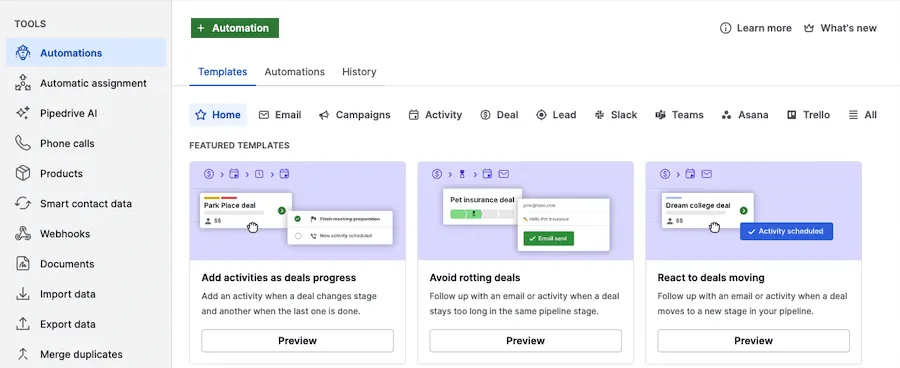
- 1 Automations: the automation section in the "Tools" menu
- 2 + Automation: a new automation from scratch
- 3 A ready-made template: an activity when a deal moves to the next stage
Deal stage changes and onboarding
When a deal is marked "won", a client onboarding flow is triggered automatically: a task for the delivery team, a welcome email to the client, and a new account with the client's details in the CRM. No manual coordination between sales and delivery.
Automatic reports
Every Monday the manager receives a weekly sales summary by email: new leads, conversion rates, stalled deals, pipeline value. Nobody prepares an Excel file; the system generates it automatically.
Pipedrive vs HubSpot vs Bitrix24 vs Salesflare: which CRM suits a 10–30 person company?
There are hundreds of CRM systems on the market. Here are four concrete options that suit a Lithuanian company (UAB or MB, i.e. a private limited company or small partnership) with 10–30 employees:
Pipedrive: from ~$14 per user/month, prices change
The best choice when the main need is a visual pipeline and tracking salespeople's activity. Intuitive, quick to set up, integrates with n8n and Make.com. Automation features are moderate, fine for simple follow-up flows. GDPR data on EU servers. No Lithuanian interface, but the interface is simple. I recommend it for 5–20 person companies with a clear sales process.
HubSpot CRM: free plan; Professional from ~$90 per seat/month, prices change
The best choice when you need CRM and marketing automation in one. The free version is fine to start with. The Pro plan unlocks powerful sequence automation and lead scoring. It integrates with email campaigns and has excellent n8n and Make.com connectors. EU data region for GDPR: yes. The downside: the full automation version is expensive.
Bitrix24: limited free plan; paid plans from ~€49/month for the whole team, prices change
The best choice when you need CRM, task management and an intranet in one. It has the most features but is also the most complex, and training takes longer. Automation is strong, with built-in robots and an API. Lithuanian interface: no, but there is a Russian one (relevant for Eastern markets). I recommend it for 15–50 person companies that want one tool for everything.
Salesflare: from ~$29 per user/month, prices change
The best choice for B2B sales teams that want minimal manual data entry. The system automatically collects contact details from emails, LinkedIn and the calendar, so salespeople hardly need to type anything. Automation features are basic, but an n8n integration lets you extend them. I recommend it for 5–15 person B2B companies that negotiate a lot by email.
The main selection criterion is not price but whether the team will actually use the CRM. The most expensive CRM is the one your salespeople stop using after three weeks.
How to implement a CRM in 30 days: a week-by-week plan
A CRM rollout does not have to take four months. Here is the four-week plan I use with 10–30 person Lithuanian companies:
Week 1: data import and audit
The first week is about cleaning and importing data. You export contacts from Excel, delete duplicates (there are often quite a few) and standardize field names. Then you run the initial import into the chosen CRM. The goal is not full automation but a tidy start: all contacts in the CRM, each assigned to a salesperson, and pipeline stages that reflect your real sales process.
Week 2: pipeline and custom fields
In the second week you configure the sales process inside the CRM: define the stages (for example, "New lead" → "First contact" → "Proposal sent" → "Negotiation" → "Won/Lost") and create custom fields that matter for your business (for example, company size, industry, budget). Most importantly, do not create too many fields: 5–7 essential ones are better than 30 rarely used ones.
Week 3: automation flows with n8n or Make.com
In the third week you connect the website form to the CRM, set up lead routing and the first email sequence flows. With n8n you can build a full automation package without an expensive CRM Enterprise plan: form → CRM → lead scoring → salesperson task → welcome email, the whole flow in one n8n workflow. More about n8n in n8n automation in Lithuania: practical cases.
Week 4: reports and team training
The fourth week is for setting up dashboards and training the team. Two hours of training for the salespeople (not the IT team), after which they know how to add a new contact, how to move a deal between stages and how to write a call summary. After 30 days you should have a working CRM with at least three automated flows and an automated weekly report.
5 CRM automation flows to set up first
Not all automation flows create the same value. Here are five that consistently have the biggest impact for small companies:
1. Website form → CRM with lead scoring
Every completed form automatically creates a CRM lead with a points system: a company with >50 employees gets +20 points, mentioning a specific budget +15, coming from the home page +10. The highest-scoring leads are automatically assigned to a senior salesperson; the rest go to a junior or into a nurturing sequence. The salesperson gets a list sorted by priority instead of an endless stream of identical leads.
- 1A visitor fills in the website formWebsite / Typeform / Google Forms
- 2A lead is created in the CRM with its sourcen8n / Make.com → CRM
- 3Lead scoring: points by rulesSize, budget, page
- 4A task for the right salespersonHigh score: senior; others: junior or a sequence
- 5The client gets a welcome email within 5 min
What the article describes in week 3 of the rollout: the whole chain fits into one n8n workflow.
2. New lead → automatic welcome email
Within five minutes of submitting the form, the client receives a personal email (informational, not promotional): confirmation that the request was received, the expected response time and a short company introduction. According to a study published in Harvard Business Review in 2011, companies that tried to contact a potential customer within the first hour were nearly 7 times more likely to qualify the lead (have a meaningful conversation with a decision maker) than those that tried even an hour later (HBR, "The Short Life of Online Sales Leads"). An automatic welcome email guarantees a fast first response every time, even when the salesperson is having dinner.
3. Lead inactive for 14 days → reactivation email
If a lead has not moved to the next stage for 14 days and there has been no contact, the system automatically sends the salesperson a reminder and the client a nudge: "is this still something you need?" With one button the client can renew contact or say goodbye. This single flow often cuts the number of "forgotten leads" considerably.
4. Deal "won" → onboarding sequence starts
When the salesperson marks a deal as won, the system automatically sends the client's details to the delivery team, creates a first-meeting task, emails the client a welcome message with a detailed onboarding plan and sets a 7-day reminder to check the status of the first call. The handover from sales to delivery becomes automatic, with no information lost.
5. Monthly sales report → the manager's inbox
On the first Monday of each month the manager receives an automatic report: new leads, conversion at each stage, the top 5 stalled deals by value, team activity metrics. Nobody builds the report by hand: the system pulls the data from the CRM, formats it and sends it. More on business process automation: business process automation with n8n and Make.com.
How much does a CRM really cost in Lithuania? Licenses, setup and training
Real costs differ from what CRM vendors show on their websites. Here is a full calculation for a 15-person company:
An illustrative ROI calculation: if the sales team saved, say, 5 hours a week of manual admin work and the CRM helped you avoid forgetting at least one extra deal per quarter (for example, worth €2,000–5,000), the investment could pay for itself within a few months. The real result depends on your deal values and volume.
Common CRM implementation mistakes in small companies
Most CRM rollouts fail not because of a technical problem but because of organizational mistakes. Here are the four that come up most often:
1. Too many custom fields from day one
"We will need to track 40 different data points about each client", and the CRM turns into a bureaucratic system that salespeople abandon within a month. Start with 5–7 essential fields and add new ones only when the need is obvious. An empty field implies it has to be filled in, and over time that discourages people from using the system.
2. No clear responsibilities for salespeople
If salespeople do not know exactly what they must enter into the CRM and when, the system stays half-finished. Define it clearly: after every call, log a summary (max. 3 sentences); after sending a proposal, change the stage; after a rejection, mark it "Lost" with a reason code. Three rules, not three hundred.
3. No data cleanup before the import
An Excel import full of duplicates, outdated contacts and non-standard fields creates a chaotic CRM from day one. Before importing, set aside one day for data cleanup: remove duplicates, standardize company names, check the format of email addresses. It is worth it.
4. Ignoring the mobile version
Salespeople often enter information right after a call, and they do it on the phone. If the CRM you chose has a poor mobile app, salespeople will not log information on time. Check the mobile experience before you buy, not after.
How Aigentas helps: CRM audit and n8n automation package
Aigentas.lt works with 10–50 person Lithuanian companies that want to set up a CRM and connect it to automation flows. The standard process:
Initial discussion (free). You write how you sell today, which tools you use and what gets in your team's way the most. I read it and reply by email with which CRM and which three flows I would choose first; if more detail is needed, we arrange a call.
Basic CRM + automation package. Includes CRM configuration, data import, building three core n8n flows (form → CRM, welcome email, weekly report) and two hours of team training. Price: from €450. Set up within 30 days.
Full automation package. In addition: lead scoring, reactivation sequences, onboarding triggers and integration with your accounting software. Price: from €1,800. Suitable for companies that want to fully automate their sales pipeline.