Slack is a work chat app where a team writes to each other in channels by topic (#sales, #projects), shares files, makes calls and gets automatic notifications from other systems. Put simply, it is like WhatsApp but built for work: with a clear history, search and integrations with your CRM, Google Drive or Jira. The Slack app works in the browser, on Windows, Mac and Linux computers and on iOS and Android phones; the free plan is enough for a small team to try it out.
Unlike email, Slack lets you reach people instantly and organize conversations by topic (channels): #marketing, #finance, #projects and so on. This is especially useful when the team works remotely.
How does Slack work in practice?
Slack is organized into channels. A channel is a place for one specific topic: #general-news for team announcements, #project-abc for discussions about that project, #sales for the sales team. Direct messages are for private conversations.
You can use Slack in a browser, on your phone or on a desktop computer. Integrations with Google Drive, Notion, Trello, Zoom and hundreds of other tools mean notifications can arrive automatically: for example, when the CRM gets a new lead, the team immediately gets a Slack notification.
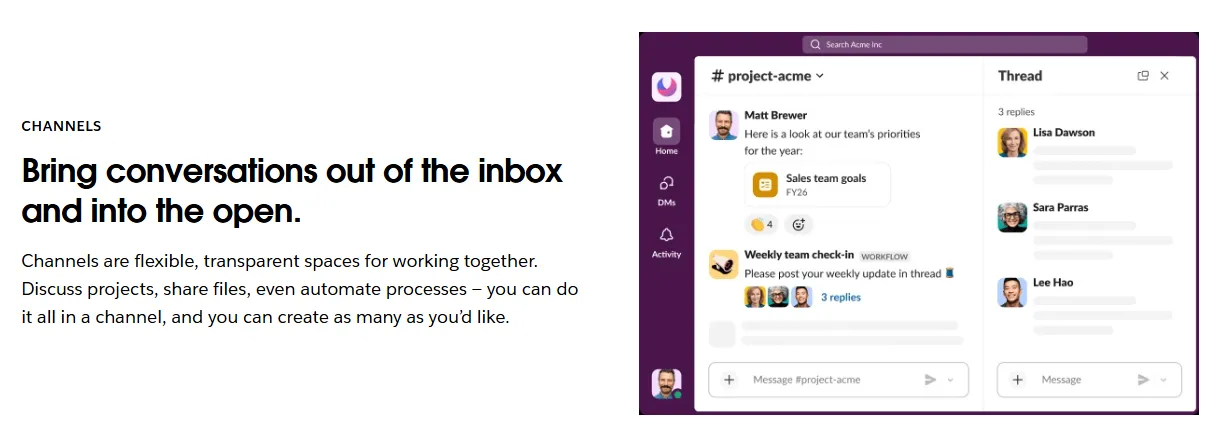
- 1 A channel for one topic or project
- 2 An automatic message (Workflow, paid plans only), e.g. a weekly reminder to the team
- 3 Thread: replies to one message do not mix with the whole channel
How much does Slack cost in 2026?
Prices from Slack's price list in euros (checked October 23, 2026, excluding VAT): Free – €0, messages visible and searchable for 90 days, up to 10 connected apps, calls between two people only. Pro – €6.75/user/month billed annually or €8.25 billed monthly: full history, unlimited integrations, group calls and Workflow Builder automations. Business+ – €15 (annual) or €18 (monthly): SSO, data export, higher security. Enterprise+ – on request.
Most small business teams start on the free plan and move to Pro when they start missing older history. For a team of 5 people, Pro billed annually costs about €34/month excluding VAT. If you are weighing Slack against Microsoft Teams, here is a comparison with prices and recommendations by team size (Slack vs Microsoft Teams for business 2026).
How to automate with Slack
Slack is especially valuable as an automation hub: a system can send notifications to Slack about important events, such as a new customer in the CRM, low stock, an unpaid invoice or the weekly sales summary.
With n8n or Make you can set up automations that pull data from your systems and send formatted messages to the right Slack channel. This replaces manual reports and reminders. If your team works in Microsoft 365, the same kind of automation is possible in a Teams channel with bots and AI agents (Microsoft Teams automation).
- 1Event: an unpaid invoice, low stock or a new customerAccounting · warehouse · CRM
- 2The workflow takes the data and builds a messagen8n or Make
- 3The message arrives in the right channelSlack, e.g. #finance
What you can connect to Slack and what typical scenarios look like: (Slack integration). If notifications are not enough and you want an AI agent to handle enquiries itself: (AI agent development). Describe your process in a message (free consultation): I will read it and reply by email; the initial discussion is free.