Short answer: Pipedrive is automated on two levels. For actions inside Pipedrive itself (tasks, stage changes, reminders), the built-in Workflow Automation is enough. When you need to connect Pipedrive with email, WhatsApp, accounting, Google Drive or a website form, you need an external layer: n8n or Make. The cost of an integration depends on how many systems are connected; indicative prices are in the pricing section below, and the integration is described here (Pipedrive CRM integration).
Pipedrive is one of the more popular CRMs among sales teams in the Baltic states: a clear pipeline structure, easy onboarding and a competitive price. But Pipedrive's native Workflow Automation quickly reaches its limits: there is no WhatsApp follow-up, generating PDF invoices is complicated, and it is hard to integrate with Rivile or other Lithuanian accounting software. This article explains how Pipedrive's native automation differs from a custom layer built with n8n or Make, shows 7 typical scenarios from Lithuanian businesses, compares Pipedrive with HubSpot on 5 criteria and gives 2026 prices for Lithuania.
What is Pipedrive automation: native Workflow Automation vs a custom layer
Pipedrive automation consists of two layers, and it is worth separating them right away. The first is the native "Workflow Automation" feature built into the Pipedrive interface. These are if-then rules: when a deal moves to the "Proposal sent" stage → a "Check in 3 days" task is created automatically → a reminder is assigned to the sales rep. Native workflows work well for actions inside Pipedrive: creating tasks, changing a deal's stage, updating a field, sending a notification email from Pipedrive's servers.
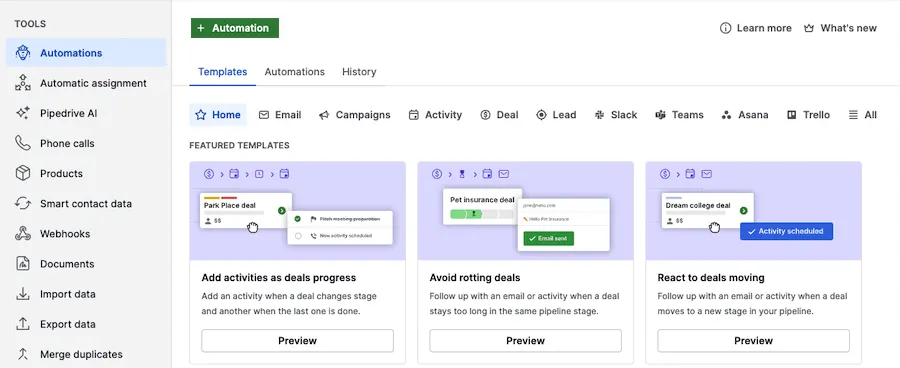
- 1 Automations: the automations section in the "Tools" menu
- 2 + Automation: a new automation from scratch
- 3 Templates: ready-made templates; Automations: the automations you created
- 4 A template, e.g. an activity when a deal moves to the next stage
The second layer is custom automation with n8n, Make or Zapier, which runs alongside Pipedrive and connects it with external systems. Here you can send WhatsApp follow-ups through the Twilio API, generate PDF invoices from Rivile or SuperVizion, sync contacts with Labas Verslas, send SMS through the Telia API, or create a Google Drive folder with ready-made templates for every won deal.
A practical rule for Lithuanian businesses: if the automation happens only inside Pipedrive, native workflows are enough and you need no extra tools. If you need to touch at least one external system (email, WhatsApp, accounting, Drive, Slack), it is time to bring in n8n or Make and build a second layer.
- 1Account menu (top right)
- 2Tools and apps
- 3Automations
- 4+ Automation
- 5Event trigger or Date trigger
- 6Apply trigger
- 7+ → condition or action
- 8Save
- 9Active
According to the Pipedrive help center (October 2026), automations are available from the Growth plan; they can be created by admins or users with the right permissions. The menu is in English.
7 Pipedrive automation examples from Lithuanian businesses in 2026
Here are seven common Pipedrive automation scenarios for Lithuanian B2B SMEs. Set up properly, they usually bring visible benefits within a few months.
- Lead routing by region and language. A new enquiry from the website form → n8n detects the language (LT, RU, EN) and the region → automatically assigns it to a sales rep by territory → creates a deal in Pipedrive with the starting stage "New lead". This can save the sales manager time every day and ensures the same response time for every lead.
- A WhatsApp follow-up sequence. When a deal has had no activity for 3 days → the Twilio API or the WhatsApp Business Cloud API automatically sends a personalized message with a specific offer. The customer's replies come back into Pipedrive Notes through a webhook and push the deal to the next stage. A consistent reminder often improves the reply rate compared with a pipeline without any follow-up.
- Moving the deal stage automatically based on proposal status. When the customer opens the proposal in DocuSign or Eversign → the Pipedrive deal stage automatically changes to "Proposal viewed" → the sales rep gets a real-time Slack notification with a link to the deal. Managers no longer track the opened status by hand.
- Document handoff to Google Drive. A deal is won → n8n creates a structured Google Drive folder (Contract, Invoices, Delivery, Communication) → copies in a standard template → gives access to the responsible project manager → invites the customer with read-only rights. Onboarding time drops from days to minutes.
- Calendar booking with Calendly + Pipedrive. The customer books a consultation through Calendly → Pipedrive creates a contact and a deal with the stage "Consultation scheduled" → a Google Calendar entry with a Meet link → 24 hours before, a WhatsApp reminder to the customer. Reminders usually reduce the number of no-shows.
- An invoicing trigger with Lithuanian accounting software. A deal moves to the "Completed" stage → n8n calls the Rivile, Apskaita5 or Labas Verslas API → the invoice is issued automatically with the correct VAT codes → the PDF is attached to the Pipedrive deal → sent to the customer by email. The accountant no longer enters deals by hand.
- A monthly pipeline report to Slack and email. Every Monday at 8:00 → n8n pulls data from the Pipedrive API → builds a KPI summary (win rate, average deal size, reasons for lost deals, sales rep productivity) → sends it to the managers' Slack channel and the owner's email. Preparing for the management meeting goes from hours to minutes.
How much do Pipedrive and its automation cost in Lithuania in 2026?
The total cost of Pipedrive automation has two parts: the Pipedrive license fee and the one-off and monthly fee for the automation work. Calculations often forget that in the first year the setup work can make up a bigger share of the cost than the license itself.
Pipedrive plans in 2026 (in euros, per user per month billed annually, excluding VAT; checked October 23, 2026): Lite – €14 (basic CRM, no automations), Growth – €39 (up to 50 active automations per company), Premium – €59 (up to 150) and Ultimate – €79 (up to 250). Monthly billing costs more: Pipedrive says annual billing saves up to 42%.
A practical recommendation for Lithuanian SMEs: for most teams of 3–15 sales reps the Growth plan is enough, as it includes automations and enough integrations. Moving to Premium is only worth it when the team grows beyond 10 sales reps or you need advanced forecasting dashboards.
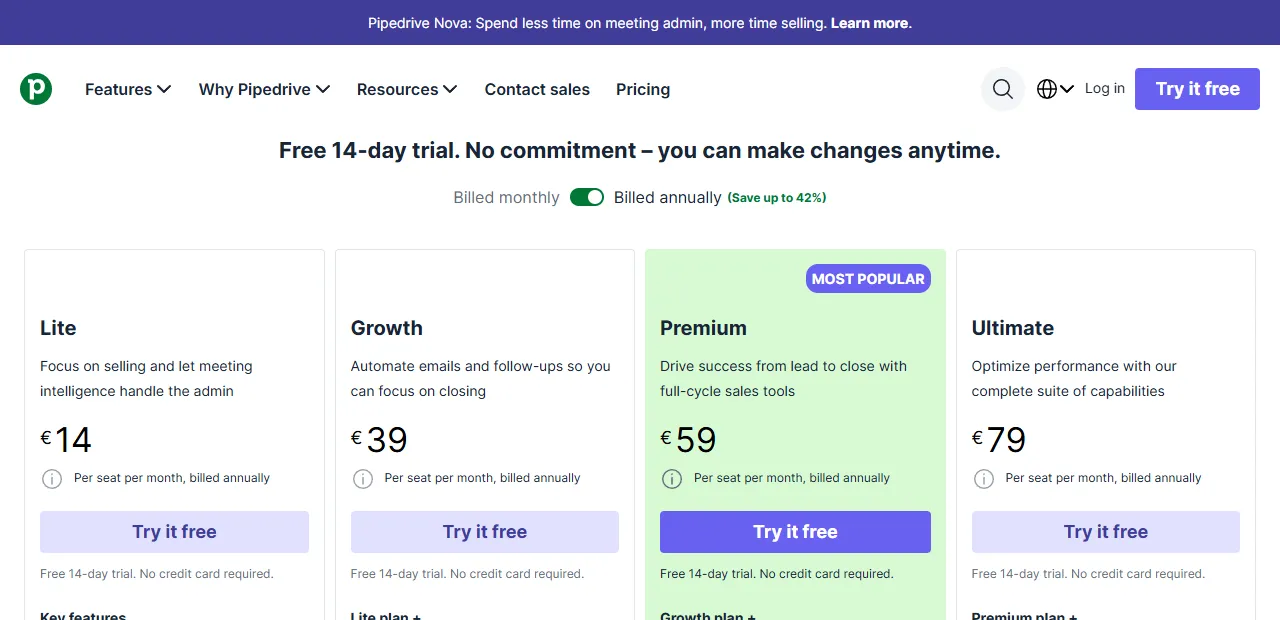
- 1 Growth: automations (Automations) are included from this plan
The cost of automation work in Lithuania in 2026: one n8n workflow with Pipedrive (lead routing, follow-up or an invoicing trigger) – from €450; a full automation package (5–7 workflows with integrations into Google Workspace, WhatsApp and Lithuanian accounting software) – €1,500–4,000 as a one-off project; monthly support, monitoring and improvements – €100–200/month.
Payback (illustration): if the sales team saved 7 h/week (at €25/h), that is worth about €750/month. In that case the investment in a full package would pay back in roughly 2–6 months, and after payback the automation keeps producing steady value at no extra cost.
Pipedrive integrations: Google Workspace, n8n, Make and Zapier compared
When choosing a platform for Pipedrive automation, four options are usually considered. They all work differently and suit different business needs.
Google Workspace native (Apps Script): free if you already have a Workspace subscription. Suits simple Pipedrive ↔ Sheets ↔ Gmail syncs. The limit: long-term logic is hard to maintain, there is no visual editor, and every change requires JavaScript knowledge. Suits small, one-off scripts.
n8n (self-hosted or cloud): open source, EU region (Frankfurt, Helsinki). The best combination of flexibility and price: the self-hosted Community edition is free (you pay for the server), or n8n Cloud from €20/month for 2,500 executions (billed annually; as of October 2026). Suits cases where data sovereignty matters (GDPR, B2B deals with the healthcare sector, public sector clients).
Make (formerly Integromat): a visual editor, the best UX for users without a technical background. Price from about $9/month for 10,000 credits (prices change). Suits marketing teams that want to maintain workflows themselves and adjust them without a developer. The downside: it is a third-party cloud (you can choose an EU data zone, but some AI features may run in the US).
Zapier: the easiest to use, the most integrations (9,000+), but the most expensive, from $19.99/month for 750 tasks (billed annually; as of October 2026). Only worth it when you need rare integrations (specific niche apps) that Make and n8n do not have. For most standard Lithuanian scenarios it is more than you need.
How to automate Pipedrive reports
Pipedrive reports work well for tracking sales, but a manager often does not want to log in to the CRM; they want the numbers where they already work. Typical scenarios: every Monday morning, a weekly sales summary in a Slack channel; on the first day of the month, a KPI report to the manager by email; a Google Sheets table with pipeline data updated daily; an alert if the conversion rate drops below a set threshold.
These reports are built with the Pipedrive API, n8n or Make and Google Sheets or Slack. The setup is done once, and after that the manager gets the relevant data without manual work and without asking sales reps to update the numbers.
Pipedrive vs HubSpot for small Lithuanian companies: 5 criteria
Pipedrive and HubSpot are often compared in the SME CRM market. Here are 5 objective criteria for small Lithuanian companies in 2026 to base the decision on.
- Entry-level price. Pipedrive Lite is €14/user/month; HubSpot Sales Hub Starter was shown in October at €7 per seat with a limited-time discount (both billed annually). The difference is small at the start, but it grows as you move to higher plans: HubSpot Professional costs €90 per seat, while Pipedrive Premium is €59.
- Pipeline visibility. Pipedrive has a better visual Kanban-style pipeline interface: cards with the deal amount, company and last activity. HubSpot's visualization is less intuitive for small teams and needs more setup work.
- Sales automation. Pipedrive automations are available from the Growth plan. In HubSpot, fully configurable workflows are in the Professional plan (€90 per seat per month billed annually, plus a one-off onboarding fee), more than twice the price of Pipedrive Growth (€39). Pipedrive clearly wins on price for the functionality.
- Marketing integration. HubSpot is stronger if you need not just a CRM but also email marketing, landing pages, forms and a blog all in one place. Pipedrive is a purer sales tool; marketing requires extra integrations through Mailchimp or ActiveCampaign.
- Ecosystem in Lithuania. Pipedrive is a company founded in Estonia and well known in the Baltic states; local consultants are usually easy to find for both systems, but it is worth checking their experience.
Verdict: if your priority is the sales pipeline, cost control and a quick start, choose Pipedrive. If you need an all-in-one marketing + sales solution and the budget allows, HubSpot justifies the extra cost. I describe more practical CRM automation scenarios in the article on CRM automation for small companies (CRM automation for small business).
Frequently asked questions about Pipedrive automation in Lithuania (FAQ)
Can I automate Pipedrive on the cheapest plan? Partly. Pipedrive renamed its plans (Essential became Lite, Advanced became Growth), and according to Pipedrive's usage limits (as of October 2026) the Lite plan has no built-in Workflow Automations, the Growth plan allows up to 50 and Premium up to 150 per company. On the Lite plan you can build automation through n8n or Make; check plan prices on pipedrive.com, as they change.
How long does it take to set up the first automation? A simple lead routing or follow-up workflow takes 3–5 working days from order to running in production. A full package of 5–7 workflows with Lithuanian integrations (Rivile, WhatsApp, Slack) takes 4–6 weeks.
Is n8n a GDPR-compliant solution? Yes, when deployed in an EU region (Frankfurt, Helsinki). n8n Cloud also offers EU data storage. With self-hosted deployments the data stays on your server in Lithuania or in an EU cloud (e.g. Hetzner Falkenstein).
Does the Pipedrive API have request limits? Yes. Pipedrive applies an API token budget that depends on the plan and the number of seats (according to Pipedrive's usage limits, as of October 2026: Lite – 30,000, Growth – 60,000, Premium – 150,000, Ultimate – 210,000 tokens per seat), plus short-term rate limits. For most SME scenarios these limits are not a problem, because a typical workflow makes few requests per minute.
What if I already use HubSpot and want to move to Pipedrive? Use Pipedrive's native HubSpot importer or move contacts, deals and activity history through n8n in 1–2 working days. Before the move it is worth mapping the fields and checking for duplicates.
Can I integrate Pipedrive with Lithuanian accounting software? Yes. For example, Rivile GAMA has a REST API that you connect to through the n8n HTTP node; for other programs the options (API, CSV import) need to be checked individually. A standard invoicing integration takes 1–2 weeks.
Next steps
If you are thinking about starting a Pipedrive automation project in Lithuania, I recommend a three-step plan: (1) pick one specific pain point, for example WhatsApp follow-up or invoicing, and test it for 2 weeks with one sales team; (2) if the first workflow works and produces visible time savings, expand the package to 3–5 workflows over the next 2 months; (3) after 3 months, assess the time saved, the change in conversion and the sales reps' satisfaction before extending automation to other departments (accounting, customer service, project management).
Aigentas.lt helps Lithuanian SMEs not only set up Pipedrive's native Workflow Automation but also build a full custom layer with n8n, Google Workspace and the WhatsApp Business API. You will find more practical examples in the article on CRM automation for small companies (CRM automation for small business) and on the process automation service page (Process automation). If you are considering adding AI agents to Pipedrive (automatic lead qualification, proposal generation), visit (AI agent development). Want to discuss your Pipedrive? Write to me (free consultation) about what your sales stages look like now: I will read it and reply by email with which workflows should pay back first. We will arrange a call if one is needed.