Bitrix24 is a well-known CRM among small businesses in Lithuania. Companies often choose it for three reasons: the Free plan lets you start without a credit card, the interface is available in many languages (including Russian), and the built-in tools (feed, tasks, documents, telephony) cover more than just CRM. For many teams of 8–25 people, Bitrix24 becomes their first central work tool.
The problem appears when the team outgrows the "fill it in by hand" phase. Pipeline stages are changed one by one, follow-up emails are forgotten, and deal-aging information is visible only when the manager opens Bitrix24, not before. In this article I cover which 7 processes to automate first, where Bitrix24's native automation ends, how it compares with Pipedrive and HubSpot for small Lithuanian companies, and what an automation layer costs in 2026.
Why do SMBs in Lithuania choose Bitrix24 first?
Bitrix24 has four competitive advantages that explain its popularity in the Lithuanian SMB segment. First, the Free plan (for 1–2 users, 5 GB of storage, as of October 2026) lets you try the CRM at no cost. Second, the multilingual interface (including Russian); whether Lithuanian is available is worth checking in your own account. Third, the built-in tools include a feed, project management, document libraries and an internal chat, so Bitrix24 often replaces several separate systems (CRM + Slack + Asana + Google Drive).
Fourth, resistance during onboarding is low in the Lithuanian market. Managers who previously worked in a Russian-speaking business environment have already seen the Bitrix24 interface and recognize its logic. Moving a team over from Excel or a simple form often takes a few weeks.
A common situation after 6–12 months of use: Bitrix24 is already full of data, the team has learned to enter deals and update stages, but recurring processes are still done by hand. That is exactly the point where an automation investment makes sense.
7 processes worth automating in Bitrix24
These seven scenarios are the most common candidates for Bitrix24 automation. Set up properly, they usually show a visible benefit within a few months.
- Moving the pipeline stage based on behavior. When a customer opens a proposal in DocuSign or clicks a link in an email tracking tool → the Bitrix24 deal stage automatically moves to "Proposal viewed" → the responsible manager gets a notification in the internal Bitrix24 chat or via Telegram. Manual stage-shifting disappears completely.
- Deal-aging alerts. A Bitrix24 deal with no activity for 7 days → an automatic internal reminder to the manager with a direct link to the deal. After 14 days, escalation to the sales manager. After 30 days, an automatic move to the "Cold" pipeline stage with a reminder to review it next month.
- 1Deal with no activity for 7 daysBitrix24
- 2Reminder to the manager with a link to the deal
- 3After 14 days: a message to the sales manager
- 4After 30 days: moved to the "Cold" stageWith a reminder to review it next month.
- Contact deduplication. Two leads with the same phone number or email → automatically merged into one contact card, keeping the full activity history. Bitrix24's native deduplication works, but it often misses cases with different spelling or phone formats (8 600, +370 600, 370600), so it is worth adding a normalization step before the comparison.
- Sending weekly reports automatically. Every Monday at 8:00 → n8n pulls data from the Bitrix24 REST API → builds a KPI summary (win rate, average deal size, reasons for lost deals, manager activity) → sends it to the managers' email and an internal Bitrix24 chat channel. Preparing for the management meeting shrinks from hours to a few minutes.
- Missed deadline notifications. A Bitrix24 task with a missed deadline → an automatic notification to the responsible employee + their direct manager + the project manager. This three-person chain makes sure missed deadlines do not quietly pile up.
- Syncing email activity to the CRM. A manager sends an email from Gmail or Outlook to a customer whose contact is in Bitrix24 → the email is automatically attached to the contact with the full history, open status and link clicks. Managers no longer have to copy emails into the CRM by hand.
- Starting onboarding when a deal is won. The deal moves to the "Won" stage → n8n triggers several actions at once: a task is created for the project manager, a Google Drive folder with the contract is created, a welcome email with an onboarding link is sent to the customer, and a new row is added to the accounting invoice generation queue. The customer gets a professional handover within the first hour after the deal.
- 1The deal moves to "Won"Bitrix24
- 2A task for the project manager and a Drive folder with the contractn8n · Google Drive
- 3A welcome email with an onboarding link to the customerEmail
- 4A new row in the invoice generation queue
Bitrix24 native automation vs third-party tools
Bitrix24 has a built-in automation editor: "Business processes" and "Robots". It is a fairly powerful tool for simple internal workflows. But there are three important limits worth knowing before you decide whether the native features are enough or you need a third-party layer.
First, fuller business process automation is available on the higher paid plans (Standard at $99/month for 50 users, billed annually; check the features of a specific plan at bitrix24.com). Lower plans usually only have "Robots": simple if-then triggers on deal and task stages. More complex logic with conditions, loops or parallel branches is limited on the lower plans.
Second, integrating external systems through native Bitrix24 depends on the limited Marketplace offering. There are integrations for Gmail, Outlook, Google Calendar and telephony, but WhatsApp Business, Lithuanian accounting software (Rivile, Apskaita5, Labas Verslas), Stripe or Paysera often require an extra layer.
Third, the issue of changes over time. Bitrix24 native automation often creates a "closed" workflow whose logic is hard to review and change after 6 months. The person who configured the Robots a year ago has already left, and the new team of managers does not understand why a certain email is sent at a certain moment.
Third-party tools (n8n, Make, Zapier) solve all three limits. Self-hosted n8n runs in an EU region, supports GDPR scenarios, lets you version workflows with Git and provides a visual editor that even a new team member understands. Make and Zapier are easier to use but more expensive in high-volume scenarios. A practical rule for Lithuanian businesses: start with Bitrix24 native Robots for simple internal triggers, and switch to n8n or Make as soon as you need to touch at least one external system.
Bitrix24 vs Pipedrive vs HubSpot: which suits an SMB in Lithuania in 2026?
These are the three most popular CRM choices for small Lithuanian teams of 8–25 people in 2026. The difference between them is not the price list but the logic of daily work. Each suits a different business profile.
- Starting price and growth path. Bitrix24 Free costs $0 for 1–2 users, Bitrix24 Standard costs $99/month for 50 users (billed annually); Pipedrive Lite starts at ~€14 per user per month; HubSpot Free costs €0 for up to 2 users, Sales Hub Starter starts at ~€15–20 per user per month (as of October 2026; prices change). For small teams of 5–10 people, Bitrix24 has the lowest cost as you grow. Pipedrive and HubSpot get more expensive linearly with the number of users.
- Pipeline visibility and UX. Pipedrive has the best Kanban view: cards with the deal amount, company and last action are optimized for a manager's daily work. The Bitrix24 interface is broader and more complex, because it covers not only CRM but also tasks, documents and chat, so the learning curve for a new user is steeper. HubSpot's UX is modern but requires more initial configuration work.
- Automation features. HubSpot Starter has up to 50 simplified workflows, while fully configurable workflows start with the Professional plan. Pipedrive automations are available from the Growth plan (up to 50 active automations), a good price-to-features ratio. Bitrix24 business processes are fuller on the higher plans, but it already includes task automation, not just deal automation, which can offset the higher price.
- Fit for the Lithuanian market. Pipedrive is a company founded in Estonia and well known in the Baltic states. Bitrix24 is popular among teams that work with the Russian-speaking market: customer history handed over between evening and morning shifts stays in one system. HubSpot is stronger in the global B2B segment, but has fewer Lithuania-specific consultants.
- Migration friction. If you already work with Bitrix24 and are thinking about switching, estimate how many historical deals and contacts you would need to move, how many custom fields you have created, and how many managers have already been trained. These numbers often explain why "an automation layer on top of Bitrix24" is a better choice than a full CRM switch. More on Pipedrive automation tailored to the Lithuanian market is here (Pipedrive automation in Lithuania), on HubSpot here (HubSpot automation for small businesses in Lithuania (2026)), and the general CRM automation guide is here (CRM automation for small business).
The verdict for Lithuanian teams: if your team has worked with Bitrix24 for 6+ months and people are used to it, do not switch CRMs; add an automation layer on top. A demo before the contract will show specific scenarios for your situation before any fees.
How much does Bitrix24 automation cost in Lithuania: projects and monthly maintenance
The total cost of Bitrix24 automation for a Lithuanian business in 2026 splits into four categories. The figures below are indicative, based on my rates and typical assumptions.
Bitrix24 license (if you are still on the Free plan). Most automation scenarios need a paid plan (for example, Standard at $99/month for 50 users, billed annually), because the free plan's features are limited. When a team grows beyond 50 users, Bitrix24 Professional costs $199/month for 100 users (as of October 2026), but Lithuanian SMBs rarely need it.
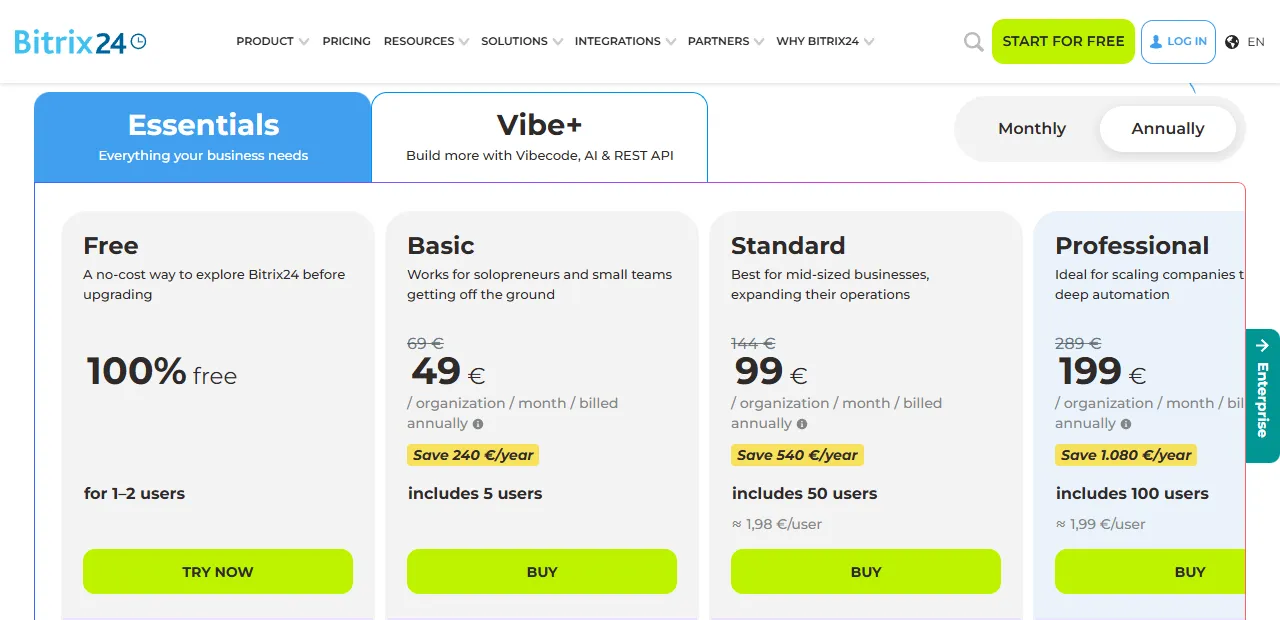
- 1 Standard: 50 users, the most common choice for automation
- 2 Professional: 100 users
One-off automation work. A single n8n or Make workflow with Bitrix24 (lead routing, follow-up, deal-aging or an invoice trigger) costs €450–800 depending on the complexity of the integrations. A full automation package with 5–7 workflows and integrations with Google Workspace, WhatsApp Business and Lithuanian accounting software costs €1,800–4,500 as one-off work.
Monthly maintenance fee. After launch I offer two support levels: Care (from €150/month), which covers monitoring, small fixes and answering questions; and Care+ (€200–400/month), which covers everything in Care plus adding new workflows, up to 4 h a month. Most Lithuanian SMBs only need the Care plan after the first 3 months of stable running.
ROI calculation. As a rough estimate, an automation layer for a Bitrix24 SMB team (10–15 managers) could save 7–12 h a week of the team's manual work. At €25/h that is ~€750–1,300 of value per month. In that case a full package (€3,000 one-off + €150/month Care) would pay back in about 3–5 months, and after that it generates a steady stream of value with no additional costs. Less manual work, more value: that is the core principle of Bitrix24 automation for a Lithuanian business.
A practical decision step: before signing a contract, I offer a demo workflow on your real data. A demo before the contract lets you see how a specific scenario will work in your pipeline before you pay the first advance. More about the process automation service is here (Process automation), and examples of past projects are here (case studies).
Bitrix24 automation FAQ
Can I automate Bitrix24 on the Free plan? Partly. On the Free plan, simple Robots work on deal and task stages, but the full Business processes feature and a higher REST API limit are available on paid plans (for example, Standard at $99/month for 50 users). Most real scenarios need the Standard plan or higher.
Does Bitrix24 integrate natively with Lithuanian accounting software? No, Bitrix24 has no native connectors to Rivile, Apskaita5, Labas Verslas or SuperVizion. The solution is an n8n or Make bridge: a Bitrix24 webhook triggers it → an API request goes to the accounting system → the invoice is issued automatically. A standard setup takes 1–2 weeks.
How long does it take to set up the first Bitrix24 automation? A simple lead routing or follow-up workflow takes 3–5 working days from order to launch in production. A full package of 5–7 workflows with Lithuanian integrations (Rivile, WhatsApp, Slack) takes 4–6 weeks.
Does the Bitrix24 REST API have request limits? Yes. The Bitrix24 REST API applies rate limiting (usually around 2 requests per second, more on Enterprise plans); check the exact limits in the Bitrix24 documentation. That is enough for most Lithuanian SMB scenarios, because one automation workflow makes 5–20 requests per minute.
How can I tell whether my team is ready for automation? Three signals: (1) the team has actively used Bitrix24 deals and stages for 6+ months, (2) there is at least one recurring process done 3+ times a week, (3) there is a responsible person on your side who will test the workflow and give feedback. If all three are there, start. If any is missing, strengthen your data hygiene first.
Next steps
If you are considering a Bitrix24 automation project in Lithuania, I recommend a three-step plan: (1) within 1 week, pick one specific pain point (for example, deal-aging alerts or weekly reports) and write to me which one you chose; I will reply with how to implement it in your Bitrix24; (2) over the next 2 weeks, test the first workflow in production and measure the time saved; (3) after 4–6 weeks, expand the package to 3–5 workflows if the first one meets expectations.
Aigentas helps Lithuanian SMBs configure Bitrix24 native Robots and Business processes and connect the CRM with Gmail, WhatsApp, Lithuanian accounting software and Stripe through an n8n integration layer. You will find more practical examples in the articles on Pipedrive automation (Pipedrive automation in Lithuania), HubSpot automation for small businesses (HubSpot automation for small businesses in Lithuania (2026)) and the general CRM automation guide (CRM automation for small business). Want me to look at your Bitrix24? Write to me (free consultation) about which modules you use and what gets in your team's way the most. I will read it and reply by email, and if I need to see your screen, we will arrange a call. A demo before the contract: no advance payment until you see a working solution.