In 2026 small Lithuanian companies often picture HubSpot as "an expensive American CRM for corporations". That is only partly true. HubSpot has a fully working free CRM with room for 1 million contacts, where you can already start managing sales, tracking deals and sending emails from Gmail at no cost. This article explains what HubSpot Free actually lets a Lithuanian SMB do, which 4 Workflows are worth turning on from day one, what the real 2026 prices are on the Starter and Professional plans, which integrations work for Lithuanian businesses, and how HubSpot compares with Pipedrive and Bitrix24 for small teams of 3–15 people.
What can HubSpot Free actually do for a Lithuanian SMB?
HubSpot Free is not a demo but a full-featured sales and contact management tool that is usually enough for the first 12 months. Here are 5 things it can do at no cost: (1) store up to 1,000,000 contacts and companies with full history; (2) manage an unlimited number of deals in a Kanban pipeline with up to 10 stages; (3) sync a Gmail or Outlook mailbox, so every email is automatically attached to the contact; (4) track email opens and link clicks (within the free plan's limits); (5) generate a meeting booking link (HubSpot Meetings) and connect it to Google Calendar.
There are also 3 important limits worth knowing right away so you are not caught by surprise. First, Workflows (if-then flows) are not available on the free plan; only simple form automations and a limited number of email templates are. Second, sending emails from the HubSpot platform is limited to 2,000 marketing emails a month, with HubSpot branding in the footer. Third, only 1 active pipeline can be used; if you need to separate B2B and B2C flows into two Kanban boards, you have to move to Starter.
A practical recommendation: if 1–2 people will use the CRM (that is what the Free plan allows) and you generate up to 500 leads a month, HubSpot Free may be enough for the first months. Later, once you see which flows need automating, you can move to Starter deliberately or add an n8n integration layer alongside HubSpot.
4 HubSpot Workflows automations worth turning on from day one
These four automations deliver a lot of value in a short time. Workflows require at least the Starter plan (up to 50 workflows with limited triggers and actions; from ~€15–20 per user per month), while fully configurable workflows start with Professional (as of October 2026). Setup takes from 30 minutes to 2 hours per flow.
- 1More → Automation → Workflows
- 2Create workflow
- 3From scratch
- 4Trigger enrollment for… → set the trigger
- 5+ → add an action
- 6Review and publish
- 7Turn on workflow
Based on the HubSpot Knowledge Base (October 2026). If there is no "More" menu, go straight to Automation → Workflows. Workflows require at least the Starter plan.
- Lead routing by language and region. A new contact form submission → a HubSpot Workflow checks the "Language" field (LT/EN/RU) and the "City" field → automatically assigns the responsible manager (Vilnius: Tomas, Kaunas: Lina, EN/RU: Marius) → creates a deal in the "New lead" stage → sends an internal notification to a Slack or Teams channel. Response time can drop from hours to minutes.
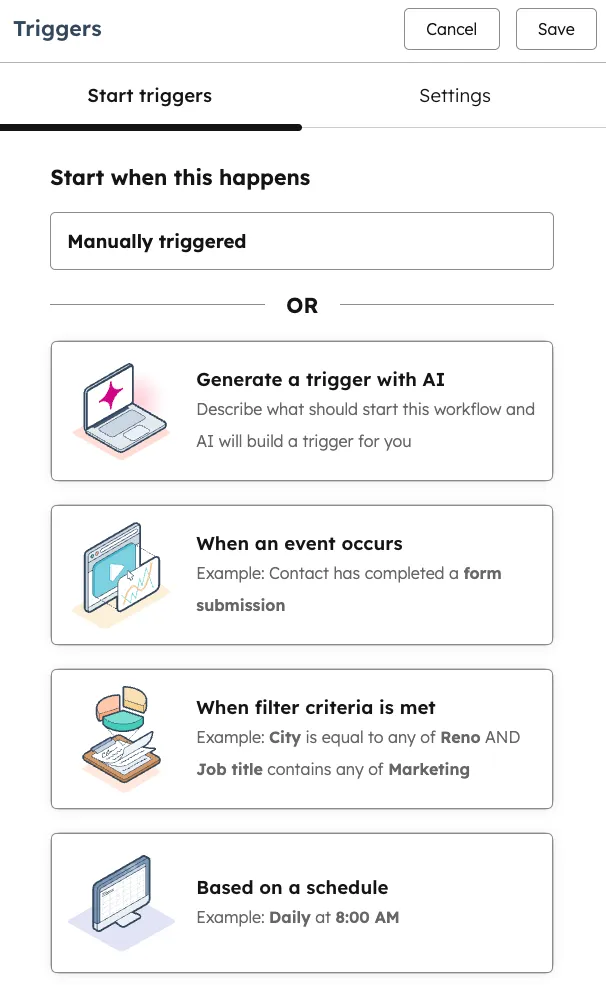
- 1 When an event occurs: for example, a contact fills in a form
- 2 When filter criteria is met: when a record matches the conditions you set
- 3 Based on a schedule: for example, every day at 8:00
- 4 Save: saves the trigger
- Deal-stage triggers with email sequences. A deal moves to the "Proposal sent" stage → after 3 days of inactivity the first follow-up is sent automatically; after another 4 days, a second reminder with a link to book a consultation; after 10 days, a final "last call" email. Consistent follow-up often improves conversion compared with irregular manual follow-up.
- A welcome email sequence for a new contact. A contact submits a form → immediately gets a "Welcome" email with a downloadable guide (a PDF lead magnet) → after 2 days, a case study; after 5 days, an invitation to a free consultation. The whole sequence runs 24/7 without a manager stepping in and "warms up" the contact before the first call.
- An internal notification trigger for the manager. Any deal reaches a value above €5,000 → a HubSpot Workflow automatically posts a message in the #sales-vip Slack channel with a link to the deal and the manager's name → the CEO or sales manager immediately sees the VIP situation and can step in if needed. Visibility of high-value deals becomes real-time.
How much does HubSpot cost? Free vs Starter vs Professional in 2026
HubSpot's 2026 structure for Lithuanian businesses (prices taken from hubspot.com/pricing, converted to euros at an average rate). All plans have monthly and annual billing options; paying annually is cheaper.
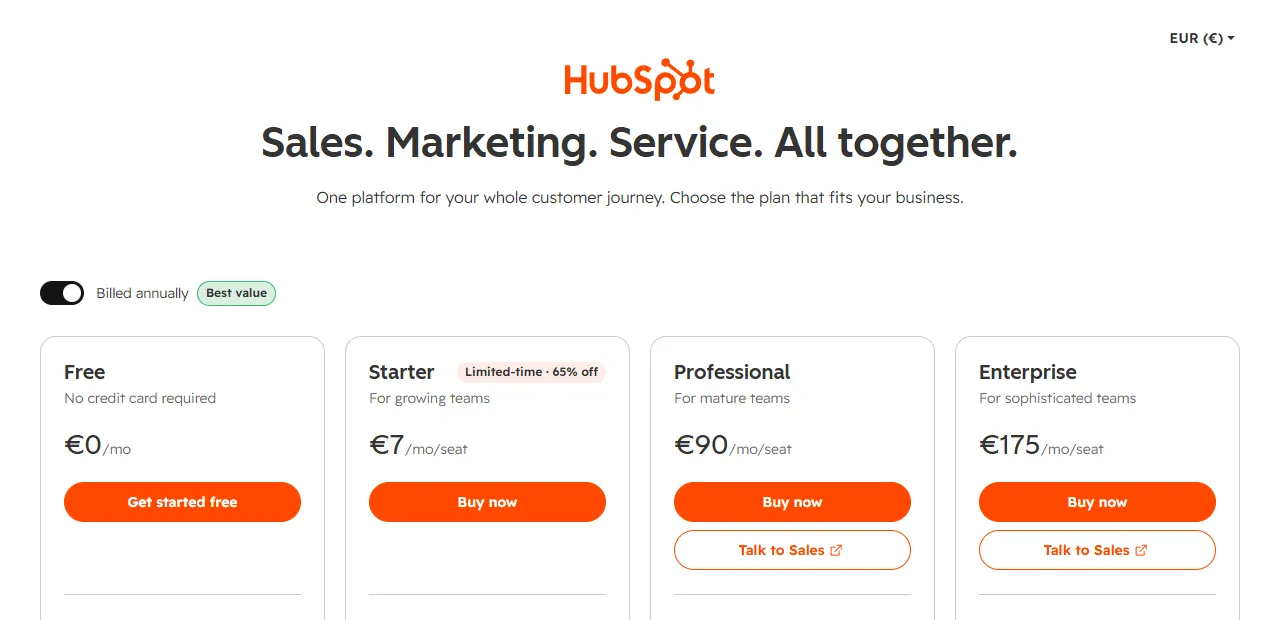
- 1 Free: no Workflows automation
- 2 Starter: limited-time discount
- 3 Professional: fully configurable workflows
HubSpot Free CRM: €0, forever. Includes: 1 million contacts, up to 2 users, one deal pipeline, simple forms, meeting booking, Gmail/Outlook sync, and live chat with HubSpot branding. No Workflows automation, no A/B testing, no SLA reporting.
HubSpot Sales Hub Starter: from ~€15–20 per user per month (depending on billing; prices change). It unlocks: up to 50 simplified workflows (with limited triggers and actions), removal of the HubSpot logo, multiple pipelines, custom fields, no limits on meeting booking, and basic calling from the platform. It suits most small companies that need their first automations.
HubSpot Sales Hub Professional: from $90–100 per user per month plus a one-off $1,500 onboarding fee (as of October 2026). It unlocks: forecasting, custom reports, A/B email testing, advanced permissions, SLA reporting, deal scoring, and up to 300 fully configurable workflows. It is worth it only when the team grows beyond 10 managers or you work with many different pipeline scenarios.
A practical decision point: start with Free; move to Starter when you need at least one real Workflow with several steps; consider Professional only after 18–24 months, when the team grows beyond 8–10 people and you need advanced forecasting.
HubSpot integrations: Gmail, Google Calendar, WhatsApp, Stripe
HubSpot has one of the largest integration marketplaces, with more than a thousand connectors. For Lithuanian businesses, these five combinations are the most common.
Gmail / Google Workspace. The native integration already works on the Free plan: every sent and received email is automatically attached to the HubSpot contact record, and templates and tracking are added. Setup takes 5 minutes through the HubSpot Sales Chrome extension.
Google Calendar + HubSpot Meetings. A customer opens your booking link → picks a time → a Google Calendar event with a Meet link is created automatically → HubSpot adds the meeting to the contact with reminders 24 h and 1 h before. It works on both the Free and Starter plans.
WhatsApp Business via Twilio or 360dialog. HubSpot Free has no native WhatsApp connector, so an n8n or Make bridge is usually used: a change to a HubSpot contact → an n8n webhook → the Twilio WhatsApp API → a personalized message to the customer. A full setup takes 1–2 working days and costs €400–700 as one-off work.
Stripe (payment processing). HubSpot's official Stripe connector (on a paid plan) lets you link a deal to an invoice and automatically change the deal stage to "Paid" as soon as the customer pays. For smaller teams there is an n8n alternative: Stripe webhook → n8n → HubSpot deal update.
Lithuanian accounting software (Rivile, Apskaita5). There is no native connector, so the n8n HTTP module is used: when a HubSpot deal reaches the "Closed" stage, n8n calls the Rivile or Apskaita5 API and automatically creates an invoice with the correct VAT codes. I describe more scenarios like this in the article on CRM automation for small businesses (CRM automation for small business).
HubSpot Sequences and automated reports
Sequences: personal follow-up emails. Unlike Workflows (one flow for many contacts), Sequences send personalized emails in the manager's name on a preset schedule. A typical sequence after a first meeting: the next day, a thank-you with the points discussed; after 3 days, a check for further questions; after a week, useful material; after two weeks, a specific proposal. When the customer replies, the sequence stops automatically. Sequences are available on paid Sales Hub plans.
Reports without logging into the CRM. Many managers want to see the weekly numbers in Slack or Google Sheets, not in the HubSpot interface. A common solution: HubSpot → n8n (data through the API) → Google Sheets (storage) → Looker Studio (visualization). Every Monday at 8:00 the team gets a sales summary in a Slack channel, and the dashboard updates on its own. A flow like this is configured once and keeps working as long as the CRM structure does not change.
HubSpot vs Pipedrive vs Bitrix24 for small Lithuanian companies
These are the three most popular CRM choices for small Lithuanian teams of 3–15 people in 2026. Here are the 4 most important criteria for the decision.
- Starting price. HubSpot Free costs €0; Pipedrive Lite starts at ~€14 per user per month; Bitrix24 Free costs $0 (for 1–2 users, limited CRM functionality). HubSpot and Bitrix24 win at the free tier, but HubSpot has broader functionality.
- Ease of automation. Pipedrive automations start with the Growth plan (up to 50 active automations). HubSpot Starter has up to 50 simplified workflows, and full workflows start with Professional. Bitrix24 has the most complex automation editor with a less intuitive UX.
- Fit for the Lithuanian market. Pipedrive is a company founded in Estonia and well known in the Baltic states. HubSpot is a strong global brand. Bitrix24 is popular among the Russian-speaking part of the business community (Russian is supported; whether a Lithuanian interface is available is worth checking). Neither Pipedrive nor HubSpot has a Lithuanian interface.
- Growth potential. HubSpot has the best path to advanced marketing automation (Marketing Hub) and customer service (Service Hub), all on one platform. Pipedrive stays a sales-focused tool. Bitrix24 tries to be everything at once, so its features are often shallow.
The verdict: start with HubSpot Free if you are unsure about your long-term strategy; you pay nothing and get a broad foundation. Choose Pipedrive if your priority is the sales pipeline and a quick start with automations at an affordable price; more details here (Pipedrive automation in Lithuania). Consider Bitrix24 only if you work with the Russian-speaking market and need a combined CRM + project management tool.
HubSpot automation FAQ
Is HubSpot Free really free? Yes, HubSpot Free CRM is free for an unlimited time, without a credit card. You only pay when you upgrade to the Starter, Professional or Enterprise plans for extra features.
Can HubSpot Free send marketing emails? Yes, up to 2,000 marketing emails a month, but every email carries HubSpot branding at the bottom. The branding can be removed only on Starter and higher plans.
How many HubSpot users can I add on the free plan? According to HubSpot, the Free plan is for up to 2 users (as of October 2026). A larger team will need paid Sales Hub, Marketing Hub or Service Hub seats.
Does HubSpot have a Lithuanian interface? No. The HubSpot interface is available in about 18 languages, but Lithuanian is not one of them. Even so, emails, forms and landing pages can be fully in Lithuanian. Most Help Center articles are in English.
Can I integrate HubSpot with Lithuanian accounting software? HubSpot has no native connectors (Rivile, Apskaita5, Labas Verslas). The solution is an n8n or Make bridge in which a HubSpot webhook triggers an API request to the accounting system. Setup takes 1–2 weeks.
How long does it take to move from Pipedrive or Bitrix to HubSpot? HubSpot has an official importer (CSV or a native Pipedrive connector) that moves contacts, companies and deals in 1–3 hours. With a full history migration (tasks, emails, documents), it takes 1–2 working days.
Next steps
If you are thinking about starting a HubSpot automation project in Lithuania, I recommend a three-step plan: (1) within 1 hour, create a HubSpot Free account and import your existing contacts from Excel or Gmail; (2) in the first 2 weeks, turn on one automation (for example, a lead routing flow or a welcome email sequence) and test it with real leads; (3) after 4–6 weeks, assess whether you are getting a tangible time saving; if so, move to the Starter plan and add the remaining 3 Workflows from this list.
Aigentas helps Lithuanian SMBs configure the HubSpot Free and Starter plans and connect them with Gmail, WhatsApp, Lithuanian accounting software and Stripe through an n8n integration layer. You will find more practical examples in the article on CRM automation for small businesses (CRM automation for small business) and in the companion article on Pipedrive automation in Lithuania (Pipedrive automation in Lithuania). Details of the process automation service are here (Process automation). Want a second opinion on your HubSpot setup? Write to me (free consultation) about which plan you use and what you would like to sort out. I will reply by email whether the Free plan is enough and which flows I would turn on first. If needed, we will arrange a call.