Every year more owners of small and medium-sized Lithuanian businesses start looking for their first CRM, and HubSpot and Pipedrive almost always end up on the shortlist. That is no accident: both products have large user communities, good documentation and clear strengths. But their internal logic is very different. HubSpot is a marketing-first platform where the CRM, email campaigns, landing pages and lead scoring live in one ecosystem. Pipedrive is a pure sales tool, built for a salesperson whose daily job is moving deals through a pipeline, not planning email nurture flows. This comparison will help you see which system fits your business's growth model in 2026, with no foregone conclusions and no affiliate links. By the end you will know not only which platform is cheaper, but which one will actually speed up your team's work.
HubSpot vs Pipedrive at a glance
Before going into detail, here are the main criteria for a Lithuanian business at a glance. Price: HubSpot has a free CRM plan (up to 2 users, up to 1 million contacts; as of October 2026), and paid plans are charged per seat: in October the pricing page showed Starter at €7 with a limited-time discount and Professional at €90 per month (billed annually). Pipedrive shows prices in euros when viewed from Lithuania: Lite €14, Growth €39, Premium €59, Ultimate €79 per user per month billed annually (excluding VAT, checked October 23, 2026); monthly billing costs more. Pipedrive automations start from the Growth plan. For a team of five salespeople, Pipedrive Growth costs €195 per month.
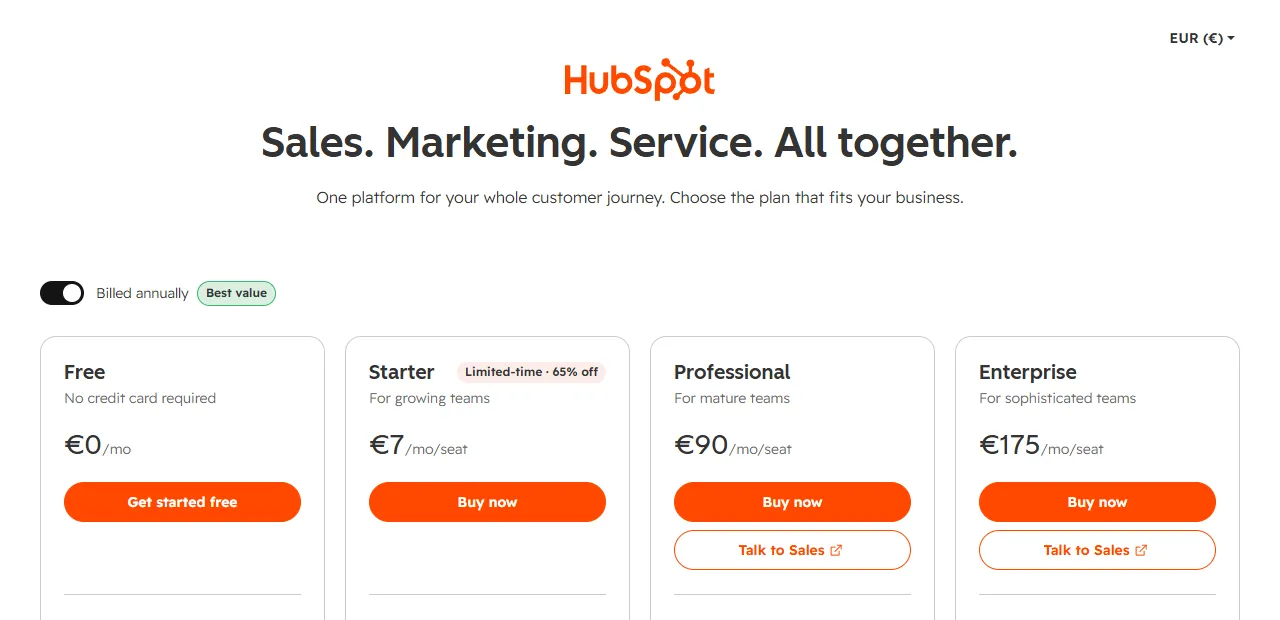
- 1 Free plan, no credit card required
- 2 Limited-time discount on the Starter plan
Complexity: a full HubSpot rollout with marketing flows takes 2–4 weeks. A salesperson gets used to Pipedrive in 2–3 days: the interface is narrow and intuitive, with no extra modules cluttering the screen. Language: neither Pipedrive (about 22 languages, including Estonian and Latvian) nor HubSpot (about 18 languages) has a Lithuanian interface (as of October 2026), so in both cases your team will work in English or another supported language. Google Workspace integration: both have a native Gmail integration that attaches emails to contacts automatically, tracks email opens and syncs with Google Calendar. HubSpot also connects to Google Ads and Google Analytics; Pipedrive connects to Google Drive and Google Sheets through third-party integrations. Notion integration: both platforms can sync with Notion databases through n8n or Make flows, to update contacts, create new deals and generate weekly reports in real time.
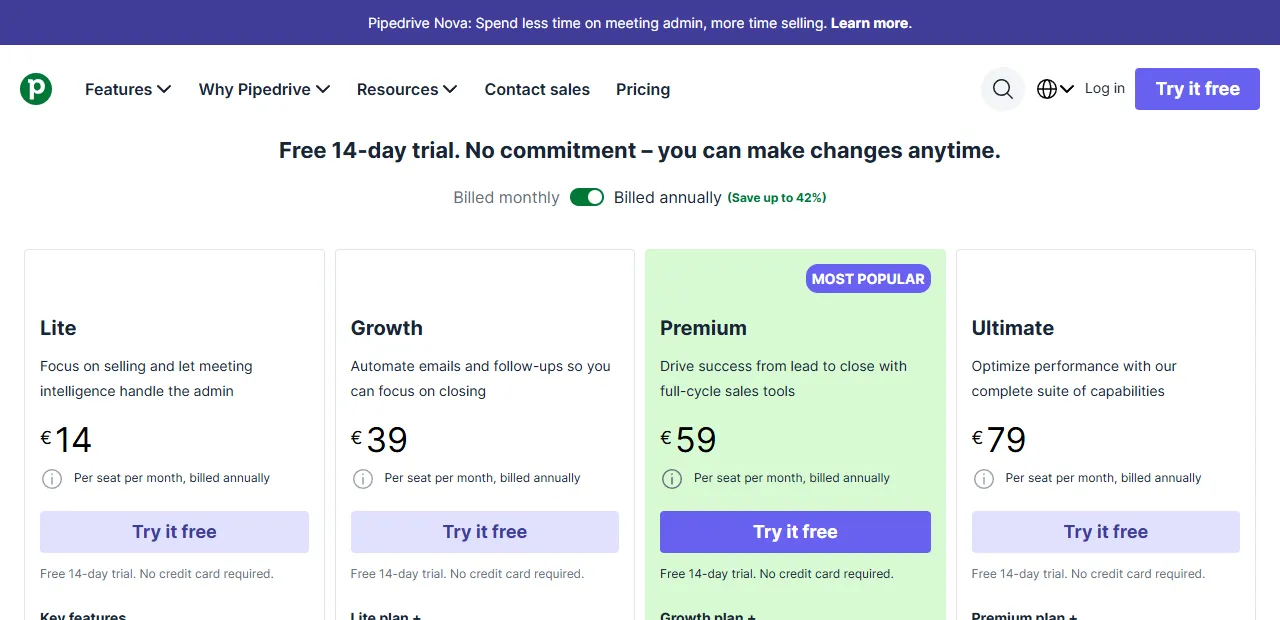
- 1 Prices shown for annual billing; monthly billing costs more
- 2 Growth: automations start from this plan
HubSpot pros and cons for a Lithuanian business
HubSpot's biggest advantage for a Lithuanian business is a genuinely free starter plan. It is not a 14-day trial but a permanent Free version (up to 2 users) with deal management and a contact database. For a small company that is only starting to put its sales process in order, it is an ideal start with no financial risk. HubSpot Free includes email templates, deal tracking, a basic reporting view and limited contact segmentation, which is enough for the first six months for most small businesses.
Marketing features are another strong point. HubSpot combines email campaigns, landing pages, forms and lead scoring in one platform. A B2B service business (consulting, IT services, marketing agencies) that grows through content marketing and email nurture flows can manage everything without extra integrations between systems. From Marketing Hub Starter you get full workflow automation: if a contact opened three emails but did not click the CTA, a follow-up sequence with a different offer and timing starts automatically. This is especially valuable for businesses whose sales cycle lasts 3–8 weeks and that need to keep in touch with a prospect systematically.
But the downsides are real. First, the price rises quickly as the number of marketing contacts grows. As marketing contacts grow, the paid version can cost hundreds of euros per month. Second, there is no Lithuanian interface: all menus, settings and automation logic are in English. For teams where some employees speak little English, this is a real everyday barrier that should not be underestimated before rollout. Third, configuration is complex. Rolling out the full HubSpot package with workflow automation, lead scoring and CRM stage logic takes 2–4 weeks and often requires a consultant's help or several hours of learning.
Pipedrive pros and cons for a Lithuanian business
Pipedrive's strength is its sales pipeline view. The Kanban-style board with deals, forecast amounts and deal aging alerts is one of the clearest CRM interfaces on the market. A salesperson sees right away which deal has gone "cold" and for how long, where a deadline is coming up and which one needs a phone call today. A sales team of 3–10 people is fully up and running with Pipedrive within a week, without long training programs or a large upfront investment in setup.
Pricing is transparent and predictable: you pay per user (Lite €14, Growth €39 per month billed annually), with no extra charges based on the number of contacts. For five salespeople on the Lite plan that is €70 per month, and with automations (Growth) €195; you know the amount in advance, no matter how many contacts pile up in the database. There is no Lithuanian interface, but other languages are supported (for example, Latvian, Estonian and Polish).
Downsides: Pipedrive is not a marketing platform. For email campaigns and lead generation through landing pages you need either the Campaigns add-on (paid separately, with limited features; prices change) or a separate tool such as Mailchimp, Brevo or ActiveCampaign. Sales reports are simpler than in HubSpot: more complex analysis will need extra integration work with Google Sheets or Data Studio. If your business plans active content marketing with automated email sequences, Pipedrive will not replace a full marketing package.
AI features: HubSpot Breeze vs Pipedrive AI
HubSpot Breeze is an AI layer built into the platform. Breeze Copilot helps while you work in the CRM: it drafts emails, summarizes deal history and suggests next steps. Breeze Intelligence enriches contact profiles with external data, and predictive lead scoring prioritizes enquiries by their likelihood to convert, which is most useful for companies that get many enquiries through marketing channels. The deeper AI features are available only on higher plans.
Pipedrive's AI Sales Assistant is simpler but practical: it suggests next steps for each deal and helps you spot stalled deals. Pipedrive's biggest advantage is how open it is to integrations: through n8n, Make or Zapier you can connect OpenAI, Claude or Gemini models to it and build your own automations, for example a proposal draft from deal data or collecting information about a client before a meeting. More about AI agents for sales (AI agent development).
A third option: Pipedrive plus a separate email marketing tool
An often overlooked option is Pipedrive for sales plus a separate specialized email marketing tool (Brevo, Mailchimp or ActiveCampaign). At first glance it looks more complicated (two subscriptions and one integration), but each tool is often stronger in its own area than HubSpot's combined package.
How it works: the email sequence runs in the marketing tool, and when a contact becomes qualified (for example, clicks the offer or fills in a form), it is automatically created in Pipedrive as a new deal with its full history, through a Pipedrive Marketplace integration, n8n or Make. Setting up the integration usually takes 4–8 hours. If your team already uses Brevo or Mailchimp, this route lets you keep the marketing layer that works well and add only a sales CRM, instead of migrating everything to HubSpot.
Which CRM suits which business?
Choose HubSpot if your business grows through inbound marketing: SEO articles, email nurture sequences, landing pages with lead magnets and retargeting campaigns on social media. It is especially suited to service businesses (consulting firms, IT service providers, marketing agencies) where prospects come through content and nurturing them up to a sales conversation takes two to six weeks. HubSpot also fits when your team is comfortable working in English and plans to grow significantly over the next 12–18 months: at that scale, investing in one integrated platform pays off.
Choose Pipedrive if your team's main work is managing deals, outbound sales or consultative sales with a clearly defined cycle. If leads come through personal contacts, trade shows, LinkedIn outbound or referrals from existing clients, Pipedrive's clarity and how quickly salespeople get used to it pay off within the first four weeks. It is the best fit for sales teams of 3–20 people with one or two clearly defined pipelines.
Important: both CRMs can be automated effectively with Aigentas.lt services. Whichever tool you choose, the real day-to-day value comes from integration with Google Workspace, Gmail and Notion: automatic handling of contact flows, deal tracking and weekly reports without manual work.
How Aigentas.lt helps automate your CRM
Whichever CRM you choose, the real value comes not from the platform itself but from how it is integrated with your everyday work environment. Here are three specific automation scenarios Aigentas.lt implements in both HubSpot and Pipedrive.
Automatic lead import from website forms. When a prospect fills in the contact form on your website, their details automatically create a new contact and deal in the CRM, assign the responsible salesperson by region or service type, and send a first reply email describing the next steps. The salesperson gets a Slack or Gmail notification with the full context right away, with no need to check forms by hand every hour or enter the same data twice into several systems.
Automatic contract sending after a won deal. When a HubSpot or Pipedrive deal is moved to the "Won" stage, the system automatically generates and sends a contract template with the client's details, creates a related document folder in Google Drive and forwards it to the manager for approval. Once the e-signature comes in through DocuSign or PandaDoc, the deal automatically moves to the next stage without extra manual steps. This can save a fair amount of time on every won deal; in a larger team it adds up to several hours or more per week.
Weekly reports without manual work. Every Monday the manager gets a Gmail or Slack message with an overview of last week's CRM activity: won and lost deals, total pipeline value, the most active salespeople and the main bottlenecks by pipeline stage. Aigentas.lt automates this flow with n8n or Make, connecting HubSpot or Pipedrive to a Google Sheets report and a Notion workspace. Management gets a real-time picture without having to ask each salesperson to update the numbers by hand. You will find more about these integrations on the service pages (AI agent development) and (Process automation).
Frequently asked questions
Is the free version of HubSpot enough for a small company? The free plan gives you up to 1 million contacts and up to 2 users (as of October 2026), but it limits marketing automation and reporting. If you only manage sales and do not need email campaigns or workflow automation, the Free plan can be enough for the first 6–12 months. Most businesses that want to run automated email sequences and lead scoring need at least Starter (shown in October at €7 per seat per month with a limited-time discount; the price is higher after the promotion). A practical approach: start with HubSpot Free, use it for 3 months and then decide whether your team is naturally hitting the limits that the Starter plan removes.
How much does Pipedrive cost in Lithuania? In 2026 Pipedrive offers Lite, Growth, Premium and Ultimate plans. Prices in euros, per user per month billed annually, excluding VAT (checked October 23, 2026): Lite €14, Growth €39, Premium €59, Ultimate €79. Monthly billing costs more (Pipedrive says annual billing saves up to 42%). Automations are available from the Growth plan. For five users, Lite costs €70 and Growth €195 per month. Compared with HubSpot's Free CRM, Pipedrive is more expensive for a small team at the start. But the Pipedrive price is predictable and does not rise with the size of your contact database or the number of marketing contacts, which matters when planning annual budgets.
Can you move data from one CRM to the other? Yes, both have CSV export and import. Standard contact, company and deal data can be moved in 2–4 hours. More complex elements (custom fields, automation flows, pipeline stage logic) have to be redesigned by hand, which can take 1–2 weeks. An automated CRM migration with data cleanup and structure mapping can be ordered through Aigentas.lt; it is usually finished in 1–3 working days without interrupting your work.
Which CRM is better for e-commerce? The HubSpot App Marketplace has integrations with Shopify and WooCommerce, so for an online store with active email marketing it is usually more convenient. Pipedrive can also connect to e-commerce platforms, but more often through Marketplace apps, n8n or Make, which adds one more layer you have to maintain.