Short answer: Google Workspace is administered in the Admin console (admin.google.com). That is where the admin creates users and groups, turns on 2-step verification, sets up Gmail (SPF, DKIM, routing) and Drive sharing rules, and manages phones and licenses. For a small company the initial setup takes one day; after that, 15–30 minutes a week is enough.
This guide is for the owner or office manager who has "inherited" Google Workspace administration. Below you will find 10 steps with the exact Admin console menu paths (based on the Google Workspace help documentation, checked in October 2026), a price table for Lithuania, a routine maintenance checklist and when it is worth getting help.
What does a Google Workspace admin do?
An admin is a person with rights in the Admin console. Whoever creates the account becomes the super admin, who can do everything, including billing and other admins' rights. Google recommends having two super admins (so you don't lock yourself out) and using narrower, prebuilt roles for day-to-day work:
- User Management Admin: creates, edits and suspends users (except other admins).
- Groups Admin: creates groups (info@, sales@) and manages their members.
- Help Desk Admin: resets passwords and sees user profiles.
- Services Admin: changes the settings of Gmail, Drive, Calendar and other apps.
You assign roles in Account → Admin roles. In a small company this is usually enough: the owner is the super admin, the office manager gets User Management + Groups Admin.
How much does Google Workspace cost in Lithuania in 2026?
The prices come from the official Google price list in euros (checked on October 17, 2026). They are per user per month with an annual commitment, excluding VAT. Paying monthly without a commitment (Flexible): €8.10, €16.20 and €25.30 (checked on October 23, 2026). Starter, Standard and Plus can be bought for up to 300 users.
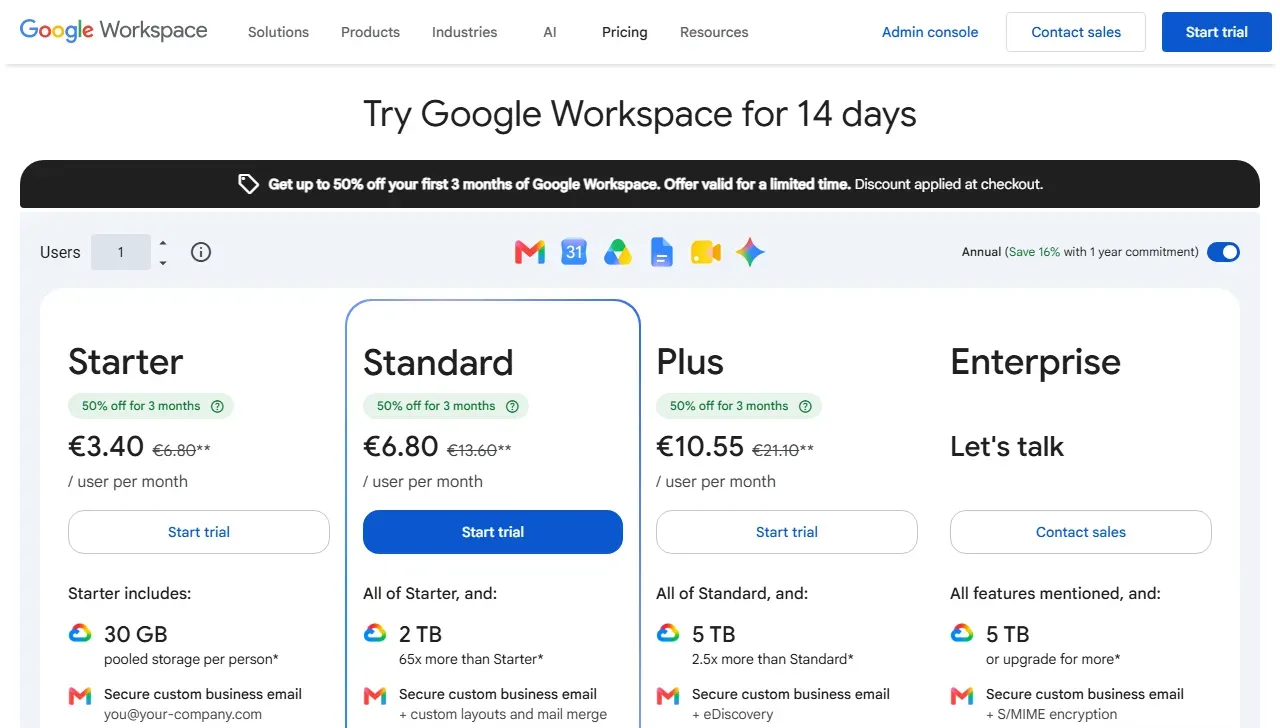
- 1 Crossed out: the regular prices shown in the table below; the large ones are a temporary discount for the first 3 months
- 2 Annual commitment selected (Annual); the flexible plan costs more
| Plan | €/user/month excl. VAT | With 21% VAT | Drive storage | Meet participants | Best for |
|---|---|---|---|---|---|
| Business Starter | €6.80 | €8.23 | 30 GB per user | 100 | 1–5 people who mainly need email on their own domain |
| Business Standard | €13.60 | €16.46 | 2 TB per user (pooled) | 150, with recording | Teams that need shared drives and meeting recordings |
| Business Plus | €21.10 | €25.53 | 5 TB per user (pooled) | 500 | Sensitive data, Vault, advanced device management |
| Enterprise | custom quote | – | 5 TB+ | 1,000 | Large organizations, advanced security |
Two practical points. First, for November 2026 to January 2027 Google's price list shows temporary introductory discounts (check the conditions and limits in the Google price list); after that the standard price applies, so base your budget on it. Second, VAT-registered businesses that enter a valid VAT number are usually charged under the reverse-charge mechanism: there is no VAT on the invoice and you account for it yourself. If you want invoices in Lithuanian and to pay by bank transfer, you can buy licenses through a local Google partner.
Comparing it with Microsoft 365 or Zoho? You will find a comparison of email services in business email: Gmail, Outlook or Zoho.
How to administer Google Workspace: 10 steps
Menu names are given in English, as you will see them in most accounts and in Google's help pages. If your Admin console is shown in another language, the structure is the same.
- Sign in to the Admin consoleGo to admin.google.com and sign in with an admin account (it ends with your domain, not @gmail.com). On the home page you will see the number of users, billing and alerts.
- Create usersDirectory → Users → Add new user. Enter the first name, last name and primary address (for example, name@company.lt). When there are many people, use Bulk update users with a CSV file. Each active user takes one license.
- Organize users into organizational unitsDirectory → Organizational units. For example, "Management", "Sales", "Warehouse". Units can have different rules: block external Drive sharing for warehouse staff but allow it for sales.
- Create groups for shared addressesDirectory → Groups → Create group. A group such as info@, sales@ or invoices@ does not need a license: emails go to all members. Choose the access type (Public, Team, Announcement only or Restricted) and, if customers write to it, allow external senders to post. When enquiries need to be split between colleagues, the group can be turned into a Collaborative Inbox.
- Turn on 2-step verification (2SV)Security → Authentication → 2-step verification. First check Allow users to turn on 2-Step Verification, give people a week to turn it on, then set Enforcement → Turn on enforcement from date. The safest option is to allow all methods except SMS codes. Google is already gradually making 2SV mandatory for admin accounts.
- Set up Gmail: DKIM, SPF, DMARC and routingYou generate the DKIM key in Apps → Google Workspace → Gmail → Authenticate email and add it as a TXT record in your domain's DNS. SPF record:
v=spf1 include:_spf.google.com ~all. Start DMARC withp=noneand watch the reports. Without these records your emails land in spam more often. Email copies, forwarding and a "catch-all" address are set in Apps → Google Workspace → Gmail → Routing. - Set Drive sharing rulesApps → Google Workspace → Drive and Docs → Sharing settings. Recommended: allow sharing outside the organization, but turn on a warning when a file is shared with an external address, and turn off public "anyone with the link" sharing for sensitive departments. Create Shared drives for team files: files in them belong to the company, not to a specific employee.
- Manage phones and computersDevices → Mobile & endpoints → Settings. Basic management is on by default: you see which devices are signed in, can require a screen lock and can remotely remove the work account from a lost phone. Advanced management comes with Business Plus and higher plans.
- Prepare an offboarding procedureWhen an employee leaves: suspend the account (Users → user → Suspend), sign out sessions and devices, forward incoming email to a colleague, and when deleting the user, transfer their Drive files and calendar to another person. Only then is the license freed up. Write this sequence down: it is the one people forget most often.
- Take care of backupsGoogle Workspace is not a backup system: deleted files and emails can be recovered only for a limited time. Vault (from Business Plus) is for retention rules and search, not for restoring. A super admin can export the whole organization's data via Data → Data import & export → Data export, and regular backups are made with third-party tools. If you keep contracts or accounting documents in Drive, a backup is a must.
- 1Security
- 2Authentication
- 32-step verification
- 4Allow users to turn on 2-Step Verification
- 5Enforcement: Turn on enforcement from date
- 6Save
Based on the Google Workspace Admin Help (checked on October 23, 2026). Super admin rights are required. On the left you can select an organizational unit if you do not want to apply the rule to everyone at once.
Google Workspace admin checklist: what to check weekly and monthly
For a small company this routine takes less than an hour a month and prevents most unpleasant surprises.
| When | What to check | Where in the Admin console |
|---|---|---|
| Weekly | Security alerts: suspicious sign-ins, phishing emails, 2SV turned off | Security → Alert center |
| Weekly | New and departed employees: are all changes done? | Directory → Users |
| Monthly | Licenses: are you paying for suspended or unused accounts? | Billing → Subscriptions |
| Monthly | Files shared publicly or with external addresses | Reporting → Audit and investigation → Drive log events |
| Quarterly | The list of admins and their roles, connected third-party apps | Account → Admin roles; Security → API controls |
| Quarterly | DMARC reports and group settings (who can write to info@) | DNS / Directory → Groups |
Google Workspace admin tools
- Admin console (admin.google.com): the main control panel, enough for most tasks.
- Google Admin app (Android, iOS): reset a password or suspend a user from your phone.
- Alert center and audit logs: who changed or shared what, and when.
- Admin SDK API and Apps Script: automated user creation, reports, group sync.
- GAM: an open-source command-line tool for bulk changes (for IT specialists).
- n8n or Make: when administration involves other systems, for example a new employee in the HR sheet → an account is created automatically, added to a group and a welcome email is sent.
How to move to Google Workspace in a week
If you are just moving from free Gmail or old hosting email, here is a proven sequence for a team of 5–15 people:
- Day 1: verify the domain. Sign up and add the TXT record Google gives you to your domain's DNS. Your current email keeps working as before for now.
- Day 2: users and groups. Create the accounts and shared addresses (see steps 2–4 above).
- Day 3: migrate old emails. Use the Data migration tool to move emails from an IMAP server or Microsoft 365. Larger mailboxes take several hours, so start it in the evening.
- Day 4: MX records. Change the MX records to the ones Google specifies. The change spreads within a few hours, sometimes up to a day.
- Day 5: SPF, DKIM, DMARC and Drive structure. See steps 6–7. Create shared drives by department.
- Day 6: a short team training. How to sign in and use shared drives, group email and Meet.
- Day 7 and later: switch off the old provider. Do not cancel the old service for at least a week after the MX change: some emails may still arrive the old way.
Google Workspace admin services in Lithuania: what to expect
In Lithuania, two types of companies offer Google Workspace support, and it is worth knowing the difference:
- Google partners and IT support companies sell licenses (invoices in Lithuanian, payment by bank transfer), run migrations and provide user support. Publicly listed support prices on the market are usually charged per workstation or as a fixed monthly fee.
- Automation specialists work not with licenses but with what happens in your email and spreadsheets: routing enquiries, replies, reports, document generation.
What I do. Aigentas.lt is not a Google Workspace reseller: you buy licenses directly from Google or through a partner. I help set up the settings (groups, DKIM/SPF/DMARC, shared drives, 2SV), migrate email and then automate daily work: Gmail enquiries go to your CRM or Google Sheets, AI prepares reply drafts, invoices from email are copied to Drive and your accounting software. A first solution starts at €450, with the price agreed in writing before we start; maintenance starts at €150/month. More: email automation, Google Workspace integrations, process automation, pricing, free initial consultation.
Where Google Workspace automation starts to pay off
Once administration is in order, these three flows save the most time:
- Enquiries from info@ to your CRM. A new email automatically becomes a record in Pipedrive, HubSpot or Google Sheets, and the person responsible gets a notification. See enquiry and lead automation.
- Invoices from email to Drive and accounting. PDF attachments are saved in a shared drive by supplier and month, and the data is read and passed on to the accountant.
- Google Forms → Sheets → reply to the customer. A submitted form immediately creates a row in the sheet and sends a confirmation, with no extra paid tool.
More examples in Google Workspace automation and Gemini AI agents in Google Workspace.
Frequently asked questions
How do you administer Google Workspace?
Google Workspace is administered in the Admin console at admin.google.com, signed in with an admin account. That is where you create users and groups (Directory), turn on 2-step verification (Security), set Gmail and Drive options (Apps → Google Workspace), and manage devices and licenses (Billing).
How much does Google Workspace cost in Lithuania in 2026?
According to the Google price list (checked on October 17, 2026), Business Starter costs €6.80, Business Standard €13.60 and Business Plus €21.10 per user per month excluding VAT, with an annual commitment. Paying monthly without a commitment (Flexible), the prices are €8.10, €16.20 and €25.30. Enterprise pricing is by custom quote.
Do you need an IT specialist to administer Google Workspace?
For a company of up to 20–30 people, one responsible employee who reviews users, licenses and security alerts once a month is usually enough. You need an IT partner for a migration, complex email rules, many devices or strict security requirements.
What happens to the data when an employee leaves?
The admin suspends the account, signs it out of all devices and, when deleting the user, transfers their Drive files and calendar to another employee. Incoming email can be forwarded to a colleague. The data stays with the company and the license is freed up.
Does Google Workspace back up your data?
Google keeps the service reliable, but the Starter and Standard plans have no classic backup from which you could restore any given day. Deleted files and emails can be recovered only for a limited time. Vault (from Business Plus) is for retaining and searching data, not for restoring it, so long-term copies are made with third-party tools or Data export.
Does Aigentas.lt sell Google Workspace licenses?
No. You buy licenses directly from Google or through an official partner. I help set up the settings, migrate email and, most importantly, automate work in Gmail, Sheets, Drive and Calendar.