The short answer: most small Lithuanian companies are best served by one of two options: Google Workspace (Gmail with your domain, from €6.80 per user/month excluding VAT) or Microsoft 365 (Outlook and the Office apps). Zoho Mail is the cheapest, and hosting email only suits very low email volume. A free @gmail.com address is not right for a business: it does not have your domain and the company does not control the account.
Below you will find a comparison table with prices (checked on October 17, 2026), when to choose which, and how to set up email with your own domain so your messages do not land in spam.
Business email providers compared: 4 options
| Option | Price (excl. VAT) | Mailbox size | What's included | Best for |
|---|---|---|---|---|
| Google Workspace (Gmail) | from €6.80 per user/month | 30 GB (Starter), 2 TB (Standard) | Gmail, Drive, Docs, Sheets, Meet, Calendar, Admin console | Teams that work in the browser and on the phone |
| Microsoft 365 (Outlook) | Business Basic €6.07 per user/month (annual billing) | 50 GB mailbox | Outlook, Teams, OneDrive; Standard also includes desktop Word and Excel | Companies that live in Excel and Word |
| Zoho Mail | Mail Lite ~$1, Workplace Standard ~$3 per user/month | 5–30 GB | Email, calendar; Workplace also includes documents | A minimal budget |
| Hosting email | often included in website hosting | depends on the plan | Email only (IMAP/POP), webmail | 1–2 people, low volume |
* Microsoft 365 prices: the US price list effective July 1, 2026, billed annually. The euro price in Lithuania is set separately and may differ slightly; you will see the exact price in the Microsoft store or from a partner. Zoho prices come from the vendor's price list in US dollars.
Gmail for business: what it is and how much it costs
“Gmail for business” is Gmail with your domain (name@company.lt), included in a Google Workspace subscription. The interface is the same as personal Gmail, but the company manages the accounts: an admin creates and closes mailboxes, sets up shared addresses (info@, sales@) and security rules. Plans: Business Starter €6.80, Standard €13.60, Plus €21.10 per user per month (excluding VAT, annual commitment, Google price list in October 2026). Paid monthly without a commitment: €8.10, €16.20 and €25.30.
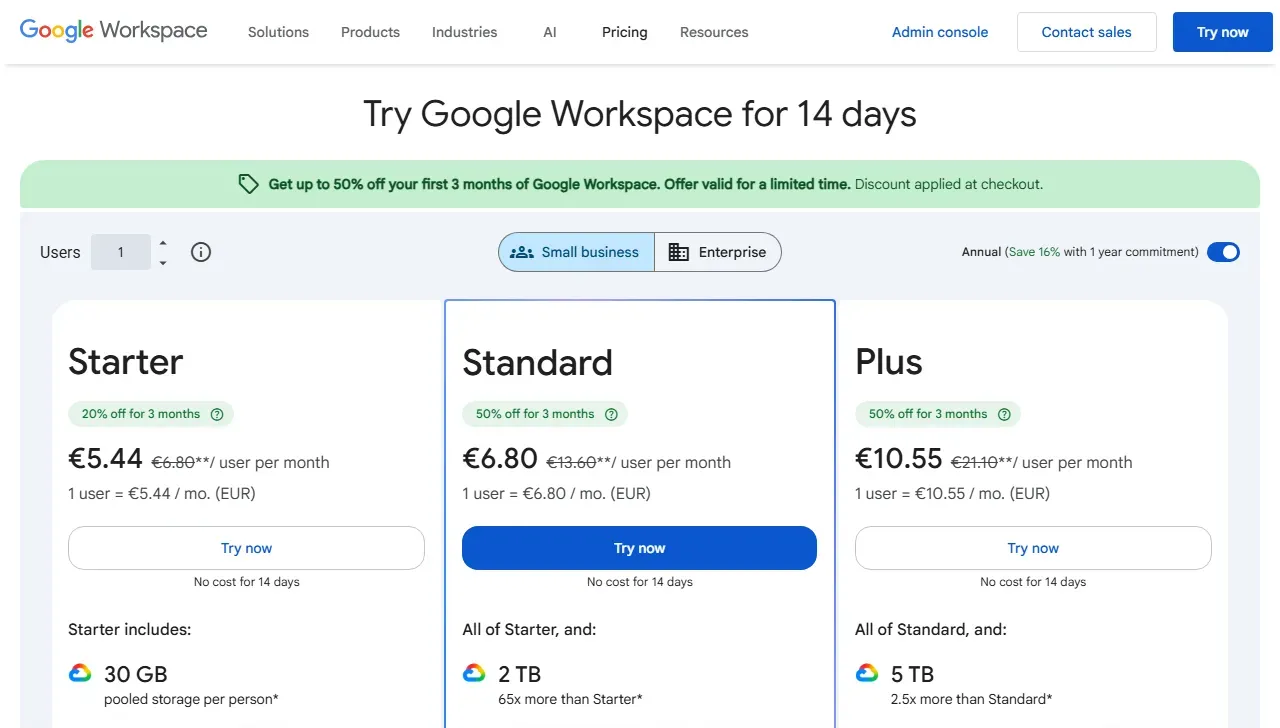
- 1 Crossed-out prices are the regular ones (€6.80 / €13.60 / €21.10); the large ones are a temporary discount for the first 3 months
- 2 Annual commitment switched on (Annual); without it the price is higher
I described how to set up users, groups, 2FA and Gmail settings step by step in the Google Workspace admin guide.
Outlook for business: Microsoft 365
Business Outlook email runs on Exchange servers and is included in Microsoft 365 Business plans. Business Basic gives you email, Teams and the browser versions of Office; Business Standard adds the desktop apps (Word, Excel, Outlook). Microsoft's strengths are the solid Outlook calendar, shared mailboxes and familiar Office files. The drawback is that administration is more complex than Google's.
If you are torn between the two, there is a detailed comparison in Google Workspace vs Microsoft 365 for small businesses. And if you already use Outlook, see how to set up an automatic reply in Outlook.
Zoho Mail and hosting email: when cheaper is enough
Zoho Mail is the cheapest full-featured business email with your domain. The free Zoho plan has no IMAP/POP access, so if you want to use Outlook or another email client, choose a paid plan. It suits a small team that does not need Office documents.
Hosting email (from the same provider that hosts your website) is often already included in the price. However, it has no shared calendar or central user management, and its spam filters and deliverability are usually weaker. If your emails to customers often land in spam, first check SPF, DKIM and DMARC (see below); if that does not help, it is worth moving to Google or Microsoft.
How to choose a business email provider for your situation
| Situation | Choose |
|---|---|
| The team works in the browser, lots of shared documents | Google Workspace Business Standard |
| Accounting and management live in Excel | Microsoft 365 Business Standard |
| 1–3 people who only need email with a domain | Google Workspace Starter or Zoho Mail |
| Lots of enquiries to a shared info@ address | A Google group (Collaborative Inbox) or a Microsoft shared mailbox |
| You already use Teams and SharePoint | Microsoft 365 |
How to set up email with your own domain: 5 steps
- 1TXT recordProves to the provider that the domain is yours
- 2MX recordsRoute incoming email to the new provider
- 3SPF and DKIMProve that you really sent the email
- 4DMARC (p=none to start)Keeps emails out of spam, you get reports
- Domain. If you do not have one yet, register a .lt domain with an accredited registrar. You need access to the domain's DNS for the next steps.
- Provider and domain verification. Sign up with your chosen provider and add the TXT record it gives you to your DNS; this confirms the domain is yours.
- Mailboxes and shared addresses. Create personal mailboxes (name@) and shared addresses (info@, invoices@) as groups; they do not need an extra license.
- MX records. Change the MX records to the ones the provider specifies. Keep the old service running for at least a week while the change propagates.
- SPF, DKIM and DMARC. These DNS records confirm that the emails really come from you. Since 2024, Google and Yahoo have checked senders strictly, so without them emails land in spam more often. Start DMARC with
p=noneand watch the reports.
Too much email? What you can automate
Once your email is in order, the biggest time saving comes not from a new provider but from automation: enquiries from info@ are logged in the CRM automatically, invoice PDFs go to accounting, and AI prepares draft replies to the most common questions. This works with both Gmail and Outlook.
- 1The email arrives at a shared addressGmail / Outlook
- 2The automation recognizes the email typen8n / Make + AI
- 3Enquiry → CRM, invoice PDF → accounting
- 4A common question gets a draft replyA person reviews and sends it
A first solution starts at €450, with setup in 1–2 weeks. More on email automation, Gmail integrations and pricing. Practical examples: Gmail automation: 7 levels.
Frequently asked questions
Which email should a business choose?
If your team works in the browser and on the phone, Google Workspace (Gmail with your domain). If everyone uses Word, Excel and Outlook on the computer, Microsoft 365. If the lowest price matters most, Zoho Mail. Hosting email only suits very low volume and 1–2 people.
Can I use Gmail for business for free?
A free @gmail.com address works, but it does not have your domain, the company does not control the account, and when an employee leaves, the mailbox leaves with them. Gmail with a company domain (name@company.lt) is part of Google Workspace and costs from €6.80 per user per month excluding VAT.
How much does business email cost?
According to the vendors' price lists (October 2026): Google Workspace Business Starter €6.80 per user/month excluding VAT, Microsoft 365 Business Basic €6.07 per user/month excluding VAT on an annual plan (Microsoft Lithuania price list), Zoho Mail Lite about $1 per user/month. Hosting email is often included in the website hosting plan.
How do I set up email with my own domain?
You need a domain (for example, company.lt) and an email provider. You sign up with the provider, verify the domain with a TXT record, create mailboxes, change the MX records and add SPF, DKIM and DMARC records so your emails do not land in spam.
Can I use Outlook with Gmail or Google Workspace?
Yes. You can connect a Google Workspace account in the Outlook app, and Google also offers the Google Workspace Sync for Microsoft Outlook tool. However, some features, such as Outlook automatic replies, only work with Microsoft accounts.