Pipedrive vs Bitrix24: in 2026 these are the two most common finalists a Lithuanian SME owner sees when looking for a first or replacement CRM. Salesforce is too expensive, HubSpot is often too broad for a start, and lighter local solutions are too narrow. These two are what is left. The good news: both are legitimate choices. But they are built for different business logic, so the wrong choice turns into daily friction instead of a speed-up. This comparison will not declare one winner. That would be unfair, because it depends on team size, integration needs, budget and cultural context. Instead, I will go through prices, features, when each one fits better and how hard migration is, and finish with a short three-question decision tree you can work through in 5 minutes. The goal is that when you leave this page you know which way to go, instead of hesitating even more between two open browser tabs.
Pipedrive vs Bitrix24 at a glance: the 2026 feature matrix
Below is a feature comparison for 2026. Prices exclude VAT and are for annual billing (monthly billing costs more). Keep this matrix as a starting point; the sections after it explain why the same features mean completely different value for different teams.
Price (checked October 23, 2026 on both vendors' websites, in euros). Pipedrive is paid per user: Lite €14, Growth €39, Premium €59, Ultimate €79 per month; automations start from Growth. Bitrix24 is paid for the whole organization: Free €0 for 1–2 users; Basic €49/month for up to 5 users; Standard €99/month for up to 50 users; Professional €199/month for up to 100 users. With monthly billing Bitrix24 costs €69, €144 and €289. What this means in practice: for 3 people, Pipedrive Lite (€42) and Bitrix24 Basic (€49) cost about the same, but for a team of 10, Pipedrive Growth is already €390/month, while Bitrix24 Standard is €99 for the whole team. The bigger the team, the cheaper Bitrix24 gets per person.
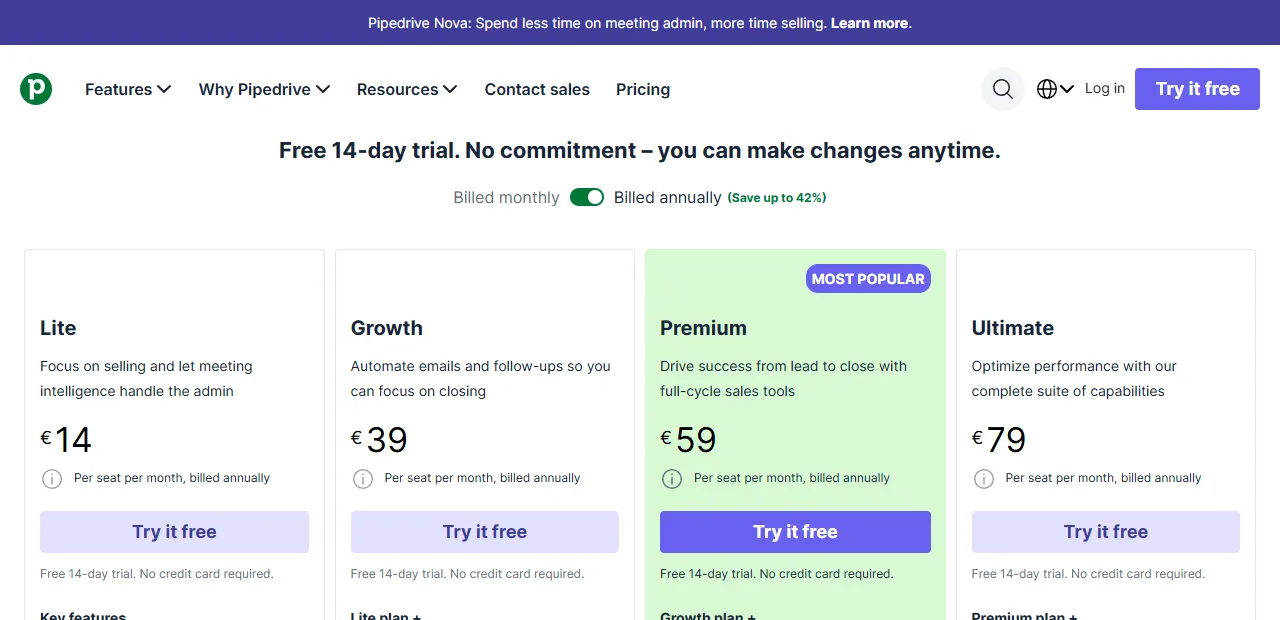
- 1 Growth: automations start from this plan
User limits. Pipedrive: unlimited on all paid plans, and you pay for each user separately. Bitrix24: a tiered structure (5, 50, 100), where each plan has its own ceiling; once you exceed it, you move up to the next tier.
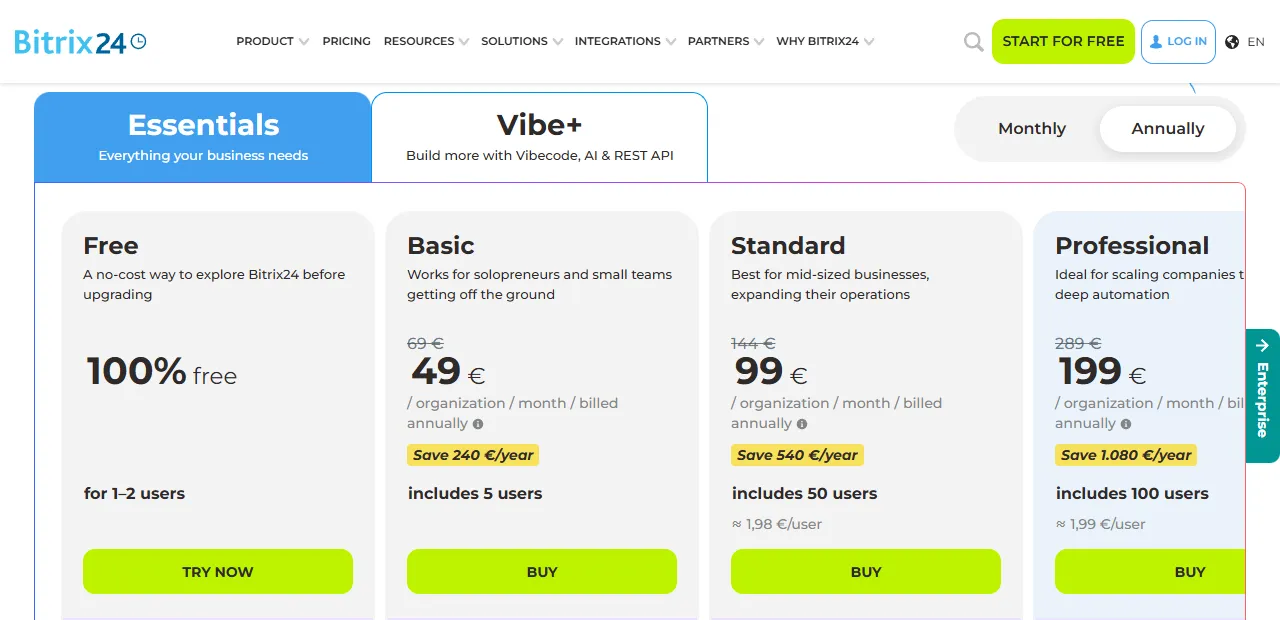
- 1 Price per organization per month, not per user
- 2 Number of users included in the plan (Basic: 5, Standard: 50)
Sales process (pipeline UI). Pipedrive has one of the best Kanban views on the market: cards with the amount, last contact and days remaining are visible at a glance. Bitrix24 has a pipeline too, but the interface is busier because project and chat elements share the screen.
Automation. Pipedrive automations are available from the Growth plan (up to 50 active automations per company; Premium 150, Ultimate 250). The Bitrix24 pricing page places sales automation ("Sales automation"), task automation and RPA in the Professional plan (€199/month for up to 100 users), which is worth knowing if automations matter most to you.
Integrations. Pipedrive: native Gmail, Outlook, Slack, Zoom and Microsoft Teams, plus hundreds of Marketplace apps; practically anything else through Zapier or n8n. Bitrix24: Gmail, Outlook, Google Calendar, Teams; the native Marketplace is smaller, but built-in telephony and video calls are included.
Mobile app. Both have iOS and Android apps. Pipedrive's is smoother and simpler for a salesperson on the road; Bitrix24's covers more but makes it harder to do one job in one place.
Interface language. Pipedrive has no Lithuanian interface (it supports, for example, Latvian, Estonian and Polish). Bitrix24 supports many languages, including Russian; check whether Lithuanian is available in your account before rollout.
Support quality. Pipedrive: a good Help Center, self-service and live chat in English. Bitrix24: a wide network of Marketplace partners, including Lithuanian integrators; deeper questions are often solved through a local partner.
When is Pipedrive the better choice?
Pipedrive fits best for a sales-focused team of 3–15 people whose daily work is moving deals through a pipeline and seeing a clear numerical answer: how many active deals there are, where they are stuck, and where a new touchpoint is needed. If your team thinks in terms of the sales board first, and chat, projects and documents are not a priority, Pipedrive's clarity and fast start bring real value.
Specific signs that Pipedrive is the right choice: (1) one main pipeline with 4–7 stages that all salespeople understand the same way; (2) most of the work happens inside the CRM, not across ten tools; (3) fast onboarding of salespeople is a priority (with Pipedrive it is usually 2–5 working days per new person); (4) the team already uses Gmail, Outlook or Microsoft 365 and needs native email sync; (5) the need for automation is moderate, with 5–15 flows enough for the first year.
An illustrative situation (built from typical assumptions, not a specific client case). Say a B2B security solutions seller from Vilnius has 8 employees (3 sales managers, 2 technical consultants, the manager and 2 support specialists). The average deal is €4,000–12,000, the sales cycle is 6–10 weeks, and there are 35–50 active deals at a time. The company works in Google Sheets and loses 2–3 deals per quarter because of missed follow-ups and deal aging nobody sees. The Pipedrive Growth plan (automations included; €312 per month for 8 users billed annually) would give them a clear pipeline, Workflow Automation alerts for deal aging after 7 and 14 days of inactivity, and the native Gmail integration that attaches emails to contacts automatically. An indicative rollout with data migration from Sheets is about 3 weeks; one extra saved deal of €4,000–12,000 could cover the annual license cost. You will find more specific Pipedrive scenarios in the Lithuanian context in the article (Pipedrive automation in Lithuania).
When is Bitrix24 the better choice?
Bitrix24 fits best for larger teams of 15–50 people for whom a CRM is only part of what they need from a platform. If your work includes internal communication (chat, video calls), task management (similar to Asana or Trello), document libraries and HR processes, Bitrix24 brings all these layers together in one system. The trade-off: the UI is not as polished as Pipedrive's, onboarding a new employee takes longer, and the learning curve is steeper in the first week.
Specific signs that Bitrix24 is your choice: (1) the team already uses several separate tools (Slack + Asana + Drive + CRM) and wants to consolidate them into one platform; (2) internal communication happens in Lithuanian and Russian, and Bitrix24's multilingual interface naturally covers both; (3) the budget is tight at the start: the Free plan for 1–2 users lets you try it at no cost, and Basic (€49/month) covers up to 5 people; (4) you need to coordinate not only sales but also project delivery or production internally; (5) the team already works, or plans to work, with the Russian-speaking market, where the Bitrix24 platform is already familiar.
An illustrative situation (built from typical assumptions). Say a manufacturing company from Kaunas has 30 employees (8 in sales, 4 project managers, 12 in production, 4 in logistics, 2 in accounting). The average order is €8,000–25,000, and the cycle from enquiry to delivery is 4–8 weeks with many internal steps. Pipedrive may not suit such a company, because after a won deal a 4-week delivery process starts with 5 different teams, which Pipedrive does not cover. Bitrix24 Standard (€99/month for up to 50 users, billed annually) would give them a CRM, project management after the win, an internal chat system for the factory, a document library for drawings and telephony for customer calls. Indicative onboarding is about 6 weeks, but the system could replace 3 separate tools. I describe Bitrix24 automation scenarios in the article (Bitrix24 automation in Lithuania, 2026).
How hard is it to migrate to Pipedrive or Bitrix24?
Migrating to any CRM from an old system or Excel breaks down into three steps: importing data, training salespeople and connecting integrations. Both platforms have CSV import, but the experience is genuinely different. Pipedrive's interface is simple: on a self-service basis you can move 2,000–5,000 contacts with standard fields (name, company, phone, etc.) in a few hours. Bitrix24 import works too, but configuring more complex fields (custom fields, multiple pipelines, role-based access) often requires a partner's help or 2–3 hours of reading documentation.
The difference in training is clear. With Pipedrive, a new salesperson is up and running in 2–3 hours, because the interface is narrow and intuitive: pipeline, contact, deal, activity. With Bitrix24, initial training takes 4–8 hours, plus a first week of learning, because the platform is broad and many features are reachable from the same screen. This says nothing about the system's quality; it says something about the number of layers.
In reality, Pipedrive is the better choice for self-service migration in small teams. Bitrix24 is most often rolled out with the help of a Lithuanian partner (roughly €250–800 one-off setup), but it replaces several systems at once, so the total annual cost is often still lower than a Pipedrive + Slack + Asana + Drive combination.
Verdict: Pipedrive or Bitrix24 for a Lithuanian business?
The honest verdict: there is no universal winner, only the right match for your situation. Work through this three-question decision tree before you choose; for most Lithuanian SMEs it gives a clear answer in 5 minutes.
Question 1: do you need more than a CRM (chat, project management, document libraries for internal work)? If YES, Bitrix24 is the more natural fit, because it covers internal communication, tasks and files in one place. If NO, Pipedrive as a pure sales CRM will work better, because there is less to pull attention away from the main work.
Question 2: how big is your team now, and where do you expect to be in 12 months? 3–10 people with no plans to grow past 15: Pipedrive Growth is the right size. 15–50 people with a growth plan: Bitrix24 Standard (€99/month for up to 50 users) is cheaper per user and adds the internal platform layer.
Question 3: what is your budget per user per month, with real automation features? Up to about €15/user: Bitrix24 Free, Basic or Pipedrive Lite (no automations). If you need automations: Pipedrive Growth (€39/user) or Bitrix24 Professional (€199/month for up to 100 users); which one is cheaper depends on team size. With a bigger budget both are justified, and the decision comes down to the feature profile and team culture.
After these three answers your choice is usually clear. If you are still unsure or need a third-party view, write to me (free consultation) about how your sales team works now. I will read it and tell you by email which platform I would choose and why. If more detail is needed, we will arrange a call. You will find more practical CRM automation scenarios in the guide (CRM automation for small business), and the full process automation service is described on the service page (Process automation).
Frequently asked questions
Can you migrate from one CRM to the other after a year of use? Yes, but it takes real work. Contacts and deals move over via CSV in a few hours, but the pipeline configuration, custom fields, automation flows and retraining salespeople take 2–4 weeks. A practical rule: migrating from Bitrix24 to Pipedrive is easier, because there are fewer layers to set up again (Pipedrive does not include chat or project management, so you do not need to rebuild them). Going from Pipedrive to Bitrix24 is harder, because you have to redesign not only the CRM but also a collaboration layer that did not exist before.
Which CRM integrates better with Lithuanian business software (i.MAS, Saskaitos.lt, Rivilė, Apskaita5)? Neither platform has native connectors to Lithuanian accounting and tax systems (i.MAS is the tax authority's electronic tax system; the others are Lithuanian invoicing and accounting software). Both need a bridge through n8n, Make or Zapier with REST API calls. In practice Pipedrive has a little less friction thanks to a stable REST API, better official documentation and more Lithuanian implementation examples in the community. Bitrix24 connections work too, but more often need a partner's advice for the first integration. You will find a detailed guide to email automation in the Gmail ecosystem, which connects to both CRMs, in the article (Gmail email automation).