Picture this (an illustrative example): the director of a small company in Vilnius does the same thing every Monday morning. He opens his email, copies new leads from Facebook into the CRM, updates the accounting spreadsheet in Google Sheets, forwards invoices to the accountant and tells the team about new orders in Slack channels. Two sales managers spend an hour and a half each on this every week. Over a year, that adds up to almost four full-time weeks (~150 hours) spent on copying and pasting.
n8n is an automation platform distributed on open-source principles (a “fair-code” license), and it changes situations like this completely. Unlike Zapier or Make, n8n can be hosted on your own server, so the data stays on a server you choose (for example, in the EU). That makes GDPR compliance easier, and at higher volumes the monthly fees are often much lower. In this article I describe five concrete ways small and mid-sized Lithuanian companies can use n8n day to day.
What is n8n and why Lithuanian businesses choose it
n8n (pronounced “n-eight-n”) is a visual programming platform for automating business processes. You build a workflow by dragging nodes onto a canvas: one node watches incoming email, another extracts the data, a third writes it into the CRM, and a fourth notifies the team in Slack. No coding is required, but developers can write extra JavaScript or Python logic directly inside the nodes.
Why n8n and not Zapier or Make? Lithuanian businesses often choose n8n for three main reasons. First, self-hosting: the data stays on your own server or a VPS in Europe, not in a US cloud. That matters for companies that handle customers' personal data. Second, price: n8n Community Edition is free on your own server, and n8n Cloud starts at €20/month (billed annually, as of October 2026). Zapier's price grows with the number of tasks, so at higher volumes it is often several times more expensive. Third, flexibility: n8n has several hundred ready-made integrations and lets you write extra JavaScript or Python logic, which is more limited in Zapier.
For a detailed comparison of n8n with Make and Zapier, including a pricing table and a feature matrix, see n8n vs Make vs Zapier 2026: which platform suits a Lithuanian business.
5 typical n8n automation use cases
Each case below is a typical scenario for Lithuanian companies with 10–50 employees. The companies and details are illustrative, and the time and money figures are typical examples, not the results of a specific client.
1. Moving leads from Facebook forms into Pipedrive CRM
The situation: a company selling business insurance in Vilnius gets ~200 leads a month through Facebook Lead Ads forms. Before automation, two sales managers opened Facebook Ads Manager every morning, exported a CSV, moved the contacts into Pipedrive by hand, assigned them to sales reps and logged them in a tracking spreadsheet. This took 45–60 minutes a day.
The n8n workflow: Facebook Lead Ads webhook → n8n checks whether the contact already exists in Pipedrive (duplicate prevention) → creates a new deal with all the data → assigns it to a sales rep by region or product → sends a Slack notification to the person responsible → logs it in a Google Sheets tracking sheet. The whole process takes 10–15 seconds from the moment the form is submitted.
- 1A Facebook Lead Ads form is submittedFacebook (webhook)
- 2Duplicate checkn8n + Pipedrive
- 3New deal assigned to a sales repPipedriveBy region or product
- 4Notification and a row in the tracking sheetSlack + Google Sheets
Typical savings: ~5 hours a week of the two sales managers' time (~€250/month in labor costs). An extra benefit: leads are handled immediately rather than the next morning, so the time to first contact drops from 12–18 hours to 1–2 hours.
2. Syncing invoices between accounting software and Google Sheets
The situation: a small IT consulting company (an MB, a Lithuanian small partnership) uses Site.pro (formerly B1.lt) to issue VAT invoices, but the director wanted to see an income summary in Google Sheets, with the filtering, calculations and charts the accounting software does not offer. Previously, the accountant moved the data over by hand every week, which took 2–3 hours.
The n8n workflow: every night (at 02:00) n8n calls the accounting software's API → takes all invoices issued in the last 24 hours → normalizes the data (client name, amount, date, project code) → adds new rows to Google Sheets → updates the summary table → if the day's income exceeds a set threshold, sends the director a positive Slack message.
Typical savings: ~3 hours a week of the accountant's time (~€90/month). The director could see an accurate daily income summary every morning without any manual work.
3. Email → Slack notifications for new orders
The situation: an online store selling dietary supplements, 15 employees, on WooCommerce. The warehouse and logistics team get no real-time information about new orders: they check email every hour or wait for the administrator to forward them. As a result, preparing shipments was delayed by 1–3 hours.
The n8n workflow: WooCommerce webhook (new order) → n8n extracts the order data → formats a message with products, quantities and the delivery address → posts it to the #orders Slack channel → if the order is over €200, also notifies the manager → updates the daily order counter in Google Sheets.
Typical savings: the administrator's time drops by ~2 hours a week (~€60/month), and the average order preparation time shortens by about 40 minutes. Customers would likely receive their goods sooner.
4. Automatically routing customer service tickets
The situation: a 40-employee company that provides accounting and legal advice uses Freshdesk for customer service. Before automation, a manager read every ticket and assigned it by hand to the right specialist by topic (accounting, law, taxes, employment). This took ~3 hours a week.
The n8n workflow: new Freshdesk ticket → n8n sends the ticket text to Claude AI (or GPT-4) with a classification instruction → the AI determines the category and urgency → n8n assigns the ticket to the right specialist based on the category and a workload table → sends the specialist a Slack notification → if the AI is unsure (low confidence score), the ticket goes to the manager for review.
- 1New customer service ticketFreshdesk
- 2AI determines topic and urgencyClaude / GPT
- 3Assigned to a specialist by topic and workloadn8n
- 4Notification to the specialistSlack
- 5AI unsure → review by the manager
Typical savings: ~3 hours a week of the manager's time (~€120/month). In this illustrative example, the AI classifies most tickets correctly (roughly ~85%), and unclear cases go straight to a person. Time to first reply can drop from several hours to under an hour.
5. OCR for VAT invoices and entry into the accounting system
The situation: a 25-employee construction company receives 80–120 supplier VAT invoices a month as PDFs by email. The accountant reads them and types them into Rivile (a widely used Lithuanian accounting system) by hand, which takes 6–8 hours a month on average for data entry alone.
The n8n workflow: Gmail receives an email with a PDF attachment → n8n recognizes the invoice by sender and subject → sends the PDF to Google Document AI (OCR) → extracts structured data (supplier, date, amount, VAT, line items) → checks the supplier against the list of approved suppliers → if everything checks out, writes it into Rivile through the API → sends the accountant a confirmation with the original and the extracted data.
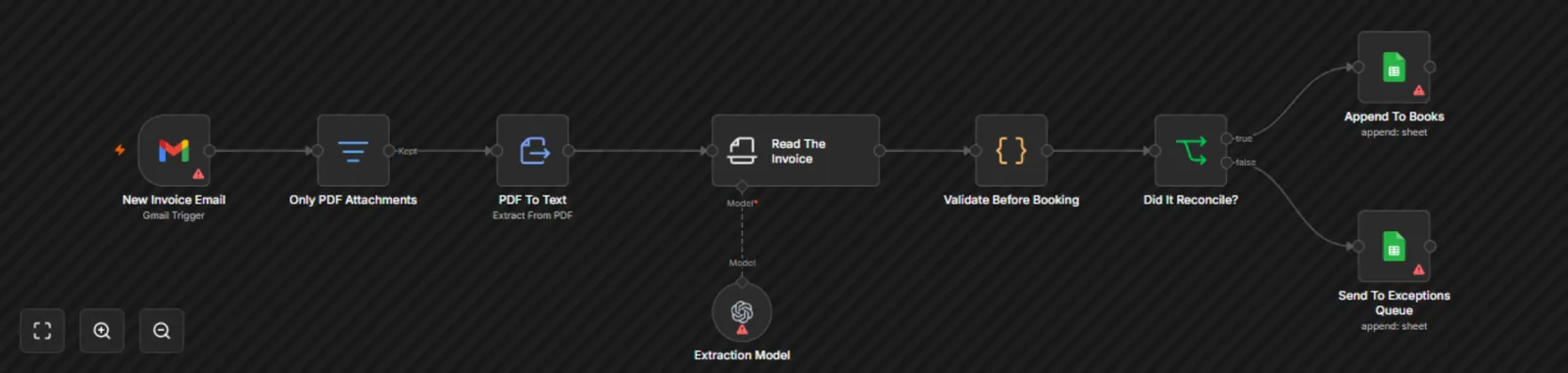
- 1 Gmail receives the email and only PDF attachments are kept
- 2 The AI model extracts the invoice fields
- 3 Check before recording: does net amount + VAT = total?
- 4 Clean ones go to accounting, unclear ones to a person
Typical savings: ~6 hours a month of the accountant's time (~€180/month). The number of errors usually goes down because data is no longer retyped by hand, and mismatches are flagged for the accountant to review. Invoices are processed the same day rather than a week later.
How much does n8n setup cost and how long does it take?
The cost of n8n depends on whether you set it up yourself or with a consultant's help.
Doing it yourself (self-hosted): n8n Community Edition is completely free. You need a VPS: for the simplest workflows, an inexpensive DigitalOcean or Hetzner plan is enough (from ~€5–10/month; prices change). Installing it on an Ubuntu server with Docker takes 30–60 minutes if you are technically minded. Building more complex workflows takes time to learn: the first workflow typically takes 2–8 hours, depending on its complexity.
With an Aigentas.lt consultant: setting up a simple workflow (1–2 integrations, e.g. Facebook Ads → CRM or email → Slack) costs from €450 as a one-time fee. A workflow of medium complexity (3–5 integrations with conditions and error handling, like the invoice OCR case above) costs €600–1,200. Complex, multi-component workflows with AI classification and integration of several systems cost €1,200–2,500. Support and monitoring start at €150/month.
Calculating ROI: if automation saves 5 employee hours a week (roughly €15–20 per employee hour including taxes), that is about €300–400 a month. In that case the setup investment could pay for itself in 1–3 months, but the exact timeline depends on your processes and volumes.
Most common n8n setup mistakes
A few mistakes come up again and again when setting up n8n. They slow the setup down or cause problems later.
Mistake #1: a first workflow that is too complex. Many business owners want to automate everything at once. The result is a workflow with 15+ nodes that is hard to test and even harder to fix when something breaks. It is better to start with one simple workflow, put it into production, watch it for a week and then expand. Small workflows that work beat one big workflow that takes months.
Mistake #2: poor error handling. n8n workflows can fail for many reasons: changes in API responses, network problems, unexpected data formats. Workflows without error handling fail silently: data is lost and nobody knows. Every important workflow should have an Error Trigger node that notifies the person responsible.
Mistake #3: not testing with real data. n8n has a great test mode with sample data. But real production data always holds surprises: Lithuanian characters (ė, š, ž, ū, ų, č, į, ą), empty fields, unusual date format variations. Before running a workflow around the clock, test it with a few dozen real cases from your database.
Mistake #4: how API keys are stored. API keys should not be typed directly into workflow nodes or text fields. n8n has a dedicated Credentials store, so always use it. This matters especially if several people administer the n8n instance or if you ever plan to export workflows.