According to Salesforce's "State of Sales" (2024), sales professionals spend about 70% of their time not selling but doing other work: entering data into the CRM, writing emails, preparing reports, keeping track of reminders. AI automation changes this ratio.
Automation in sales does not replace people; it helps them work more effectively. The sales rep still leads the conversations, builds relationships and closes deals. Automation handles everything around that.
Lead handling: from enquiry to CRM in seconds
A fast response to a lead is critical: according to a study published by Harvard Business Review (2011), companies that tried to contact a potential customer within an hour were nearly 7 times more likely to qualify them successfully than those that waited longer. Automation ensures every enquiry is handled immediately.
An automated lead workflow: a website form, WhatsApp or email → n8n or Make receives the enquiry → automatically creates a CRM record (HubSpot, Pipedrive) → assigns it to the responsible sales rep → sends the customer a confirmation within 30 seconds → the sales rep gets a Slack notification.
- 1An enquiry from a form, WhatsApp or email
- 2The workflow receives the enquiryn8n · Make
- 3A CRM record is createdHubSpot · Pipedrive
- 4A responsible sales rep is assignedBy a priority set by AI or rules.
- 5The customer gets a confirmation within 30 sEmail
- 6The sales rep gets a notificationSlack
AI lead qualification: before assigning a lead to a sales rep, AI can automatically assess the lead's quality based on the data the customer provided (budget, timeline, company size) and assign a priority.
Automated follow-up: no more lost deals
The biggest problem in sales is a forgotten follow-up. After the first call, the sales rep plans to check in a week later, but gets busy and forgets. The potential customer decides to buy from a competitor.
An automated follow-up scenario: after the first contact → day 2, an automatic email with additional information → day 5, a reminder to the sales rep in the CRM → day 7, an automatic "do you have any questions?" message → day 14, a last attempt with a specific offer.
- 1Day 2: an email with additional informationEmail
- 2Day 5: a reminder to the sales repCRM
- 3Day 7: "do you have any questions?"Email
- 4Day 14: a last attempt with an offerEmail
The emails are sent from the sales rep's mailbox and in their name.
Important: automated follow-up has to feel personal. The emails are sent from the sales rep's email address, in their name. The customer does not realize it is automatic; they feel the sales rep is staying in touch.
How AI helps write sales proposals
AI can significantly speed up proposal preparation: given the customer's data and needs, it generates a draft proposal from your template. The sales rep only adds specific information and adapts it, which can shorten proposal preparation time considerably.
Integrated into the CRM: when a new deal with customer data is entered in the CRM → AI automatically generates a draft proposal → the sales rep reviews it and sends it.
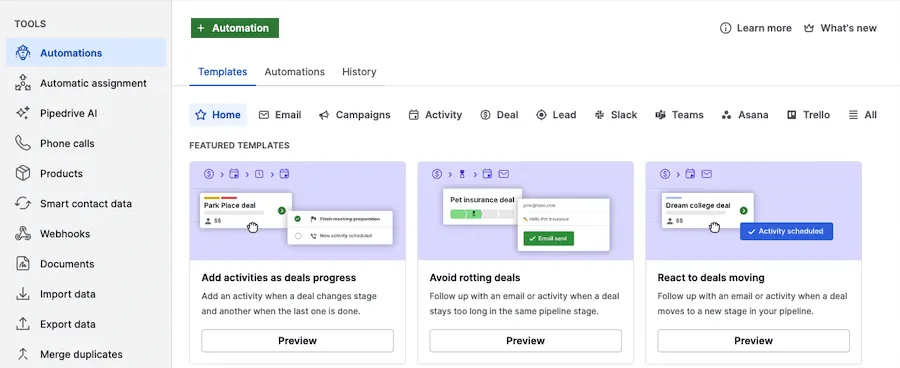
- 1 Automations: the automations section in the "Tools" menu
- 2 + Automation: a new automation from scratch
- 3 A ready-made template: an activity when a deal moves to the next stage
How to automate sales reports
Managers spend a lot of time collecting sales data from the CRM and putting together weekly reports. Automation: every Monday a summary arrives in Slack with last week's deals, new leads, the conversion rate and stalled deals.
Forecast automation: AI can analyze the sales pipeline and forecast the month's results based on patterns in historical data.
The cost of setting up sales automation: a simple workflow (leads → CRM → follow-up) costs €450–800. Full sales automation (leads + follow-up + proposals + reports) costs €800–2,000.