A customer booked an appointment three weeks ago, and on the day they simply don't show up. For a dental clinic, beauty salon or car service, that is a specialist's time you can no longer sell. The receptionist could call every customer the evening before, but that is hours of work every week, and some customers still don't pick up.
The fix is automated appointment reminders and customer notifications that go out on their own based on the calendar: by SMS, email or WhatsApp. This guide covers when and through which channel to send a reminder, what an SMS costs in Lithuania, which tools to choose (from booking systems to a custom workflow), the five most useful notification sequences, GDPR requirements and a 7-day rollout plan.
Automated appointment reminders: how they work and what they cost
Short answer: an automated appointment reminder is an SMS, email or WhatsApp message that the system sends to the customer a set time before the appointment (usually 24 hours before and, for short appointments, 2 hours before). The message is built from your calendar or booking system and includes the time, the address and an option to confirm or cancel. An SMS in Lithuania costs roughly €0.03–0.06 per message (prices change), and I set up the whole system from €450.
Three ways to set up SMS reminders for customers
| Option | Best for | Pros | Cons |
|---|---|---|---|
| Booking system with reminders (e.g. Reservio, EasyWeek) | Salons and specialists who don't have a booking system yet | Reminders are switched on in the settings, SMS and email | You have to change your booking system; SMS is often charged extra |
| Bulk SMS provider | When the appointment list is already in Excel or a system with an export | Cheap messages, a Lithuanian sender name | Without an integration, the list has to be uploaded by hand |
| Custom workflow (n8n + calendar + SMS API) | Clinics, car services, B2B: when appointments are already in Google Calendar, a CRM or your own system | You change nothing; reminders, confirmations and cancellations flow back into your system | Needs a one-time setup |
What to know about SMS in Lithuania
- Price. Twilio's official price for a message to Lithuanian mobile numbers in October 2026 is $0.0578 per segment (Twilio pricing); local providers are often cheaper.
- Lithuanian characters double the price. An SMS with Lithuanian letters (ą, č, ė and so on) fits only 70 characters (160 without them). A longer message is split into several segments, and each one is billed.
- Sending hours. Send reminders between 9 a.m. and 8 p.m.; a message scheduled to go out at night should wait until morning.
- Cancellations. If the appointment has been cancelled, the reminder must not go out: the system has to check the status at the moment of sending, not at the moment of scheduling.
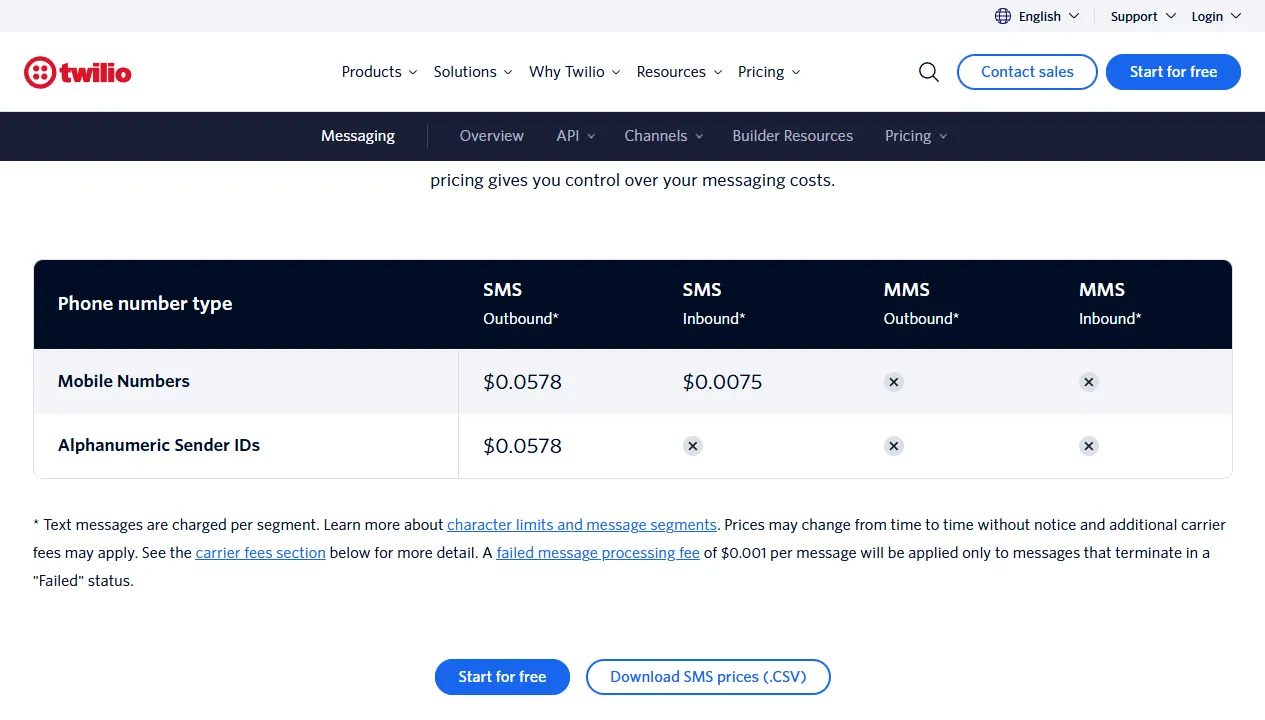
- 1 SMS Outbound: price per segment sent to Lithuanian mobile numbers
- 2 Alphanumeric Sender IDs: the same price when the sender is shown as a name, e.g. your company name
- 3 You pay per segment, not per message
Ready-made solutions by industry: for dental clinics, beauty salons, medical clinics, language schools and educational institutions.
Why several channels work better than SMS or email alone
The three main channels differ in cost and in how quickly a message gets read. An SMS is read fastest and works without internet, but costs roughly €0.03–0.06 per message: 500 messages a month come to about €15–30. Email is almost free and holds all the details, but it is often read hours later or lands in spam. A WhatsApp message is cheap and read quickly, but it only works for customers who use WhatsApp, and business-initiated messages require templates approved by Meta.
Multichannel does not mean bombarding the customer through three channels at once. It means using each channel where it is strongest. Email for the confirmation right after booking (a record with all the details). WhatsApp 24 hours before the appointment (high open rate, conversational tone). SMS 1 hour before the appointment (high reach even without internet). This combination reaches more customers than any single channel; how much it reduces no-shows is worth measuring with your own data: write down the number of no-shows for the month before and the month after.
It also matters that customers respond to channels differently depending on age and habits. Older customers tend to prefer SMS: the message is clearly visible without any extra apps. Younger ones more often choose WhatsApp. Email works for both groups as a confirmation record. By using all three channels, you reach your whole customer base regardless of how digitally savvy they are.
5 sequences with the best ROI from week one
1. Appointment confirmation sequence
Right after booking: an email with all the details (service, specialist, date, location, parking information). 24 hours before: a WhatsApp message with a friendly reminder and the option to confirm or cancel in one tap. 1 hour before: an SMS with the address and the specialist's name. Three messages, three channels, one workflow. A customer who cancels through the reminder frees up the slot for someone else, so the cancel link matters as much as the reminder itself.
- 1Customer booksBooking system · Google Calendar
- 2Immediately: confirmation with all detailsEmail
- 324 hours before: reminder with "confirm / cancel"WhatsApp
- 41 hour before: address and specialistSMS
- 5A cancelled slot is freed up for someone elseBefore sending, the system checks that the appointment has not been cancelled.
2. Invoice payment sequence
Right after the service: an email with the invoice and a payment link. 7 days before the due date: a polite reminder with a payment button. If the invoice is still unpaid after 14 days: a WhatsApp message asking the customer directly to get in touch. This scenario matters especially for B2B businesses with 30-day payment terms: reminders go out on time every time, and the sequence stops automatically once payment arrives.
3. Google review request sequence
2–4 hours after the service: a WhatsApp message with a personalized request to leave a review. The message includes the customer's name, the specific service and a direct link to the review page of your Google profile, with no extra steps. If the customer has not clicked the link within 48 hours: an email with a follow-up request (once, no more). Asking consistently usually brings more reviews than asking now and then, and reviews matter for local search on Google Maps.
4. Inactive customer reactivation sequence
A customer who has not come in for 90 days (or has not booked within their usual service cycle) automatically enters a reactivation sequence. An email with personalized content: "It's been 3 months already", an offer to come back with a special promotion, or simply a reminder that their favorite specialist has free slots. After 7 days: a WhatsApp message with a booking link. This is a marketing message, so it requires the customer's consent (see the GDPR section).
5. New customer welcome sequence
After their first appointment, a new customer automatically receives a short educational email series: day 1, a thank you and aftercare recommendations; day 2, useful information on caring for the result; day 3, complementary services; day 5, an invitation to book the next appointment in advance. The first month often decides whether a customer becomes a regular.
Tools: email service, SMS API, WhatsApp Cloud API and n8n
When reminders are built as a custom solution, all five scenarios run on four tools connected by the n8n automation platform (prices as of October 2026):
Email sending (Gmail / Google Workspace, Brevo, SendGrid)
For small volumes, your Google Workspace or Microsoft 365 mailbox is enough. For larger ones, use a transactional email service: SendGrid dropped its permanent free plan in 2025, and the Essentials plan starts at ~$19.95/month; Brevo has a free plan with a daily limit.
Twilio: SMS sending
SMS to Lithuanian numbers via Twilio costs $0.0578 per segment (70 characters with Lithuanian letters). 500 short SMS a month come to about €25–30. Local SMS providers are often cheaper; Twilio's advantage is two-way messaging and delivery statistics.
WhatsApp Cloud API: WhatsApp notifications
Meta charges for business-initiated template messages by category and country; reminders fall into the "utility" category, which is cheaper than marketing messages. You need a Meta business account, a verified phone number and approved templates.
n8n: orchestration
Self-hosted on a VPS: €10–15/month. It connects all the tools, decides which channel to use and when, keeps the sending history and integrates with your booking system.
Indicative monthly cost (500 customers/month): about €40–70/month
This stack works with any booking system that has an API or a webhook: Calendly, Acuity, SimplePractice or even Google Calendar. If the booking system has no API, n8n can check a Google Sheet or imported CSV files. More on what n8n can do: n8n automation in Lithuania: 5 practical cases.
GDPR legal basis: consent and legitimate interest
Automated notifications to customers in Lithuania are governed by the GDPR. Two key concepts decide whether you need an opt-in or not:
Performance of a contract or legitimate interest (GDPR Art. 6(1)(b) and (f)) lets you send service notifications without separate consent when the message is directly related to a contract or a booked service. A dental appointment reminder, an invoice sent after a service, information about the progress of a service: these are service messages, not marketing. The customer does not have to fill in a separate consent form, but this processing must be disclosed in your privacy policy.
Prior consent (opt-in) is mandatory for electronic marketing messages to individuals under Article 81 of the Lithuanian Law on Electronic Communications: promotions, new products, loyalty offers, reactivation campaigns. The exception (Art. 81(2)): you may send an existing customer offers of your own similar goods or services if you obtained the contact during a sale and the customer was given, then and in every message, a clear, free way to opt out. Since April 22, 2026, prior consent is no longer required for legal entities, but every message must include an opt-out (VDAI (Lithuanian data protection authority) guidance, May 19, 2026). Best practice: collect the opt-in in the booking form with a clear checkbox such as "I agree to receive informational notifications and promotional offers". You must record who gave consent, when and through which channel.
The practical difference: an appointment reminder needs no consent, while a reactivation promotion to an individual usually does (unless the existing customer exception applies). An n8n workflow can automatically check the customer's opt-in status before sending each marketing message and skip contacts without consent. The WhatsApp Cloud API also requires approved templates (HSM) for all business-initiated messages; that is a separate Meta requirement, independent of the GDPR.
7-day rollout plan
Day 1: communication audit
You take stock of your current communication: which notifications go out now, who sends them, how long it takes and where the blind spots are. You record the no-show rate and the number of unpaid invoices; this is the baseline for calculating ROI a month after launch.
Days 2–3: copywriting and template approval
All notification texts are written in Lithuanian to match your brand voice: every message of every sequence in every channel. SMS: up to 160 characters, to the point. WhatsApp: a friendly, conversational tone. Email: structured, with a clear call-to-action button. WhatsApp templates are submitted to Meta for approval (this often takes from a few hours to a few days).
Day 4: Twilio and WhatsApp Cloud API setup
A Twilio account is registered and the business phone number is verified for SMS sending. The same goes for the Meta business account and WhatsApp Cloud API access. Both channels are tested by sending a message manually before the automation is connected; it is important to check delivery before the workflows go live.
Day 5: building the n8n workflows
An n8n workflow is built for each sequence. The trigger is a webhook from the booking system or API polling. The logic: choose the channel, pick the message template, insert the customer's data, send, log the result. The sending-time logic is also set: no messages between 10 p.m. and 8 a.m.
Day 6: full testing
All workflows are tested with real scenarios: a booking created, a booking cancelled, an unpaid invoice, a new customer. You check that messages arrive on time, that the data is correct and that the channel selection logic works. Edge cases must be checked too: a booking made less than 2 hours ahead, a missing customer name, a number without a country code.
Day 7: launch and monitoring
The system goes live with your real customer base. For the first 48 hours it is monitored manually: are messages arriving, are there errors, how are customers responding. After a week, the first statistics: delivery rates, number of replies, change in no-shows.
Mistakes that make automated notifications hurt your reputation
Badly configured automation can do more harm than having none. Four of the most common mistakes when these systems are set up:
Too many messages. Automating three channels does not mean the customer gets nine messages a week. Each channel has its own limit: no more than 1–2 messages per appointment, no more than 1 reactivation message per 60 days. A customer who feels pressured unsubscribes from everything.
Wrong name or service. A "Hi Rasa" message received by someone called Tomas destroys trust instantly. Template variables must be tested with edge cases: a missing name, an empty field. n8n workflows need fallback logic: if the name is unknown, a neutral greeting is used.
Messages outside business hours. An SMS or WhatsApp message at 11:45 p.m. is not a convenience, it is an annoyance. n8n workflows should check the sending time and hold the message until 8 a.m. the next day if the scheduled time falls within the 10 p.m.–8 a.m. window.
A language that doesn't match the customer's. If your customer base includes Russian speakers (relevant for many service businesses in Vilnius), the system has to know each customer's preferred language and send the message in it. n8n makes this logic easy to implement based on a CRM field.
The Aigentas package: 5 sequences live in a week, with Lithuanian copy and a GDPR audit
Aigentas.lt provides full-cycle setup of automated notifications for service businesses in Lithuania. The standard package has four components:
Initial discussion (free). You write how you currently remind customers about appointments and how many don't show up. I read it and reply by email with where notifications would save the most time; if needed, we arrange a call. We agree on the scope and price before starting, so you know what to expect before you commit.
Lithuanian copywriting. All notification texts are written in natural Lithuanian that matches your business's tone. Not template phrases, but texts that sound as if written by someone who knows your customers.
GDPR compliance audit. I check which messages require consent, set up an opt-in recording mechanism and document the chosen legal basis for each message category.
Technical setup of 5 sequences in 7 days, from the first meeting to a working system with monitoring. Integration with your booking system, CRM or Google Calendar. Price: from €450 one-time, support from €150/month. When the investment pays off, I calculate during the audit based on your number of appointments and your current no-show rate. More on end-to-end business communication automation: business process automation with n8n and communication sequences.