Shopify is one of the most popular online store platforms in the world, and more and more small business owners in Lithuania use it. But most Shopify stores use only the basic features and miss out on its powerful automation options.
Shopify automation lets you build a sales machine that works 24/7: it processes orders, communicates with customers, monitors stock and generates reports, without manual work.
What is Shopify Flow? Native automation
Shopify Flow is a built-in automation tool that, according to Shopify, is available on all main plans, including Basic (some features, such as HTTP requests, only on higher plans). It lets you build rule-based automations: for example, when an order exceeds €100 → a VIP customer tag is added automatically → a personal thank-you email is sent.
The most common Shopify Flow scenarios: tagging new customers by the amount of their first purchase, stock alerts, review requests after delivery, and flagging fraud risk on large orders.
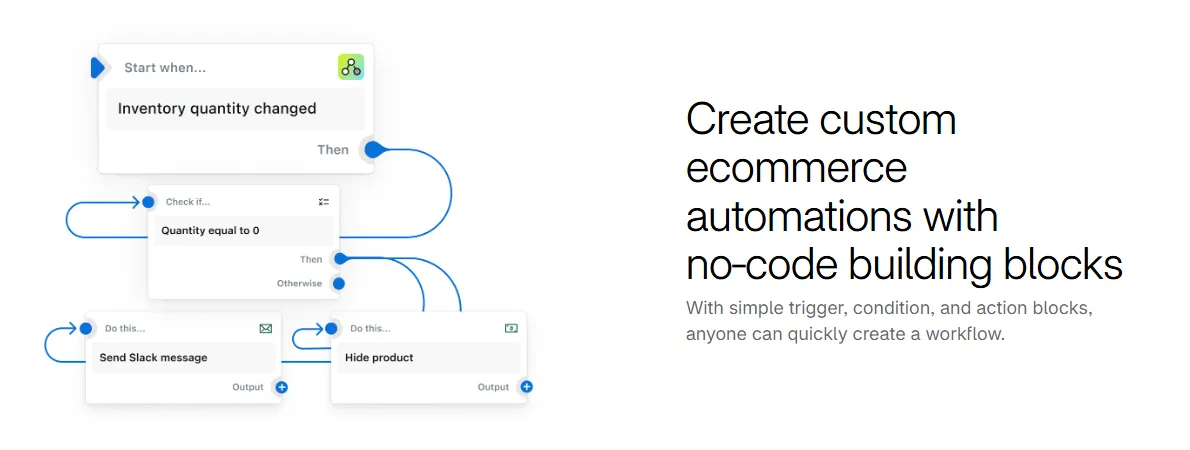
- 1 Trigger: the product's stock level changed
- 2 Condition: stock equals 0
- 3 Actions: a Slack notification and hiding the product in the store
The limitation of Shopify Flow: it works only within the Shopify ecosystem. If you need an integration with an external system (accounting, CRM, warehouse), you need n8n or Make.
Shopify + n8n: advanced integrations
n8n + the Shopify API open up options that native Shopify does not have: automatically moving new orders into the accounting system (e.g. Rivile, Site.pro, Lithuanian accounting software), updating the warehouse management system, and syncing customer data with a CRM (HubSpot, Pipedrive).
A practical scenario: a new Shopify order → n8n receives a webhook → creates an invoice in the accounting system → notifies the warehouse → sends a confirmation email → after 5 days, a delivery check email → after 10 days, a request to leave a review.
- 1New orderShopify webhook
- 2Invoice in the accounting system and a note to the warehousen8n → Rivile / Site.pro
- 3The customer gets a confirmation emailEmail
- 4After 5 days: did the parcel arrive?Email
- 5After 10 days: a request to leave a review
This workflow is fully automated: a person does not have to take a single manual step from the order to receiving the review.
How to automate Shopify inventory management
Shopify tracks stock levels automatically, but its alert system is limited. Automation fills the gap: when stock drops below a set level → an automatic email or Slack notification to the person responsible → an automatic purchase order to the supplier (if a standardized process is used).
Seasonality management: the system can analyze historical sales data and warn you about an upcoming increase in demand (e.g. before holidays), so you can restock in time.
How much does Shopify automation cost and what results can you expect?
Shopify Flow: free, also available on the Basic plan. Configuration: €200–500 (if you use a specialist). Shopify + n8n integrations with external systems: €500–1,500, depending on the number of integrations.
What you can expect: less administrative work per order, fewer errors from manual data transfer, faster order processing and more reviews thanks to the automatic request. The exact numbers depend on your order volume and current processes.
Get in touch with me: we will discuss your Shopify store's processes and I will create a tailored automation plan.