Short answer: in an online store, the first things to automate are the order steps (confirmation, invoice, shipment, tracking link) and the most common customer questions: "Where is my parcel?", delivery times, returns. When order emails and status updates reach the customer on their own, fewer people write to customer service at all; a chatbot can answer the remaining questions, while complaints and unusual cases go to a person.
Online store automation solves exactly this problem: an order comes in → the system automatically handles all the next steps, from the confirmation email to the invoice, from the warehouse notification to sending the tracking link.
How to automate order processing
Typical automated order processing: 1) New order → an automatic confirmation email to the customer; 2) Payment confirmed → an invoice by email; 3) A notification to the warehouse/packer (Slack, email or a printing system); 4) The tracking code is received from the courier → sent to the customer automatically; 5) Delivery confirmed → a request to leave a review.
- 1New order – confirmation to the customerWooCommerce · Shopify
- 2Once paid – invoice by email
- 3Notification to the warehouse or packerSlack · email · printing
- 4Shipment created, tracking code to the customerDPD · Venipak · LP Express
- 5Once delivered – a request to leave a review
All these steps happen automatically after the initial order. The operator only packs and ships; the system takes care of everything else.
Integration with couriers: DPD, Venipak, LP Express Lietuva (Lithuanian parcel carriers) all have an API or integrations with popular platforms. n8n can automatically create the shipment, get the tracking code and send it to the customer.
How to automate inventory management
Managing inventory by hand is a constant headache: while someone updates the stock level, too many orders can come in, or the opposite happens and products do not sell because they show as "out of stock". Automation solves both problems.
Automatic inventory updates: WooCommerce or Shopify automatically update the stock level after every order. When the stock reaches a critical level → a notification is sent automatically to the supplier or the purchasing manager.
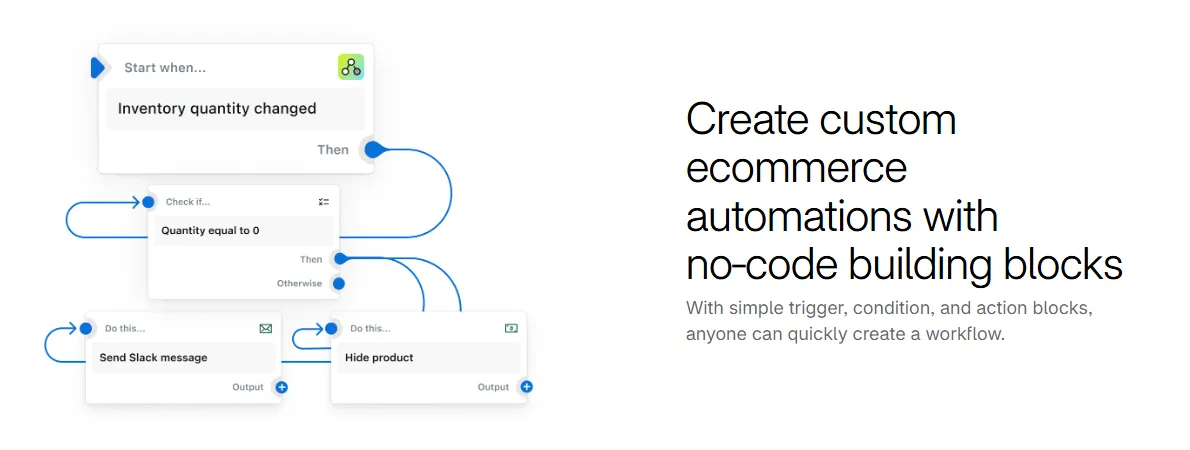
- 1 Trigger – the product stock level changed
- 2 Condition – stock equals 0
- 3 Actions – a Slack message and hiding the product in the store
Managing several warehouses: if you have a physical store and a warehouse, automation syncs stock across all channels. A sale online → deducted from the central stock table → updated in both systems.
How to automate customer communication in an online store
Customer communication in an online store is more than transactional emails. Well-designed communication sequences increase repeat purchases and loyalty.
Automated communication scenarios: D+7 after a purchase, an email with usage tips and a request to leave a review; D+30, a personalized offer based on the category of the previous purchase; D+60, a "We miss you" email with a discount; abandoned cart reminders: the customer left a cart → the first email after 1 hour, and after 24 hours one with a small discount.
Abandoned cart reminders let you remind people about an unfinished purchase with no manual work; whether they are worth a discount is something to check with your own store's data.
Customer service. The most common online store question is about order status. An automatic reply with a tracking link (based on the order number or email) and a clear FAQ about delivery and returns reduce the number of repeat emails. How to set this up step by step: (AI customer service); a chatbot for your website: (AI chatbots for business).
How to automate returns and complaints
Processing returns is one of the most time-consuming processes in online stores. Automation reduces manual work and improves the customer experience.
An automated return scenario: the customer fills in a return form → a ticket is created automatically in the internal system → the customer gets a confirmation with instructions → when the return arrives at the warehouse → a refund is started automatically → the customer gets a confirmation.
- 1The customer fills in a return form
- 2A ticket is created, the customer gets instructions
- 3The item arrives at the warehouse
- 4A refund is started and the customer gets a confirmation
Handling complaints: email parsing lets you automatically identify complaint emails, create tickets in a priority channel and notify the responsible team member. No customer is forgotten.
WooCommerce and Shopify automation in Lithuania
WooCommerce is one of the most popular online store platforms in Lithuania (it runs on WordPress). It has a good API and many native integrations. n8n and Make both work well with WooCommerce through webhooks or the API.
Shopify is another popular platform, better suited to international sales. Shopify Flow (the built-in automation tool) suits simple scenarios, and n8n/Make suit more complex ones.
How to get started with online store automation: find where the most time goes (often order processing or customer emails), start with one process, test it, and only then expand.
How much does online store automation cost, and what is the return?
In an online store the benefit of automation is easy to measure: you know the number of orders and customer emails and the time spent on each.
Investment: basic order processing (confirmations, invoices, courier integration) €450–800; setting up all customer communication sequences €600–1,200; full operational automation of an online store €1,200–2,500. Monthly support €80–200.
A return estimate: 50 orders a day × 5 minutes of manual work = 250 minutes a day = about 4 h/day. That is the time automation can free up; your own order data will show the exact number.