Three tools dominate automation conversations among small Lithuanian businesses: n8n, Make (formerly Integromat) and Zapier. Each is built for a different kind of buyer, and the wrong choice means overpaying for features you do not need or hitting a wall as your processes grow. This article is an objective comparison on price, AI capabilities, GDPR compliance and self-hosting, with specific recommendations for each growth stage of a Lithuanian business. If you are just starting with automation and are not sure which processes to automate first, I recommend reading the general introduction first (Process automation). This text focuses on how to choose a platform.
The short verdict by use case
Before getting into detailed numbers, here is a quick indicative answer for the most common situations in small Lithuanian businesses.
Zapier is the best choice if your team has no technical experience and wants to connect two or three popular SaaS apps (Gmail, Slack, HubSpot, Google Sheets) quickly and get going right away without configuring any server. The price is higher, but onboarding is the fastest of the three. It suits the simplest workflows, when integration with the US SaaS ecosystem matters more than optimizing cost.
Make is the optimal choice if you need more complex workflows with loops, conditions and multiple branches but want to stay in a SaaS environment without the worry of server maintenance. Its European origin and the option to choose an EU data zone are an extra advantage for GDPR. It offers the best balance of functionality, accessibility and price in most small Lithuanian business scenarios.
n8n is the best choice when you need full data control, the option to self-host, flexible AI agent integration, or you plan a high number of executions where platform pricing starts to grow disproportionately. It needs technical skills or a partner for setup and maintenance, but in the long run it has the lowest cost ceiling of the three.
Pros and cons in brief
n8n. Pros: open source, can be installed on your own server (data stays in your infrastructure), JavaScript code where ready-made nodes are not enough, and built-in AI agent nodes. Cons: needs server maintenance or a paid n8n Cloud plan, and the learning curve is steeper than Zapier's.
Make. Pros: a visual editor that shows the data flow clearly, strong data transformation modules and an attractive starting price. Cons: very complex scenarios become hard to maintain, and data passes through Make's cloud.
Zapier. Pros: the most ready-made integrations of the three, the simplest start, good documentation and a large template library. Cons: the most expensive as volume grows, and more limited logic for complex scenarios.
n8n vs Make vs Zapier pricing for real business scenarios
Small business (up to 1,000 executions a month): startups, one-person agencies and small service companies that need a few basic automations: collecting leads into a CRM, automatic emails, sending invoices. The Zapier Free plan allows 100 tasks a month and only two-step Zaps. That is enough for a first experiment, but the paid Professional plan (from $19.99 a month for 750 tasks, paid annually; as of October 2026) can be a surprise once you pass the threshold. The Make Free plan gives 1,000 credits a month; Make Core (from about $9 a month, prices change) opens 10,000 credits. n8n self-hosted (Community) software is free, but VPS costs (about €5–10 a month) and setup time have to be counted. Verdict for a small business: Make wins with the best free plan and the lowest paid plan prices. Zapier makes sense only if specific integrations with US tools cannot be replaced.
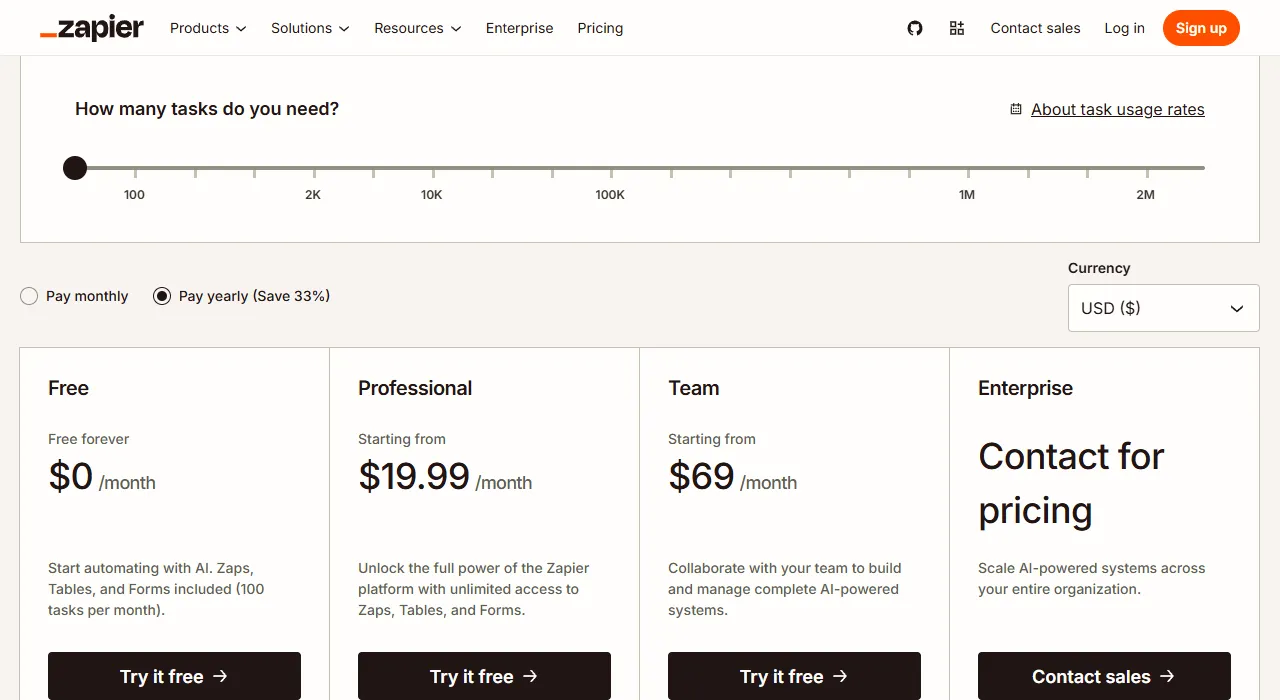
- 1 Slider: how many tasks a month you need; the plan price depends on it
- 2 Paying annually is cheaper than paying monthly
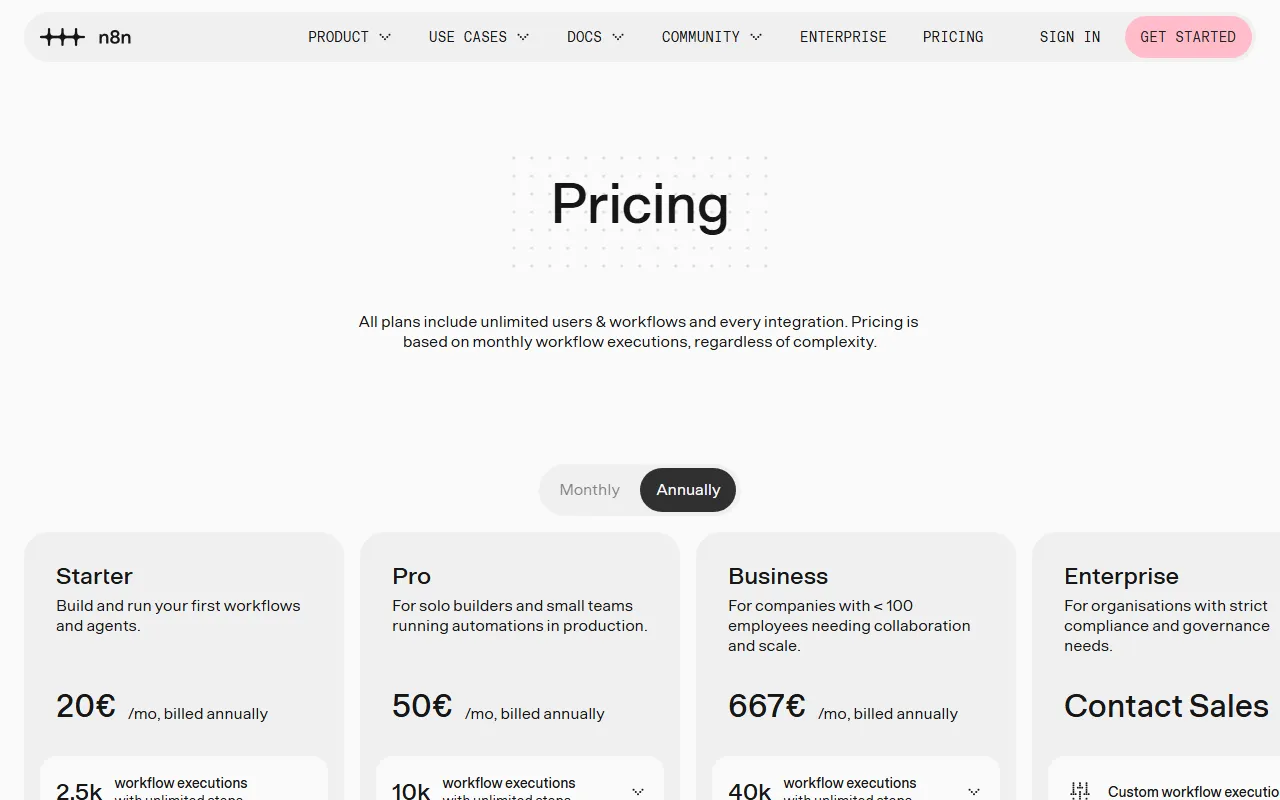
Mid-size business (5–25k executions a month): busy agencies, e-commerce and B2B sales teams with several parallel workflows. Zapier Professional for 5,000 tasks costs about $89 a month (paid annually; as of October 2026) and gets more expensive fast as volume grows. Make Pro or Teams plans (from about $16–29 a month for 10,000 credits; prices change) stay economical. n8n Cloud Starter (€20 a month for 2,500 executions) or n8n Pro (€50 a month for 10,000 executions; both paid annually, as of October 2026), or self-hosted, where the number of executions is limited only by server resources. Verdict: Make and n8n Cloud cost about the same, but n8n wins where AI integration becomes a core part of the workflow. At this stage Zapier only makes sense with an integration library you cannot replace.
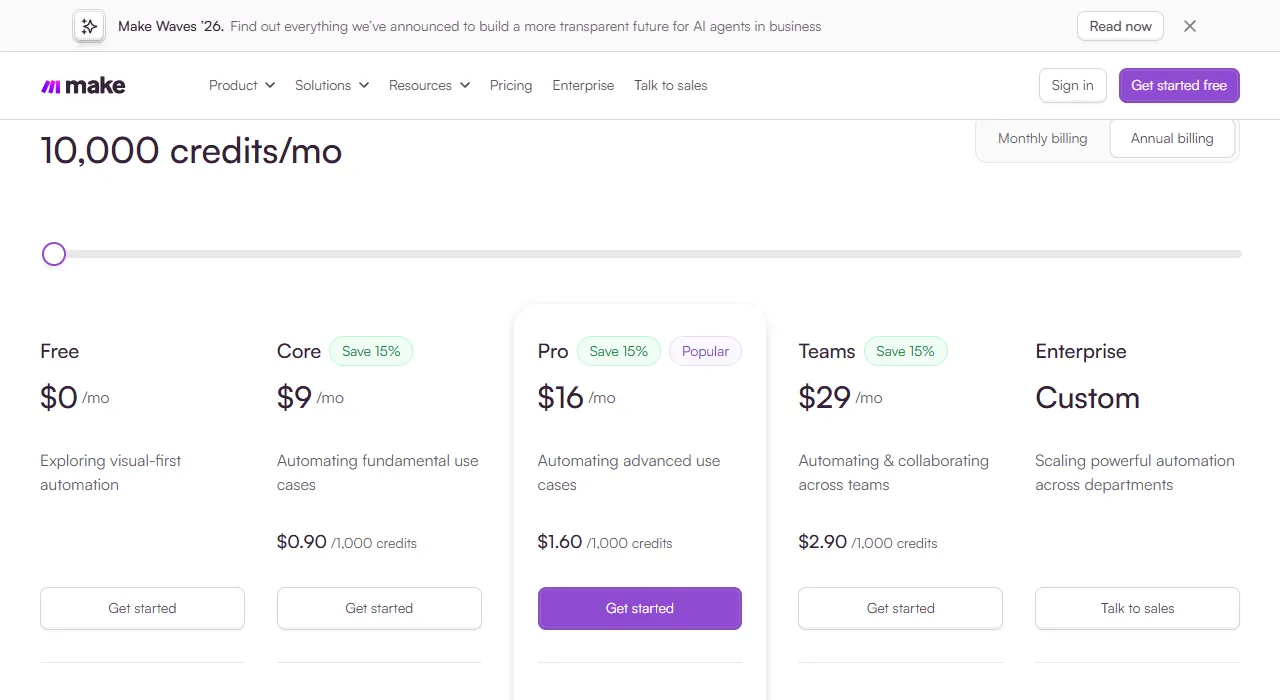
High volume and AI agent logic: companies where automation has become the backbone of operations: thousands of executions a day, complex AI workflows with LLM decision steps, data processing from several sources. Zapier becomes uncompetitive on price: Enterprise pricing is custom, and even the Team plan for 50,000 tasks costs about $399 a month (paid annually; as of October 2026). Make Enterprise also gets more expensive in proportion to growth. n8n self-hosted is often the most economical and technically flexible choice at this level: you pay only for the server and an n8n Enterprise license (if you need corporate management features), not for every execution. Verdict: in high-volume and AI agent scenarios, n8n is usually ahead on both price and functionality.
AI integrations: which platform works best with LLMs?
In 2026 LLM integration in automation platforms is no longer new; it is a basic feature. But the platforms differ a lot in how deeply AI models are built into the workflow architecture and what agentic workflows they let you build without special programming skills.
Zapier AI offers ready-made AI steps with OpenAI, Anthropic and Google Gemini that you can add to a Zap in a few clicks. It is fast and accessible, but limited: it is hard to build more complex agentic workflows where LLM decisions must change the direction of the flow dynamically. Zapier remains the better choice for static workflows with simple one-off AI steps, not for a real multi-step agent architecture.
Make integrates popular AI models through OpenAI and Anthropic modules and also has an AI agents feature. The visual editor lets you branch on the AI's answer, but building real agentic logic with memory management, dynamic tool calls and iterative decision loops in Make needs extra workarounds that make workflows more complex.
n8n has a built-in AI agent node based on LangChain that is a full part of the platform, not an add-on. The built-in AI agent node lets you build an LLM chain with memory management, tool calls and dynamic decision loops without writing code from scratch. Native support: LangChain, OpenAI, Anthropic Claude, Google Gemini, Mistral and Ollama (local models on your own infrastructure). This is the key difference if you plan not just simple AI steps inside a workflow but real autonomous AI agents that make multi-step decisions without manual input.
GDPR and data security: where is your data physically stored?
Small Lithuanian businesses fall under the EU GDPR, which requires you to state clearly where personal data is physically processed and whether transfers to third countries meet the requirements. An automation platform that carries customer emails, CRM contacts or financial information becomes a data processor, and that relationship must be documented.
Zapier is a US company, and its servers run on US infrastructure. Data flowing through Zapier is technically treated as a transfer of personal data to a third country under GDPR. Compliance requires a lawful transfer basis (for example, the EU-US Data Privacy Framework (DPF) if the vendor is certified, or standard contractual clauses (SCCs)) and a signed data processing agreement (DPA); this must be reflected in your records of processing activities. It is not an automatic ban, but it is an extra legal burden and a real compliance risk if the transfer basis is not documented.
Make (Czech origin, part of the Celonis group) lets you choose an EU data zone (EU1/EU2) and provides a standard data processing agreement (DPA). For Europeans this is a significant advantage, but it is worth knowing: according to Make's documentation, choosing the EU zone does not automatically guarantee that all data will be processed only in the EU; for example, some built-in AI features may run in the US. This makes Make a natural choice for businesses that handle EU customers' personal data every day.
n8n self-hosted gives the highest level of GDPR compliance: the data is fully under your control. If the server runs in the EU (Hetzner Falkenstein, OVH Paris or a Lithuanian data center), no process data leaves the EU: not log files, not workflow history, not intermediate API responses. It is the ideal solution for sectors with strict requirements: healthcare, law, financial services. n8n Cloud also offers an EU server option for those who do not want to run their own infrastructure.
Self-hosted vs SaaS: when is your own n8n server worth it?
Self-hosting is n8n's distinctive advantage over the other two platforms. But it cuts both ways: you get full control and unlimited executions, but you take on responsibility for the server, updates and security maintenance.
When self-hosted n8n pays off: (1) Executions regularly exceed 10,000 a month: SaaS plan prices grow while server costs stay flat (about €5–15 a month for a VPS depending on resource needs). (2) Data security requires that personal or commercial data does not leave your infrastructure. (3) Someone on your team or at a partner can do basic Linux server maintenance and update n8n every few months. (4) You plan AI agent workflows with local models (Ollama) running on your own hardware.
When self-hosted does NOT pay off: there are no technical skills on the team and no partner for maintenance, so critical downtime without a specialist is a real scenario. The business is small, the processes are simple and executions are few: the Make Free or Core plan achieves the same goal without server administration. You need to start immediately without several days of setup. In these cases Make SaaS or n8n Cloud is the more logical path with less operational noise.
A practical recommendation by growth stage
Putting all the dimensions together, here is a practical decision tree for small Lithuanian businesses. Stage 1 (0–500 executions a month, no technical skills): Start with the Make Free plan. Learn to build workflows and understand process logic with no upfront investment. At this stage the choice of platform is not critical: what matters is to start and gain experience.
Stage 2 (500–10k executions a month, a growing team): Move to Make Core or Make Business. Or consider n8n Cloud Starter if AI integration becomes an important part of the workflow. At this stage it is worth deciding whether the platform will become the strategic backbone of your operations or stay a simple connector: that answer will set the direction for stage three.
Stage 3 (10k+ executions a month, AI agents, data control): n8n self-hosted or n8n Pro Cloud is the economically and technically sound choice. If you need technical help with setup and maintenance, use a certified n8n partner. Zapier fits at any stage only if you have specific integration needs that n8n or Make do not cover, and if your business runs mainly in the US SaaS ecosystem.
Why I usually recommend n8n
As an automation provider in Lithuania, I work with all three platforms and choose based on the client's needs, not on platform commissions or marketing positioning. Still, for medium and large projects n8n is usually my first choice, for three specific reasons.
AI agent architecture. n8n lets you build multi-step AI agents visually and without deep programming experience. LangChain integration, memory management and dynamic tool calls are core n8n features, not beta experiments. Data control. Many companies work with customers' personal data, financial documents or trade secrets: GDPR compliance with EU infrastructure and full data control is a business requirement, not an optional feature. Predictable pricing. As the business grows, executions grow, and so do SaaS plan prices. Self-hosted n8n removes this factor from the business model calculation and lets you measure automation by the value it creates, not by the platform's usage limits.
If you are still unsure which platform would suit your processes, write to me briefly about what you want to connect and how many operations a month you expect. Get in touch through (Process automation): I will read it and reply by email with the platform I would choose and why. If more detail is needed, we will set up a call. The initial discussion is free.