If you are interested in business process automation, you have probably heard the name n8n. But what exactly is it? Why do so many professionals use it? And does it suit your situation?
The short answer: n8n is a visual platform that lets you connect different apps and build automated workflows without programming knowledge (although code helps with more complex scenarios).
In plain terms: what does n8n let you do?
Think of n8n as a "switch" between different apps. Got an email with attachments? n8n can automatically save the attachments to Google Drive, create a task in Trello and notify the team in Slack. All without you.
n8n is used to build "workflows". Each workflow consists of a trigger (what starts the action) and a chain of actions (what happens next).
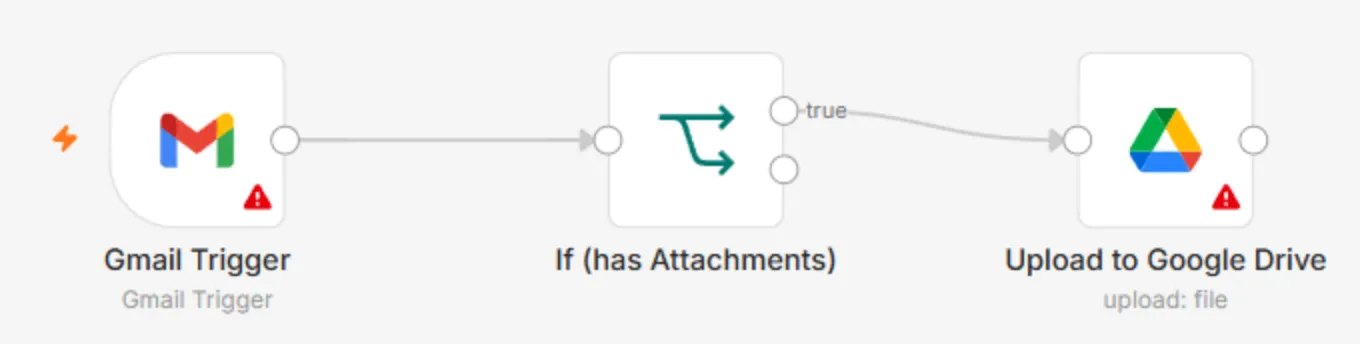
- 1 Trigger: a new Gmail email arrived
- 2 Condition: does the email have attachments
- 3 Action: the attachment is uploaded to a Google Drive folder
Why is n8n popular? The advantages
Open source: n8n is an open-source project. You can install it on your own server, and your data does not go to third parties. This is especially important for B2B companies.
Flexibility: n8n has hundreds of ready-made integrations, but it also lets you write JavaScript code right inside the workflow. That gives almost unlimited flexibility.
Price: n8n can cost considerably less than other solutions, especially if you run many operations a month.
n8n vs Make vs Zapier: the difference in plain terms
Zapier: the easiest to use, the most integrations, but the most expensive option. Good for beginners.
Make (formerly Integromat): the middle option, more visual, more flexible, better price.
n8n: the most technical, but also the most flexible. Especially good when you need complex logic or when data privacy matters.
There is no "best" tool; each fits different needs. I work with all three.
3 practical n8n workflow examples
- Automatic lead handling: a new website form → confirmation email, contact in the CRM, a manager assigned, a reminder after 2 days.
- 1A website form is filled inTrigger
- 2Confirmation email to the customerGmail
- 3Contact in the CRM, a manager assignedCRM
- 4After 2 days: an automatic reminder
- A weekly activity summary: every Monday it collects data from Analytics, the CRM and the accounting software, creates a summary and sends it to the manager.
- Online store automation: a new order → stock check → confirmation and courier notification, or a waiting notice to the customer.
Who is n8n for, and who is it not for?
n8n suits best: companies for which data privacy matters; projects with complex logic; situations where you need many operations a month.
Although n8n is designed so you can start on your own, more complex workflows require technical knowledge. I can help build and configure them and train your team.