An illustrative example: an online store that gets 400 customer requests a week can spend a dozen or more staff hours answering repetitive questions: "where is my order?", "how do I return an item?", "what is your return policy?". These questions don't need human creativity or judgment, just information and speed.
In 2026, customer service automation is not just a chatbot on your website. It is a structured system that resolves first-line requests without a person stepping in and passes on only what really needs human attention. If you have already looked at AI chatbot pricing and ROI, this article goes deeper, into scenarios rather than prices. Together, the seven scenarios below can free up roughly 10–14 hours a week in a mid-sized e-commerce or SaaS team; the exact number depends on your request volume. See also: AI chatbot cost for a website in Lithuania 2026, which covers pricing and payback step by step.
Why a large share of customer requests can be automated
An illustrative (not research-based) breakdown of e-commerce requests; in your store it may differ, so count your own requests first:
- Order status and delivery: 35–45% of all contacts
- Returns and exchanges: 15–20%
- FAQ on prices, promotions and terms: 10–15%
- Invoice and payment questions: 8–12%
- Complex and individual situations: 10–15%
With a breakdown like this, most requests can be at least partly automated, and a good share fully: they have no variations and only require pulling data or giving standard instructions. The rest need a human decision, but even there automation can shorten resolution time by gathering the context in advance.
Scenario 1: Automatic "where is my order?" replies
"Where is my order?" makes up the bulk of all customer service contacts. The bot connects to Shopify, WooCommerce or your ERP, pulls the real-time order status by the customer's email address or order number, and returns a personalized reply with a tracking link. The answer comes within seconds; without automation, each request takes a person several minutes.
Technically, this runs through the Shopify or WooCommerce REST API, connected to a chatbot platform (Intercom Fin, Tidio or a custom solution on the OpenAI API) and a shipping aggregator (an Omniva or LP Express webhook; both are Baltic parcel carriers). The system determines the order status, gives the expected delivery date and automatically logs the resolved request on the dashboard. A standard "where is my order" question no longer takes up any agent time.
Scenario 2: Self-service returns and exchanges
The returns and exchanges process creates twice as much work as it needs to: the customer asks about the terms, the agent explains, the customer confirms, the agent creates an RMA and sends instructions. An automated scenario cuts this down to one step for the customer.
The customer fills in a form with the purchase ID and the reason for the return; the system checks the 14-day withdrawal period and the item status; if the criteria are met, it automatically generates an RMA number and emails return instructions with a QR code for the parcel locker. If the situation is non-standard (the item was damaged in transit, the deadline was missed for a valid reason), it goes to a person with the context already collected. The team can save a large part of the time spent on return requests, and the customer gets an answer in seconds rather than hours.
- 1Customer fills in the formPurchase ID and reason
- 2System checks the 14-day period and item status
- 3An RMA number is generated
- 4Customer receives instructions with a QR codeEmail · parcel lockerNon-standard case: goes to a person with the context collected.
Scenario 3: Frequently asked questions (FAQ) with AI
RAG (retrieval-augmented generation) lets an AI agent answer FAQ questions based on your actual documentation rather than general knowledge. A customer asks about delivery terms; the system finds the matching document in your knowledge base and gives an answer with a source link and a date stamp.
The difference from a simple chatbot: RAG knows that your return policy is 14 days, not 30, and can point to the relevant page section or PDF document. Build the knowledge base from your FAQ page, help center articles and existing email reply templates. To start, I recommend a set of 50–80 questions; in most cases it covers the majority of typical requests.
Scenario 4: Order changes before shipping
Before the order ships, the customer wants to change the delivery address, reduce the quantity or add a gift card. Done manually, that means email back and forth, an internal check in the system, a reply and the change itself. The automated flow: the customer sends the change request to the chatbot; the system checks the order status; if it has not shipped yet, it updates the data in WooCommerce or Shopify and sends the customer a confirmation email within seconds.
If the order has already been handed over to logistics, the customer is told so clearly and directed to the start of the returns scenario. In standard cases, no step requires an agent. Roughly, this scenario can save an hour or two a week of handling order changes.
Scenario 5: Invoice and payment questions
In B2B, "can you send me the invoice?" comes up again and again. The automated scenario: the customer gives the order number or company name; the system pulls the invoice from the accounting system (Rivile, Navision or another) and sends the PDF by email or provides a direct download link in a self-service portal.
Payment status, overdue invoice reminders with a payment link and resending invoices are all automated in the same n8n workflow. This scenario can shorten the invoice cycle and reduce the time your accounting team spends answering repetitive customer questions about the state of payment documents.
Scenario 6: Urgent escalation to a person based on sentiment
Fully automated customer service without sentiment analysis is a risk. When the AI sees these signals (the customer is sending the same request for the fourth time, uses words of strong negative emotion, mentions court, the media or going public on social media), the system must immediately hand the conversation to a senior agent with the full context instead of leaving the customer with automated replies.
Technically: the OpenAI API or Anthropic Claude with a sentiment classifier. If the classifier score exceeds a set threshold, a trigger goes to Intercom or Zendesk with a high-priority tag, the conversation history and suggested resolutions. The person gets ready-made context and can respond in minutes instead of hours. This scenario protects you from one of the most common automation traps: the customer feels ignored by an AI "wall" and the situation escalates on social media.
Scenario 7: Post-purchase follow-up (NPS and reviews)
Seven days after the purchase: an automatic NPS question by email or SMS, one question with a 0 to 10 rating. Send the request to leave a Google review, with a direct link to your business profile, to all customers, not only the happy ones: Google's rules forbid asking for reviews selectively ("review gating"). For detractors (0–6), add an automatic escalation to the support team so they contact the customer within 24 hours. For passives (7–8), a follow-up offer with a new product or promotion after 30 days.
This scenario reduces churn, increases your number of Google reviews and helps you spot product or service problems early, before they grow. Asking consistently usually brings more Google reviews than asking now and then; measure the effect on your own profile. On using WhatsApp for follow-up sequences: WhatsApp Business automation in Lithuania.
Customer service automation tools in 2026: pricing and how to choose
Four commonly considered options, compared by price and fit (prices as of October 2026, indicative, excluding VAT; they change):
| Platform | Price | Best for | Integrations |
|---|---|---|---|
| Intercom Fin | Seats from ~$29/user/month + $0.99 per conversation resolved by Fin (Intercom) | SaaS, B2B, >200 conversations/month | Shopify, Salesforce, Stripe |
| Zendesk AI | From ~$55/agent/month (Suite Team); advanced AI agents cost extra | E-commerce, mid-sized team | WooCommerce, HubSpot, Jira |
| Tidio | From ~$24/month (Starter, billed annually); AI (Lyro) costs extra | Small business, online store | Shopify, WooCommerce, WordPress |
| Custom (OpenAI + n8n) | Roughly €40–80/month + setup | Specific processes, GDPR | Any system with an API |
The choice depends on two factors: conversation volume and integration needs. For a small business with up to 100 conversations a day: Tidio or custom OpenAI + n8n. For mid-sized and large ones: Zendesk AI or Intercom Fin, which can scale. A custom solution makes sense when standard SaaS tools are too limited for integrating with specific Lithuanian accounting systems (Rivile, iMIS) or when the GDPR requires data to be stored within the EU.
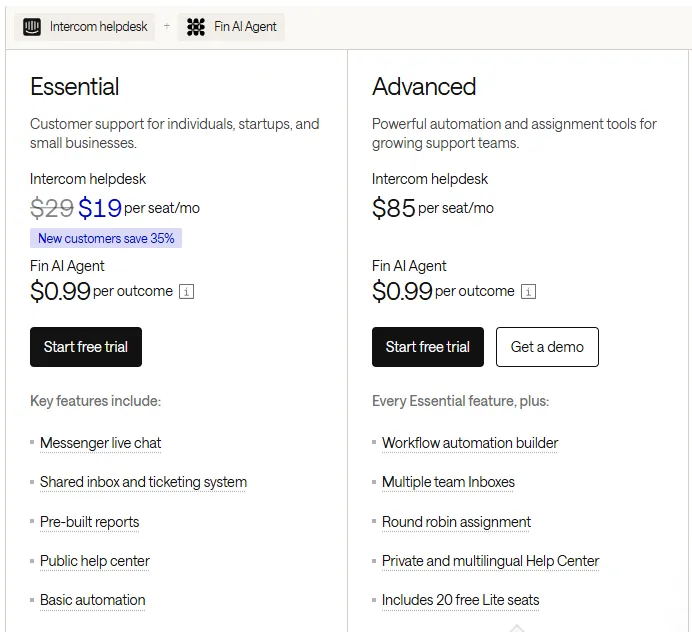
- 1 Intercom helpdesk: price per agent seat per month (a discount is shown for new customers)
- 2 Fin AI Agent: $0.99 per resolved conversation ("outcome")
30-day rollout path
Week 1: classify your requests
You analyze the last 200–500 customer emails and conversations from the support system you use now. You sort them by type and record each type's share of the total. You identify the 5–7 most common scenarios; that is the basis for prioritization: start with the ones that make up >15% of all requests. This analysis also gives you the baseline for calculating ROI after a month.
Week 2: the 3 easiest scenarios
The three lowest-risk scenarios go live: an FAQ chatbot with a knowledge base, automatic invoice sending and order status replies. This lets the team learn to work with the system before the more complex returns or escalation flows are set up. In the first week, the whole flow runs in parallel with a person: the customer gets an automatic reply, but an agent also sees it and can correct it.
Week 3: AI integration and escalation
AI sentiment analysis is integrated, escalation triggers are configured, and the returns and order change scenarios go live. The first week is monitoring with the team's help: are the triggers firing correctly, are the AI answers accurate, are the escalation thresholds set right. Corrections happen every two days, not after a month.
Week 4: dashboard and measurement
Five key metrics are set up: the percentage of requests resolved automatically, average response time, escalation rate, post-purchase NPS score and agent time saved in hours per week. This data lets you keep improving the system and justify the investment to management with numbers. More on business process automation: business process automation with n8n and AI agents.
Customer service automation mistakes to avoid
- Replacing everything too early. Automate step by step: start with 2–3 scenarios, not all 7 at once. The team needs to adapt and the system needs to "learn" your specifics. A sudden switch increases errors and customer dissatisfaction in the first month.
- A tone of voice that doesn't match. The AI has to speak in your brand's voice: if your communication is formal, the chatbot should be formal; if it is friendly, friendly. A generic AI tone quickly gives the automation away and lowers trust.
- Untracked automatically resolved requests. Without measurement, you cannot prove ROI. Record every automatically resolved conversation as a separate metric line; it is your main argument when you need to justify the system to management or expand the investment.
Aigentas service: a customer support automation package
Aigentas.lt provides full-cycle customer service automation for e-commerce and SaaS businesses in Lithuania. We start with your message: you write which requests you get most, and I read it and reply by email with the scenarios that should bring the biggest return. If more data is needed, we arrange a call; I calculate ROI from your numbers, not market averages.
The standard package includes setting up 3–5 scenarios over 4 weeks, integration with your existing platform (Shopify, WooCommerce, Zendesk, Intercom or a custom ERP), GDPR compliance, and support and optimization for the first two months. Price: from €450 for the first solution, support from €150/month. When the investment pays off depends on your request volume; I calculate it from your data before we agree on the price.