An illustrative example: the manager of a travel agency in Kaunas received three chatbot quotes. One vendor offered a SaaS solution for €49 per month, another a custom setup for €4,800, and the third a "fully integrated AI assistant" for a one-off €11,000. All of them said this was "the standard market price" and that "the investment will pay off in six months". None of them showed a calculation based on his business data.
This article is for those who have already decided they need a chatbot but want to understand the real pricing, without the sales talk. I give specific prices by tier, a breakdown of the cost structure, a payback calculation and a decision matrix: when it is worth paying more and when the cheapest SaaS is enough. If you are still unsure whether a chatbot suits you at all, read AI chatbot ROI for customer service where I give the ROI formula and typical examples from Lithuanian businesses.
Three AI chatbot price tiers
There is no single "right" chatbot price on the market. There are three fundamentally different tiers that fit different business needs. Buying the most expensive one when the cheapest would do is a mistake, and so is saving money where you need integration with your business systems.
1. SaaS no-code tools: from ~€30 to ~€150 per month
Tidio, Crisp, Chatfuel, ManyChat, Freshchat: these tools let you set up a chatbot in 1–3 days without any coding. You upload FAQ documents or point to your website URL, and the platform uses that content as the AI model's knowledge base. Prices change and often depend on the number of conversations: for example, Crisp Mini is €45/month, Tidio Starter is about $24/month billed annually, and the AI add-on (Lyro) is paid separately (as of October 2026). The chatbot answers from your content, and questions it does not recognize are routed to a person.
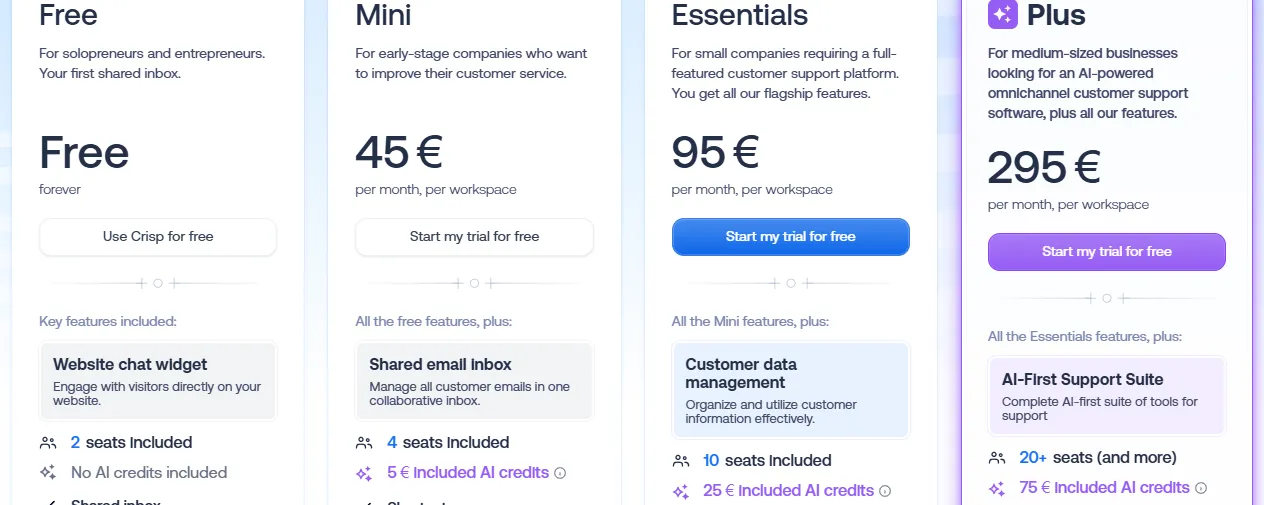
- 1 Mini: €45 per month per workspace (not per user)
- 2 Included AI credits: €5 on Mini, more on larger plans
- 3 Free: no AI credits included
Good for: online stores with standard questions (delivery, returns, FAQ), service businesses with up to 150 questions a day, and businesses setting up their first chatbot that want to test it before investing more. The limitation: the chatbot has no access to your real business data, so it cannot answer "what is the status of my order" or "is this item in stock today".
2. Custom GPT with an FAQ knowledge base: €500–2,000 setup + €30–80/month
A chatbot built on the OpenAI API (Responses API) or the Anthropic Claude API with your business knowledge base. Here deeper customization is possible: specific conversation flows, lead capture, integration with Zapier or Make workflows. The cost depends on conversation volume, because you pay for LLM tokens: roughly €0.005–0.015 per query with a GPT-4o-class model, depending on the length of the conversation (API prices change).
Good for: businesses with specific terminology or processes, for whom SaaS templates are too limited but full ERP integration is too expensive. An example: an accounting services firm whose chatbot answers tax questions based on the firm's internal guidelines and routes people to the right specialist by question type.
3. Fully integrated with CRM/orders: €3,000–8,000 + €100–300/month
The top-tier solution: the chatbot has real-time access to real business data, such as order history, stock levels, customer loyalty status, bookings and invoices. Integrations with Shopify, WooCommerce, Pipedrive, HubSpot, SAP or custom ERP systems. Every setup is unique, so pricing is agreed case by case.
- 1The customer asks in the website chat"When will my order arrive?"
- 2The chatbot identifies the customer and the orderShopify / WooCommerce
- 3It pulls the status and stock in real timeCRM / ERP
- 4It answers specifically or hands over to a personA manager gets the unclear cases
A SaaS chatbot without integration would stop after the first step: it sees only your FAQ, not your orders.
Good for: e-commerce above €30,000 MRR, service companies with a complex booking system, and B2B companies with portal-based customer service. At this level the chatbot is no longer just an FAQ responder: it actually runs business logic and can handle personalized questions with real data.
Chatbot prices by company size: an indicative table
Below are indicative annual cost ranges by business size. The figures include both setup and a year of running costs:
| Business size | Question volume | Recommended tier | Annual cost |
|---|---|---|---|
| Small business | <50/day | SaaS no-code | €360–1,800 |
| Mid-sized business | 50–300/day | Custom GPT | €1,500–4,000 |
| Large business | 300+/day | Full integration | €4,200–11,600 |
These figures do not include your internal time for initial training and configuration. Add 8–20 internal working hours during the first month of setup, whichever tier you choose.
What actually makes up the cost of a chatbot
Vendors often quote only the subscription or setup price. The full cost structure of a chatbot looks like this:
- LLM token costs. Every conversation with an AI model costs money. Roughly: a GPT-4o-class model is ~€0.005–0.01 per query, Anthropic Claude Haiku ~€0.002–0.004 (API prices change). 1,000 short conversations a month add just a few to a dozen or so euros on top of the subscription. Once you grow to 10,000 conversations a month, token costs become a significant line in the budget.
- Knowledge base upkeep. Every time prices, FAQs or terms of service change, the knowledge base has to be updated. Roughly 1–2 hours a month for internal staff, or €50–150 for an external administrator.
- Integrations. A CRM or online store integration adds €200–1,500 at the setup stage, depending on how complex the system is. Shopify is simpler; SAP or a custom ERP is much more expensive.
- Hosting and API costs. For SaaS tools, included in the subscription. For a custom GPT, an extra €20–80/month in server costs.
- Updates and support. After launch, the chatbot needs to be improved based on real conversation data. More intensively in the first quarter: 2–4 hours a month of tuning and knowledge base additions.
AI chatbot ROI: a realistic calculation
A customer service specialist in Lithuania costs roughly €1,200–1,800 a month including all employer costs. A well-prepared AI chatbot can take over a good share of the repetitive questions; exactly how much depends on the knowledge base and the type of questions. If you have one full-time customer service person and 300+ questions a week, a chatbot can take over a significant part of that person's work.
Sample calculation. A service company, 200 questions a week, one specialist:
Assumption: the chatbot resolves 60% = 480 questions/month
5 min/question × 480 = 40 hours saved
40 hours × €9/hour = €360 saved per month
SaaS subscription: €79/month
Net monthly benefit: €281
Setup cost: €800
Break-even point: ~3 months
This model shows why chatbot payback depends so heavily on question volume: below 50 questions a day the numbers stop looking good; above 100 the return becomes visible within six months. For a more detailed ROI analysis and typical examples from Lithuanian businesses, see AI chatbot ROI for customer service.
Intercom Fin / Tidio / Crisp vs a custom build (OpenAI API)
The most common question for a business with 50–300 questions a day: should you use a ready-made SaaS platform or build your own solution on the OpenAI or Anthropic API? A comparison by the five most important criteria:
| Criterion | SaaS (Tidio / Intercom Fin) | Custom build (OpenAI API) |
|---|---|---|
| Price | €30–150/month, fixed | €30–80/month + tokens |
| Management | No-code, intuitive UI | Needs a technical person |
| Lithuanian language | Average (Tidio is good) | Good (latest GPT / Claude models) |
| EU data / GDPR | Often US servers | EU hosting possible |
| CRM integration | Standard ones (HubSpot, Shopify) | Any (custom) |
Bottom line: if your integration needs are standard and you have no in-house IT team, go with a SaaS platform. If you have specific GDPR requirements, need to handle the nuances of Lithuanian or want deep CRM integration, a custom build can pay off in roughly 12–18 months compared with SaaS subscription costs (depending on volume) and gives you much more flexibility as the business grows.
How long does it take to set up a chatbot? The process and real timelines
Vendors often promise to have it "ready in 2 days". That is only true for individual SaaS configurations with minimal content. A real chatbot setup that will actually work well looks like this:
- Week 1: collecting and structuring FAQs. Pick the 80–100 most common questions from emails, Messenger and chat history. This is your biggest contribution, and it directly determines the chatbot's quality. A poor knowledge base = a poorly working chatbot.
- Week 2: configuring the agent. Loading the knowledge base, building conversation flows, rules for handing over to a person, and calibrating the tone of answers to your brand voice.
- Week 3: testing with real questions. Testing not with demo scenarios but with actual customer questions from your history. Gaps are found and fixed: answers that miss the point or are wrong.
- Week 4: launch and monitoring. In the first month, I recommend reviewing failed conversations every week and adding to the knowledge base. The first month often turns up quite a few situations the chatbot could not handle at setup.
- 1Week 1: collect the 80–100 most common questionsFrom emails, Messenger and chat history
- 2Week 2: configure the agentKnowledge base, flows, handover to a person
- 3Week 3: test with real questionsNot with demo scenarios
- 4Week 4: launch and fix weeklyFailed conversations → knowledge base additions
A proper SaaS setup realistically takes 4–6 weeks, a fully integrated solution 8–12.
The whole process: 4–6 weeks for a proper SaaS setup, 8–12 weeks for a fully integrated solution. It can be done faster, but the chatbot's quality will suffer.
Hidden chatbot costs nobody tells you about
These costs regularly surprise businesses after the first few months of use:
- Token overages in peak season. SaaS platforms often have a conversation limit in the subscription or charge for every AI answer. For example, the Intercom Fin AI agent costs $0.99 per resolved conversation (as of October 2026, Intercom pricing). In the Christmas season this can mean several hundred euros of extra spending per month, often an unexpected line in the budget.
- CRM integration, in more detail. "Integrates with HubSpot" often means only basic data sync. Two-way integration with real-time data adds €300–800 at the setup stage, which you will only find out about when you ask.
- Multilingual plug-ins. Multilingual support on SaaS platforms often requires a separate plan or extra fees for every additional language, which matters especially for Lithuanian e-commerce serving Polish- or Latvian-speaking customers.
- Premium support. "24/7 technical support" on the basic plan often means self-service documentation. A real SLA with a 4-hour response time is a separate enterprise plan that can cost 2–3 times more.
- Reconfiguration as you grow. After 6–12 months, businesses realize the initial configuration no longer matches their growing needs. Reconfiguration costs an extra €500–2,000 that was not in the original contract.
When an AI chatbot is NOT worth it for your business
In these cases it is better to postpone the chatbot and invest in other improvements:
- Too little traffic. If your website gets fewer than 200 unique visitors a month or you receive fewer than 20 questions a week, the chatbot will not pay off even in two years. First improve your website content and FAQ section: that is free and brings results faster.
- Highly specialized or expert content. Legal advice, medical diagnosis, complex engineering support: AI can generate plausible but wrong answers. The reputational and potential legal damage costs far more than the operator time you save.
- B2B with complex deals. If your average sale is €10,000+, customers expect a personal account manager, not a chatbot. Here a chatbot can be used only for initial lead qualification, not as the main communication channel.
- Messy internal information. If your FAQ is out of date, your pricing changes every month and there are no clear internal processes, a chatbot will only add to the chaos by answering with outdated information and annoying customers.
Aigentas chatbot packages for small and mid-sized businesses in Lithuania
Aigentas.lt offers two chatbot setup options tailored to small and mid-sized businesses in Lithuania, with clear pricing and a no-hidden-fees policy:
- Starter package (from €450 setup + from €150/month support). A chatbot configured on your FAQ, with conversation handover, Lithuanian language optimization and basic analytics. Suits businesses with up to 100 questions a day that are setting up an AI chat assistant for the first time.
- Business package (€3,500–6,000 setup + €150–250/month). A custom solution with CRM or e-commerce platform integration, automatic lead qualification, GDPR compliance and a monthly performance report review. Suits businesses with 100–500 questions a day.
Before you choose a package, I offer a free fit survey: 5 questions about your business size, question volume and integration needs, and within 24 hours you get a specific price and ROI calculation for your situation instead of generic market figures. Read more about building and deploying AI agents on AI agent development and deployment.