The short answer: an AI chatbot for customer service usually pays off when you get a lot of repetitive questions (delivery, returns, opening hours, FAQ), or need to answer outside working hours or in several languages. It rarely pays off when enquiries are few, the questions are complex (legal, medical, technical) or sales rely on personal relationships. Calculate based on your own enquiry volume and the time per answer; the formula is below. I build bots that answer from your content and hand complex cases over to a person as part of my AI chatbot service.
An illustrative example: over two weeks, the owner of a textile online store in Vilnius works out that his customer service specialist spends a third of her working day answering one type of question: where the parcel is, what the delivery times are and whether goods can be returned. Three times a day. The same information. 350–400 times a week. He knows something has to change. But chatbot quotes range from €200 to €15,000, vendors promise miracles, and nobody gives a simple answer: will it pay off within 12 months, and how exactly?
This article is that answer. I give an ROI formula, typical examples from Lithuanian businesses with specific numbers, and a list of 9 questions you should ask every chatbot vendor before signing a contract. If you are looking for a broader overview of setting up an AI chatbot, read the guide to AI chatbots for customer service.
How much does an AI chatbot cost in Lithuania in 2026?
There are three main price levels for AI chatbots on the market, and the choice between them depends not only on the features you want but above all on the volume and complexity of your questions.
SaaS tools: from ~€30 (basic plans) to €200–800 per month with an AI module and higher conversation volume; prices change. Tidio, Intercom, Freshchat and similar platforms. The subscription includes a ready-made AI model that can use your website content, FAQ (frequently asked questions) and product catalog information. Setup takes 1–3 days. You also get integration with email, CRM and WhatsApp Business. These tools suit online stores and service businesses whose enquiries are standard and repetitive, where most of the traffic is the same 10–20 questions.
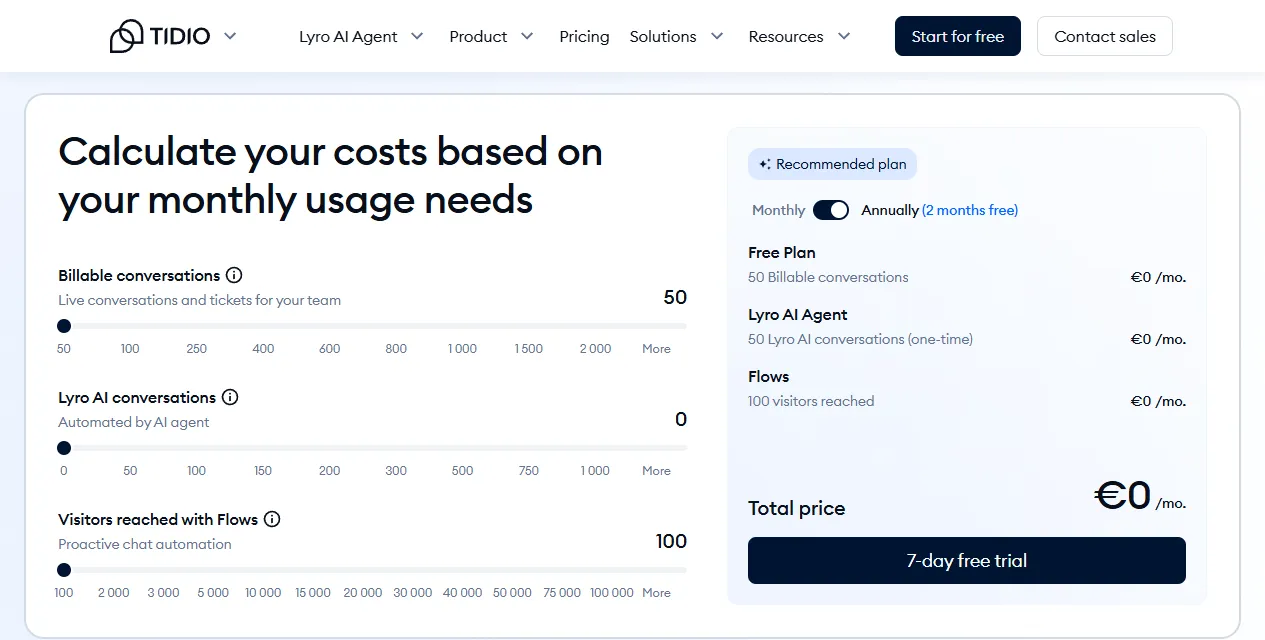
- 1 Billable conversations: conversations and enquiries your team answers
- 2 Lyro AI conversations: conversations the AI agent resolves
- 3 Total price: the monthly price for the selected volumes
Custom AI chatbots: roughly €3,000–15,000 one-off setup, €300–600 per month support. Built from scratch on GPT-4, Anthropic Claude or an open-source model. Integrated with business systems: ERP, CRM, warehouse management, customer order history. The chatbot answers from real data: whether an item is in stock, what discount applies to a specific customer, what the delivery status of their order is. Suitable for e-commerce above €30k MRR or service companies with complex workflows built into their systems.
Hybrid solutions: €1,500–4,000 setup plus a SaaS subscription. The base is an existing SaaS platform (for example, Voiceflow, Botpress), customized to your business logic: special data-collection forms, CRM integration, specific business rules. This is the best compromise between a quick setup and fitting a unique business process.
Chatbot ROI formula: does it pay off within 12 months?
A simple formula you can work out in 10 minutes with your company's data:
Costs (the full list vendors often leave out):
- SaaS subscription over 12 months: €200–800/month × 12 = €2,400–9,600
- One-off setup and initial configuration: €500–15,000
- The initial learning period: operator time over the first 2–4 weeks spent supervising and improving the chatbot
- Fixing errors in the first month: 2–5 hours of operator time
Benefits (realistic, not optimistic):
- A well-prepared chatbot can often resolve more than half of standard enquiries on its own (but rarely as many as the ads promise); the real rate becomes clear during a pilot
- Operator hourly cost: roughly €8–12/hour (labor cost of a customer service specialist in Lithuania)
- Average time per enquiry: 4–6 minutes
Calculation example (assumptions). An online store gets 300 enquiries a week. The chatbot answers 70% of them automatically = 210 enquiries a week × 4 weeks = 840 automated per month × 5 min = 70 hours/month saved × €10/hour = €700 saved per month. SaaS subscription: €350/month. Net monthly return above the subscription: €350. Initial setup: €1,000. Break-even point: €1,000 ÷ €350 ≈ 3 months.
SaaS subscriptionValue of work saved
300 enquiries a week
~400 enquiries a week (example below)
Figures from this article's illustrative examples (assumptions, not a guaranteed result). The gap between the bars is the net monthly return that pays back the setup.
This calculation shows why ROI depends so heavily on question volume. Below 100 enquiries a week, the numbers stop looking good. Above 300 a week, a chatbot becomes one of the fastest-paying digital tools for a small business. More on chatbot pricing in how much an AI chatbot for your website really costs.
5 cases where a chatbot really pays off
1. An online store with more than 300 enquiries a week
Delivery status, return policy, product specifications, promotion terms: these are structured, repetitive enquiries. The chatbot handles them 24/7, while operators focus on complaints, unusual situations and customers who need real human attention. The effect is twofold: operator time saved and a faster answer for the customer, in a few seconds instead of a few hours.
2. A service company with recurring FAQs
Dental clinics, beauty salons, car repair shops, accounting firms: their customers ask the same 15–20 questions every day: opening hours, prices, how to book an appointment, what to bring. The chatbot passes on this information in seconds at any time of day. For such businesses, a SaaS tool trained on the FAQ is the best choice; there is no need for an expensive custom build.
3. Qualifying B2B sales leads
The chatbot greets a website visitor, asks 3–4 qualifying questions (company size, budget, priority, timeframe), classifies the lead and hands it to the most suitable sales manager with the full context. The manager starts the conversation already knowing the customer's needs and situation. This can save a good deal of first-call time for every lead.
4. A need for 24/7 service
If your customers are in different time zones, or your business is seasonal with late-night buying peaks (for example, the Christmas season), a chatbot is the cheapest way to stay available around the clock. No night shifts needed. A customer at 11:15 pm gets an answer immediately, not in the morning or hours later.
5. A multilingual business
Chatbots built on large language models naturally serve customers in Lithuanian, English, Russian and Polish without separate translations or extra staff. This matters especially for Lithuanian e-commerce serving the Baltic and Scandinavian markets. One well-configured chatbot can reduce the need for operators in several languages for standard enquiries.
3 cases where a chatbot just wastes money and reputation
1. Complex technical, legal or medical questions
An IT services company, a law firm, a medical clinic. If your customers expect an expert opinion and the chatbot gives a generic, unchecked answer, the customer's decision may be based on wrong information. Here the reputational and potential legal damage costs far more than an hour of operator time saved.
2. Fewer than 100 enquiries a week
If your business gets 10–15 questions a day, the chatbot's setup and subscription costs will not be covered by the benefit for at least two years. A well-written FAQ section on your website and a clear contact email are better. Automate what creates high volume, not what happens rarely.
3. B2B built on personal relationships
In B2B segments with large deals, where a customer has worked with the same account manager for decades and expects individual attention, introducing a chatbot can signal that the relationship is becoming impersonal. For example, after a chatbot goes live, a VIP customer may ask directly: "So you no longer work with us personally?" In such contexts the chatbot should stay a back-office tool, not the front line of customer communication.
Calculation example: an online store with ~400 enquiries a week
An illustrative example: a clothing online store with average monthly sales of €15,000 and two customer service specialists. Weekly enquiry volume: 380–420, of which 68% are about delivery status or the return policy. The problem: both specialists spend more time answering standard questions than solving real customer problems or complaints.
A possible solution: a SaaS chatbot integrated with Shopify and the DPD tracking system. The chatbot would see each customer's order history and delivery status in real time. The initial configuration could take up to 6 weeks, including FAQ training and testing the Shopify integration with real questions.
Investment: SaaS platform €350/month, initial configuration and integration €1,200, 3 months of support €600. Total costs for the first 6 months: €3,900.
A possible result after 4 months (assumptions): say the chatbot answers about 73% of all enquiries on its own. The specialists no longer need to answer standard questions, only complaints and unusual situations. Savings: ~1,170 enquiries × 4 min ≈ 78 hours per month × €10/hour = €780. Net monthly return above the subscription: €430. The one-off costs (€1,800) pay back around the end of the 4th month. After the first year, the net return could reach about +€3,300. An added benefit: the response time to standard questions can drop from several hours to a few seconds, which often shows up in customer satisfaction scores. This is a calculation example, not a guaranteed result.
Example: a B2B consultancy, and why a chatbot can lower conversion at first
An illustrative example: an IT consultancy adds a chatbot to its contact form to qualify new leads. In the first six weeks, the visitor-to-contact conversion rate may drop by, say, 18%, and the owner already wants to switch the whole thing off.
The typical cause: the chatbot asks 7 questions in a row before letting people fill in the contact form. Potential customers feel interrogated rather than advised. Especially in B2B, managers do not want to answer 7 questions; they just want to get in touch quickly and talk through their needs by phone.
The fix: the configuration is changed to a 3-question sequence, and the chatbot immediately offers a call and a guaranteed reply within 24 hours. In that case the conversion rate can return to its original level within a few weeks, and lead quality may even improve: the chatbot filters out prospects whose budget or needs did not match the service. On building and configuring AI agents, see AI agent development and deployment.
The lesson: the chatbot's configuration matters as much as the choice of platform. A badly configured chatbot does not just fail to help; it actively hurts conversion and reputation. Better to launch later and well than quickly and badly.
Checklist: 9 questions to ask before choosing a chatbot vendor
Before you sign a contract or start a pilot, ask the vendor these 9 questions. If the vendor avoids or gives a vague answer to any of them, take it as a warning sign.
- Does the chatbot answer in Lithuanian? Ask for a real demo with your typical questions, not prepared sales scenarios.
- Can the chatbot be trained on your specific content: FAQ, product catalogs, pricing, return policy?
- How does the chatbot hand a conversation over to a person, and does the handover go smoothly with the full conversation context?
- Does it integrate with the CRM or e-commerce platform you use (Shopify, WooCommerce, HubSpot, Pipedrive)?
- Is there analytics: which questions are most common, where the chatbot gets it wrong, what share is resolved automatically without a person?
- What is the SLA for technical support: if the chatbot stops working, within how many hours is it fixed?
- Is data stored on EU infrastructure, and does the system meet GDPR requirements?
- Do you pay a fixed subscription or per conversation? For a seasonal business, a variable fee model can cost several times more in December.
- Can you try it free for 14–30 days with your real question content rather than a demo scenario?
A chatbot is an investment, not an expense, but only when it is configured properly and chosen for the right business model. I would treat 300 enquiries a week as a benchmark: above that threshold a chatbot can often pay off within a few months; below it, it is better to first improve your website's FAQ section and the UX of your contact form.