Sales managers in Lithuania increasingly ask the same question: why do our salespeople spend half the working day filling in the CRM instead of talking to customers? In many B2B teams, salespeople spend a good part of every day updating CRM data, writing emails and setting manual reminders: time that does not go to customers. Admin routine often demotivates the strongest salespeople, too. AI agents for CRM management solve exactly this problem: they do not replace the salesperson, they take over the routine admin so the person can focus where their value is beyond doubt: building relationships, handling complex objections and closing deals. In this article I cover how AI agents integrate with Pipedrive and HubSpot, which specific workflows get automated and what the ROI can be for Lithuanian sales teams. Read about the AI agent development service here (AI agent development).
How is an AI agent different from CRM automation?
Traditional CRM automation works on "if X, then Y" rule logic: if a lead filled in the form, send a confirmation email; if a deal reached the "Proposal sent" stage, assign a task to the responsible sales manager. These rules are valuable but only so flexible: they do not take context, tone or history into account.
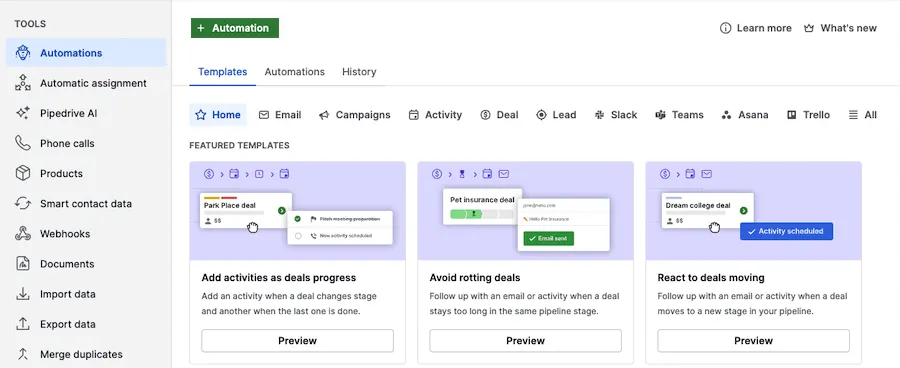
- 1 Automations: rule-based automations
- 2 Template: an activity is created when a deal moves to another stage
An AI agent works differently: it makes decisions based on context, not just conditions. Take lead qualification. Traditional automation checks whether the form is complete, whether the email is valid, whether the company matches the ICP (ideal customer profile) criteria. An AI agent also analyzes the tone of the first email, compares it with the profiles of similar successful customers from the history, and gives the lead a "temperature" (hot, warm, cold) with a reasoned explanation. The result: the sales manager knows which lead to call first, without assessing them by hand. More on sales automation options with AI: (AI sales automation).
5 jobs AI agents do in sales
Job one: qualifying leads based on context. The AI agent reads a new lead from the CRM, analyzes the content of their email, company size and industry fit, then compares it with historical data on successful deals. Within 30 seconds, the sales manager gets a Slack notification: "Lead X: hot. Similar to customers who closed within 3 weeks. I recommend calling today." No manual assessment needed.
Job two: writing personalized follow-up emails. The AI agent reads the contact's full CRM history (previous emails, meeting summaries, buying stage) and generates a personalized follow-up email. The salesperson reviews, adjusts and sends it, often in a few minutes rather than a quarter of an hour. Job three: automatic call summaries after Zoom or Meet. Within 5 minutes after the call, the meeting transcript (Google Meet or Zoom) is automatically turned into a structured CRM record: the customer's needs, the objections discussed, the agreed next steps and deadline. The CRM is always up to date, even if the salesperson forgot.
Job four: grouping customers and finding similar profiles. The AI agent analyzes closed deals and identifies what successful customers have in common: the combination of industry, size, buying cycle and average deal size. This lets you repeat success: filter your new lead database by these profiles and focus resources where conversion is statistically highest. The practical result: instead of "we work with everyone", the team gets a data-backed answer on which customer types are most likely to close within 30 days. Job five: forecasting deal closure. Based on historical data, the AI agent assesses each active deal: how long it has been in the same stage compared with successful deals, whether communication has picked up or slowed down, whether there is a link to seasonality. The sales manager gets a more accurate monthly revenue forecast and knows which deal needs extra attention before the end of the month, not after. Read about wider CRM automation for small companies here (CRM automation for small business).
What works in Lithuanian and what does not?
The good news: writing emails in Lithuanian with GPT-4o works well. The model generates fluent, natural Lithuanian text: not a translation from English, but an authentic business style. Personalized follow-up emails in Lithuanian are one of the strongest practical uses of an AI agent in Lithuanian sales teams today.
Transcribing calls and meetings also works in Lithuanian: the OpenAI Whisper model accepts recordings of Lithuanian conversations and produces a transcript that is accurate enough for business. Accuracy for important terms and surnames is lower than in English, so the salesperson should review the CRM record before leaving it as the final version. A practical solution: a Whisper transcript + GPT-4o editing with the instruction "check Lithuanian names and terms" gives a considerably more accurate summary than either model alone. One aspect is harder: old CRM records with Lithuanian names sometimes have UTF-8 encoding problems, especially data imported 5–10 years ago from Excel or old Latvian or Polish systems. Before integrating an AI agent, a data cleanup procedure, or at least a data quality audit, is recommended so the AI gets clean context and its recommendations are based on an accurate, not distorted, history.
What does AI agent integration with Pipedrive or HubSpot look like?
A typical AI agent architecture for a sales team has four layers. First, data sources: the Pipedrive or HubSpot CRM with the history of contacts, deals and emails, Google Meet or Zoom meeting transcripts, the Gmail or Outlook email flow. Second, the orchestrator: a Make or n8n workflow that connects all the sources and manages the triggers. Third, AI models: OpenAI GPT-4o for analysis and generation, Whisper for transcription. Fourth, outputs: automatic CRM updates, Slack notifications for managers, ready emails for the salesperson to review.
A concrete workflow example: a Google Meet meeting with a customer → Zoom/Meet saves the transcript file → a Make trigger picks up the file → the Whisper API creates the text → GPT-4o reads the transcript and the CRM history → it generates a meeting summary, identifies objections and suggests the next action → Make updates the Pipedrive deal and sends the salesperson a Slack notification with a ready follow-up email template. The whole process takes 3–5 minutes after the meeting ends, with no human involvement: the salesperson only clicks approve or makes adjustments. Rough setup time: with an AI integration consultant, 2–4 weeks; DIY with an in-house developer who is learning the APIs, 6–12 weeks. The main difference is not just speed but also debugging time and knowledge of specific AI integration problems (API rate limits, error handling, CRM field validation) that an experienced consultant has already run into on earlier projects.
- 1The customer meeting endsGoogle Meet · Zoom
- 2The recording is turned into textMake · Whisper API
- 3The AI writes a summary and the next stepGPT-4o + CRM history
- 4The deal is updated, the salesperson gets an email draftPipedrive · Slack
- 5The salesperson approves or editsNo email is sent without a human review.
How much do AI agents for CRM cost, and what is the ROI?
AI API costs depend on usage volume and the models you choose. For a small team (3–7 salespeople, up to 500 AI-processed emails and meetings a month), the expected monthly costs are: €50–120 (OpenAI GPT-4o + Whisper transcription), €15–25 (Make workflow license), €10–20 (additional integrations and storage). In total, €75–165 a month. For a medium team (8–20 salespeople, up to 2,000 AI-processed events): €150–350 a month. These amounts look small compared with the monthly salary cost of one salesperson (roughly ~€2,000–3,500 including all taxes). One-off setup costs: a standard integration with Pipedrive or HubSpot, €1,500–3,000; a more complex architecture with custom AI logic and several data sources, €3,000–5,000.
ROI calculation for a team of 5 salespeople: if the AI saves each salesperson 1.5 h/day (7.5 h a week for the team) and that time is reinvested in extra customer calls, even a conservative assumption of one extra deal a month for the whole team means the system could pay for itself within a few months. Add fewer CRM errors, more accurate forecasts and less routine for salespeople: harder to measure, but a real benefit.
What are the most common mistakes when adding an AI agent to a CRM?
Mistake No. 1: the AI writes the email and the salesperson does not review it. Chasing speed leads to AI-generated emails being sent automatically without a human check. The result: the customer gets an email with a factual error or the wrong tone, which hurts the relationship more than a late reply. The rule: for the first month, every AI-generated email goes through the salesperson's review before it is sent.
Mistake No. 2: GDPR is ignored. Uploading customer call transcripts to a personal ChatGPT account (not a business plan or the API) can breach GDPR: in that case there is no data processing agreement, and by default the conversations may be used to improve the models. The safe route: the OpenAI API with a business DPA (data processing agreement), or self-hosted models (for example, Whisper on-premise) for sensitive data. Mistake No. 3: an overly ambitious first project. Teams that try to automate everything at once (qualification, emails, transcripts, forecasts) often have nothing running after two months. Start with one process: only call summaries after meetings, or only drafting follow-up emails. Success with one process in 4 weeks gives the team confidence in the technology and collects the data to base the next step on.
Frequently asked questions
Will an AI agent replace the salesperson? No, at least not in the near future. The AI agent takes over admin routine: filling in the CRM, reminders, writing summaries, entering dates and facts. Closing deals, building relationships, handling complex objections and building trust remain human skills. A more accurate way to put it: an AI agent lets one salesperson be as productive as one and a half used to be. Which CRM works best with AI agents? Pipedrive and HubSpot have the best APIs and documentation for Make/n8n integrations, which in practice means faster working workflows and fewer errors during rollout. Bitrix24 works, but it has more API limits. If you are still choosing a CRM, my recommendation today is Pipedrive for small teams (up to 15 salespeople) or HubSpot if you plan to grow and integrate marketing. Want to find out whether an AI agent fits your CRM? Write to me about which CRM you use and which routine your salespeople would most like to hand off (AI agent development). I will read it and reply by email, and if I need to see more, we will arrange a call.