The safest way to create ad images with AI: you photograph the real product yourself, the AI generates only the background or setting, and you add the text and logo in an editor such as Canva, following the platform's formats and safe zones. A fully generated image works for conveying a mood or an idea, but not for showing what your product looks like: in an ad, that is already a promise to the buyer.
If you have not created images with AI before, start with the beginner's guide on how to describe an image and fix mistakes (How to create an image with AI). Here we cover only advertising: formats for Facebook, Instagram and Google Ads, a workflow with a real product, the platforms' AI features, labeling, and cases where it is better not to use an AI image.
What size should ad images be?
Decide the aspect ratio before generating, not after. If you later crop a square image into a vertical one, you will cut off part of the composition. The main sizes (checked October 22, 2026):
| Where it shows | Ratio, px | Note |
|---|---|---|
| Facebook, Instagram Feed | 4:5, 1440 × 1800 | JPG or PNG, up to 30 MB |
| Instagram Stories, Reels | 9:16, 1440 × 2560 | see safe zone |
| Google PMax, Demand Gen | 1.91:1, 1200 × 628 | required |
| Google PMax, Demand Gen | 1:1, 1200 × 1200 | required |
| Google PMax, Demand Gen | 4:5, 960 × 1200 | recommended |
| Google Search | 1:1 and 1.91:1 | no text overlays or logos |
PMax (Performance Max) is a Google campaign type that distributes the ad across Search, YouTube, Gmail and other placements by itself; Demand Gen is for campaigns in YouTube, Discover and Gmail feeds. Performance Max lets you upload up to 20 images; Google recommends several of each ratio, and the file must be no larger than 5 MB.
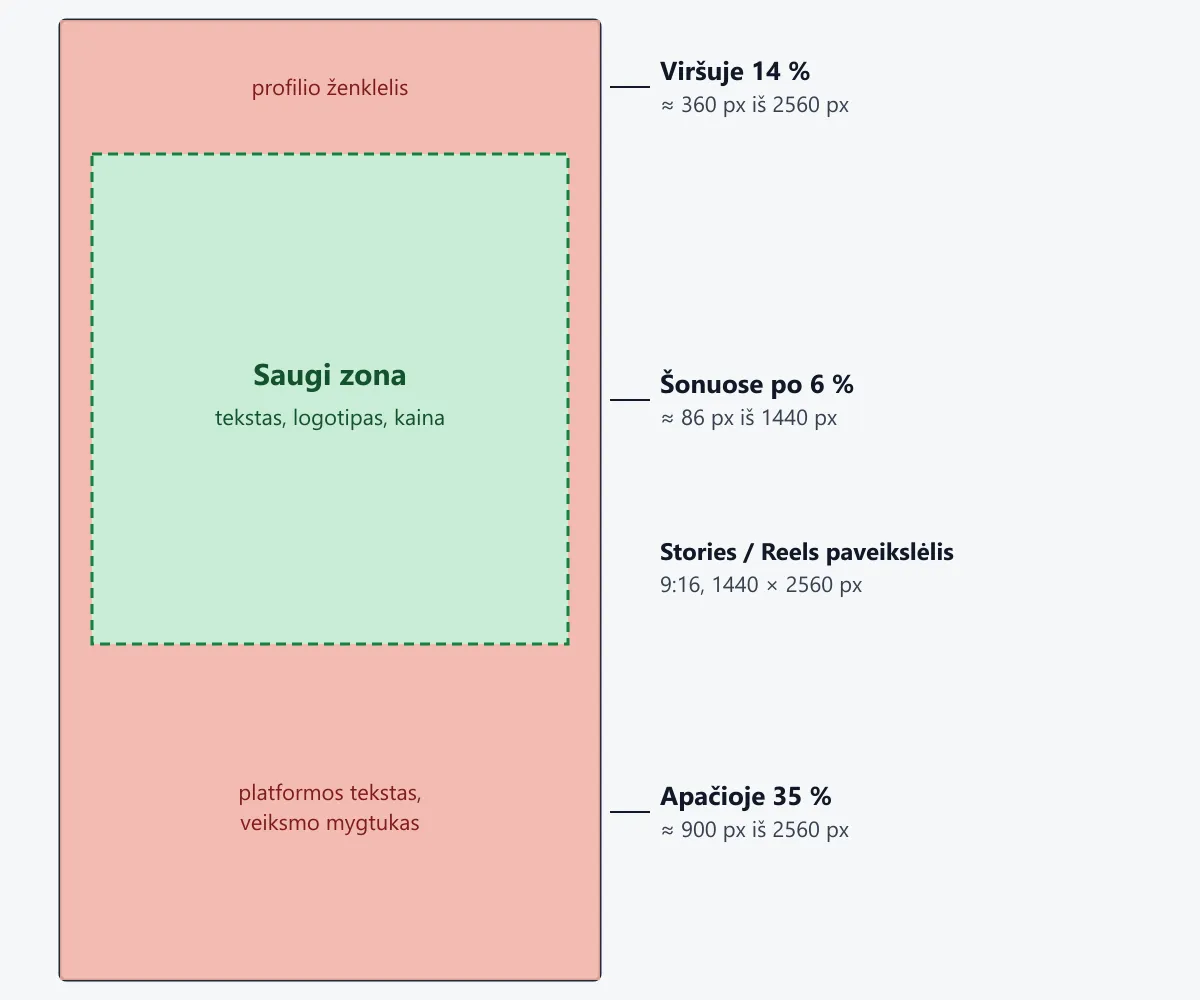
The safe zone is the part of the image that will not be covered by the profile icon, text or the call-to-action button. For Stories and Reels images, Meta recommends leaving about 14% at the top, 35% at the bottom and 6% on each side free of text, logos and other important elements: that is where the platform's buttons and labels appear. In a 1440 × 2560 image this means about 360 px at the top and about 900 px at the bottom; put the text and logo in the remaining, safe part. For Google Search images, the advice is to keep the most important content in the central 80% of the area.
Workflow: real product, AI background
Say a small handmade candle shop in Vilnius wants an autumn ad for Facebook and Instagram, and later a Google Performance Max campaign too. The product is a soy wax candle in an amber-colored jar with a paper label.
- Photograph the product. With a phone, in daylight, on a plain background, from the angle you want to show in the ad. The label should be sharp and straight.
- Remove the background. You can do this with a background removal tool, for example in Canva or your phone's photo editor. Check the edges: glass and smoke are the hardest parts.
- Generate only the background. Ask ChatGPT or Gemini for a setting without the product, at the right ratio from the start, with an empty space where you will place the product (prompt below).
- Combine them in an editor. In Canva or another app, place the product on the background and add a natural shadow so the product "stands" rather than "floats".
- Add the text and logo yourself. With a real font and the real logo file, inside the safe zone, away from the platform's buttons and labels.
- Produce all formats. From the same design: 4:5, 9:16, 1:1 and 1.91:1. If there is not enough background, ask the AI to extend it rather than stretching it.
- 1Photograph the productPhone, daylight
- 2Remove the backgroundCanva / photo editor
- 3Generate only the background with an empty spaceChatGPT / Gemini
- 4Combine and add a shadowCanva
- 5Text and logo: by you, in the safe zone
- 6All formats: 4:5, 9:16, 1:1, 1.91:1
There is another way: upload the product photo to ChatGPT or Gemini and ask it to "place" the product in a new setting. This is faster, but the model often changes small details: the letters on the label, the shape of the jar, the shade of the color. Compare such a result with the original zoomed in, and if anything at all has changed, go back to steps 2–4.
Prompts you can copy
The first is for the background. Replace the product description and mood with your own.
Create a photographic-style background for an ad, 4:5 vertical format. Scene: an autumn evening, a wooden windowsill, dusk outside the window, warm lamp light from the left, a wool blanket lying nearby. In the lower third, in the center, leave an empty, well-lit space for the product, a short glass jar that I will add myself, so do NOT draw the product. In the upper part, leave a calm, uncluttered area for text. No text, letters, logos, people or other brands. Light and perspective as if photographed at eye level, so the product added later looks natural.
The second is for another format. Upload the background you already created and ask for it to be extended.
Extend this image to a 9:16 vertical format by adding scene at the top and bottom. Do not change the existing part. In the newly added top and bottom parts, do not place any important details: the app's buttons and text will go there. No text or logos.
If the tool does not keep the ratio exactly, crop the result to the right size in the editor. General principles of writing prompts are in the guide on how to write prompts (How to write AI prompts).
Text in the image
AI tools still often distort Lithuanian letters (ą, č, ę, ė, į, š, ų, ū, ž), so add text to the ad image yourself in an editor. The offer, price and call to action are usually better left to the ad's text fields; how to write them with AI is covered in the article on Meta ad copy (Facebook and Instagram ad copy with AI).
Google is stricter. In Search campaign image assets, text overlays, logos and graphic elements on the photo are not allowed. Performance Max allows them with restrictions, but Google recommends having at least one image without text overlays for each ratio. Also rejected: collages put together after the photo was taken, blurry, distorted or badly cropped images, and too much empty space where it is unclear what is being advertised.
How to keep ad images consistent with your brand
When you generate each image separately, the ads quickly start to look as if they came from different companies. A few ways to avoid this:
- One base prompt. Write down the fixed part (light, colors, materials, style) and change only the scene.
- Colors and fonts in the editor. A Canva brand kit or a simple template with your colors and logo matters more than the AI's style.
- A reference image. Upload a background you already liked and ask for a new one "in the same style, light and colors".
- Same product, same photo. Do not change how the product looks between ads.
Platform AI features for images
Meta. The Advantage+ creative enhancements in Ads Manager include generative features too: image expansion for other placements (e.g. extending a square to vertical), background generation (mainly for catalog ads), image animation and others. Meta says some enhancements may be turned on by default, that you can turn them off, and that the preview shows only examples of possible versions, not all of them. Availability depends on the account, format and country, so check in your own Ads Manager (checked October 22, 2026).
Google Ads. The Asset studio tool and its image editor let Performance Max and Demand Gen campaigns generate images, change backgrounds and produce the required ratios. Google says manual generation requires the interface to be in one of the supported languages (Lithuanian is not among them), and the account must be active, must have run ads for at least 30 days and must have no policy violations; the feature is being rolled out gradually. Only adults are generated, images of well-known people and children are not allowed, and a generated image does not guarantee the ad will be approved. More on Google Ads AI features in a separate article (Google Ads AI features).
Platform tools are convenient because the image goes straight into the ad. But the same rule applies as with ChatGPT: if a generated background or expansion changes the product, do not use that feature for that ad.
People, rights and AI labels
Real people. Upload photos of employees or customers to AI tools only with their consent, ideally in writing and stating clearly that the photo will be used in advertising. Do not create or use images of well-known people: Meta's Advertising Standards specifically name the deceptive use of celebrity images.
Other brands. Write "no logos or brands" in the prompt, and check the objects in the background of the result: AI sometimes draws a recognizable bottle or badge. Tool terms of use and content ownership are covered in the beginner's guide (How to create an image with AI).
Meta labeling. Meta says that ads created or significantly edited with its generative tools get an "AI info" label in the "About this ad" section. If its tools create a photorealistic person, the label is shown next to "Sponsored". Meta has also said it will start identifying ads created with other companies' AI tools using industry signals (e.g. file metadata). The experience may vary by region.
Google labeling. Images generated in Google Ads are marked with SynthID, an invisible watermark. ChatGPT and Gemini images also carry provenance marks. Do not try to remove them: it is dishonest, and some tools' terms prohibit it outright.
When is it better not to use an AI image?
When the image is a promise about the product. How a garment hangs, the color of furniture, the size of a portion, how a room looks after renovation: if the buyer gets something other than what they saw, it is misleading advertising, however nice it looks.
"Before and after" images. A generated "after" is not a result but a made-up promise. Meta prohibits deceptive or exaggerated claims about product benefits, and especially health benefits, and applies extra restrictions to ads for health, weight loss and cosmetic procedures.
Regulated categories. Health, food supplements, finance, alcohol: here the rules are stricter both on the platforms and in law. Use an AI image for such ads only after finding out what is allowed.
Made-up customers and reviews. A generated "happy customer" with a quote is deception, even if the quote is based on a real review.
Checklist before uploading
- The product is identical to the real one: shape, color, label, letters. Compare it with the original photo zoomed in.
- The background has no strange details: deformed objects, illogical shadows, half-drawn letters or other companies' logos.
- The text and logo are inside the safe zone, away from the platform's buttons and labels; check in the Ads Manager preview for every placement.
- All required ratios and sizes are ready, and the files do not exceed the limits.
- Google: at least one image without text overlays for each ratio; no text overlays in Search images.
- People are generated or you have written consent; there are no well-known people.
- The image matches the landing page: same product, same color, same offer.
- You do not treat the image as a winner in advance: test several images just like copy, judging by orders, not only by clicks.
Sources
Meta Ads Guide: image ad in Facebook Feed: 4:5 ratio, 1440 × 1800 px, file types and size.
Meta Ads Guide: Instagram Stories: 9:16, 1440 × 2560 px and the safe zone (14% top, 35% bottom, 6% sides).
Meta Ads Guide: Instagram Reels: the same sizes and safe zone for Reels images.
Meta Advantage+ creative: generative features, default settings, limits of previews.
Meta: Generative AI transparency in ads: the "AI info" label, photorealistic people, identifying other tools.
Meta Advertising Standards: unacceptable business practices: deceptive claims and celebrity images.
Meta Advertising Standards: health and wellness: extra restrictions for health and weight ads.
Google Ads: Performance Max requirements: ratios, sizes, file limits.
Google Ads: Performance Max image best practices: up to 20 images and recommended numbers.
Google Ads: Demand Gen requirements: Demand Gen image ratios and sizes.
Google Ads policy: image asset requirements: text overlays and logos, collages, blurriness, the central 80%.
Google Ads: Generated images: availability conditions, languages, SynthID, restrictions on people, policy review.