Process automation means handing repetitive work steps over to software so they run without someone stepping in every time. Instead of copying data from a form into an email and then into your CRM by hand, the system does it in seconds.
Many business owners in Lithuania say "this is too complicated for us" or "we're too small". In reality, a first automation often solves one specific, annoying task and can pay for itself within a few weeks or months.
Where to start with automation: pick one specific process
Mistake number one is trying to automate everything at once. The best place to start is a single repetitive process that happens at least once a day or once a week, involves moving data by hand, and causes clear problems when someone gets it wrong.
These are the ones I most often start with when working with clients:form submissions go straight into the CRM; a weekly report is sent to the manager automatically every Monday; a follow-up email goes to the customer automatically after the service is delivered.
- 1A customer fills in the form on your website
- 2The data lands in the CRMMake · n8n · Zapier
- 3The person responsible gets a notificationEmail or Slack
The simplest starting example: one repetitive task the system handles the same way every time.
Which automation tools do you need?
There are three main tools: Make (formerly Integromat) has a convenient visual editor and fits most everyday business processes; n8n is an open-source platform that runs on your own server (a good fit if data control matters); Zapier is the most popular in the world, but more expensive.
You don't need to know how to code. These tools have a visual editor: you drag blocks around and build a workflow. Technical providers (such as Aigentas.lt) help set up a first automation in 1–2 weeks.
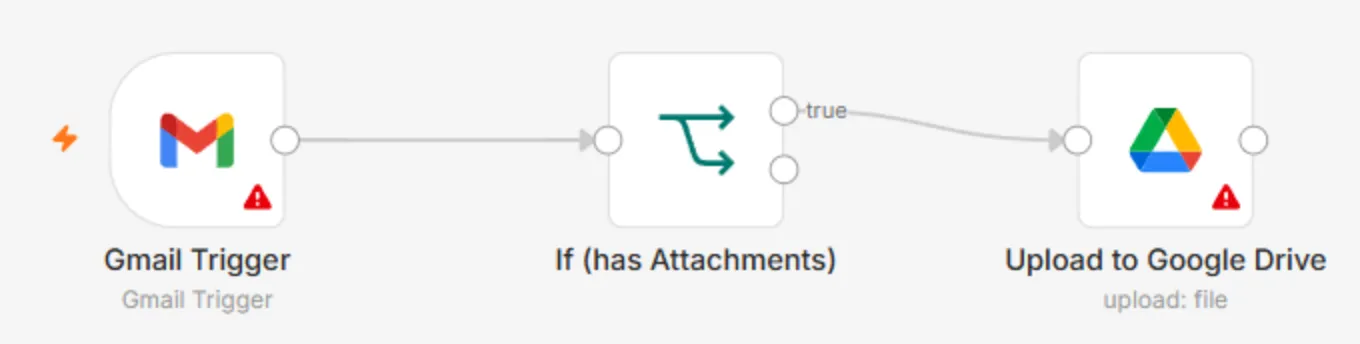
- 1 What starts the workflow – a new email
- 2 Condition – is there an attachment?
- 3 Action – the file is uploaded to Google Drive
What to expect in the first 30 days
A rough expectation for a first automation: a few hours saved per week (depending on how often the process runs), far fewer errors from moving data by hand, and less stress about tasks that "slipped through".
The process: week 1 – process analysis and plan; weeks 1–2 – building and testing; 1 week – launch and monitoring. After a month it is usually clear where the next automation would add the most value.
- 1Process analysis and plan1 week
- 2Building and testing1–2 weeks
- 3Launch and monitoring1 week
- 4Clear what to automate next