Notion is an all-in-one workspace that can be several things at once: a document store, a project management system, a lightweight CRM, an internal wiki and a content calendar. The main idea: all data in one place, in a fully customizable structure.
How is Notion different from Trello or Asana? Notion is more flexible but takes more time to set up the structure. Trello and Asana are quicker to start with but more limited for complex needs.
How to use Notion as a business management system
Notion works better than Excel for running a business because it lets you build relational databases: a customer database linked to projects, which are linked to tasks and documents.
The most popular use cases: a customer list with history, a project template with deadlines and owners, a weekly team report template, and staff onboarding documents.
How to automate filling in Notion
The Notion API lets you automate creating and updating entries. With n8n or Make you can: automatically create a Notion entry when the CRM gets a new customer; sync Notion with Google Sheets; create a project template when your online store receives a new order.
This is especially valuable for onboarding: a new employee added to the CRM automatically gets a Notion page with all the steps, contacts and documents, with nothing done by hand.
- 1A new customer appears in the CRMCRM
- 2The workflow takes the customer's datan8n or Make
- 3An entry is created in a Notion databaseNotion APIFrom a template: steps, contacts, documents.
- 4The team starts work right away, without retyping anything
The same principle works for employee onboarding: a new employee instead of a customer, an onboarding page instead of a project.
How much does Notion cost? Plans and pricing
According to Notion's price list in euros (checked October 23, 2026, price per seat per month billed annually; Notion says annual billing is up to 20% cheaper): Free – €0, for trying it out and personal use; Plus – €9.50, for small teams; Business – €19.50, with the Notion AI agent and more advanced permission management; Enterprise – on request. For most small business teams the Plus plan is enough to start. If you are planning automations, keep in mind: on the free plan you can only create Slack notification automations, while your own database automations (assigning an owner, changing a status and so on) come with the Plus plan.
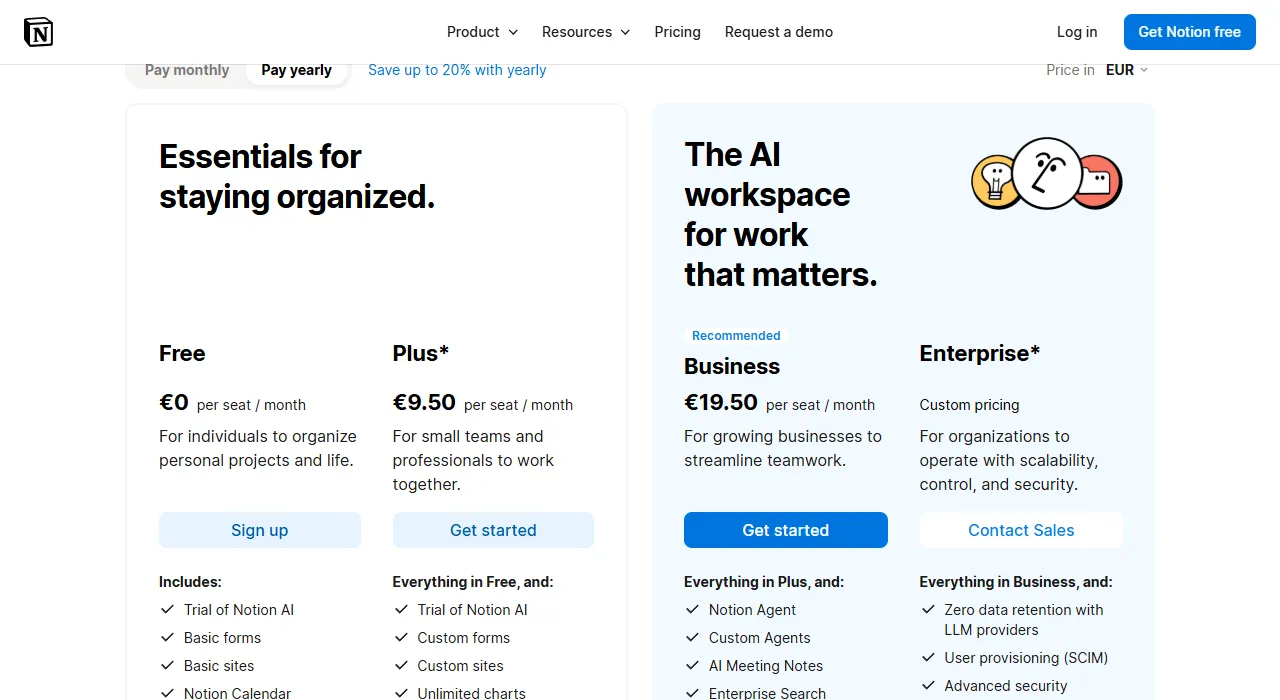
- 1 Pay yearly: cheaper with annual billing
- 2 Plus: usually enough for a small team
- 3 Business: with Notion AI agents
Notion works well as a lightweight CRM or project register, but if sales is your core process, compare it with dedicated systems: see the comparison of the best CRM systems in Lithuania (Best CRM systems in Lithuania 2026).