Short answer: sales pipeline automation means handing the manual steps between an enquiry and a contract over to a system. Enquiries from every channel land in one CRM and are assigned automatically to the right salesperson by rules (region, product, company size or round-robin), which is called lead routing. The customer gets a confirmation right away, and follow-up reminders and the management report are produced on their own. Start with collecting and routing enquiries: this step is the easiest to check and measure.
According to Salesforce's "State of Sales" survey (2024), salespeople spend about 70% of their working time not on selling but on other tasks, typically: moving leads into the CRM, sending emails by hand, tracking follow-ups in an Excel sheet and preparing monthly reports for management. In practice, a good share of incoming leads never hear from a salesperson in the first 24 hours; they simply die without any follow-up. Sales pipeline automation solves this not by hiring more people but by removing manual work from every step, from the first enquiry to the signed contract. In this guide: a 6-step system to automate, an illustrative IT services company example with numbers and a 4-week implementation plan for B2B SMBs. On managing enquiries and leads effectively, see (Lead and enquiry automation).
Why do sales teams lose so many leads before the first contact?
In many companies the response to a new B2B lead takes hours. According to Harvard Business Review (2011, "The Short Life of Online Sales Leads"), companies that contacted a lead within the first hour were nearly 7 times as likely to qualify it as those that contacted it later than an hour. By the end of the working day it is too late. A typical scenario: a lead comes in through the contact form → gets lost in a shared inbox → a salesperson remembers a day or two later → the customer is already talking to a competitor. The second cause is bad routing: the lead lands with a busy salesperson or the wrong region and sits untouched for a week. The third: missed follow-ups. Many salespeople give up after the first or second contact, although a B2B deal usually takes several touches. An automated pipeline removes all three mistakes systematically, instead of policing them by hand every time.
Which 6 sales pipeline steps should you automate?
Lead capture from forms, LinkedIn and email. Every lead source, whether a website form, a LinkedIn message, an email or an ad landing page, should create a CRM record automatically with full contact details, the source and a link to the original message. Automation: n8n or Make.com takes the data from all sources, normalizes the format and creates the lead in the CRM without manual copying. The result is zero missed contacts and full source tracking at every stage. More on CRM data quality in (CRM data cleanup with AI).
Lead scoring and routing. Not all leads are equal: one fills in a form out of curiosity, another is a decision-maker who needs a proposal within 48 hours. An automatic scoring system assigns points based on company size, job title, pages visited and the content of the enquiry. A high-scoring lead goes to a senior salesperson and triggers a Slack notification within a minute. A low-scoring lead goes into a nurturing sequence; it does not need a salesperson's time today.
First-contact sequences. The first contact with a new lead should happen within 15–30 minutes of the enquiry, not the next morning. An automated first-contact sequence: right after the lead arrives, a personal email goes out with a specific salesperson's signature; after 2 hours, a Calendly link to book a meeting; after 24 hours, an extra value email with a relevant case study. By the time the salesperson picks up the phone, the customer already knows who you are and has received something concrete and useful.
Follow-ups (4–7 touches). B2B sales often need several to a dozen or more contacts, yet many salespeople stop after the first or second. An automated follow-up sequence makes sure every lead gets the full number of touches regardless of the salesperson's workload. The sequence differs by lead type: an MQL gets a series of educational content, an SQL gets a specific reminder about the proposal. At this stage, clean CRM data is critical; more on that in (CRM automation for small business).
Proposal and contract generation. Every time a salesperson copies the client's name and the list of services into a Word template by hand, they spend 20–40 minutes that bring in no revenue. The automated process: the salesperson picks a service package in the CRM → the system creates a PDF proposal with the client's details and prices → sends it to the client → tracks when they open the document and how long they read it. Deals where the client's attention is high automatically create a priority task for the salesperson to call.
Management reports. A monthly sales report that takes 2 working days to prepare is not acceptable in 2026. An automated BI report every Monday at 8 a.m. shows: last week's pipeline status, conversion rates by stage, average deal sizes and missed follow-ups. The manager gets a structured picture without asking or waiting, and can react quickly to problems before they turn into crises.
- 1Lead from a form, LinkedIn or emailn8n · Make.com
- 2CRM record, score and assigned salespersonHubSpot · Pipedrive
- 3First contact within 15–30 minGmail · Calendly
- 4Follow-up sequence (4–7 touches)The sequence stops when the customer replies.
- 5PDF proposal from CRM dataPandaDoc · DocuSign
- 6Monday report for the managerPipeline status and missed follow-ups.
The six steps of this section in one chain. You can start with the first two.
Sales automation tool stack for 2026 (HubSpot, Pipedrive, n8n, gpt-4o)
Effective B2B sales pipeline automation in 2026 rests on four components. CRM core: HubSpot Sales Hub or Pipedrive; both have a good API and native automation features. HubSpot is stronger for large teams with complex lead nurturing logic; Pipedrive is more flexible and cheaper for SMBs with up to 10 salespeople. Automation platform: n8n (self-hosted, data stays on your infrastructure) or Make.com (fast cloud setup). Both connect the CRM, email, LinkedIn, calendar and reports without programming skills. AI layer: the gpt-4o or Claude API for generating personalized emails, classifying leads by message content and tailoring proposal text to the client's profile. Document generation: PandaDoc or DocuSign for automating proposals and contracts with e-signature.
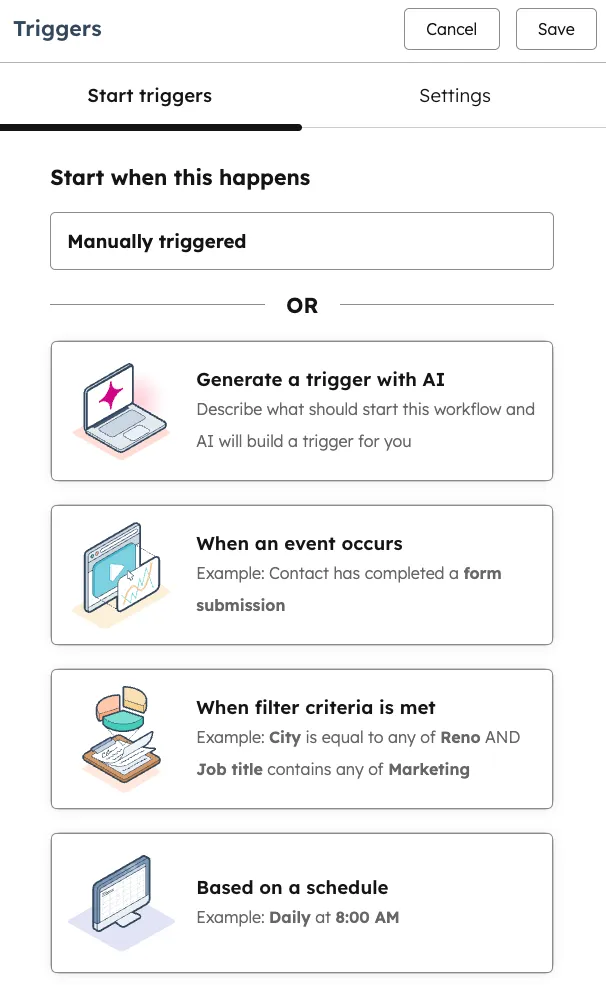
- 1 When an event occurs: when something happens, e.g. a contact submits a form
- 2 When filter criteria is met: when a record meets conditions, e.g. a high lead score
- 3 Based on a schedule: on a schedule, e.g. the Monday report
Illustrative example: an IT services company
Illustrative scenario: the company and the numbers are built from typical processes and rough assumptions; these are not a specific client's results. Your numbers may differ.
Say an IT services company with 22 employees, 4 salespeople and ~€800k annual revenue. Starting point: average response time to a new lead is 6 hours; about a third of leads get no follow-up after the first contact; the monthly management report takes 2 working days of manual data gathering. Possible solution: a full n8n + HubSpot integration with Calendly, Gmail and Google Docs. All lead sources are merged into one flow, automatic scoring and routing are set up, the first-contact email goes out within minutes, and a 6-touch follow-up sequence and automatic proposal generation run. What would change: the first reply to an enquiry would go out within minutes, no enquiry would be left without follow-up, and the monthly report would be produced automatically. Whether and by how much deals would increase only your own CRM data will show after a few months. Indicative investment: €4,200 for setup + €280/month for support.
Mistakes that break an automated sales pipeline
Automating chaos instead of a clear process. If the team does not follow the actual sales process, automation only speeds up the chaos. Before implementation, map the current pipeline: where leads come from, how they move through each stage, what counts as success. Poor CRM data. Automation depends on accurate data; duplicates, outdated contacts and empty fields break any sequence. Cleaning the data before implementation is not optional. An overly complex sequence from day one. The best results come from starting with one step, for example just the first-contact sequence, and expanding based on the results you see. No one in charge. Automation needs one person who watches the metrics, reacts to problems and updates the sequences as business needs change.
A 4-week implementation plan
Week 1: audit and setup. Analysis of current lead sources, CRM condition and pipeline stages. Basic CRM data cleanup. HubSpot or Pipedrive configured to your pipeline logic and the team's needs. Week 2: lead capture and routing. All lead sources connected to the CRM through n8n or Make.com. Scoring rules configured. Routing logic tested with real leads. Week 3: sequences and follow-ups. First-contact and follow-up sequences built and trial-run with 10–20 leads. Calibrated based on response rates. Week 4: reports and launch. Automatic weekly BI report set up. Pilot launch with the whole team. Metrics reviewed and adjusted based on the first cycle's data. Want to see what your current pipeline would look like automated? Book a free audit (free consultation).
How much does sales pipeline automation cost? (3 tiers)
Starter: €1,500–3,000 (setup) + €150–250/month (support). Lead capture from one source, a first-contact sequence, basic scoring and routing. Suits companies with 2–3 salespeople that want to remove the main pain point quickly. Payback: 3–5 months.
Professional: €3,000–6,000 (setup) + €250–450/month (support). All lead sources, full scoring, a 6-touch follow-up sequence, automatic proposal generation and a weekly BI report. Suits B2B companies with a team of 4–10 salespeople. Payback: 2–4 months.
Enterprise: €6,000–15,000+ (setup) + €450–900/month (support). A multi-channel pipeline with AI personalization, predictive sales analytics, integrated contract management and a full BI dashboard for management. Suits teams of 10+ salespeople with complex sales logic. Let's discuss your case (free consultation).
FAQ
Does sales pipeline automation make sense for a small team of 2–3 salespeople? Yes, and teams of exactly this size see the fastest payback. A small team cannot afford to miss a single lead, and managing follow-ups by hand is especially hard when everyone is busy with active deals at the same time. The Starter package (€1,500–2,000) solves the main pain point in 2–3 weeks and shows you which leads to keep following.
How long until you see real results? The first results, faster responses to new leads and fewer missed follow-ups, show up in the first week after the pilot launch. A change in conversion rates usually becomes visible within 30–60 days, once the sequence runs across the whole pipeline. Revenue changes take 2–4 months, depending on the length of your sales cycle and average deal value.
What if our CRM is not HubSpot or Pipedrive? Automation also works with Zoho CRM, Salesforce, Bitrix24 or even setups based on Google Sheets. n8n and Make.com have connectors for most popular CRM systems, and custom API connections can be built for specific platforms. What matters is not which CRM you use but whether it has API access and whether its data is clean enough to run automation on.