Every company has documents whose data someone has to read and move into a system by hand: invoices, orders, CMR consignment notes, customer forms, contracts. It is monotonous, slow and error-prone work.
AI document analysis lets you automatically extract data from any document (a PDF, a photo, an email attachment) and move it into your system. This is not a technology of the future: it works today and is available to small businesses.
How does AI document analysis work technically?
The process has two steps: first, OCR (optical character recognition) turns the document into text; second, a large language model (Claude, GPT-4) extracts structured data according to your template.
An example with an invoice: the AI reads the document and extracts the supplier name, invoice number, date, amount, VAT and the list of line items. This data goes automatically into the accounting system or Google Sheets.
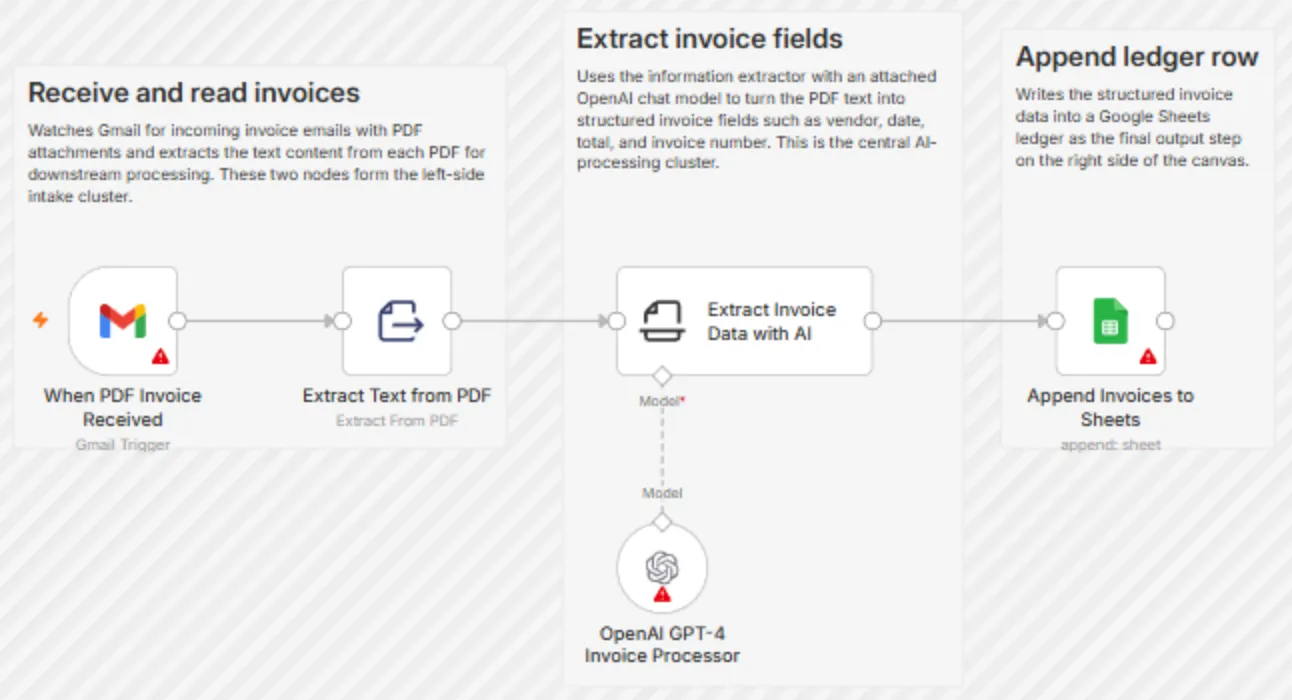
- 1 Gmail: an email with a PDF invoice arrives
- 2 Text is extracted from the PDF
- 3 The AI model extracts the fields: supplier, date, amount, invoice number
- 4 The data is written to a Google Sheets row
Accuracy: with typical, clearly scanned business documents, modern AI models often reach high accuracy, but it depends on the document's quality and format. Non-standard or poorly scanned documents may need an extra check; I recommend automatically flagging documents with a low confidence level.
Practical use cases for Lithuanian businesses
Accounting: automatic entry of supplier invoices. Instead of copying data by hand, the system automatically creates accounts payable entries. For a small bookkeeping firm this can save several hours a week.
Transport and logistics: automatic extraction of data from CMR consignment notes. Cargo data (sender, recipient, weight, route) goes automatically into the TMS or Google Sheets.
Real estate and legal services: automatic extraction of the key data fields from contracts: parties, dates, amounts, terms. This helps catalog a large contract archive quickly.
Pharmacies and medical facilities: automatic scanning of prescription data and entry into the pharmacy management system.
How to integrate AI document analysis into existing processes
Documents received by email: n8n watches the inbox, and when a PDF attachment arrives it automatically sends it for AI analysis and passes the extracted data into the system.
Manual upload: a simple portal where an employee uploads a document, and the system returns structured data for confirmation within a few seconds.
Automatic monitoring: if documents appear in a specific Google Drive folder, the system processes them automatically with no manual step.
- 1The document arrives by email, is uploaded or appears in a Drive folderGmail · portal · Google Drive
- 2The text is recognizedOCR
- 3A language model extracts the fields according to your schemaClaude · GPT
- 4A person confirms unclear cases
- 5The data goes into the systemAccounting · Google Sheets · CRM
All three methods described above lead into the same chain; only the first step differs.
How much does AI document analysis cost and when does it pay back?
The setup cost for AI document analysis depends on the document types and how complex the integration is: a simple solution (one document type, Google Sheets integration) costs €500–900. A full package (several types, the accounting system, a confirmation interface) costs €1,200–2,500.
Monthly API costs (using Claude or GPT-4): about €0.01–0.05 per document. 500 documents a month = €5–25 in API costs.
If an employee today spends 1 minute per document and processes 500 documents a month, that is 8 hours of manual work. Automation gives that time back for more productive work.