Short answer: in a real estate agency, the first thing to automate is the path of a lead. Enquiries from Aruodas.lt, Domoplius.lt (Lithuania's main property portals), the website, WhatsApp and Facebook are collected in one place, the client gets a reply right away, they can book a viewing themselves, and the agent gets follow-up reminders. I set up enquiry collection and routing as a separate service (Lead and enquiry automation); the general principle is described here (Lead automation).
Real estate agents can get many enquiries a day from the Aruodas.lt and Domoplius.lt portals, skelbiu.lt (a classifieds site), the website, WhatsApp and Facebook. All of them are different channels, and all of them need a fast reply.
A fast reply and consistent follow-up are the two things agents struggle with most. Automation solves both: every enquiry is handled immediately, and the client gets a reply within a few minutes.
Where do real estate leads come from, and how do you bring them together?
Real estate agencies get enquiries from many sources at once: property portals (Aruodas, Domoplius, skelbiu.lt), the website contact form, WhatsApp, Facebook Messenger, Instagram DMs, phone calls and email.
Each channel is a separate silo. If nobody checks Messenger, that enquiry gets lost. Automation brings all channels together: no matter where a contact came from, it lands in the CRM automatically (for example, Pipedrive or HubSpot) and is assigned to the responsible agent.
Some property portals have an API that lets you read new enquiries directly and process them automatically. Otherwise, email parsing is used: the portal's notification arrives by email → the automation reads its content → it creates a CRM record with all the details.
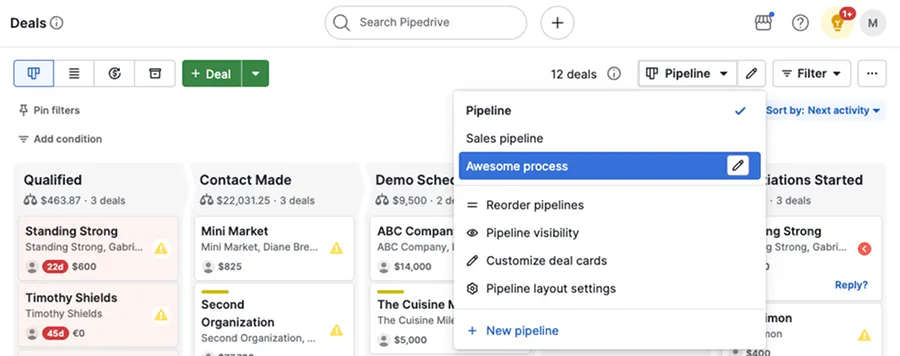
- 1 Stage – name, deal total and count
- 2 Card – contact and deal value
- 3 Pipeline – separate pipelines, e.g. for buyers and sellers
How to send an automatic first reply to a property enquiry
The first minutes after an enquiry are critical. According to a study published by Harvard Business Review (2011), companies that tried to make contact within an hour were nearly 7 times more likely to qualify the lead than those that waited longer, and a property client often writes to several agents at once. Automation makes sure the client always gets a reply within a few minutes.
An automatic first-contact scenario: the client leaves an enquiry → within 30 seconds they get an email or WhatsApp message with a confirmation and the nearest free time slot → the agent gets a Slack notification with the client's details and likely preferences.
- 1Enquiry from a portal, the website or MessengerAruodas.lt · Domoplius.lt · website
- 2A record is created in the CRMPipedrive · HubSpot
- 3The client gets a reply and a free viewing slotEmail · WhatsApp
- 4The agent gets the client detailsSlack
Enquiries from portals without an API are read from the email notifications.
AI can personalize the first reply based on what the client is looking for: if they asked about an apartment in Vilnius, the system automatically includes three similar listings from the catalog with photos. The client feels they are dealing with professionals who understood their needs right away.
How to automate viewing bookings
Scheduling viewings is one of the most time-consuming parts of an agent's job. A common situation: by 10 a.m. on Monday, 5 enquiries come in to view the same apartment, and the agents have to coordinate times with the owners and potential buyers by hand.
Automation solves this: the client gets a link to the agent's calendar (Calendly or Google Calendar integration), picks a time, the system automatically sends a confirmation and a reminder before the viewing, and the owner gets a notification.
A more complex scenario: if the owner's consent is needed for every viewing, the system automatically sends them a request and waits for approval before booking the viewing. The whole back-and-forth happens automatically, and the agent does not need to be involved.
How to automate follow-up so you stop losing clients
An agent's work does not end with the viewing. After a viewing the client is often silent for a few days, then decides to buy, but from a competitor who asked sooner. Automatic follow-up solves this problem.
A typical real estate follow-up sequence after a viewing: D+1 – a thank-you message and a question about their impressions; D+3 – similar listings based on their preferences; D+7 – a reminder asking "Are you still looking?" with new listings; D+14 – information about market trends and current offers.
- 1D+1 – thank-you and a question about impressions
- 2D+3 – similar listings based on preferences
- 3D+7 – "Are you still looking?" and new listings
- 4D+14 – market trends and offersWhen the client replies, the sequence stops and the agent takes over.
If the client replies at any point, the automation stops and the agent takes over. The system runs in the background and keeps in touch with the client until they decide.
How to automate real estate portfolio reports
Real estate agency managers often spend a lot of time pulling reports together: how many listings were added, how many viewings, how many deals closed. Automation creates these reports for you.
Every Monday the manager gets a Slack message with: a summary of the past week (new leads, viewings, deals), a list of active clients with the date of the last contact, and listings that have had no viewings for 30+ days (maybe the price needs adjusting?).
These reports are generated automatically from CRM data, so the manager does not have to do anything by hand. This can save several hours a week and gives a real picture of how the business is moving.
Where to start with real estate automation?
The biggest impact for the least effort in real estate: 1) Centralizing leads (enquiries from every channel → one CRM); 2) An automatic first reply via WhatsApp or email; 3) Connecting viewing bookings to a calendar.
These three steps can save an agent several hours a week and make replies much faster. After that, you can expand with AI personalization and more advanced analysis.
Get in touch for a real estate automation consultation. I will review your agency's processes and suggest specific solutions with a clear return forecast.