Email marketing is still one of the most effective marketing channels. According to the Litmus "State of Email" survey (2025), a large share of marketers report a return of $10–50 for every $1 spent. Mailchimp is one of the most popular tools for beginners, but many people use only its basic features.
Mailchimp automation lets you build email sequences that are sent automatically based on what a subscriber does, with no daily manual work.
Mailchimp Customer Journeys: how do automated sequences work?
Mailchimp Customer Journeys is a visual tool for building automations. You can create complex sequences based on subscriber behavior: opened the email → one path; did not open → another; clicked a link → an offer is sent.
The most common Mailchimp automations: a welcome series for new subscribers (3–5 emails over 2 weeks), abandoned cart reminders for online stores, a re-engagement series for inactive subscribers, and a review request after a purchase.
Mailchimp offers the full Customer Journey features on the Standard and Premium plans (Standard from about $20/month with 500 contacts; prices change). On the free and Essentials plans automation is limited.
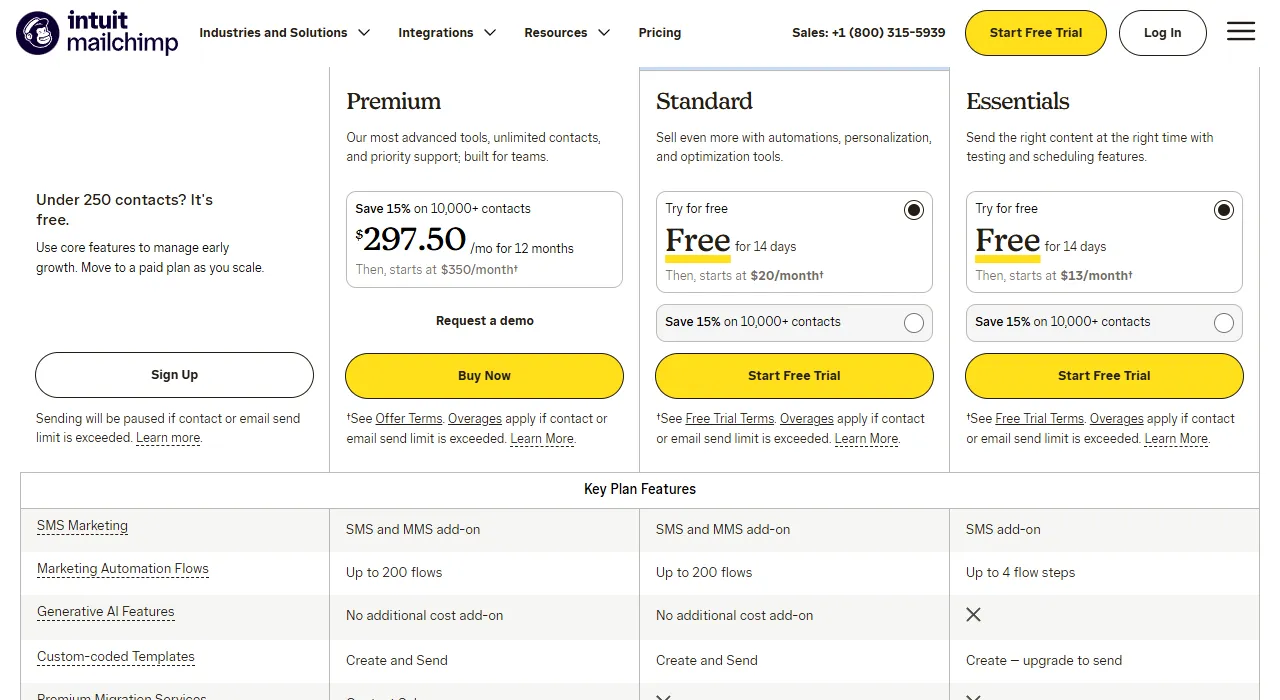
- 1 Up to 250 contacts – free
- 2 Standard – from $20/month after a 14-day trial
- 3 Automation flows: Standard – up to 200, Essentials – only up to 4 steps
How to connect Mailchimp to your website and CRM
Mailchimp can automatically sync contacts from website forms (Gravity Forms, Contact Form 7, Elementor), WooCommerce, Shopify and many other platforms.
CRM integration through n8n or Make: when a deal in the CRM (HubSpot, Pipedrive) is marked as "won" → the contact is automatically added to a Mailchimp onboarding sequence; when a deal is lost → the contact is moved into a "lost deals" re-engagement campaign.
- 1The deal is marked "won" or "lost" in the CRMHubSpot · Pipedrive
- 2A workflow passes the contact onn8n or Make
- 3The contact enters the right sequenceMailchimpWon – into the onboarding sequence; lost – into a re-engagement campaign.
Segmentation based on CRM data: your Mailchimp audience is segmented automatically by purchase history, interests or location, so emails go only to the group they are meant for.
Mailchimp A/B testing and optimization
Mailchimp has a built-in A/B testing feature: you can test subject lines, send times and content, and see which version converts better. The system then automatically sends the winning version to the rest of the recipients.
Send time optimization: Mailchimp's "Send Time Optimization" feature looks at when each recipient usually opens emails and automatically sends to them at the best time.
Mailchimp vs. alternatives: which should a Lithuanian business choose?
Mailchimp is a good choice for beginners and small businesses with up to 2,000 contacts. For larger audiences, consider Brevo (formerly Sendinblue), which is cheaper with a large number of contacts, or ActiveCampaign, which has more powerful automation but is more complex and more expensive.
The cost of setting up Mailchimp with integrations: simple automations (a welcome series + an abandoned cart reminder) start from €450 of specialist time. A full email marketing setup (Mailchimp + CRM integration + segmentation + automations) costs €600–1,200.
Get in touch for a free initial discussion. Write what you expect from email marketing, and I will reply by email with the sequences I would start with. If needed, we can talk.